Free ClickUp time tracking integration

Connect My Hours and ClickUp for clean timesheets and clear reports.
Free ClickUp time tracking integration
  • Import your ClickUp work into My Hours
  • Keep My Hours in sync with ClickUp
  • Analyze time with powerful reports
  • Use smart timesheet approvals
Integrate with ClickUp for Free
No credit card needed.

Trusted by more than 100.000 businesses worldwide

Capterra logoG2 logoMicrosoft logo
TypeFox logo
KPMG logo
Impartner logo
Semaphore logo
Aurora logo
Manpower logo

Track time with a classic weekly timesheet or with the stopwatch.

An easy to use time tracking that matches your work in ClickUp.
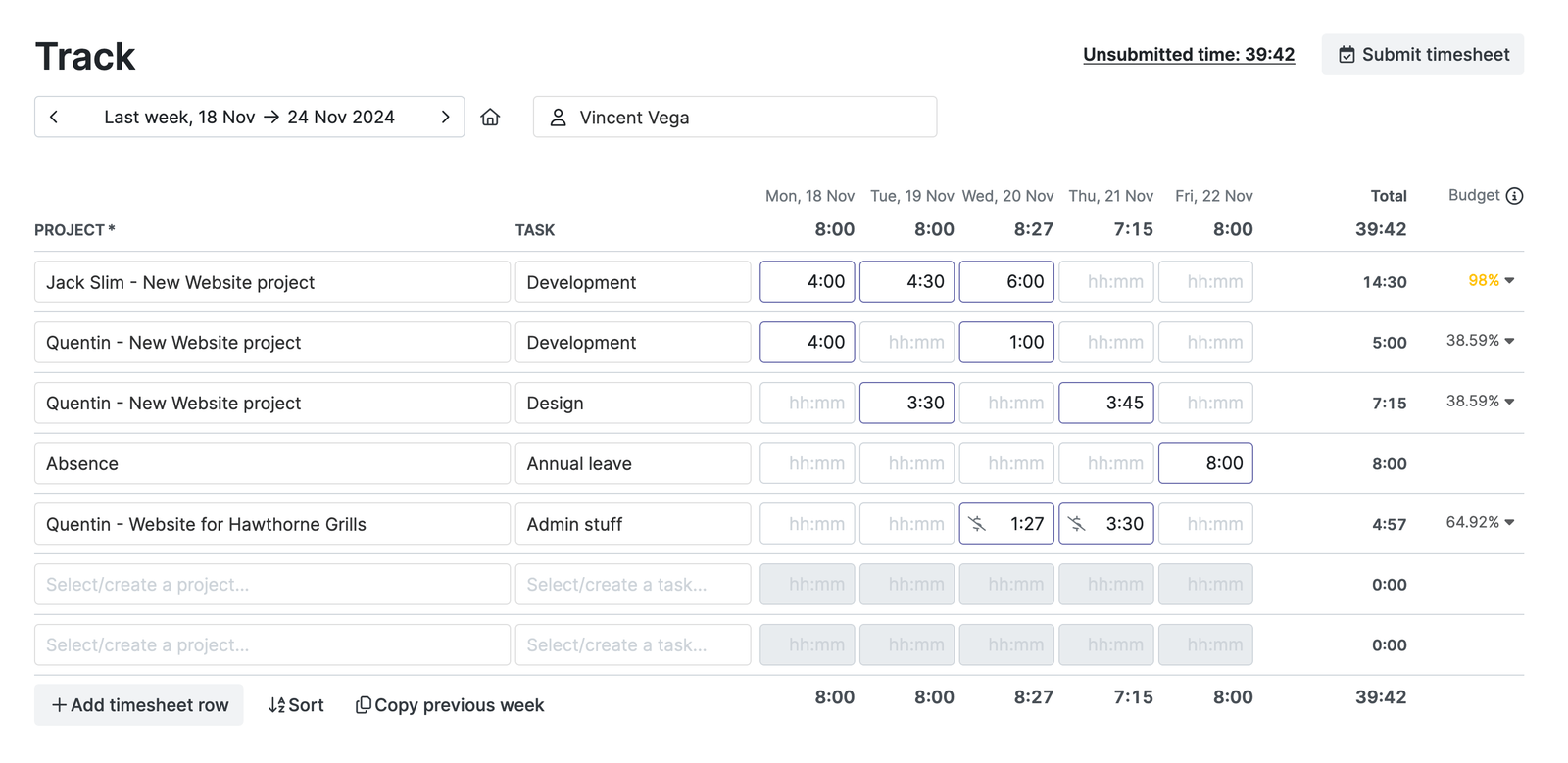
Time Tracking Integration with ClickUp - Timesheet view

Get clean time tacking data by quickly filling the weekly timesheet with work hours that correspond with your work in ClickUp.

Create an automatic sync between ClickUp and My Hours

Update your Tasks, Projects and Spaces in ClickUp and My Hours will automatically create the corresponding items.

Clickup and My Hours interface comparison after sync.

The three level hierarchy from ClickUp is mirrored in My hours. This way your team is always on the same page and your time tracking is more precise.

Clear timesheet approvals on top of your ClickUp work

ClickUp stays the place where you plan and assign work. My Hours adds clear time tracking with an approval workflow on top of it.

Approval workflow in My Hours

Your team submits their hours and you can assign who approves them. To keep things in order you can set validation rules that prevent timesheet errors.

Turn ClickUp work into budgets, rates and invoices

ClickUp is not a billing tool. My Hours picks up where ClickUp stops.
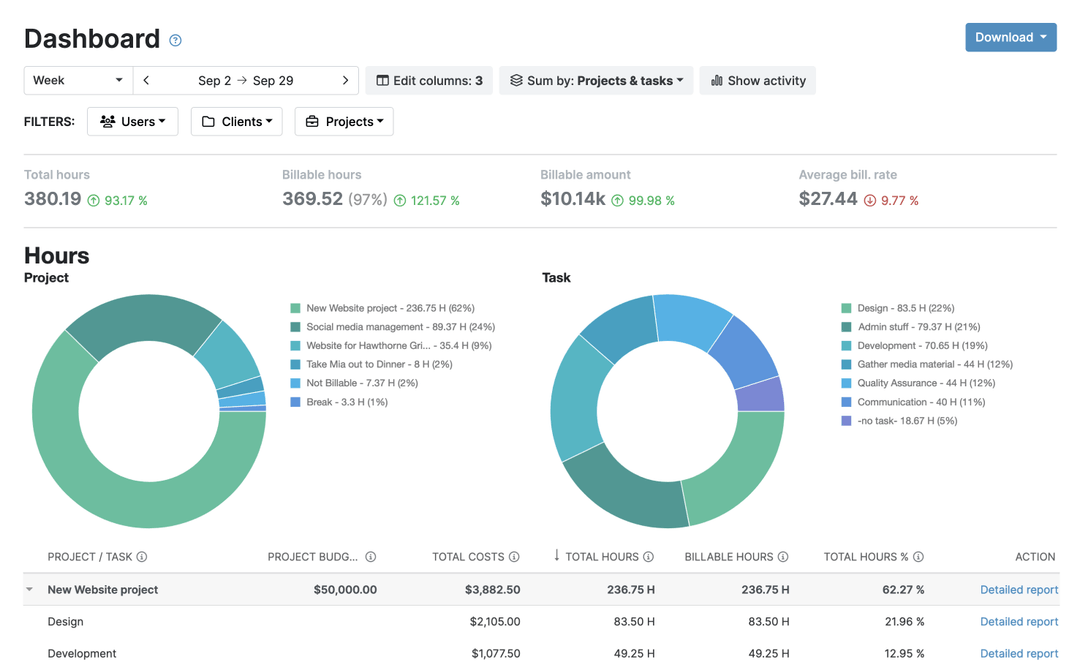
Dashboard report with budget overiew hourly rates and billable time

Set project and task budgets to match your ClickUp structure, choose hourly rates, mark time as billable, and add expenses.

See exactly how time is spent on a project

Use reports to track project budgets, compare planned vs. actual time, and show clients exactly where their money went.

Detailed report in My Hours

Save, schedule and export your favorite reports.

2) Choose: One time import or Ongoing 5 min sync.

Choose an ongoing sync or a one time sync.

3) Start tracking time.

Time tracking interface in My Hours

FAQ

How do I set up the integration?
Is the integration two-way?
How do ClickUp items map to My Hours?
How is this different from ClickUp’s built-in time tracking?
Are there any limitations to the integration?

Highest praise from our customers

4.7
rating on all review portals

“Best time tracker app out there”

"My Hours does everything I need it to do, and is in an easy to use and functional format with a clean, uncluttered interface. It's become an indispensable tool for me."

Brian S. | Marketing and Advertising

“Couldn't do my job without My Hours”

"My Hours saves me a ton of time tracking projects. My Hours makes it easy to assign multiple tasks to multiple projects. I also like that I can organize reports by client or project."

Cheri G. | Graphic Designer

“Great for tracking time on tasks and projects!”

"Love this software! I don't bill for my time, but I do need to keep track of time spent on various projects and on tasks within those projects. Easy to set up projects that you need track your time on."

Jenifer H. | Business Analyst

“Great Time Tracking Software”

"My manager wanted me to track the amount of time I spent on different tasks so we could better define the role. I tried a few different things before I found My Hours, and I've been using it ever since. I love it!"

Bonnie L. | Multimedia Content Developer

“Best Hours Tracking Tool”

"I like how easy it to use but has features to do custom reporting. It's always available, in 2+ years I've used it, it's always up. I totally rely on it to track hours and there has never been a hiccup."

Lori A. | Software Engineer

Waste no more time,
jump right in!

Get started - it’s free
My Hours is free for teams of up to 5 users.