


My Hours vs. Clockify in 2026
Choosing the right tool for maintaining project profitability
Not all time tracking tools are built for profitability. The right ones need to go beyond logging hours, giving you meaningful and actionable insights to control costs and keep projects financially on track.
My Hours and Clockify both track time and project expenses, but they differ in how they best support teams.
*Last Updated: June 2026*

My Hours vs. Clockify: At a Glance
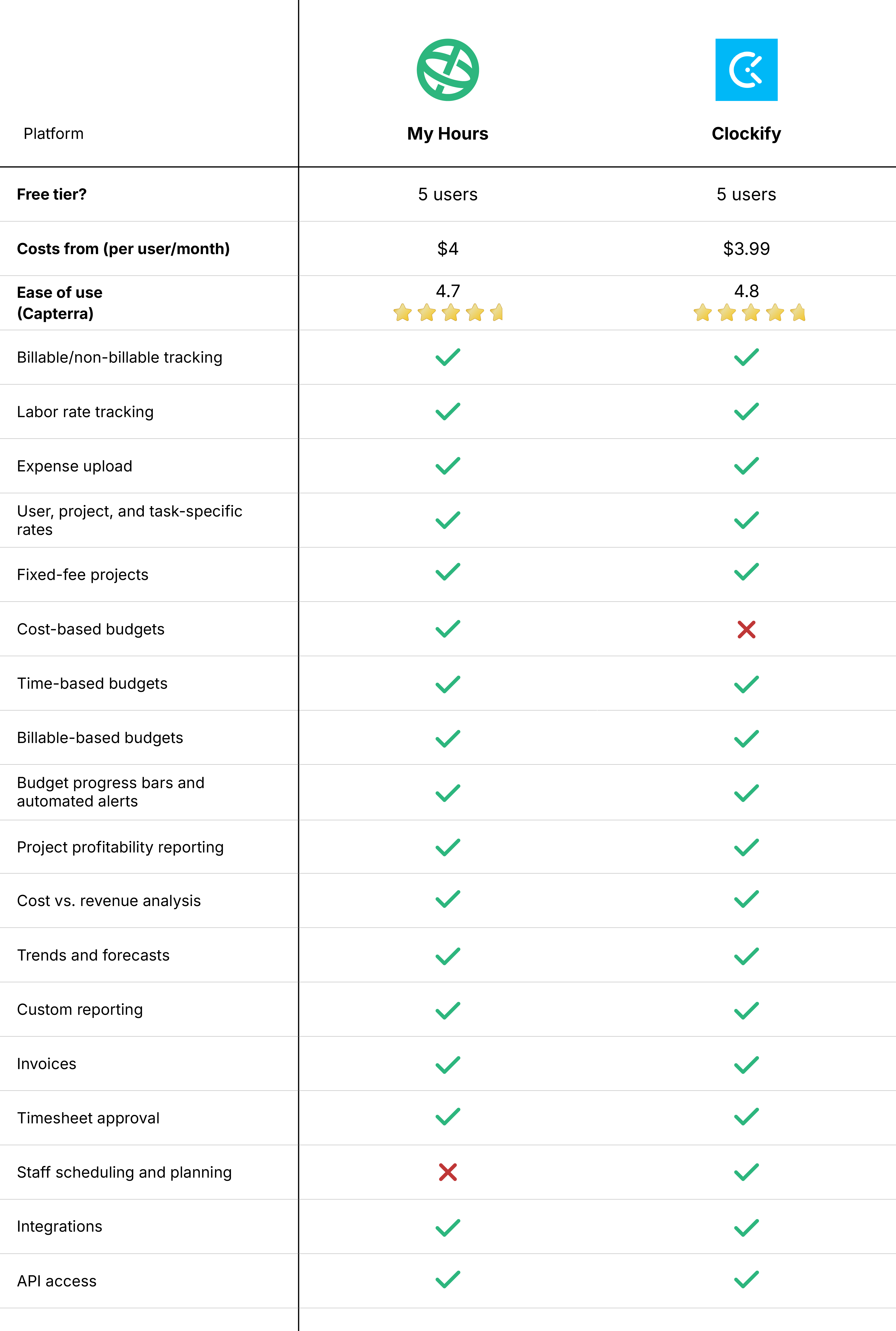
1. Project Cost Capture
My Hours
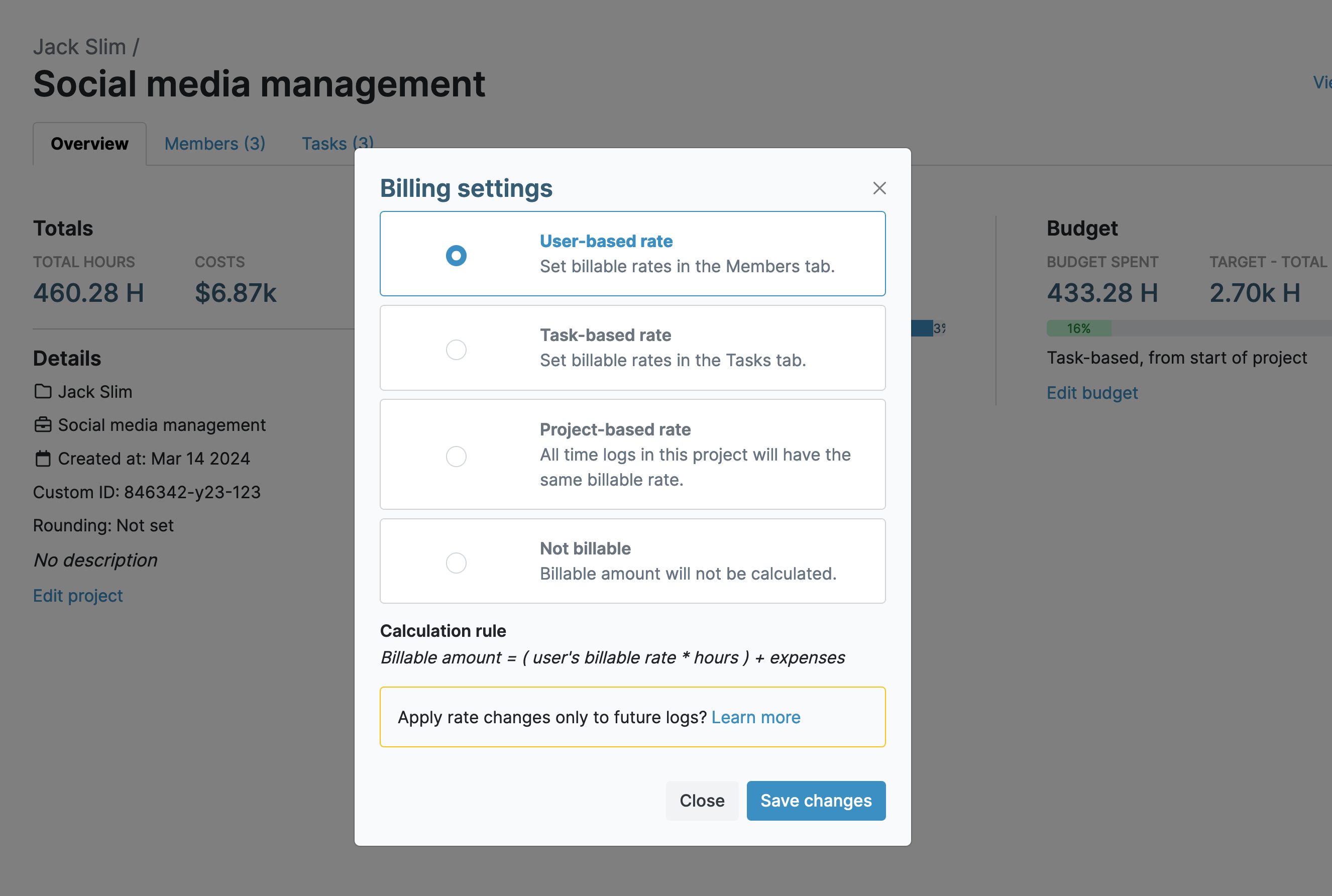
My Hours approaches cost capture by treating costs as a combination of tracked time, billable rates, and project expenses.
You’re able to set the rates, depending on how you prefer the project to be billed. For example, you can pick from user-based, task-based, or project-based rates. Or you can assign a flat fee across the entire project.
This makes it straightforward to capture costs according to your preferred project setup and monitor profitability throughout each project’s lifespan.
Users track time and additional expenses at the project and task level, which means you can keep an eye on which workloads are costing you the most.
Each time entry can be marked as billable or non-billable, allowing users to define internal work vs. work that should be invoiced.
Clockify
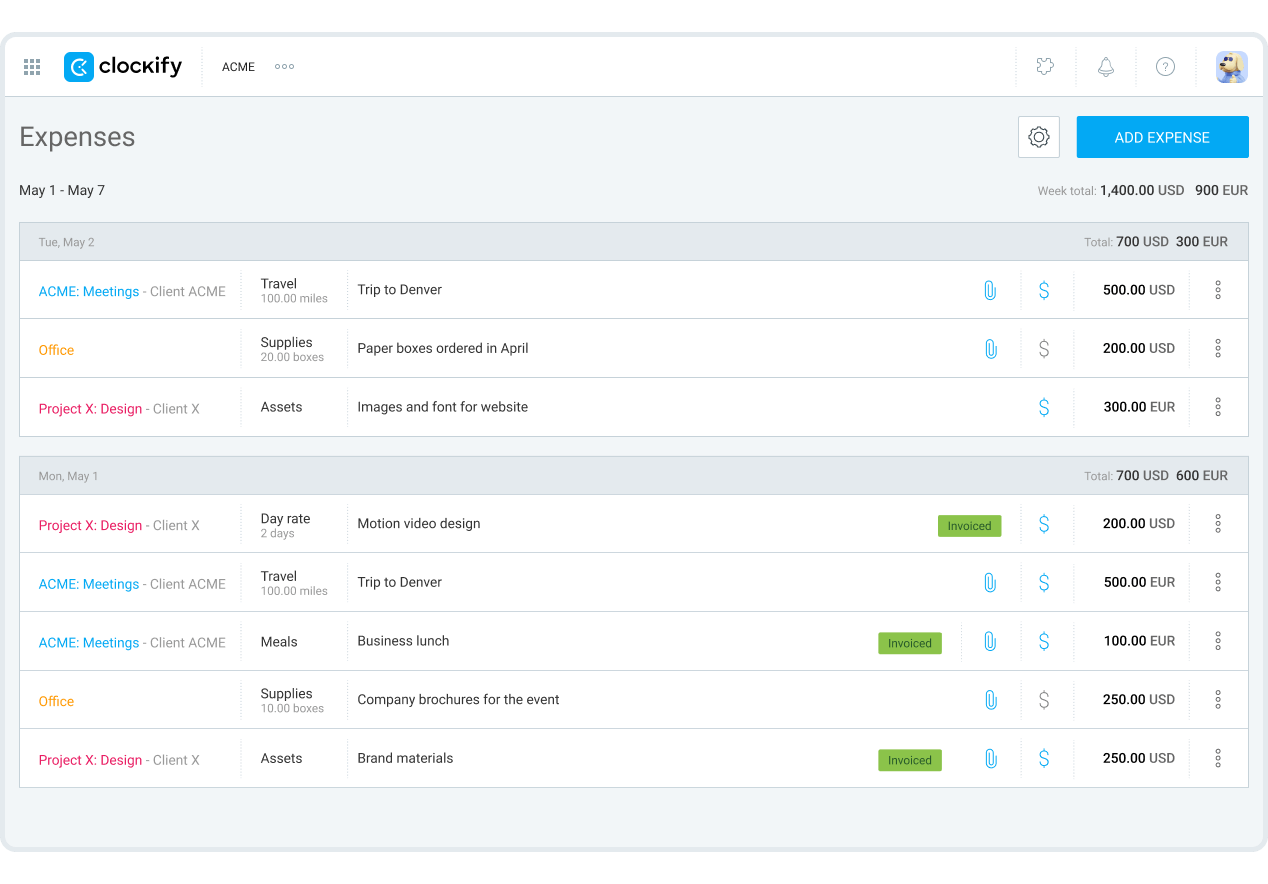
Clockify uses a similar setup for assigning rates to projects. However, it applies a strict hierarchy where, for instance, a task rate always overrides a workspace rate.
This can be a little confusing and increases the risk of the wrong rate being applied when a time entry is created. It also adds complexity where it isn’t necessarily needed. However, for teams that require more detailed cost allocation, it can work to their advantage.
Like My Hours, Clockify tracks time at the project and task level, and entries are marked as billable/non-billable.
Project cost capture verdict
Both platforms provide strong project cost capture capabilities and support multiple billing models.
My Hours takes a more straightforward approach, making it easier to configure rates and understand project costs without navigating complex rate hierarchies.
Clockify offers greater flexibility through its layered rate structure, which may appeal to organizations with highly specific pricing requirements or complex client agreements.
2. Budget Tracking
My Hours
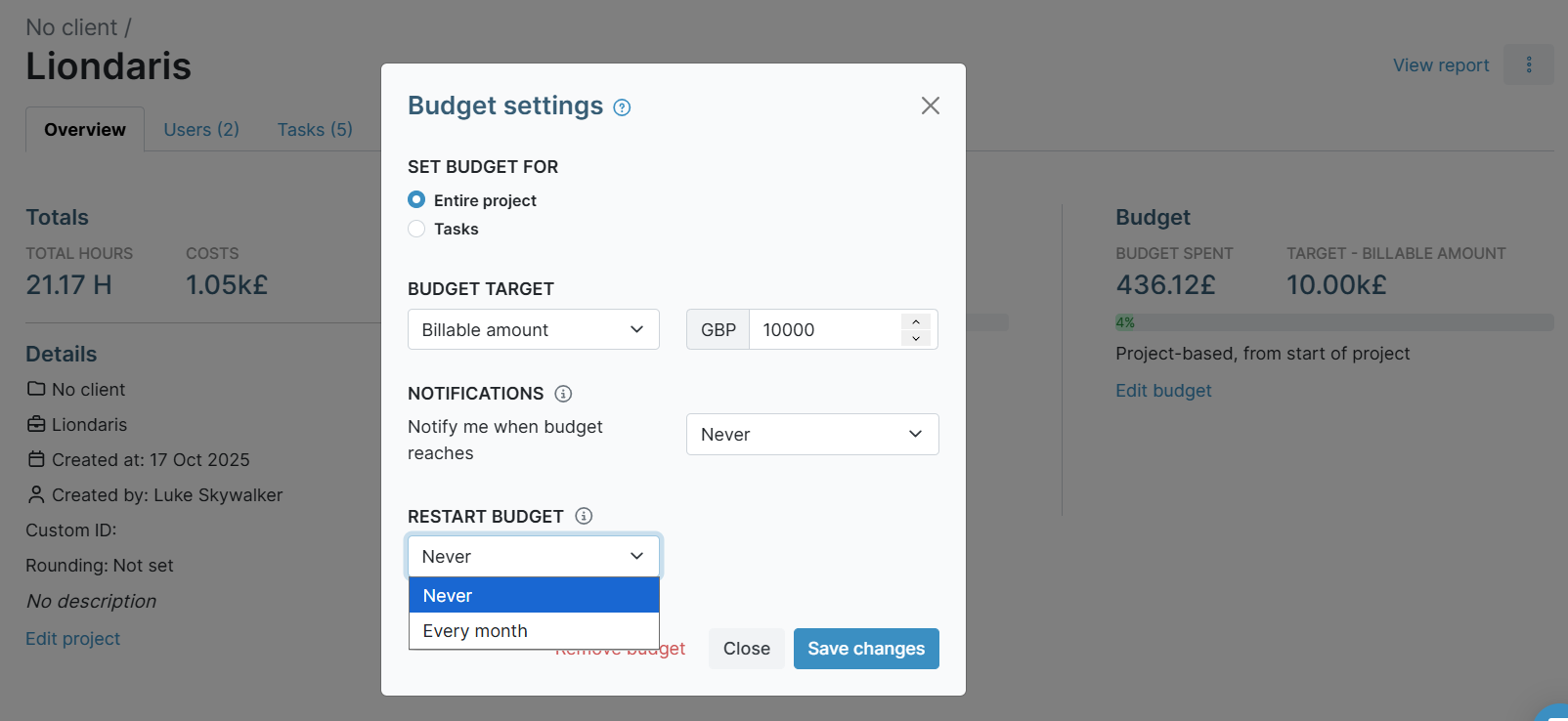
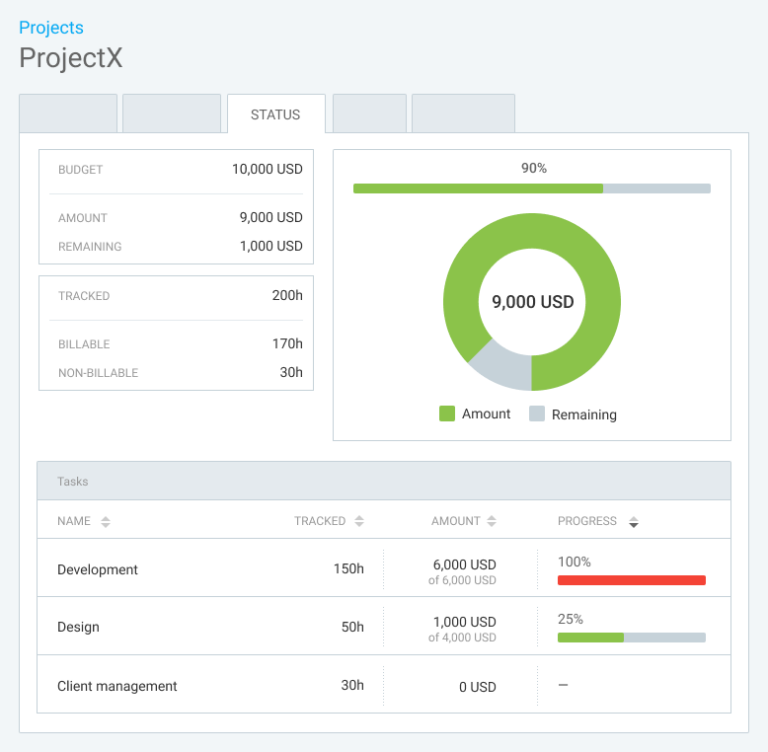
My Hours supports flexible budget tracking with budgets based on total costs, billable amounts, or total hours. These budgets can be assigned at the project and task level and set to recur each month if desired.
Automated alerts help teams stay on top of expenditure, activating once a set percentage of the budget has been spent. Budget progress bars give you an at-a-glance view of how much remains.
The cost budget is particularly helpful because it incorporates labor rates, tracked time, and expenses. This means the figures remain closely aligned with actual project performance.
Clockify
Clockify supports both time-based and monetary budgets; however, it doesn’t have a specific cost-based budget, as My Hours does. For either budget type, you can choose whether to include any billable expenses.
The platform also offers automated alerts and progress tracking bars.
You do get more options for recurring budgets, though. They can reset on a weekly, monthly, or annual basis, including a custom reset date and time.
Budget tracking verdict
My Hours offers better options for tracking different budget types, but Clockify is stronger for recurring budgets. Both tools are equally effective for monitoring and oversight to help keep expenditure on track.
3. Labor vs. Billable Rates
My Hours
My Hours allows businesses to define labor costs and compare them against billable values to understand project margins.
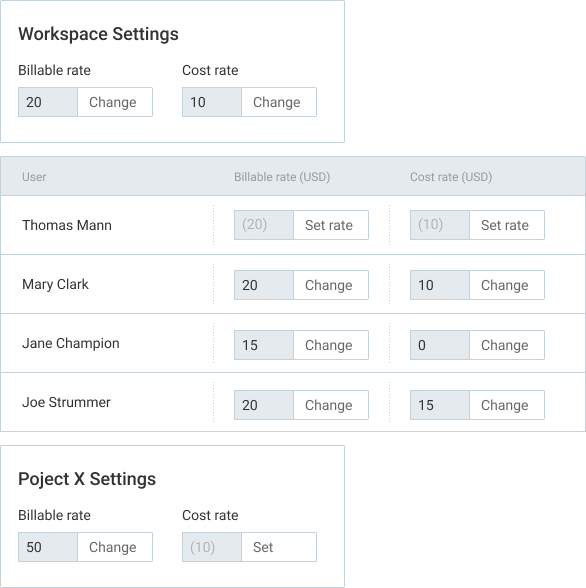
You can do this by assigning a labor rate and a billable rate per user. These rates are flexible and can be adjusted specifically for individual projects, making it possible to customize costs depending on the type of project being run.

Clockify
Clockify operates on a similar basis, allowing per-user labor and billable rates that are adjustable within specific projects.
Because of its strict rate hierarchy, you have to be careful when adjusting rates so you don’t end up with one rate overriding the other when it shouldn’t.
Rates verdict
Both platforms support profitability calculations. Clockify offers more granular control over how rates are configured and applied across different projects, users, and clients. My Hours shines for its simple yet effective structure.
4. Profitability Analysis
My Hours
Because labor costs flow directly into project budgets and profitability reports, managers can quickly see whether projects are generating sufficient revenue to justify delivery costs. The separation between cost budgets and billable budgets helps teams evaluate both sides of the profitability equation.
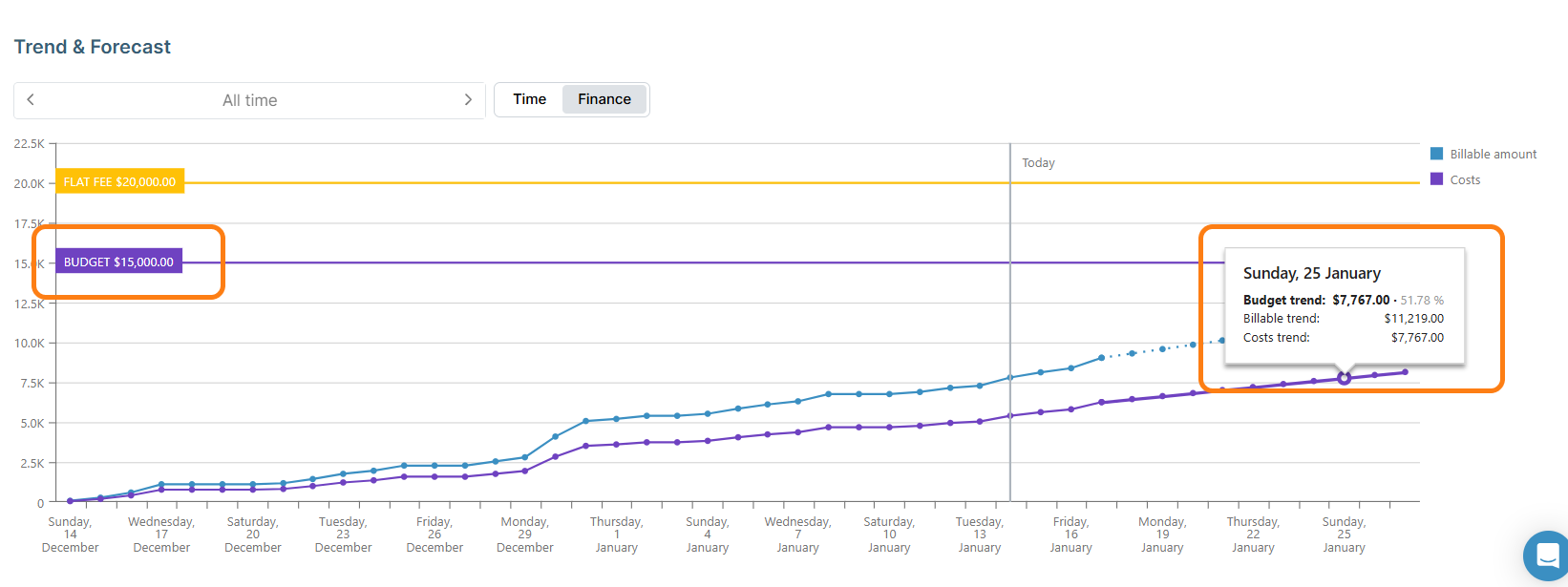
For a quick overview, the Trend & Forecast chart for each project allows you to instantly compare billable amounts against costs at a glance. You’ll also gain a good grasp of how costs are likely to affect profitability based on their current trajectory.
Because costs, labor rates, budgets, and expenses are all connected, profitability insights are available without extensive report customization. Although granular control is available if you need it.
Clockify
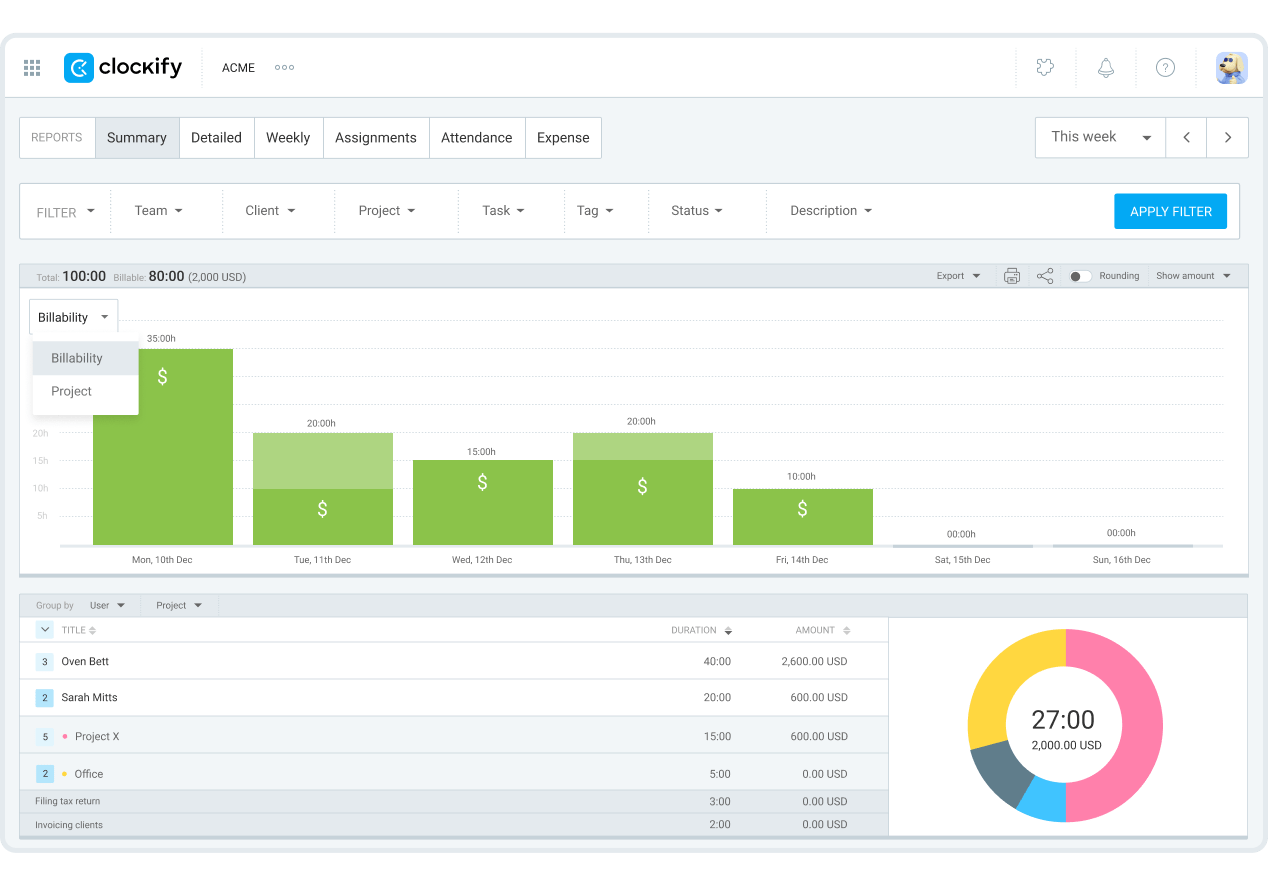
Clockify approaches profitability through its reporting engine. Once cost rates and billable rates are configured, managers can analyze revenue, labor costs, expenses, and profit across projects and clients.
Reports can display billable amounts, cost amounts, and profit calculations, while custom filters allow teams to analyze profitability by user, project, client, or date range.
Clockify also includes profitability-focused reporting features in its higher-tier plans.
Profitability analysis verdict
While both platforms provide meaningful profitability insights, My Hours offers more granular data for in-depth analysis. This depth of reporting is available to all users, regardless of their chosen plan.
Clockify’s reporting is less in-depth, but its dashboard report is slightly easier to analyze compared to My Hours. And, it’s a shame that its best reporting features are locked behind a high-tier paywall.
5. Invoicing and Revenue Capture
My Hours
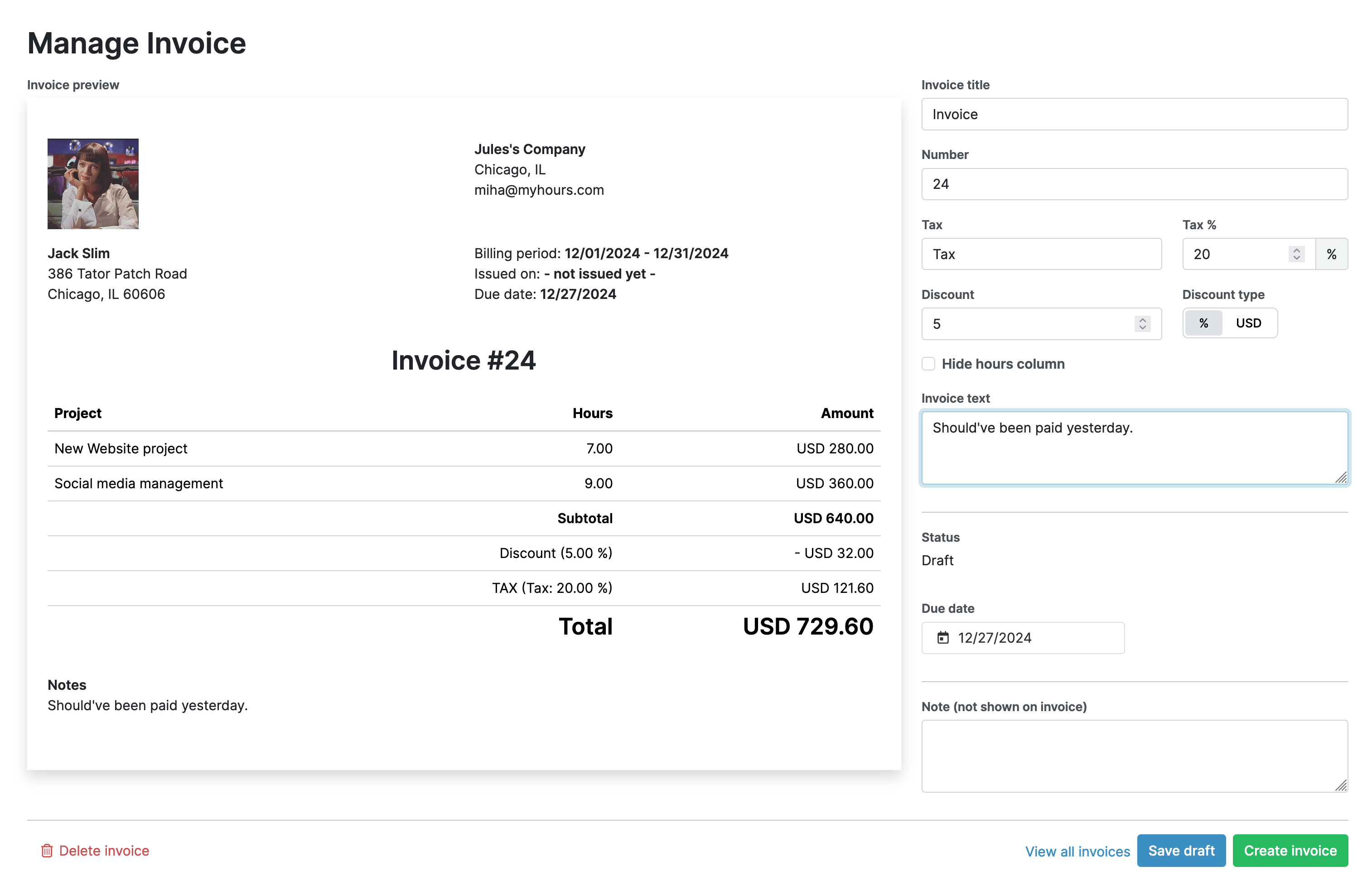
My Hours quickly converts tracked billable time and project expenses into invoices, helping you capture revenue from completed work.
Billable costs feed automatically into the invoicing tool, removing the need for manual calculations. Invoices also support basic customization and multiple currencies. Plus, My Hours provides you with uninvoiced amounts so you don’t forget to collect any revenue.
If you need more advanced invoicing capabilities, My Hours easily integrates with accounting platforms.
Clockify
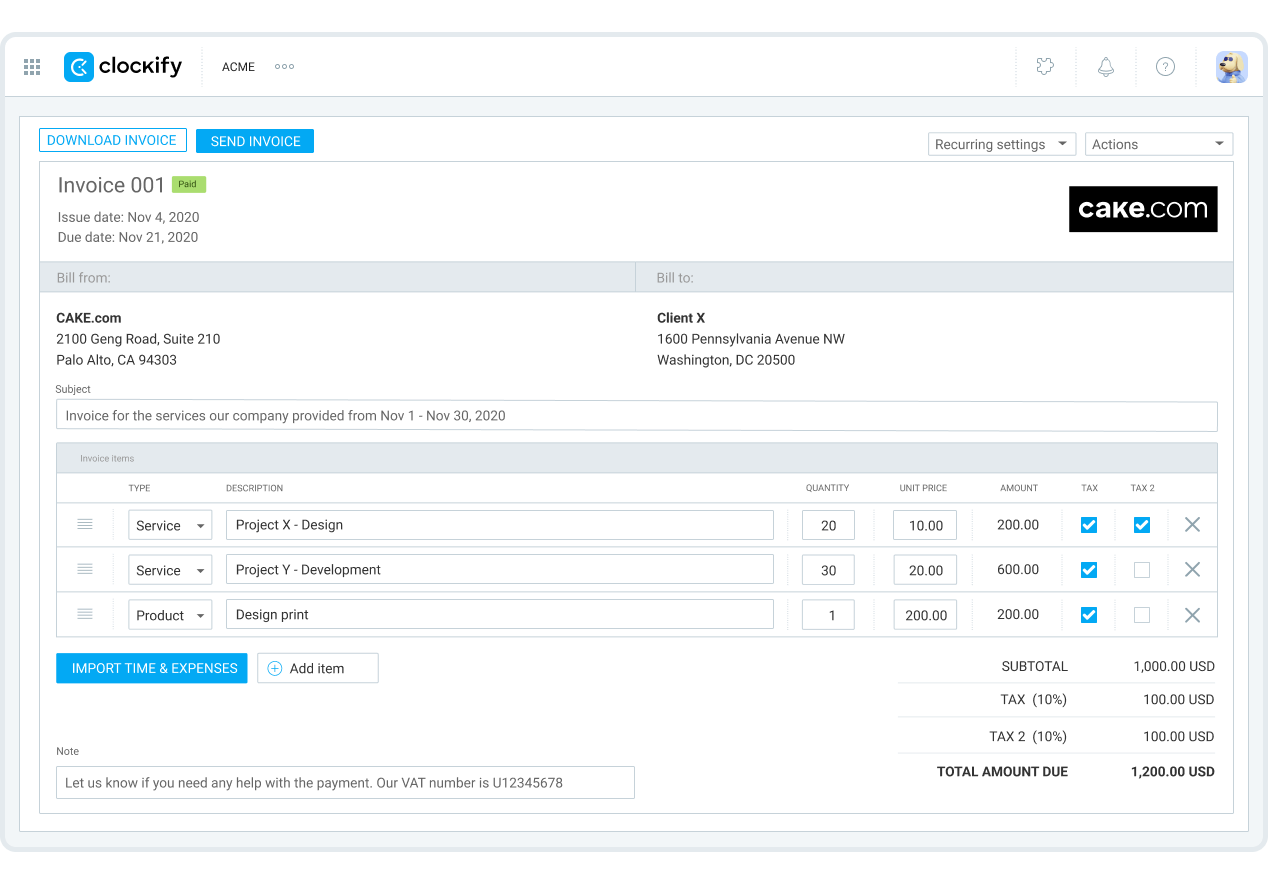
Clockify also includes a simple invoicing tool with basic customization options, comparable to what My Hours provides. The one key difference is that Clockify supports recurring invoices.
This means you can set an invoice to send automatically at custom intervals. The system will also send an alert when a recurring invoice has been generated and sent.
Invoicing and revenue verdict
For invoicing capabilities, both platforms perform similarly. However, Clockify’s recurring invoices make it a stronger option for teams that invoice frequently or in large volumes.
6. Team Oversight
My Hours
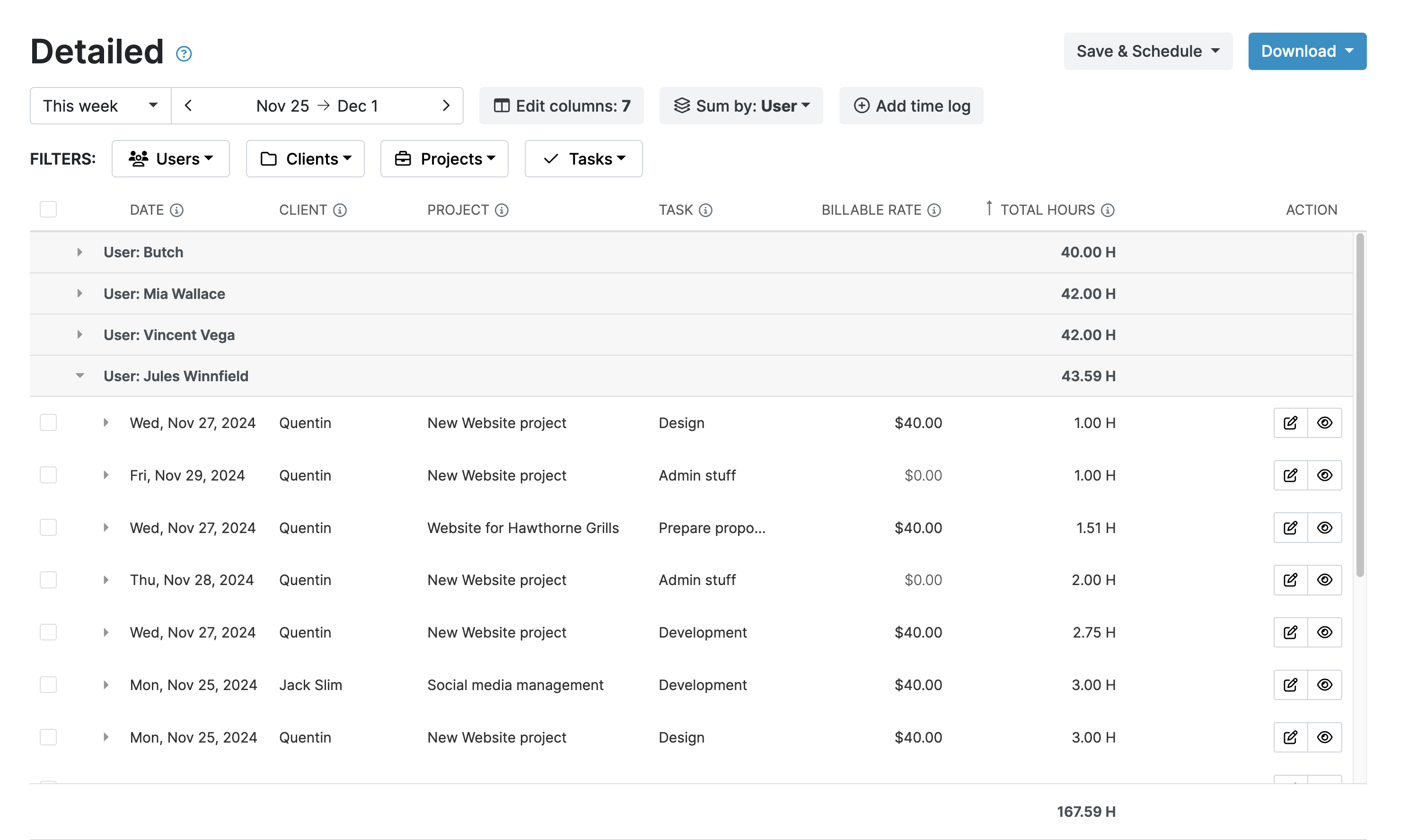
My Hours focuses team oversight on project health and performance. Through the reporting tool, managers can monitor team activity, analyze workload distribution, and track progress against project goals.
The platform's emphasis is less on workforce management and more on ensuring projects remain financially viable and on schedule.
To ensure data completeness and prevent gaps in cost and time information, My Hours features timesheet validation workflows. Managers can check and approve time entries before they are sent for invoicing.
Clockify
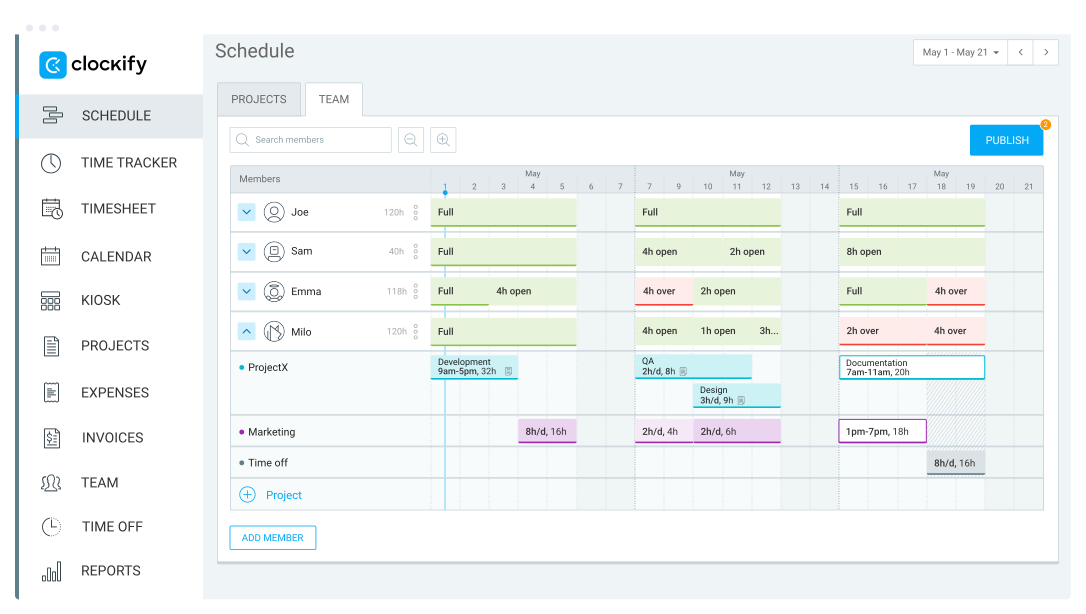
Clockify offers a broader range of team management tools. For instance, there are specific features for staff scheduling and planning time off. This can be helpful when trying to avoid staff shortages that could affect a project’s progress.
Optional idle time detection and screenshotting are also available. Used carefully, these can help identify team productivity patterns, though there is a risk that workers may find them intrusive.
Clockify also has time validation workflows to ensure data is complete.
Team oversight verdict
Clockify has a stronger team oversight feature set. Organizations looking for workforce management and scheduling will likely find more depth here.
My Hours remains focused on helping managers understand how team activity affects project budgets and profitability.
My Hours vs. Clockify: Price Comparison
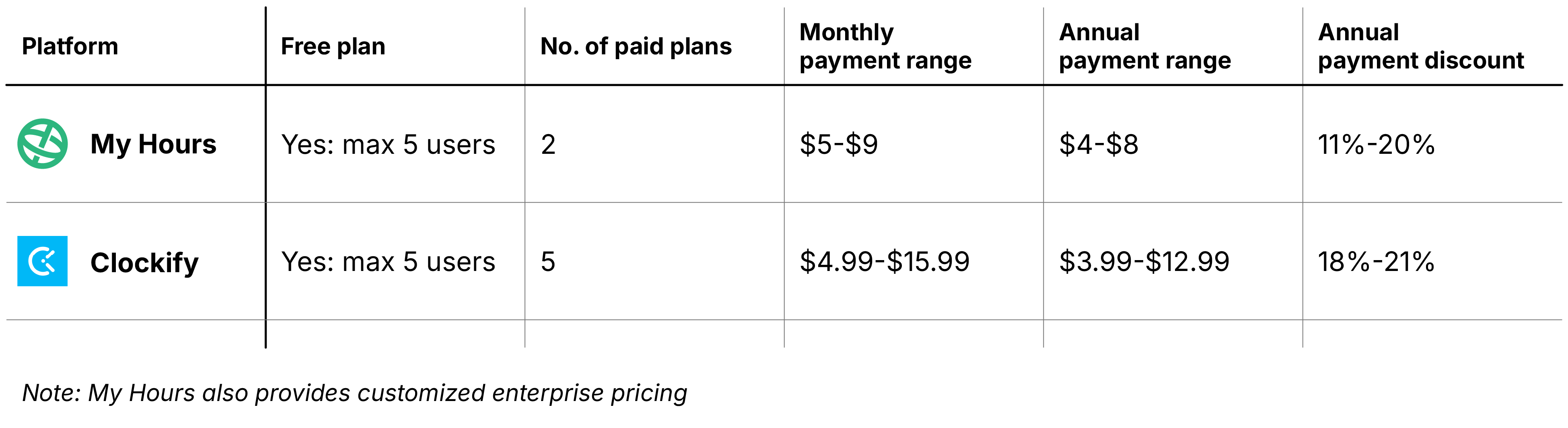
Quick overview
My Hours pricing
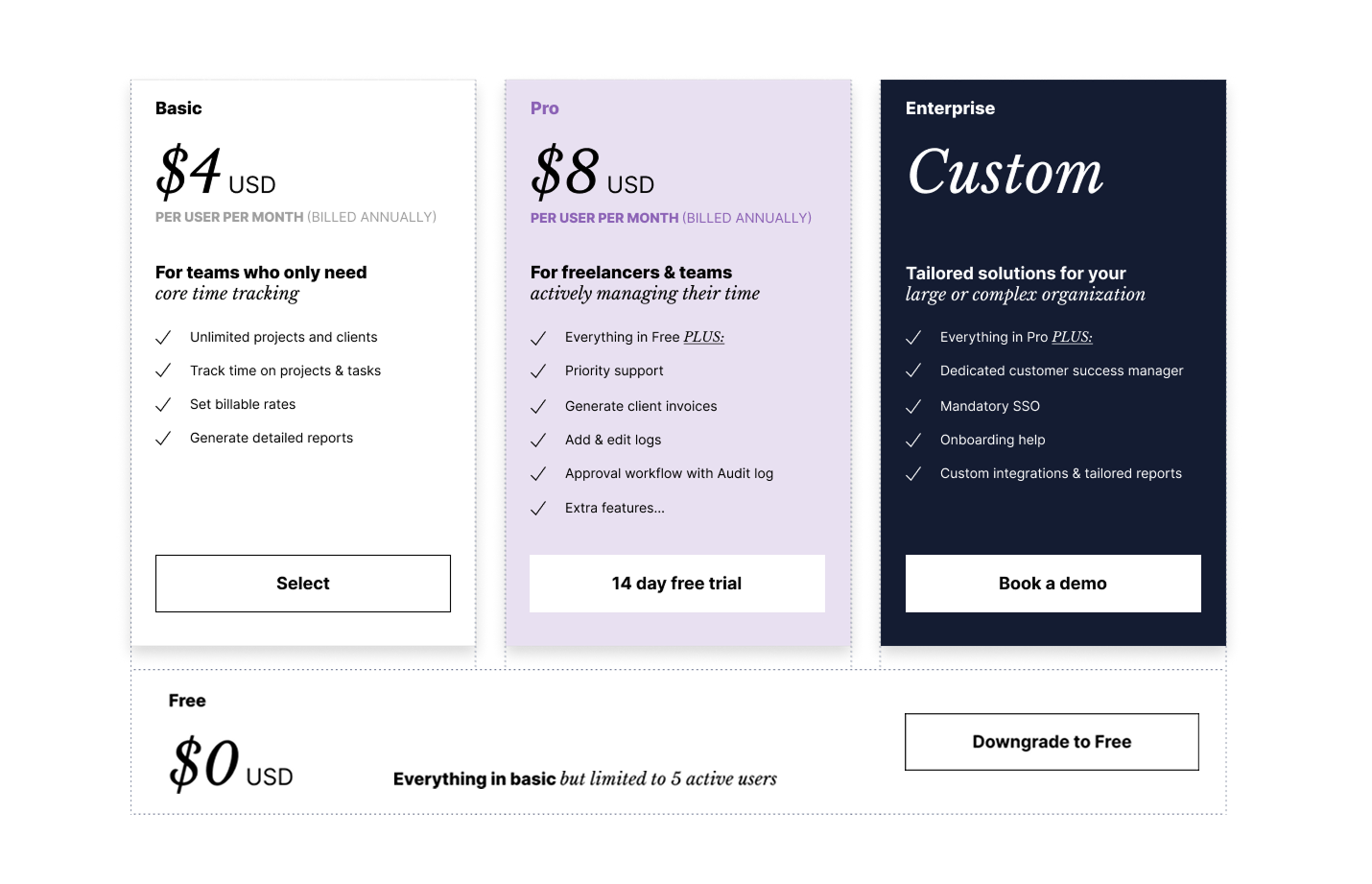
My Hours offers two simple paid plans alongside its free plan, making it easy for teams to understand which option they should choose.
For large organizations, an enterprise option is available with some feature customization and specialized support.
Compared to Clockify, My Hours is more accessible because essential features are included on lower-priced or even free plans. This means it can work out significantly cheaper overall, because you don’t have to keep upgrading to access the tools you need.
The free plan has remained stable over the years, offering core time tracking features to up to five users per account.
Clockify pricing
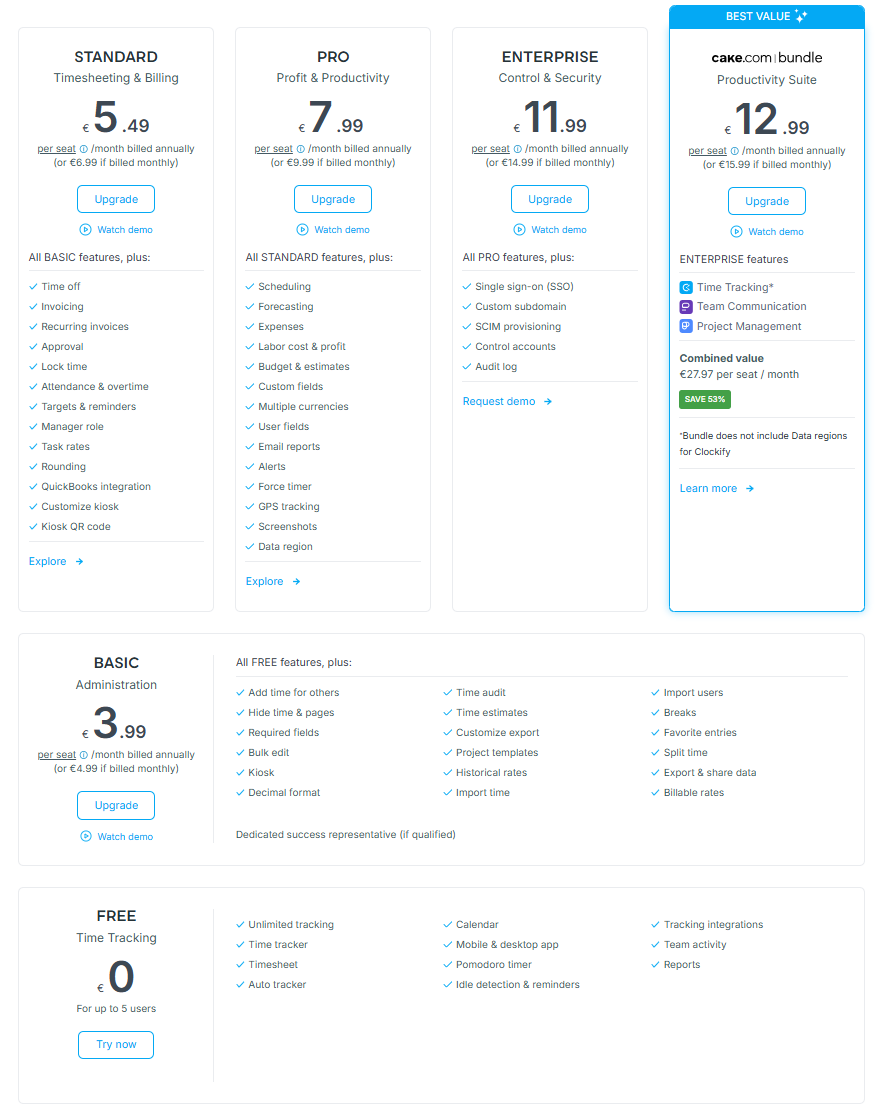
Clockify has recently (April 2026) moved its free plan from unlimited users to a maximum of five, and shifted some features onto paid plans.
The main sticking point for Clockify is that it spreads features over five plans, making it harder to decide which option is best at a glance.
For project profitability, the key tools are locked behind the Pro plan (from $7.99/month), which means the cheaper plans might be unsuitable for teams focused on profitability tracking.
And, because the pricing and plans appear to shift often, you can’t guarantee that you won’t have to upgrade or pay more in the future.
Pros and Cons of Each Tool
My Hours
Pros
 Flexible project cost capture with simple rate configuration
- Dedicated cost budgets alongside billable budgets
- Strong profitability reporting available across plans
- Trend and forecast tools make profitability easy to visualize
- Essential profitability features available on lower-cost plans
Cons
 Fewer workforce management features
- Less granular rate hierarchy than Clockify
- No recurring invoices
- Teams needing advanced scheduling may find it limited
Clockify
Pros
- Flexible rate structures for complex billing models
- Strong recurring budget and recurring invoice capabilities
- Visual profitability reporting with custom filters
- Workforce management, scheduling and planning tools
Cons
- Rate hierarchy can be confusing to manage
- Best profitability features require higher-tier plans
- More setup required to configure profitability tracking
- Recent free-plan restrictions reduce long-term value
Bottom Line
Both My Hours and Clockify help teams understand project profitability, but they take different approaches to getting there.
My Hours focuses on simplicity and accessibility. It combines all essential project cost and tracking features into a streamlined workflow that is easy to configure and manage.
It offers a strong balance of functionality and value, especially for agencies, consultancies, and service-based businesses that need clear margin visibility without complex setups.
Clockify is better suited to organizations that want greater flexibility and operational oversight. For instance, its advanced rate structures provide more control, but they also introduce complexity.
Yet, for larger teams with in-depth billing requirements or detailed planning needs, the trade-off could be worth it.

Waste no more time,
jump right in!

All rights reserved.