


My Hours vs. Deltek Replicon
Choosing the Right Tool for DCAA Compliant Timekeeping
My Hours and Deltek Replicon both offer DCAA-compliant time tracking systems.
And they each do an excellent job of it.
Which one will work best for you? This comparison will help you decide.
*Last Updated: March 2026*
Content overview

My Hours vs. Deltek Replicon
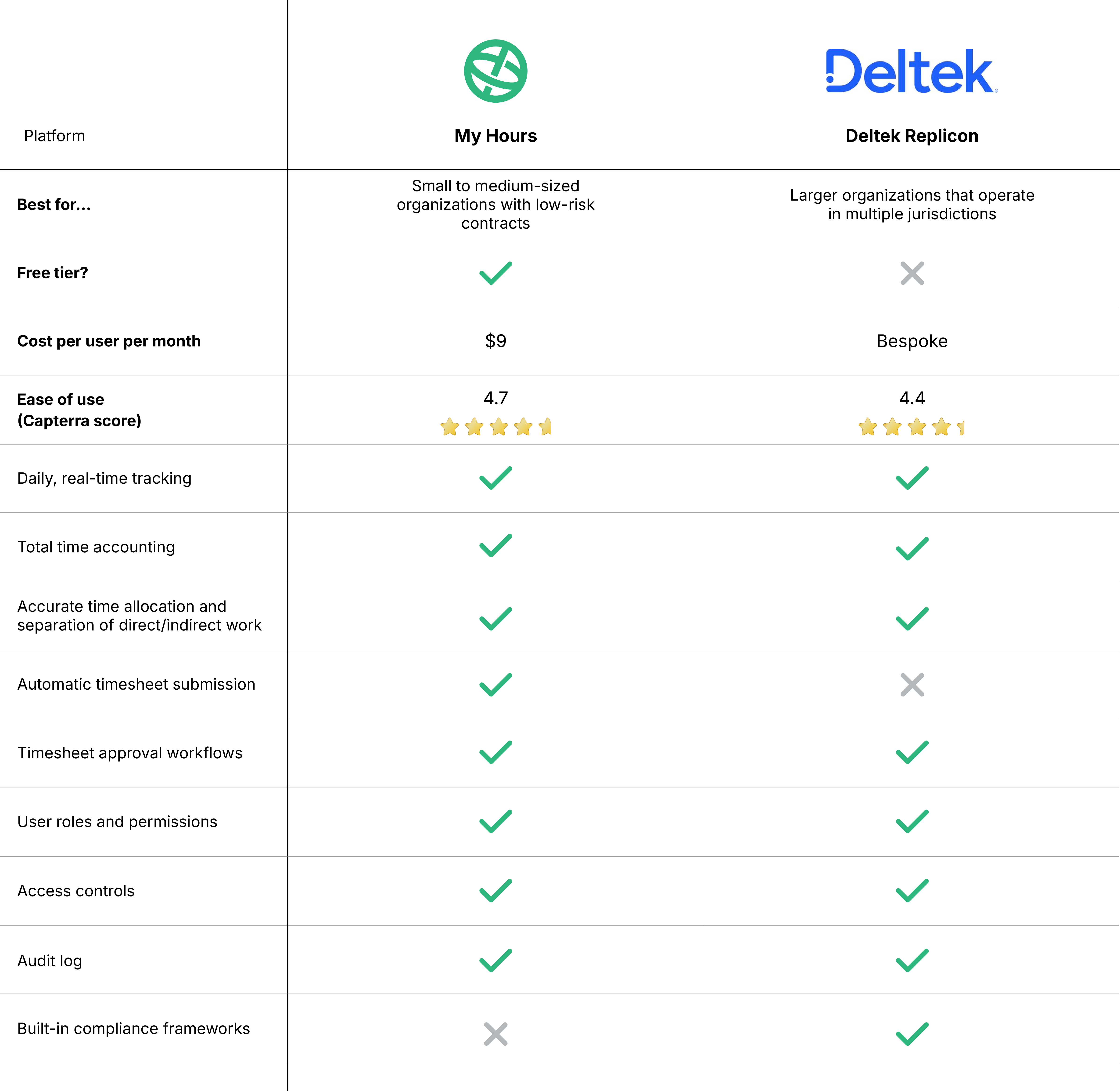
Key Differences Between My Hours and Deltek Replicon
Deltek Replicon (also known as simply “Replicon”) has recently undergone some significant changes, so it’s worth highlighting them.
Replicon used to be a standalone time tracking and time management system. In 2023, it was acquired by Deltek and now forms part of a wider business solution, which includes ERP and accounting, CRM management, project management, HR, and more.
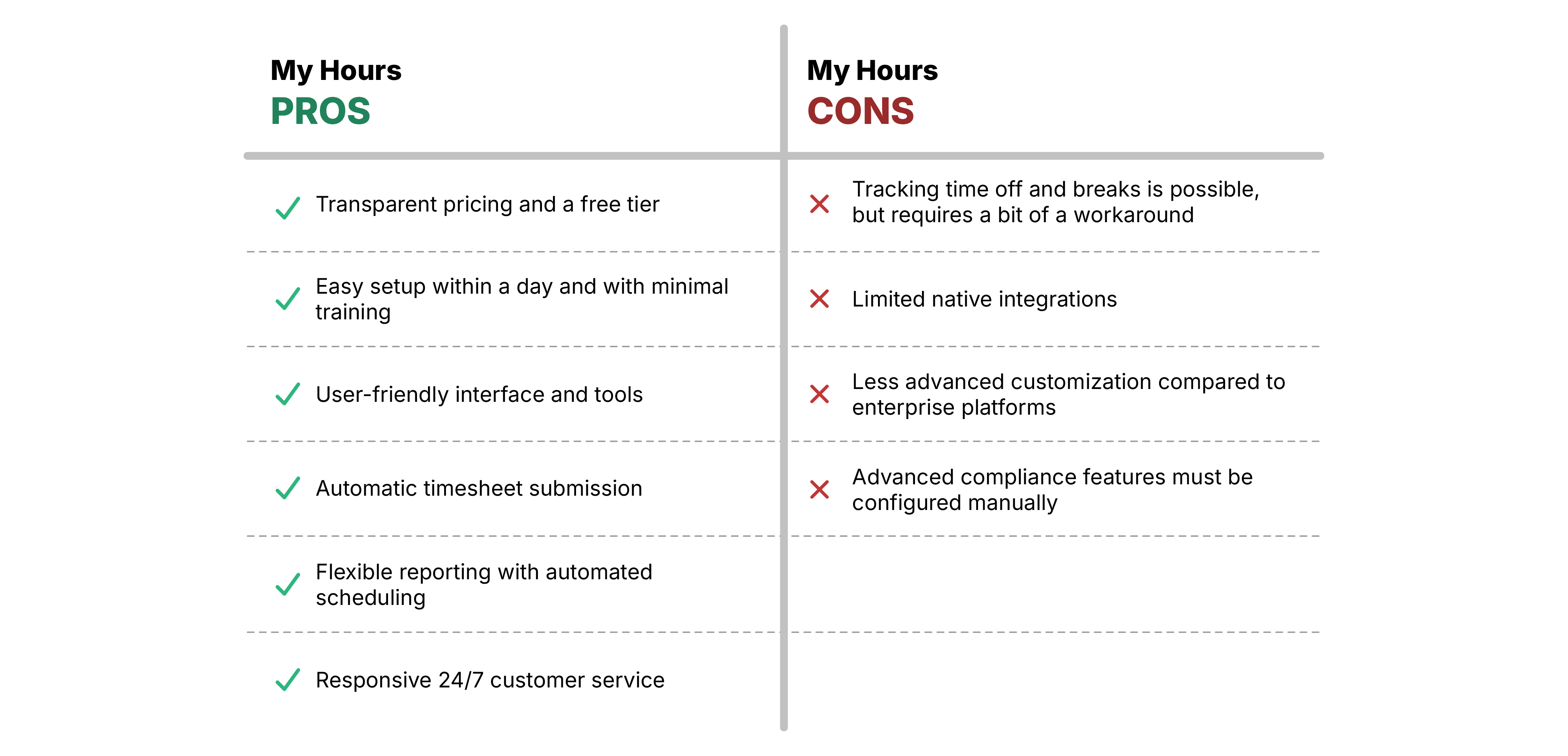
In contrast, My Hours is designed only for time and labor cost tracking. As such, the platform is simple to use and fast to implement.
Because of this, My Hours is able to offer transparent pricing and even a free tier for up to five users. On the other hand, Replicon no longer features distinct pricing, and the only way to find out what it costs is to book a live demo.
What this means is that although both platforms can facilitate DCAA-compliant time tracking, they serve very different audiences.
1. Daily timekeeping
The DCAA mandates that government-contracted workers track their time daily.
My Hours
My Hours provides multiple ways to track time in real time using a simple start/stop timer. A fully-featured mobile app is available for both Android and iOS, and a variety of browser extensions can be used for desktop work.
Additionally, time entries can be completed manually in just a few clicks.

Deltek Replicon
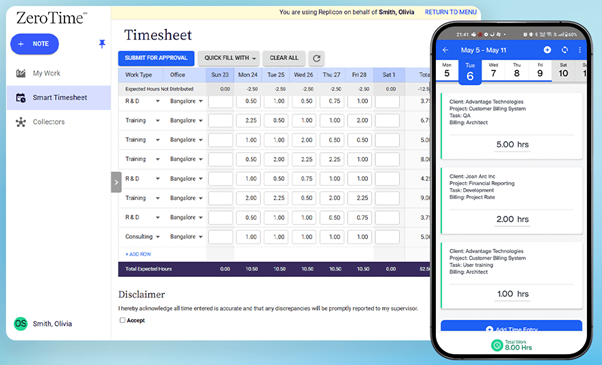
Replicon relies heavily on AI to track time via integration with 100+ apps and then autopopulate timesheets. This can obviously save time in creating time entries, but it also means you’re putting your trust in AI to get it right (and we all know that isn’t always a safe bet).
Time can also be tracked via the start/stop timer and the mobile app (which works offline). Replicon also features Cloud Clock, a tool designed for field crews that comes complete with GPS and geofencing.
2. Total time accounting (TTA)
Total time accounting means capturing all work hours, whether they’re worked or not.
Do both platforms facilitate this?
Yes, but in different ways.
My Hours
My Hours can easily capture different types of time spent. Just use the projects/tasks hierarchy to set up different categories of time off and idle time, which can then be assigned to time entries.
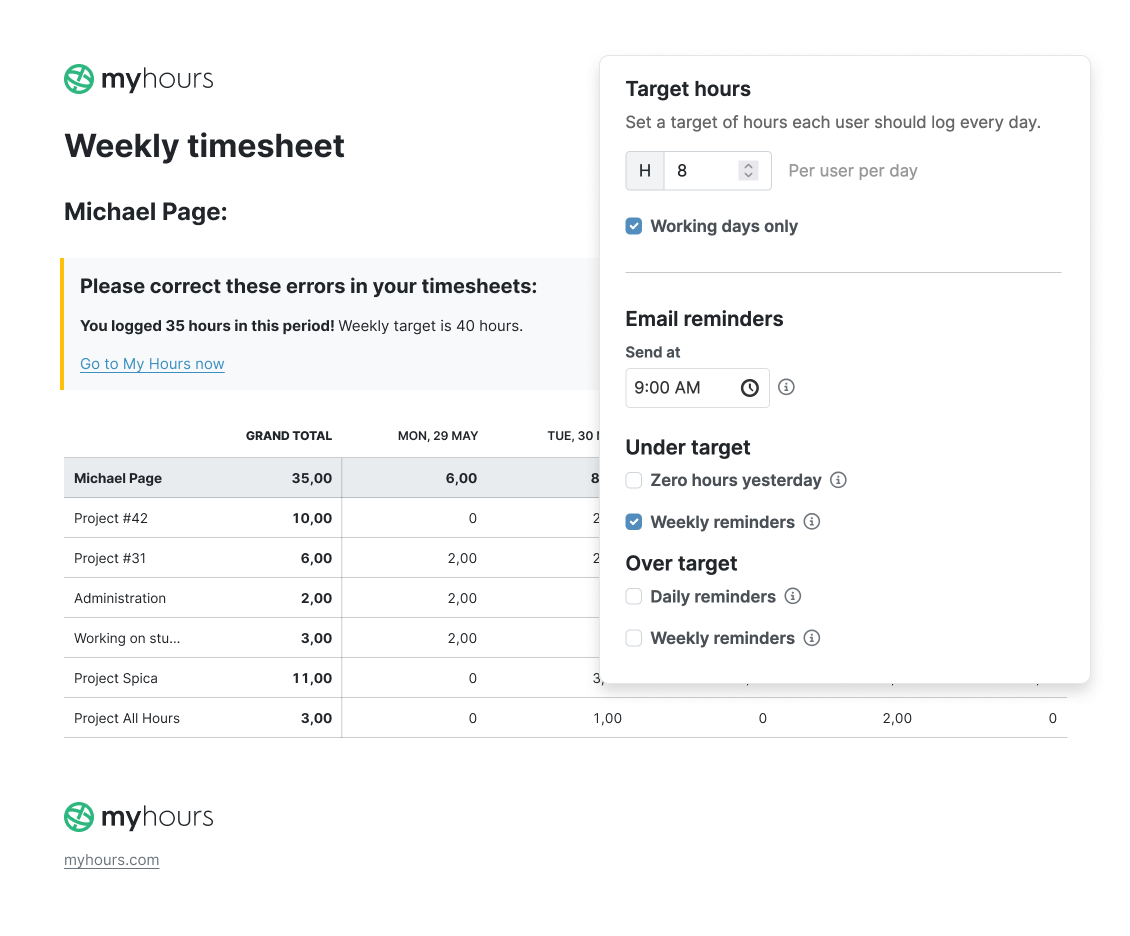
Additionally, you can set daily target hours per user. The system will alert users when they are going into overtime hours, and all overtime can be viewed in the reporting feature.
Deltek Replicon
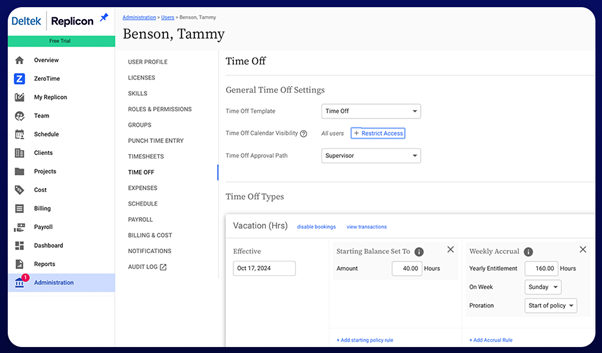
Replicon has a full leave management system along with an employee self-service portal. So, you can create leave policies, and the system will feed them into the time tracking system.
It can track overtime according to exempt and non-exempt statuses. Plus, it can automatically apply rules for meal breaks and labor laws for over 145 jurisdictions.
3. Separate direct from indirect labor
Both platforms enable the segregation of direct and indirect labor.
My Hours
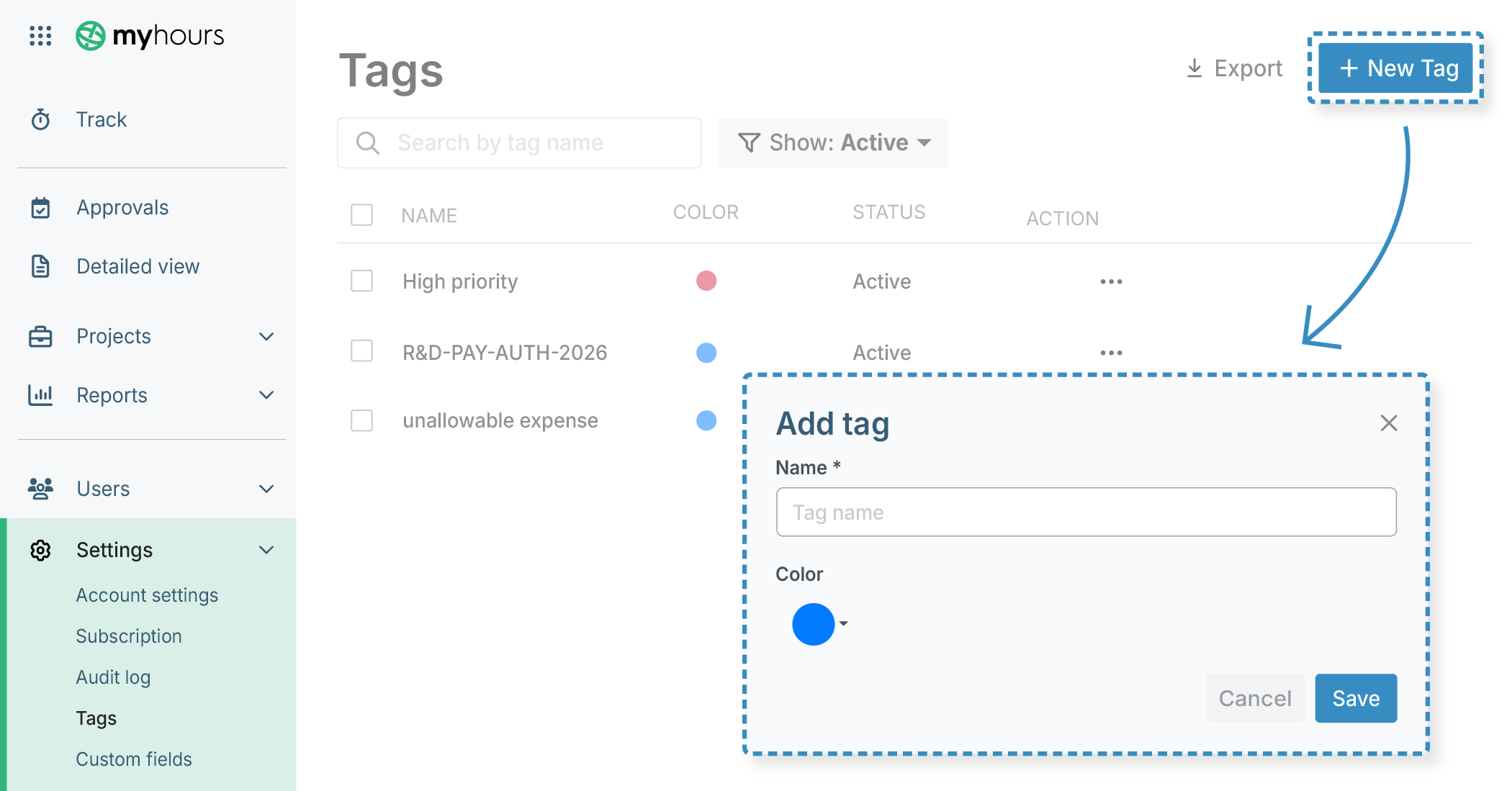
With My Hours, administrators can set up dedicated clients, projects, and tasks that are predefined as direct or indirect labor and assign custom IDs for clear classification.
In this setup, classification decisions are made centrally—not by employees. Users are simply assigned to projects and log time against them.
Tags and custom fields can provide an additional filtering layer, applied directly by users.
Deltek Replicon
With Deltek Replicon, administrators configure project structures and charge codes that determine whether work is recorded as direct or indirect labor. These classifications are built into the project or task setup so that time entries are tied to the appropriate contract or cost category.
As with My Hours, classification decisions are controlled centrally rather than by employees. Users select the relevant project, task, or charge code when creating a time entry, and the system applies the associated labor classification.
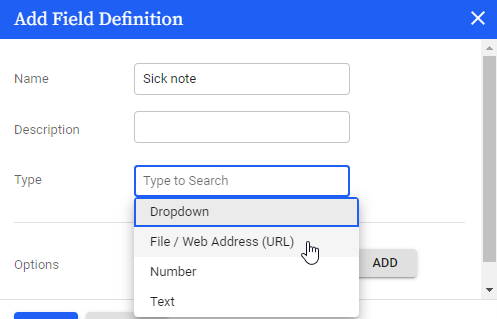
Additional information can be captured through a dropdown box available on the time entry.
4. Accurate time allocation
This is another area where both platforms perform similarly.
My Hours
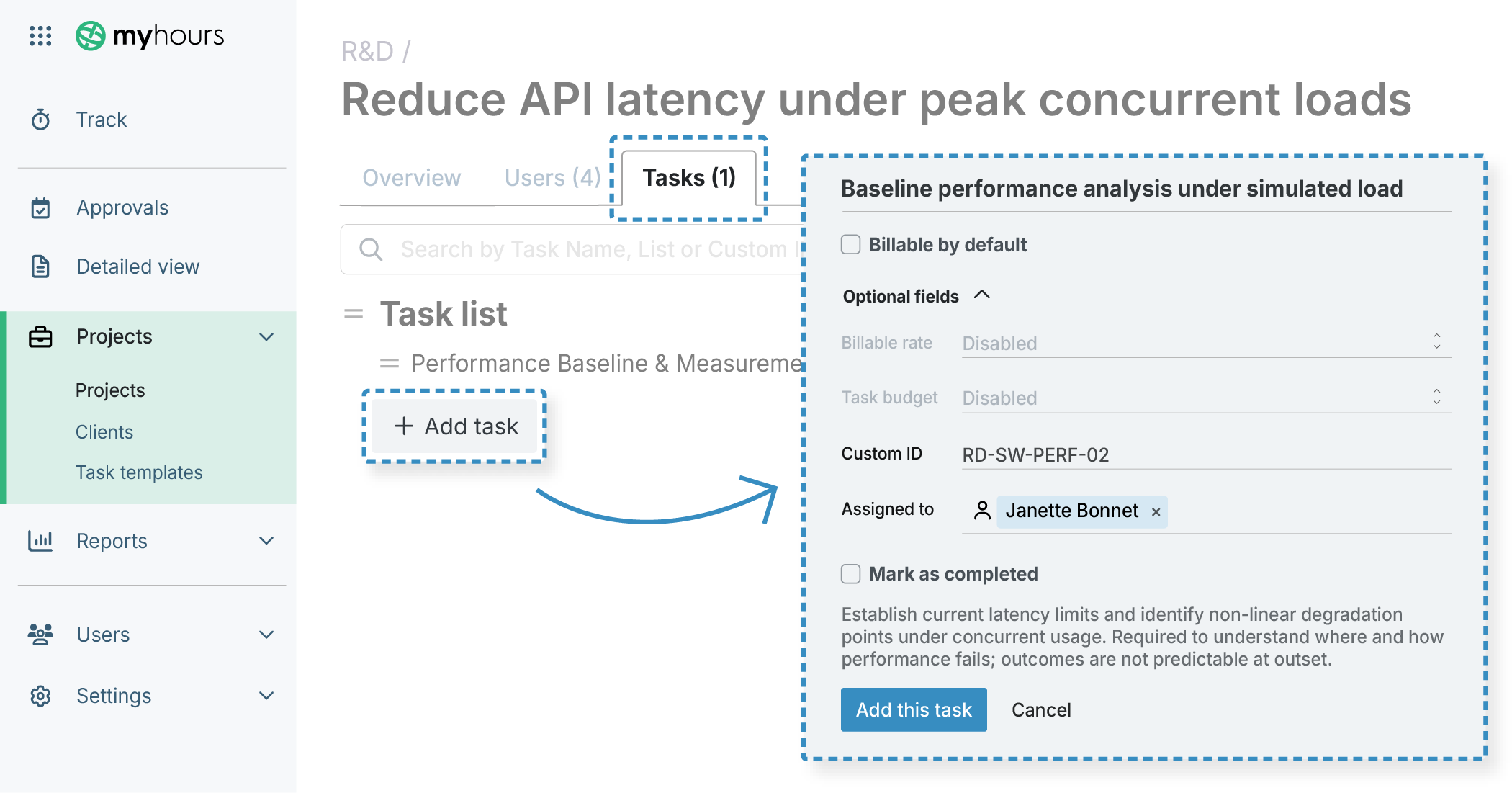
My Hours feature a clients > projects > tasks hierarchy, allowing you to set up workflows according to each contract.
Once time entries are created, they are assigned a project and task. Custom fields and tags also enforce the addition of project and/or charge codes.
Deltek Replicon
Deltek Replicon also supports a projects and tasks hierarchy, allowing organizations to organize work according to contract structures.
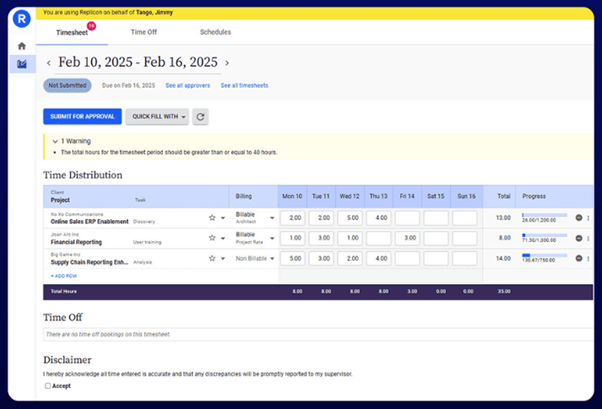
When creating a time entry, users select the relevant project and task, and additional fields can be used to capture charge codes or other cost allocation data.
Replicon offers slightly more timesheet customization options, including dynamic fields and dedicated fields for items such as time off.
5. Timesheet submission and approval workflows
My Hours
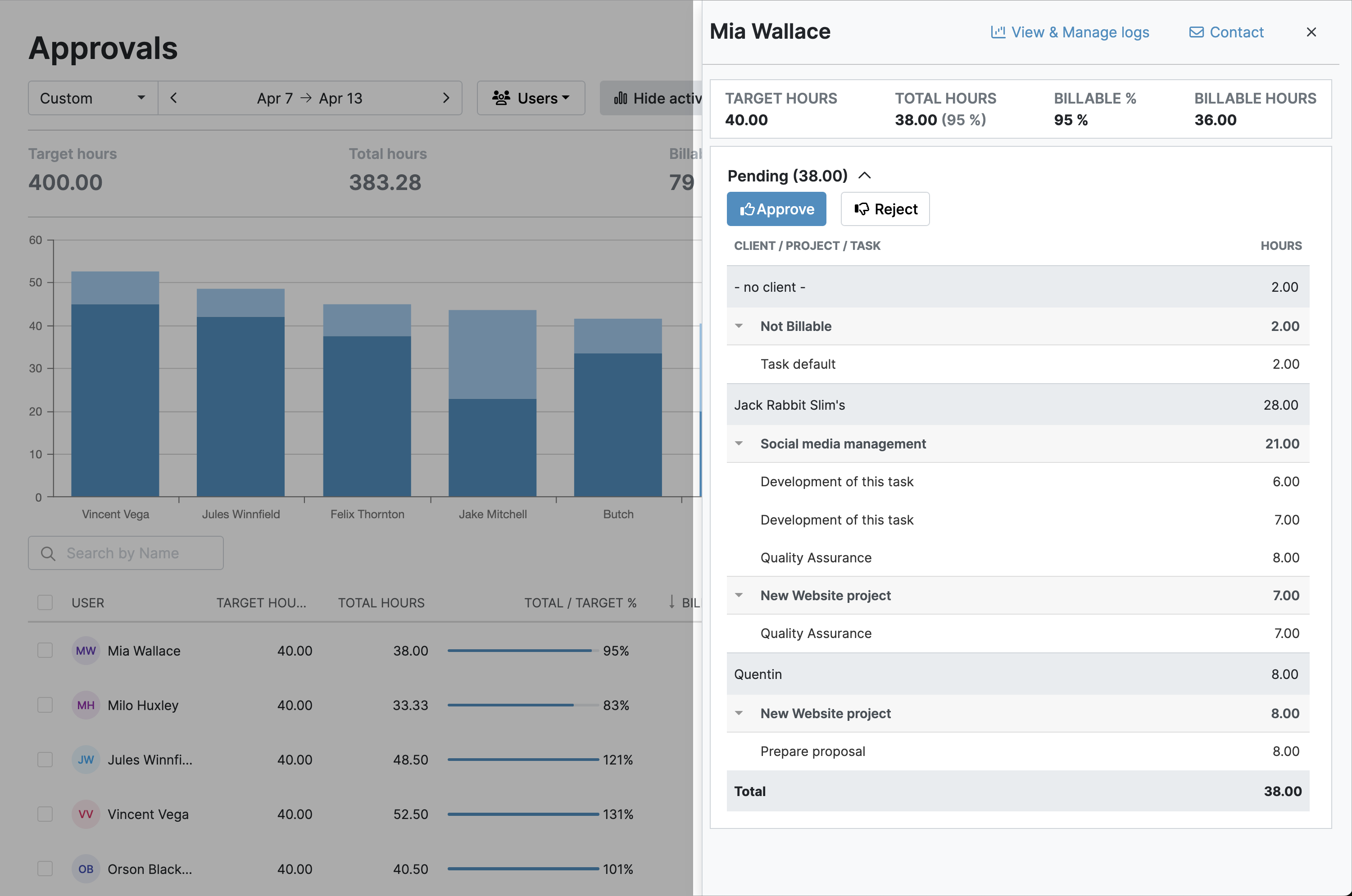
My Hours features a simple yet robust submission and approval process.
Firstly, timesheet submission can be automatic. So, once the daily timesheet is complete, it will be sent straight for approval. This is great for preventing forgotten submissions.
Another advantage is that users will receive a warning if the timesheet is incorrect, allowing them to correct it before it goes to the approval stage.
Once timesheets are submitted, supervisors are notified, and they can approve or reject timesheets or time entries in one click. All corrections and modifications to time data are tracked and logged with justification.
Importantly, timesheet data is locked after approval (or even right after submission), preventing unauthorized changes.
Deltek Replicon
Replicon’s submission process is a bit on the clunky side. Timesheets have to be manually submitted. And, although you can submit time entries ahead of the submission date, you still have to remember to submit the entire timesheet.
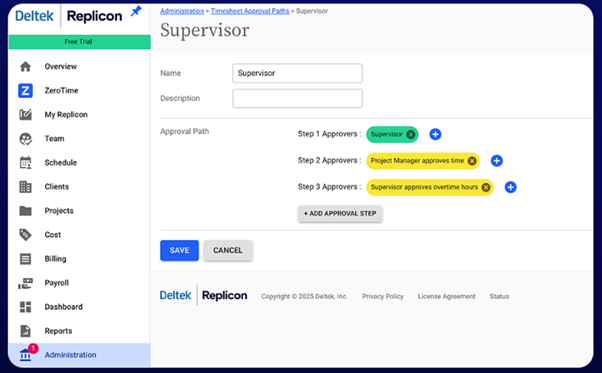
Approval paths can be multi-step. So if you need timesheets to be approved by more than one individual, you can set this up in Replicon. Additionally, you can set conditional rules that escalate approvals after a certain amount of time has lapsed or if a certain number of hours have been logged.
Like My Hours, timesheet data gets locked, preventing further changes.
6. Access controls and segregation of duties
My Hours
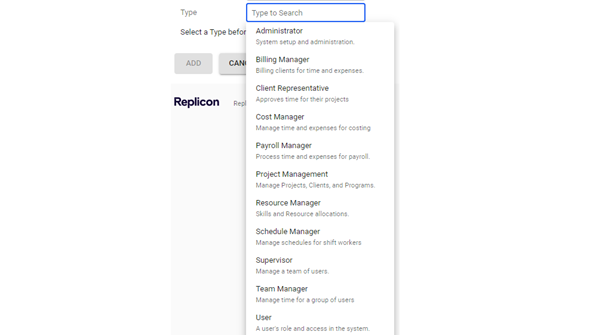
Because My Hours is a standalone time tracking software, it’s pretty easy to maintain segregation between time tracking and payroll. All you do is define the user roles, which determine the level of access an individual has to time data.
The platform also uses secure single sign-on, which prevents users from accessing another user’s data.

Deltek Replicon
Replicon combines HR, payroll, and time tracking into one system, so the user role setup is a bit more detailed. You can decide which parts of the platform each individual can and cannot access.
Login security is maintained via 2FA authentication, and you can set the system to expire passwords after a certain amount of time. Additionally, the system can run a check during login to ensure the user’s employee ID is still valid.
7. Audit logs and reporting
Both platforms maintain an audit log that tracks all activity and changes within the system. This information can be exported as needed, ready to present during an audit.
My Hours
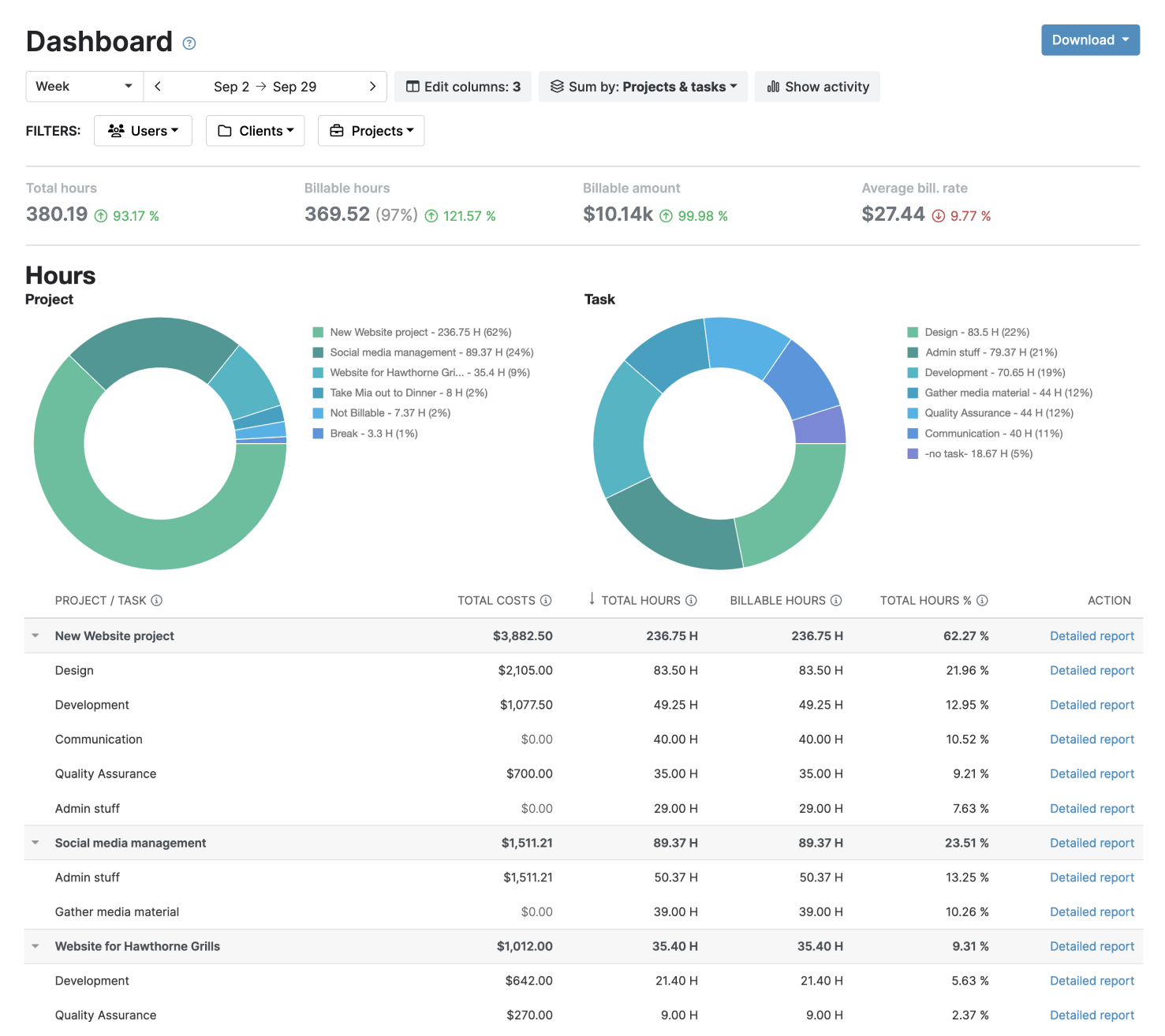
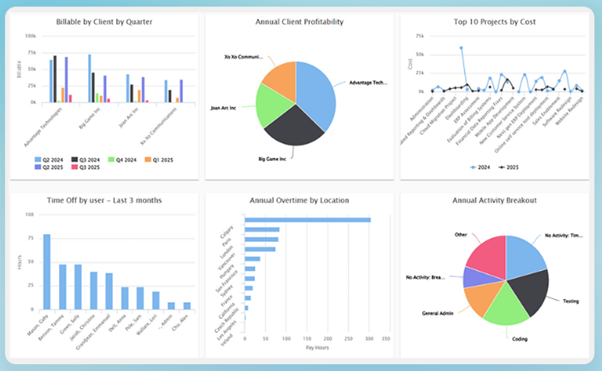
My Hours offers several reporting options, including timesheet and project data, dashboard overviews, and detailed reports.
Each report type is customizable by choosing the data columns and filters. Reports can be sent externally (and automatically) by using the built-in scheduling tool.
Deltek Replicon
Replicon has a large number of default reporting types. These can be customized, but the tool is a bit complicated, especially if you want to add custom data columns.
Disappointingly, you can only send reports to other users, not to anyone outside of the platform.
8. Additional compliance
My Hours
My Hours is GDPR compliant, and it abides by labor laws as long as you configure it to do so.
Deltek Replicon
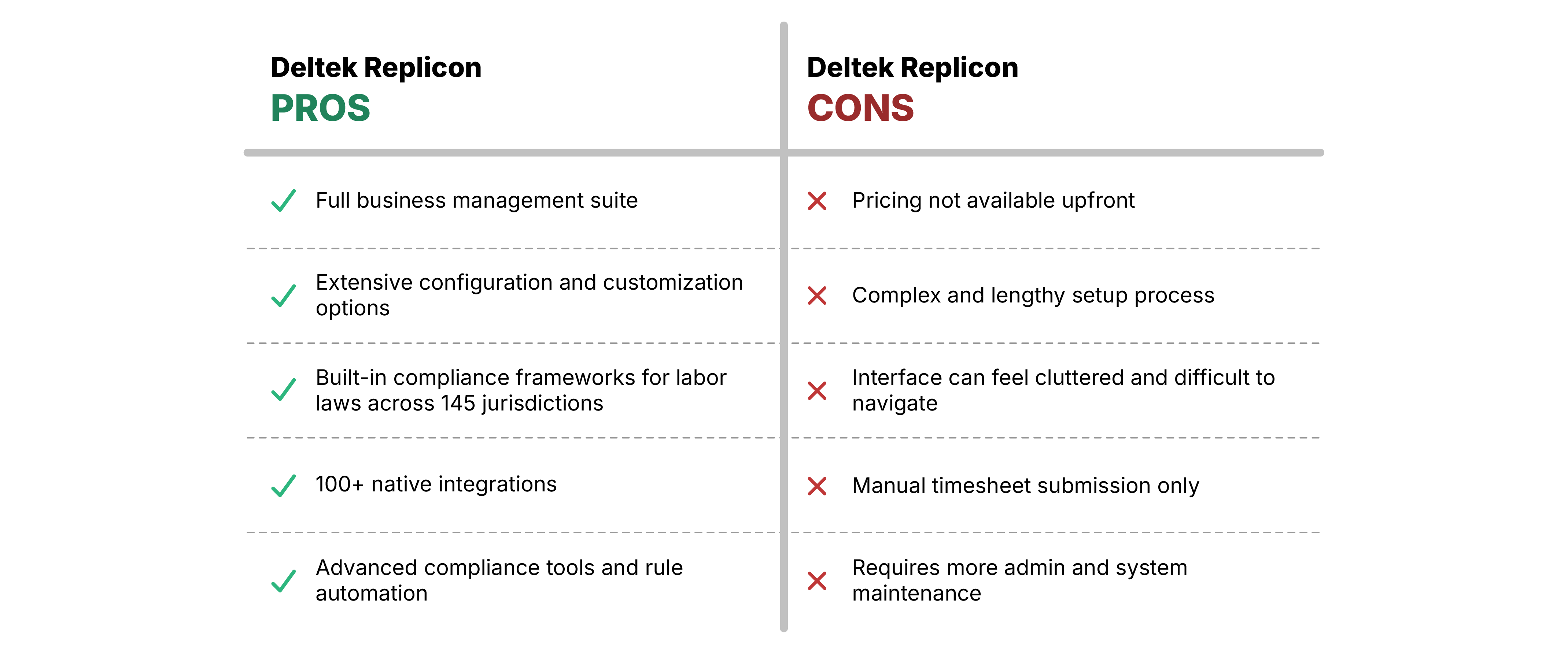
Replicon does have an edge here, since it has built-in compliance frameworks for labor laws in over 145 jurisdictions across 75 countries. It also allows you to set up customized compliance rules for other regulatory frameworks.
While this doesn’t strictly relate to DCAA, it’s important for higher-risk industries and government contractors that operate across multiple states.
My Hours vs. Deltek Replicon: Setup and Usability
If you dive into review sites, you’ll see that one of the chief complaints about Replicon is the complexity surrounding setup and configuration. Many find it difficult, time-consuming, and not possible unless they are guided by a Replicon agent.
Additionally, the user interface is not very intuitive. It’s cluttered with features, so it can be difficult to find the tool you need.
The payoff, though, is that once you have it set up, you do get a great deal of customization. This means you can bend the platform to fit the way your organization works rather than the other way around.
My Hours, on the other hand, is quite the opposite.
Reviews praise its ease of use and intuitive interface, both for everyday users and admin staff. It’s quick to navigate, learn, and can be set up within a day.
Of course, this means that there is less overall flexibility and customization, but not all organizations need that level of complexity. Also, keep in mind that My Hours is pure time tracking, while Deltek consists of multiple systems. So, this also plays into it.
My Hours vs. Deltek Replicon: Pros and Cons
Bottom Line
My Hours certainly doesn’t support the level of features that Replicon provides, but then it’s not designed as a business management system.
What it does extremely well is enable fast and convenient time tracking, without complications or a steep learning curve.
Because of this, it’s an excellent choice for small to mid-size government contractors who just need a DCAA-compliant way to track time and costs.
It’s also a solid choice for contracting firms that already have a business management system in place and want to integrate time tracking into their tech stack.
Since the acquisition, Deltek Replicon is firmly positioned as a business management solution for enterprise-level businesses.
It has the tools and features required to support complex business environments with heightened compliance needs.
For a smaller government contractor, this level of detail is overkill, and you’ll end up paying for many features you don’t even need.
Yet, if you’re a large-scale government contractor working across state lines, Replicon’s built-in compliance mechanisms will prove extremely valuable.

Waste no more time,
jump right in!

All rights reserved.