


My Hours vs. Harvest in 2026
Choosing the right platform for client billing
Time tracking is essential for billing clients accurately, but other features matter too. The right platform should capture all costs effectively and enable efficient invoicing.
My Hours and Harvest are both suitable for client billing, but they offer different strengths for cost management, reporting, and billing.
My Hours has a straightforward per-user pricing model, while Harvest has shifted from simple per-seat pricing to a base subscription plus usage-based pricing model.
*Updated: July 2026*

My Hours vs. Harvest: At a Glance
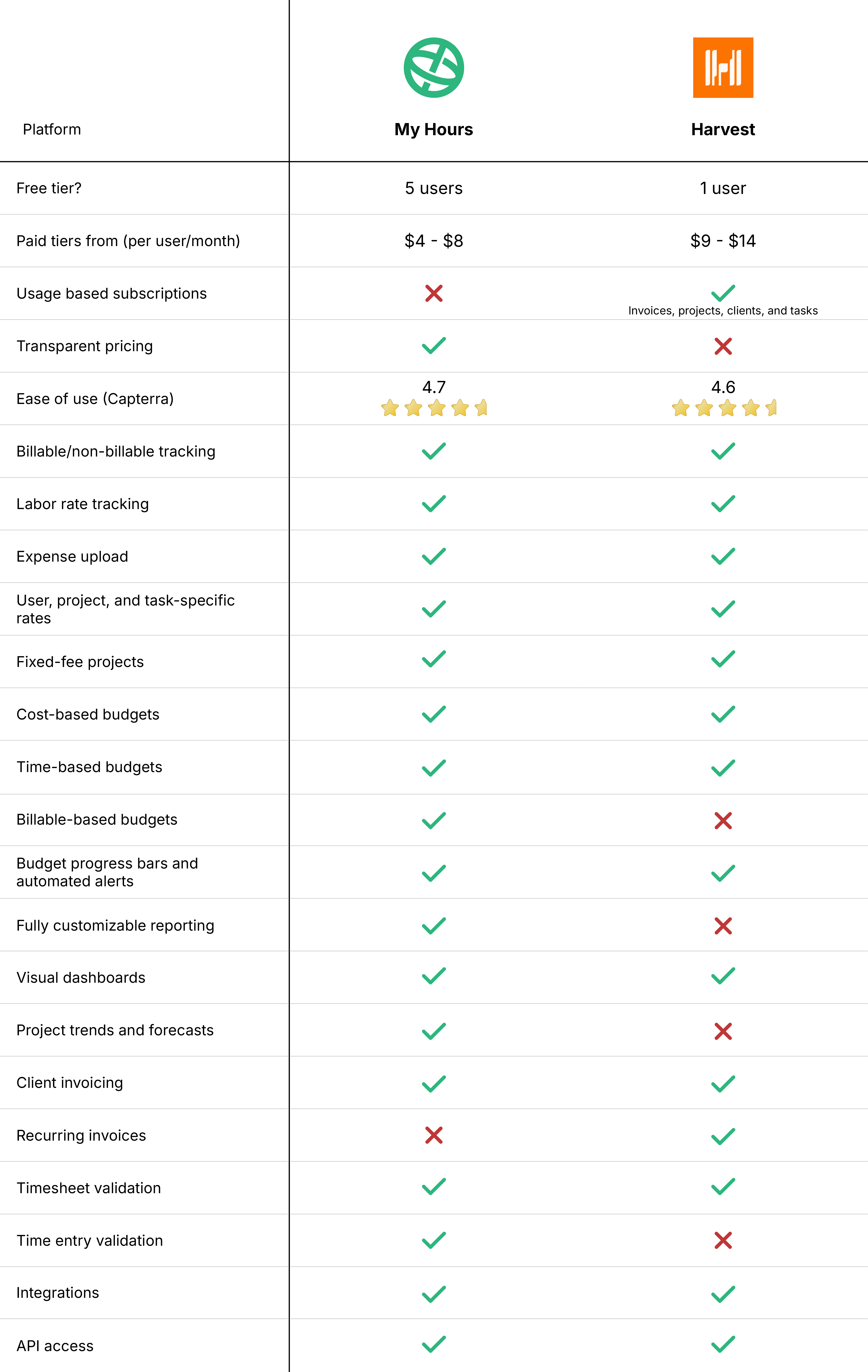
1. My Hours vs. Harvest: Cost Comparison
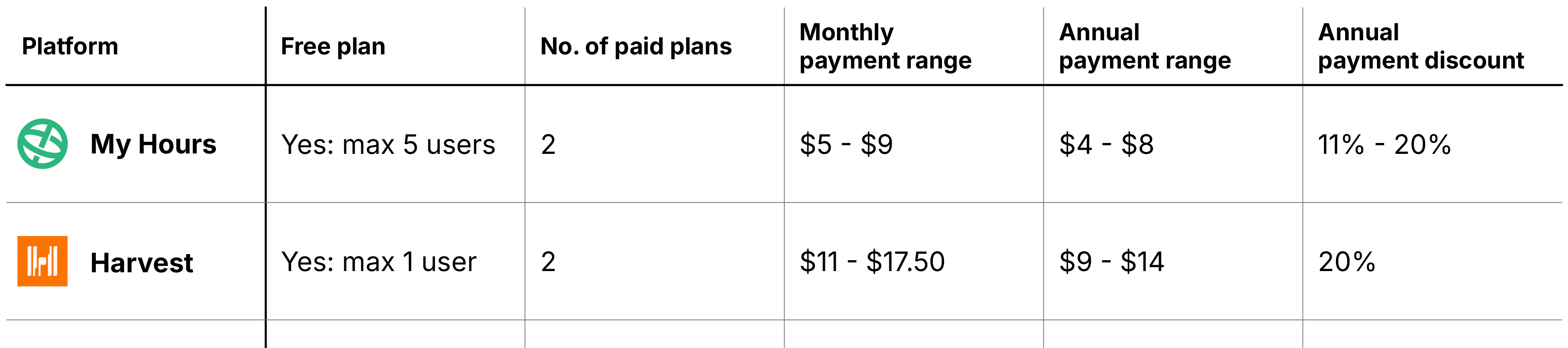
My Hours pricing
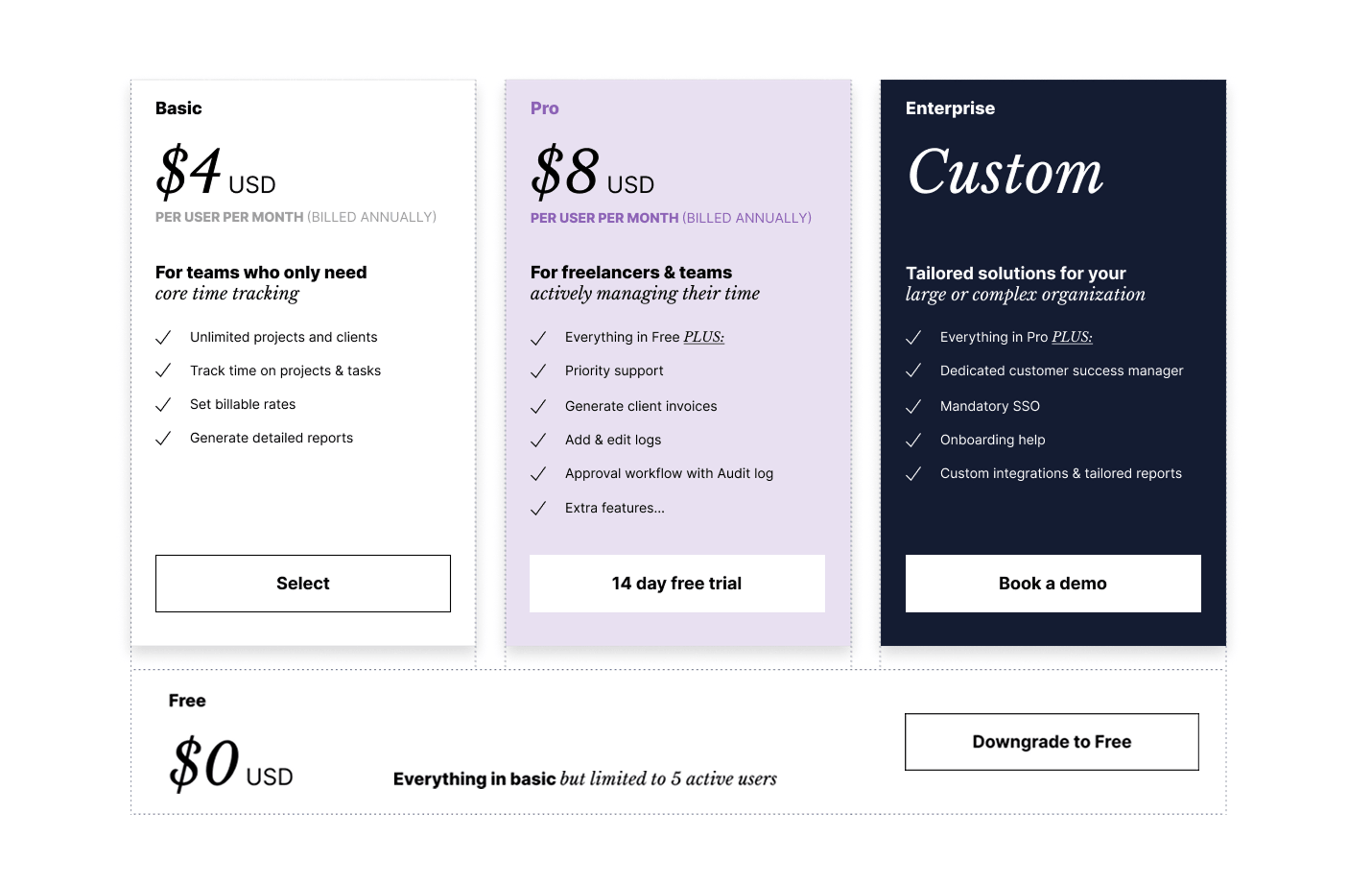
My Hours has two clear plans alongside its free plan, which allows up to five users. While the free plan is basic, it’s still enough to facilitate basic time tracking for small teams.
Paid plans unlock features such as billable rate tracking, budgets, and priority support. An enterprise plan is also available with bespoke pricing and customized features.
My Hours is transparent with its pricing, meaning there are no add-on costs or hefty hikes at renewal. The price you see is what you pay.
 Get My Hours Free
Harvest pricing
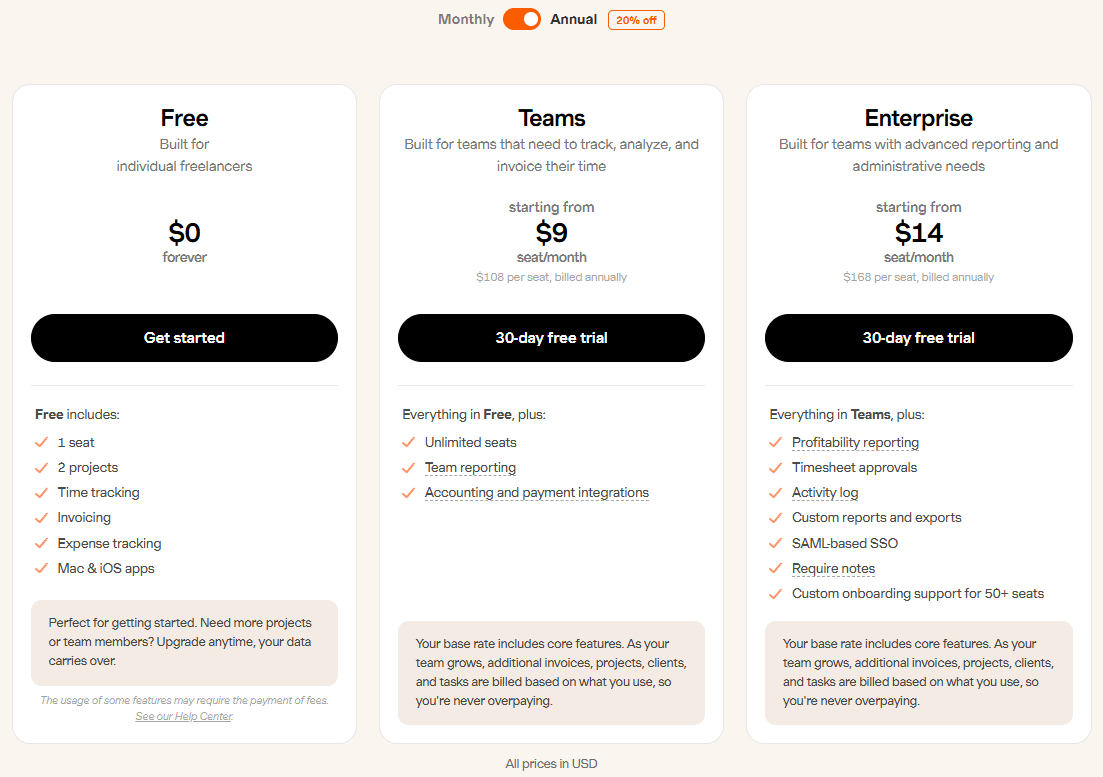
Harvest’s pricing has changed significantly since Bending Spoons acquired the company in mid-2025. It’s moved away from a flat per-seat model to a base subscription plus usage-based pricing structure.
Previously, customers paid a flat fee per seat for access to Harvest’s core time tracking and invoicing features. With the new change, the per-seat annual subscription ($9/month for Teams and $14/month for Enterprise) is only the starting point. Customers can also incur additional charges for how they use the platform, including factors like the number of invoices sent, projects created, clients managed, and tasks logged.
This means that the headline subscription price may not truly reflect the total cost of using Harvest. Two businesses with the same number of users could pay vastly different amounts depending on their account activity and usage levels.
Since Harvest has reduced its free tier to one user, it could still work as a decent free tracker for solopreneurs, but businesses considering a paid plan should calculate their expected total usage costs carefully. Confirming pricing directly with Harvest before committing to a paid plan is worth doing.
2. Billable Time Tracking
My Hours
For each user, an hourly billable rate and labor rate can be set up. As time is tracked, the rates are tracked alongside it, giving you an accurate cost for each time entry.
For greater flexibility, rates can also be adjusted for specific projects, keeping billing aligned with what’s been agreed with the client.
For better control, each time entry can be marked as billable or non-billable. This means that if a user completes project-related work that isn’t billable, marking the time entry as non-billable keeps it off the invoice.
Harvest
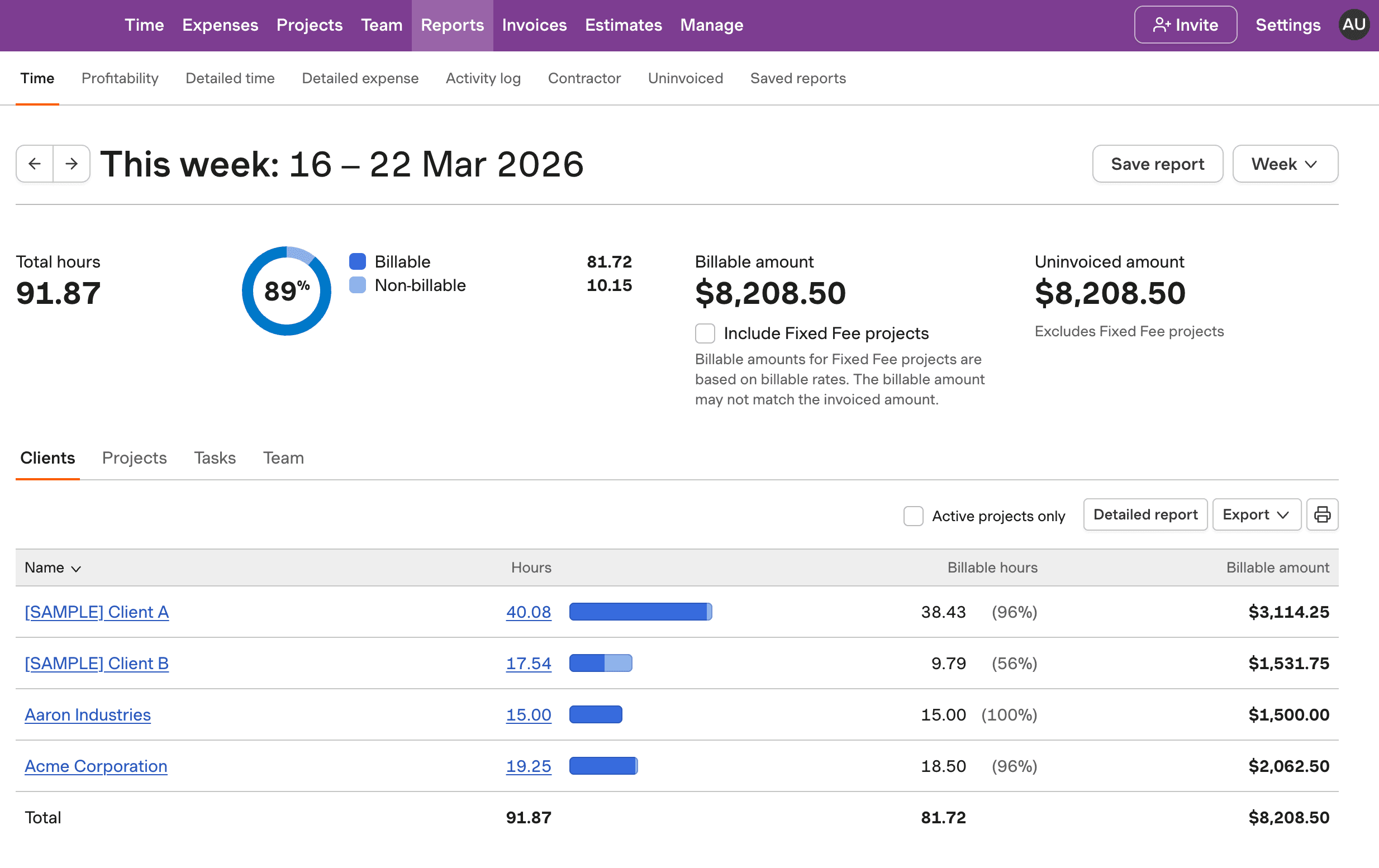
You can also set up user billable and labor rates in Harvest, and adjusting them at the project level is just as simple.
Recording time entries as billable or non-billable is a little more rigid, though. Rather than marking the time entry itself, billable status has to be set up at the task level. For instance, you might need to create a billable task for admin work and another one for non-billable admin work.
Billable time tracking verdict
My Hours is less rigid in terms of defining what is and isn’t billable, avoiding the need to set up large amounts of billable and non-billable tasks. Although Harvest may take more setup time, it’s a good option if you need stronger control over billable and non-billable time entries.
3. Choice of Billing Methods
My Hours
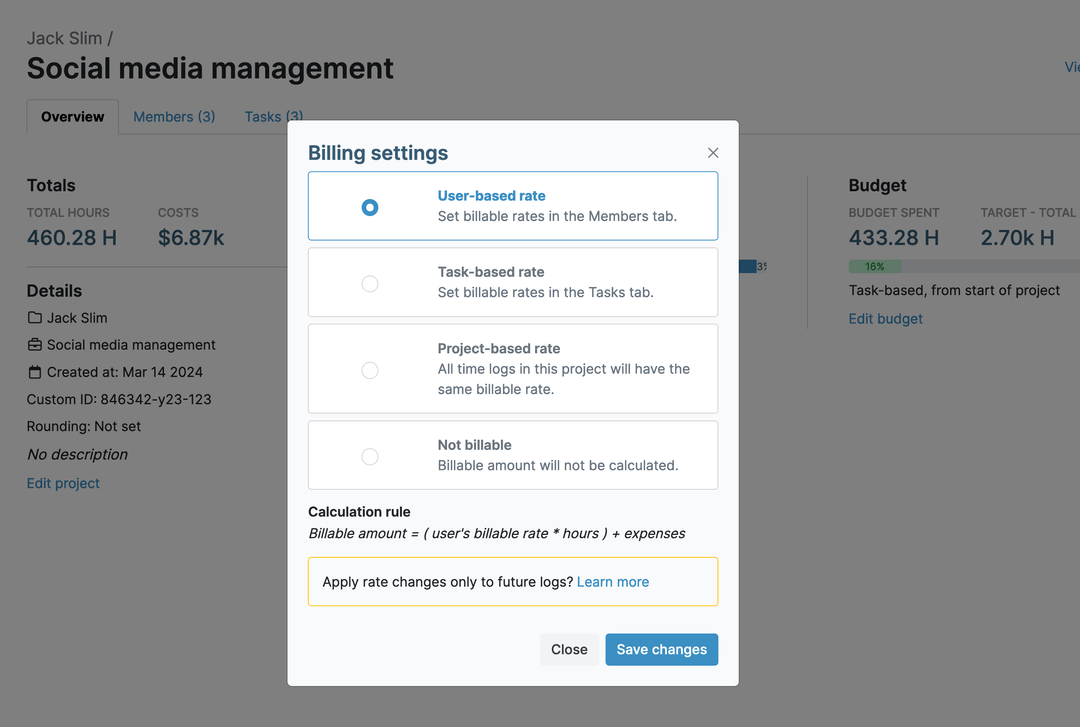
Each project can be configured to match how clients are billed. You can choose from a user-based rate, set a unique rate for each task type, or apply a single hourly fee across the entire project. A flat-fee option is also available for projects billed that way.
As time is tracked, so is the chosen rate, removing the need to perform manual calculations. When an invoice is generated, the correct billing rates display automatically for each specific client.
Harvest
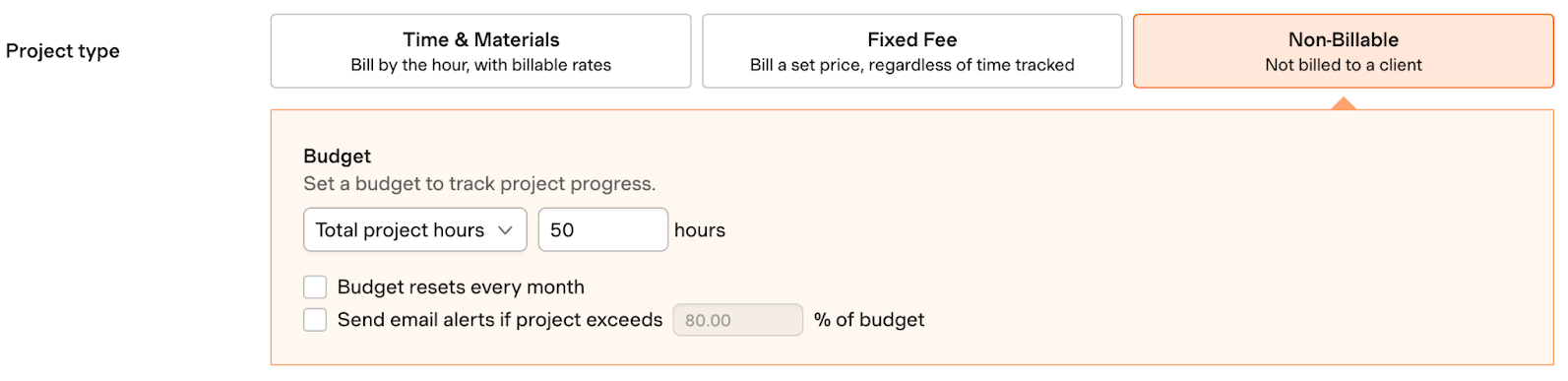
Harvest closely mirrors what My Hours can do, offering the same project billing options, including a fixed fee.
When configuring the project billing method, it’s also possible to set up the invoice values. So if you need to add tax or apply a discount, you can do this upfront rather than when the invoice is generated.
Billing methods verdict
Both platforms perform equally here, providing the same amount of control and flexibility. The only slight difference is Harvest’s upfront invoice configuration, which can save time when sending out payment requests.
4. Budget Control
My Hours
With My Hours, you have three straightforward budgeting options: Total hours, total costs, and billable amount. Budgets are set for the whole project or can be defined at the task level.
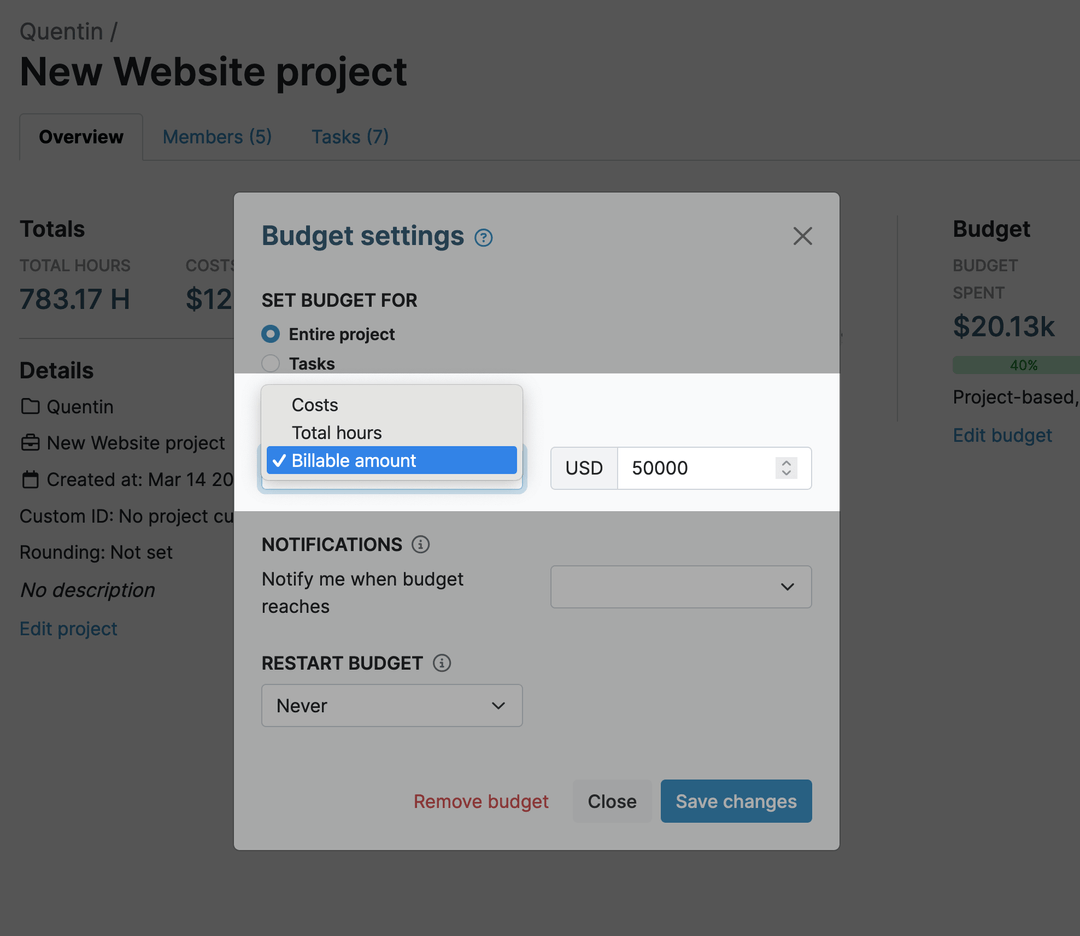
Budgets can be one-off or reset monthly, which is great where a set amount applies to a specific client each month.
To keep budgets under control, you can view the expenditure progress bars and set up automated alerts to ping you when a certain percentage of the budget has been spent.
Harvest
Harvest gives you roughly the same amount of budget flexibility, but in a slightly different way.
As with My Hours, budgets can be set at the project or task level and reset each month.
Budget types are limited to total project fees or total project hours, one less option compared to My Hours. However, you can set an hours-based budget at the user level, which is something My Hours does not offer.
Email alerts are sent when a certain percentage is spent, and you can also view the budget progress bars to keep tabs on spending.
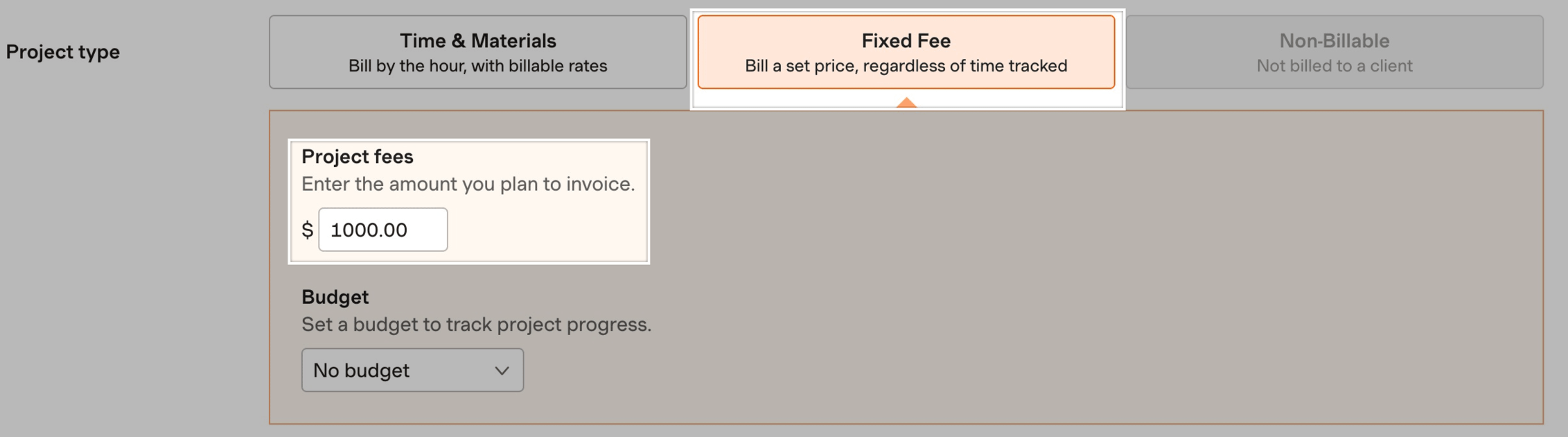
Budget control verdict
Both platforms perform as well as each other here. My Hours gives you more budget types by including the billable rates budget, while Harvest adds its own user hours-based budget.
5. Client Reporting
My Hours
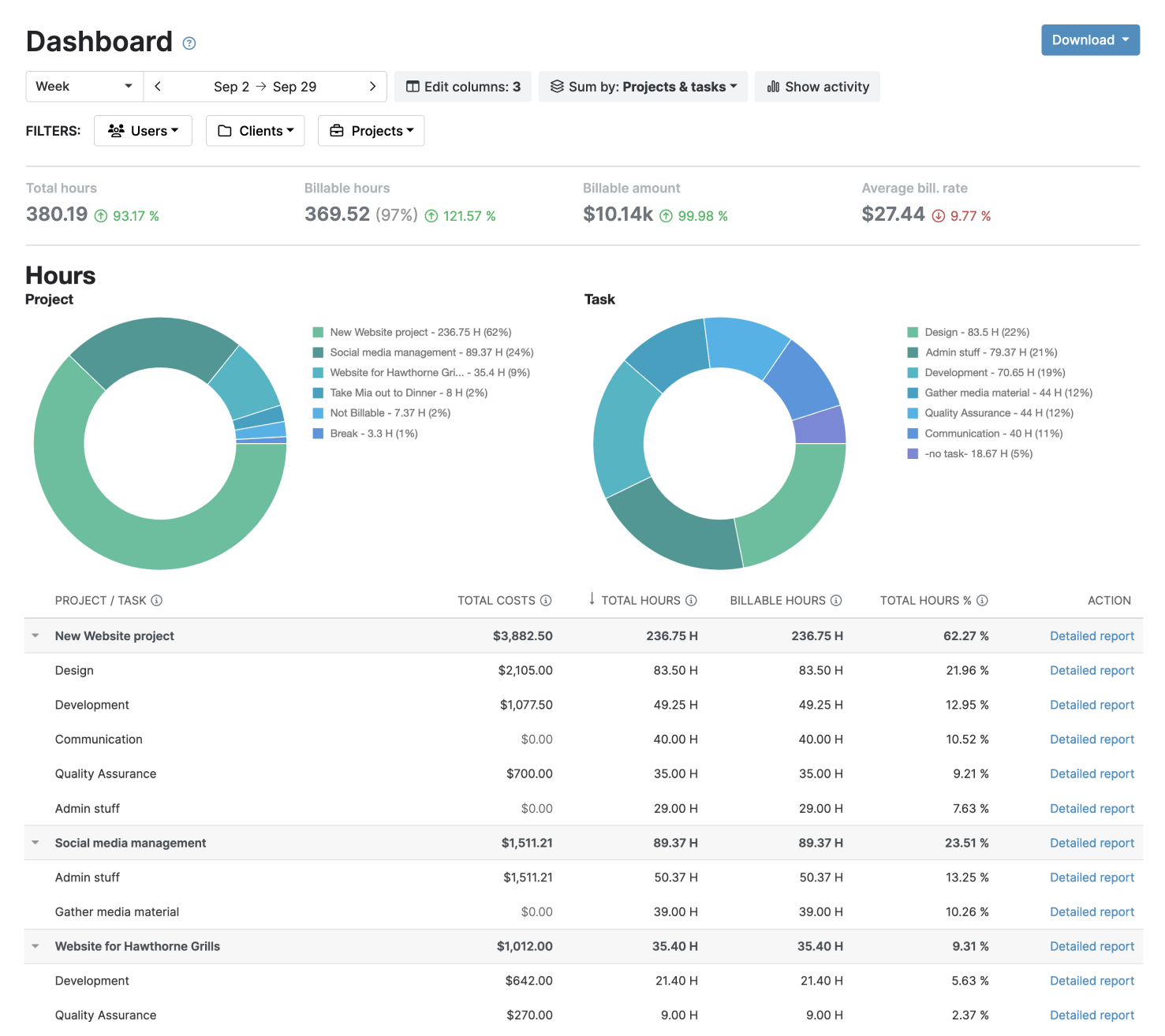
Full report customization is at your fingertips within My Hours reporting tools.
The Dashboard report provides a visual overview, while the Detailed report offers more granular depth. Both let users choose the desired data columns and filters to get exactly the data they require.
For faster report generation, you can save your report settings and set up auto-scheduling. This allows My Hours to generate reports on your behalf and send them directly to stakeholders at set intervals.
My Hours also offers specific timesheet reports to analyze team performance, along with project reports that show how projects are tracking against profitability and other metrics. Each project also provides instant insight into projected forecasts and trends for time and costs.

Harvest
Harvest’s reporting tool includes multiple report types, like profitability, detailed time, and detailed expenses.
While the layout is tidy and easy to follow, the data that can be analyzed at one time is more limited. For example, you can’t mix detailed expense data with time data, and invoicing data is separate from other reporting types.
Harvest recommends integrating with external apps to access a granular level of detail, so this might suggest that the platform is aware of its reporting limitations.
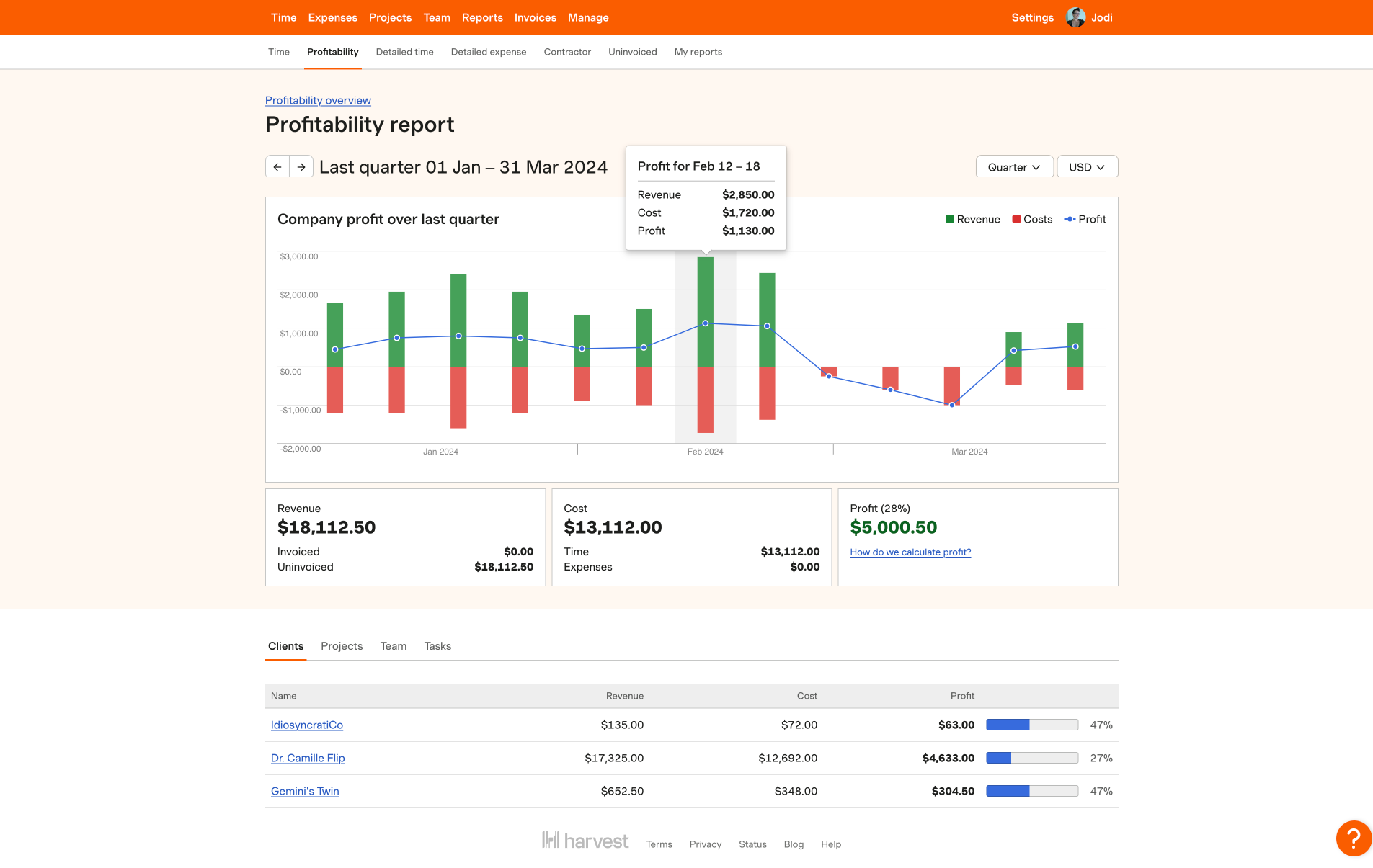
Reporting verdict
My Hours reporting tool offers greater customization and flexibility than Harvest, without being limited to reporting types. Users also have complete freedom to set up data in a way that works for them.
Harvest is good for at-a-glance analysis, with a dashboard that’s extremely easy to read and understand. That said, its more detailed reporting features are more limited than those My Hours provides.
6. Invoicing and Payments
My Hours
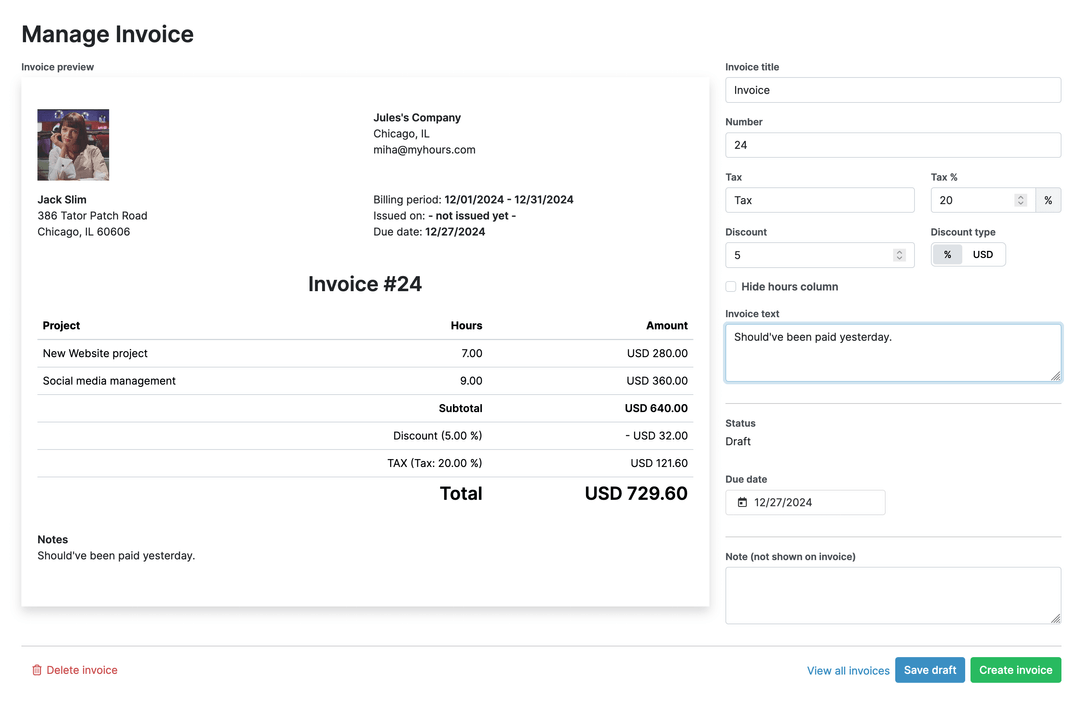
My Hours offers a streamlined invoice tool that is easy to set up and manage.
Although automated invoices are not available, the system will automatically pull client billing data and generate an invoice for a specific time range.
Outstanding amounts are displayed in a simple tracking system, though following up on them remains a manual process.
For more comprehensive invoicing capabilities, My Hours integrates with QuickBooks and Xero.
Harvest
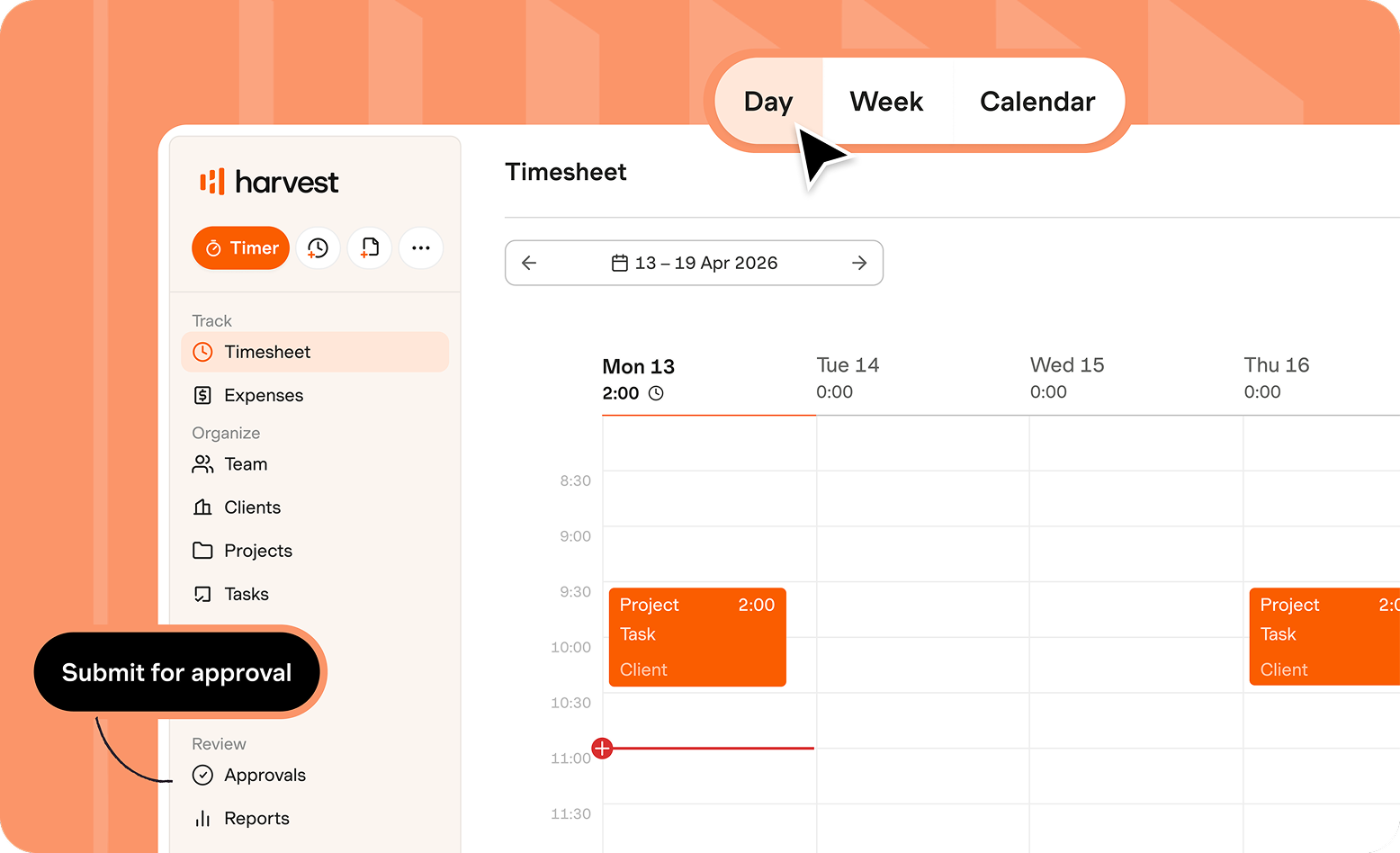
This is Harvest’s strongest area, as it’s known as the time tracker with one of the best built-in invoicing systems.
A detailed dashboard allows users to track open invoices and see revenue in real time. Recurring invoices can also be fully automated, making it a handy solution for clients billed regular amounts and/or on regular schedules.
Invoice data can be transformed into reports in a few clicks, and the invoice itself can be fully customized.
Harvest also integrates with Stripe and PayPal, letting clients pay directly and keeping all financial data within the same ecosystem.
Like My Hours, Harvest also integrates with QuickBooks and Xero.
Invoicing and payments verdict
Harvest is the stronger option for teams with frequent or recurring invoicing needs. My Hours is more streamlined, but remains a solid fit for teams with basic invoicing requirements.
7. Data Accuracy
My Hours
To ensure timesheets contain accurate data for billing, My Hours features a strong approvals workflow.
Once a timesheet is submitted, managers are alerted that it’s ready for review. From there, they can approve/deny entire timesheets or individual time entries.
Denied items go back to the user for correction, and because managers can click on the exact time entry that’s incorrect, it makes the process fast and simple.
All timesheet adjustments are documented and timestamped to create an audit trail. What’s more, timesheet data can also be locked, preventing any edits unless they have been specifically approved.
Automated daily or weekly alerts can be set up to ensure users complete and submit timesheets on time.
.png)
Harvest
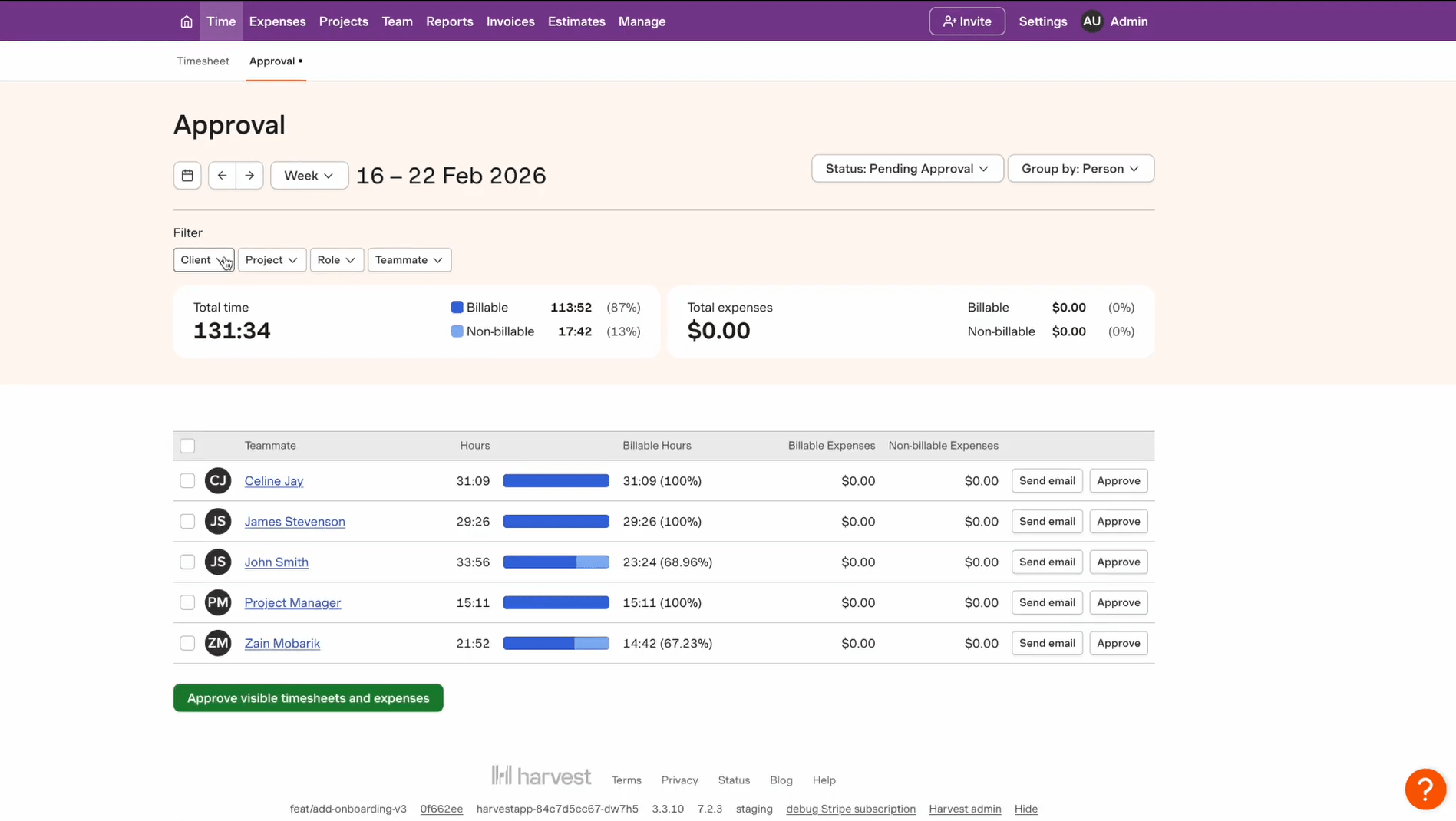
Harvest also has an approvals workflow, but with one significant difference: managers can only approve or deny entire timesheets, not individual time entries.
This can lengthen the correction process, since managers have to specify exactly which entries need adjusting. This can create a potential workflow bottleneck for teams on tight billing schedules, and a time-consuming step for larger teams needing to detail every correction.
Harvest also features timesheet data locking and automated timesheet completion reminders.
Data accuracy verdict
My Hours’ approval workflow is the stronger of the two. Being able to approve or deny individual time entries is much more efficient than having to specify which part of a timesheet is incorrect.
Pros and Cons of Each Tool
My Hours
Pros
 Billable/non-billable tracking at time-entry level
- Supports multiple client billing models
- Cost, time and billable budget tracking
- Highly customizable reporting with scheduled reports
- Strong timesheet validation and approval workflows
- Transparent pricing with no reported renewal surprises
Cons
 No recurring invoices
- Basic invoicing tools
- No built-in payment processing
Harvest
Pros
- Detailed invoicing and payment management tools
- Automated recurring invoice
- Built-in Stripe and PayPal payment gateways
- Easy-to-read dashboards and financial summaries
- User-level budget controls
- Project-level invoice configuration
Cons
- Price changes and renewal increases have concerned some existing users
- More complex billable/non-billable setup
- Limited reporting customization
- Approval workflows lack individual time entry validation
Bottom Line
Both platforms are great contenders for accurately tracking and recording billable time.
My Hours is less suited to teams whose top priority is invoicing, but it offers more comprehensive features with greater flexibility, making it a stable and scalable option for teams that value reporting depth and approval controls over advanced invoicing.
Harvest is generally the stronger option when it comes to invoicing and client payments, though its recent usage-based billing on top of the per-seat base has raised concerns for some users. Its reporting and timesheet validation are also more limited, which may be a drawback for some teams.

Waste no more time,
jump right in!

All rights reserved.