
project profitability management
Project Profitability TrackingWithout Complicated Spreadsheets
 Real-time visibility into project profitability and margins
- Clear separation of billable vs. non-billable work
- Centralized tracking of labor costs and project expenses
- Built-in budget tracking to prevent margin loss
Track and compare labor rates, billable time, and non-billable time with My Hours
Tracking project profitability across multiple spreadsheets is an administrative nightmare.
Labor costs are split across departments, while expenses exist on a spreadsheet guarded by finance. Comparing data side-by-side requires logistical gymnastics, and in the meantime, costs start spiralling.
My Hours brings time, labor, billing, and expense tracking together. Data is centralized, allowing you to compare and monitor in a couple of clicks.
You get a clear, real-time view of project profitability, without building complex formulas or trying to link spreadsheets together.
My Hours is also incredibly user-friendly, allowing users to effortlessly track their time. This means greater accuracy and fewer gaps when analyzing costs.


Trusted by more than 100.000 businesses worldwide


Track Labor vs. Billable Rates
Simultaneously track user labor rates and billable rates and view the total costs for labor vs. billable per project. My Hours automatically performs the profit calculations on your behalf.

- Assign custom labor and billable rates per user and project
- Adjust rates based on client, scope, or project requirements
- Automatically track costs and revenue in real time as time is logged
- Visualize labor costs vs. billable amounts with project-level graphs
- Quickly spot when costs exceed revenue and take action to protect profitability
Flexible Project Billing Structures
My Hours supports multiple billing structures to match different project types.
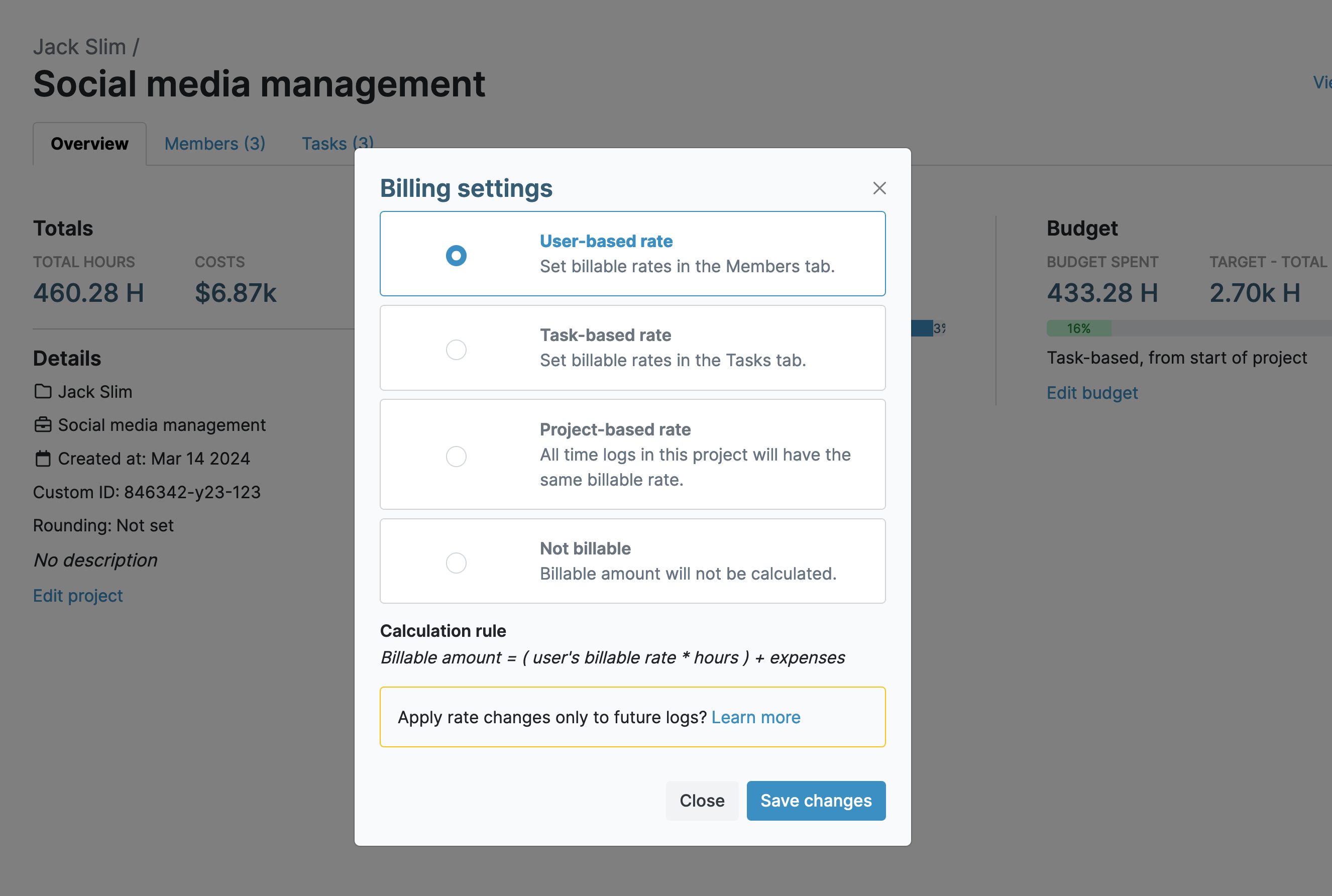
- User-based rates: Different billable rates per team member
- Task-based rates: Rates vary depending on the type of work
- Project-based rates: A single rate applied across the entire project
- Flat fee projects: A fixed price tracked against logged time
- Non-billable tracking: Internal work tracked without impacting revenue
Track Expenses Alongside Labor Costs
While labor takes up the lion’s share of total costs, other expenses, like travel, equipment purchases, and subcontractor costs, can quickly add up, eating into margins.
.png)
- Log expenses directly and link them to projects and tasks
- Mark expenses as billable or non-billable
- Upload receipts and invoices as proof of purchase
- Maintain clear cost documentation for client transparency
Set Budgets at the Project or Task Level
My Hours lets you set a budget for the entire project or individual budgets for each task.
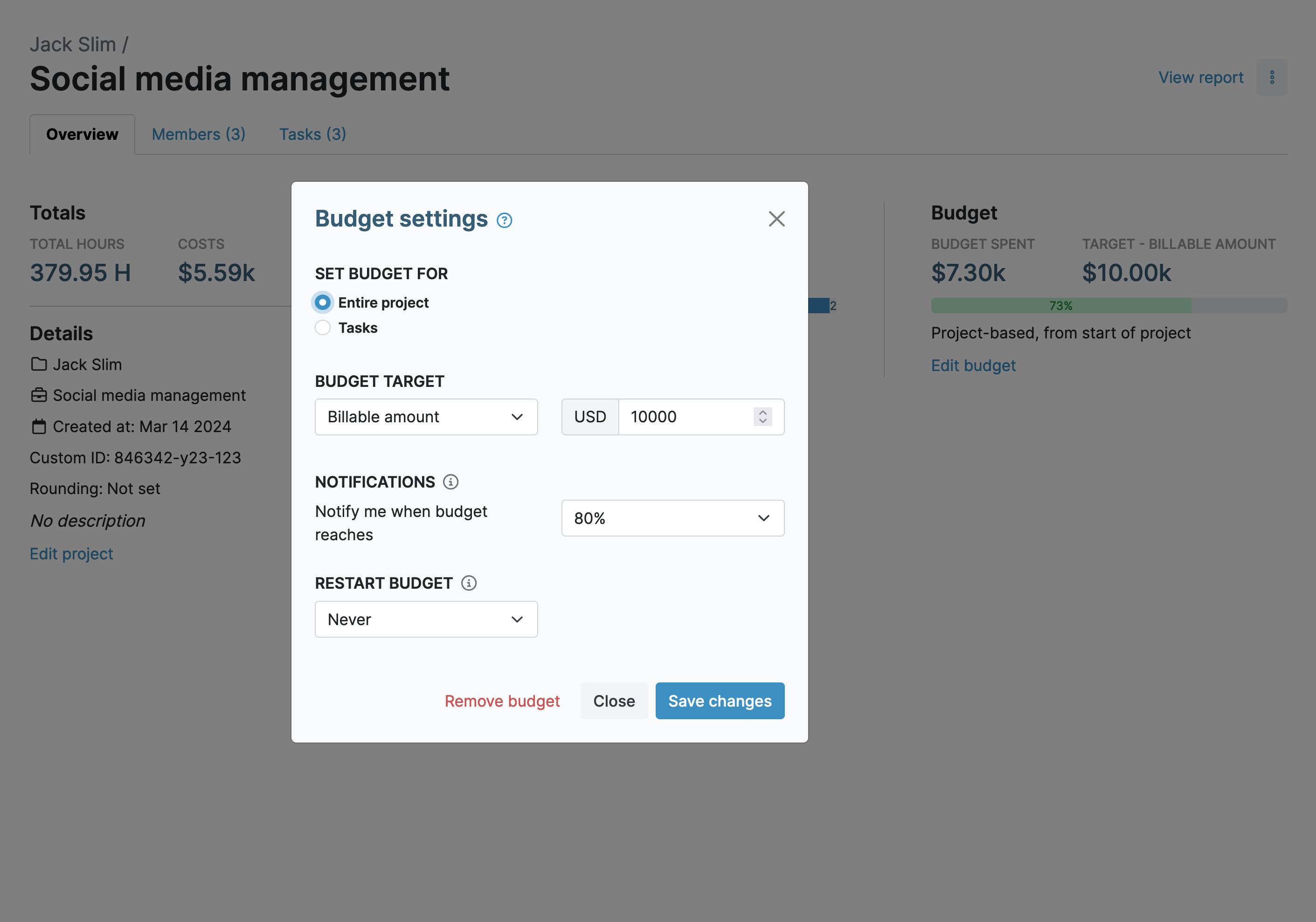
- Set time-based budgets using total tracked hours
- Track billable budgets based on billable time and expenses
- Monitor cost budgets including labor rates, time, and expenses
- Enable monthly budget resets if needed
- Receive automated alerts when budget thresholds are reached (50% – 90%)
Trend & Forecast project chart
View time and cost trends on the project overview with clear charts that show budget spending at a glance.
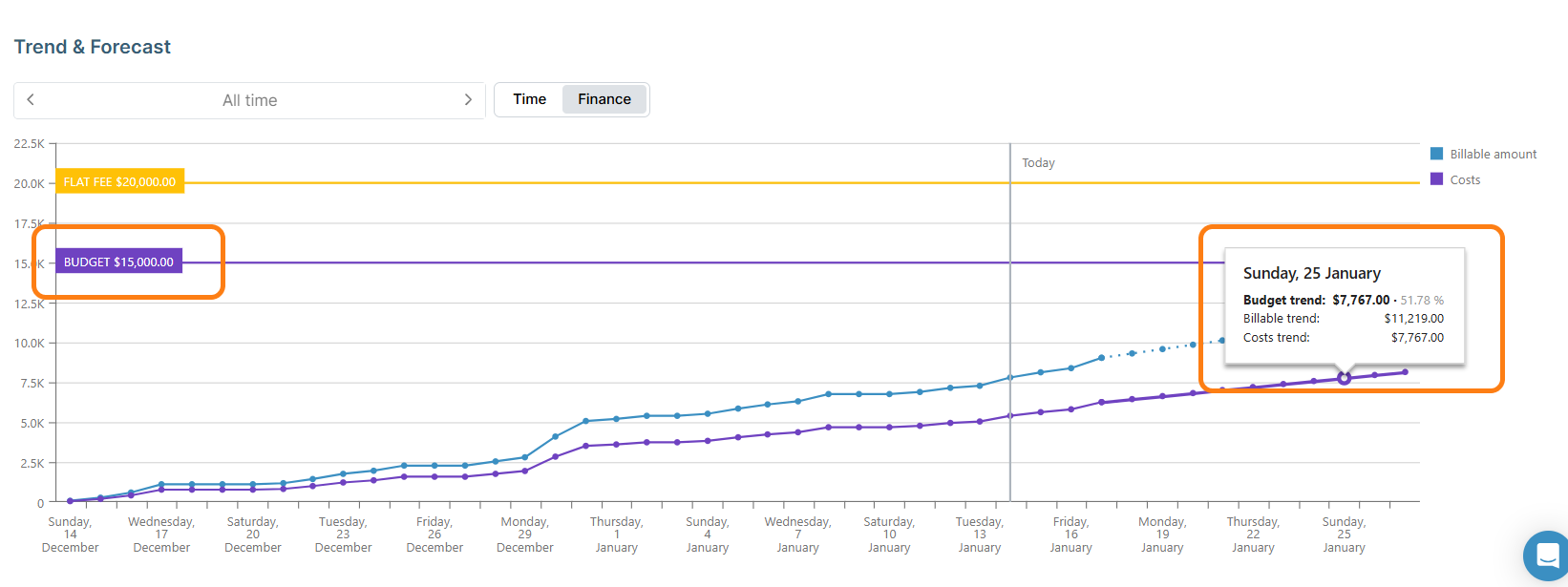
- Time Chart – shows trends and forecasts of total tracked hours for the project
- Finance Chart – shows trends and forecasts of billable amounts and total costs
- The trend slope is calculated from the average slope of the latest 30% of the chart points.
Project Reports
Get a clear overview and deep analysis of your project performance with powerful reports designed to help you monitor costs, track time, and understand profitability.
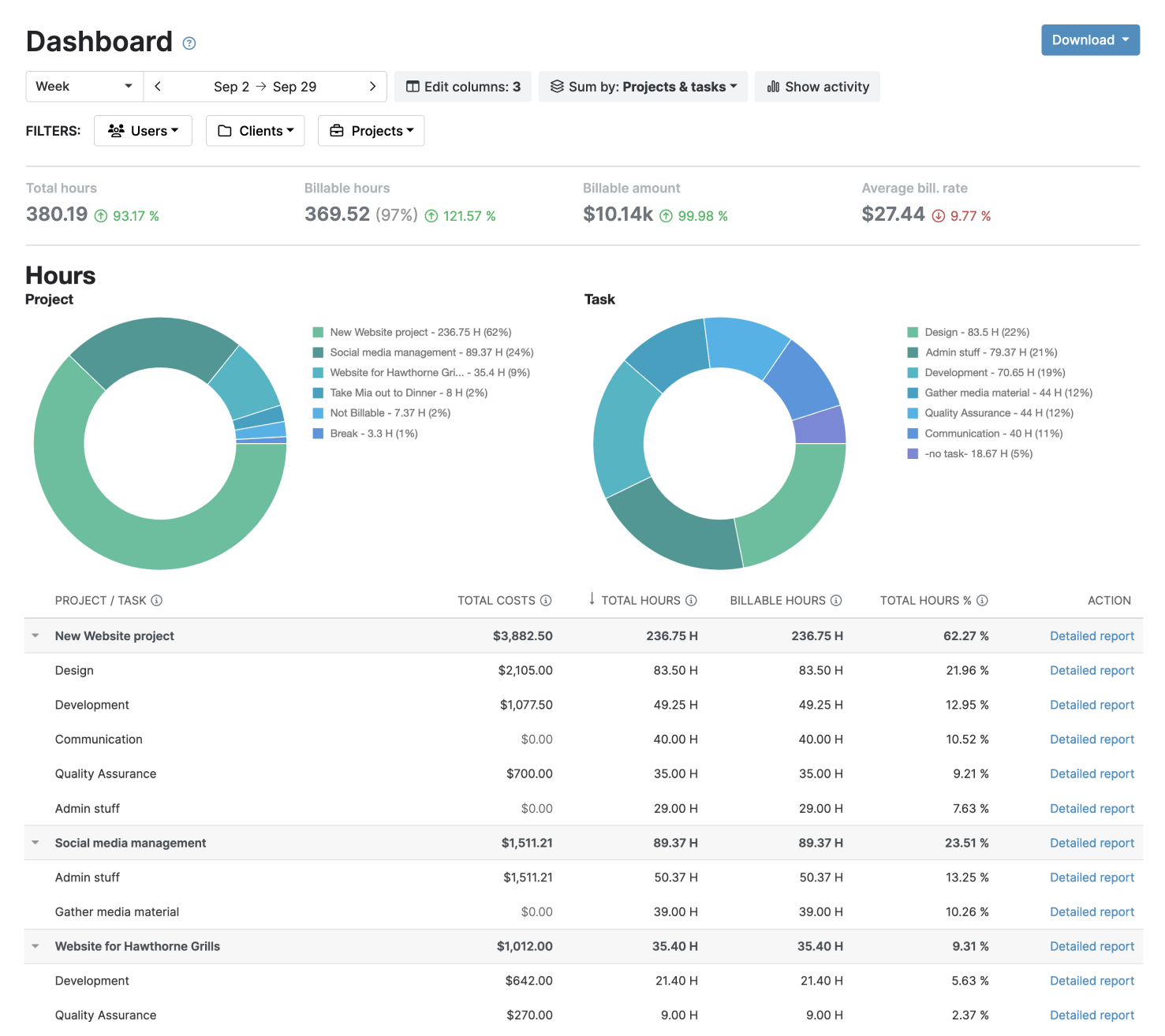
- Dashboard report - high-level overview of time, costs, and project profitability
- Detailed report - analyze granular data with advanced filters and custom views
- Timesheet report - review, verify, and manage logged hours across teams
- Use filters, date ranges, and custom columns to focus on key insights
- Export reports in XLS or PDF, or share and schedule reports
Approval Workflows
While My Hours enables real-time tracking, approval workflows take that extra step to ensure timesheets are verified and complete before they impact margins.
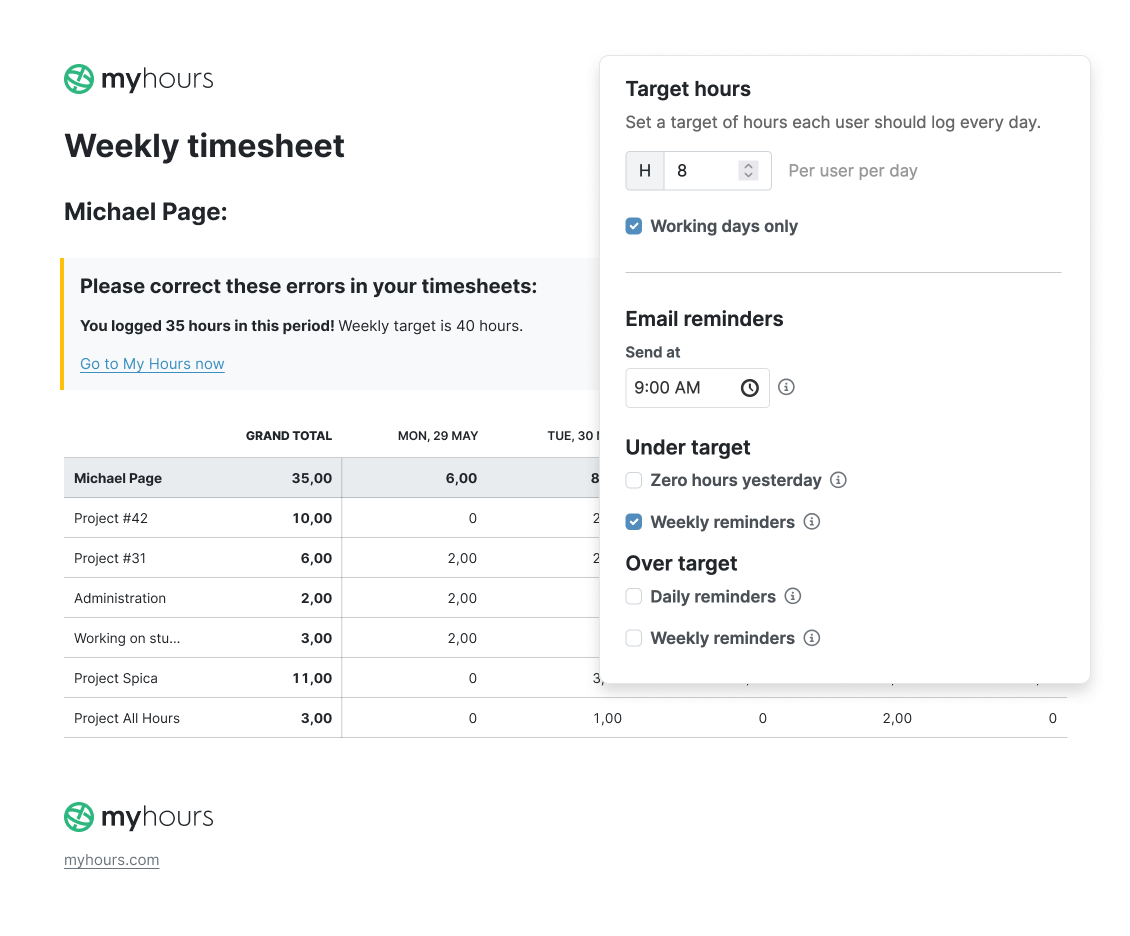
- Managers can review, approve, or reject timesheets in one click
- Rejected entries are sent back to users for correction
- All changes are timestamped and fully documented
- Approved timesheets are locked to prevent unauthorized edits
My Hours time tracking features

Timer or weekly timesheet
Track time with our seamless timer or enter your time through our keyboard-friendly timesheet. Add a description and custom inputs.

Set billable rates and budgets
Automate calculation of billable amounts by setting precise hourly rates by project, task or team member. Add a project budget to monitor its progress.

Analyze logged hours & expenses
With the Dashboard you’ll get a bird’s-eye view of billable vs non billable hours, earned income by project, under- or over-utilized employees and more.

Generate custom reports
Detailed reports are completely customizable and display as much information as needed. Print to PDF, export to XLS or send schedule it via email.

Manage tasks
Add and assign tasks with an estimated budget. Create templates when identical tasks appear across projects.

Submit and approve timesheets
Supervisors get email whenever timesheets are submitted. Each timesheet can be approved or rejected with an email message.

Set flexible roles
Invite your team to track time on their projects without seeing each other’s hours and rates. Designate managers to oversee their team and manage their work.

Prevent inconsistent reporting
Lock team’s time logs to prevent editing or adding new logs in a selected period. Download the audit log report to keep your books in order.

Streamline invoicing
Create numbered invoices straight from hours logged. Integrations with the most popular invoicing apps are available to all customers.

Integrate with other tools
Connect My Hours data with other tools or vice versa through Zapier connectors. Alternatively, use our API to develop your own integration.

Access from anywhere
My Hours is a cloud-based app with nothing to install. View and manage your hours from any web browser or install our native mobile apps.

Secure infrastructure
My Hours is hosted in Microsofts Azure cloud and we are proud of 99.95% uptime. We perform regular security checks to keep your data in safe hands.
Highest praise from our customers


Waste no more time,
jump right in!

All rights reserved.