

Why Choosing a Time Tracker Got Harder in 2026
Ten years ago, choosing a time tracker meant picking whichever one was easiest to use. In 2026, time tracking software has become much more than a digital stopwatch.
Most tools now incorporate billing, staff scheduling, project management, and reporting. There are now several hundred options to pick from within a rapidly growing market.
But while the market is growing, it’s also changing. Recent adjustments to Clockify’s free plan, including a new five-user limit, highlight how quickly pricing and feature access can shift.
For many small teams, this served as a reminder that building processes around a free tool can become risky once your business starts growing.
And for many growing businesses, a time tracker must do a lot more than keep on top of productivity.
Yet, despite these different needs, most teams still choose software based on one of two things:
- Price
- Popularity
The problem is that neither tells you whether the software actually fits the way your business operates.
This is why this guide is not another “best of” roundup. Instead, it offers a practical decision-making framework to help you evaluate the options available.
Core Time Tracking Features That Teams of 5 - 25 Need
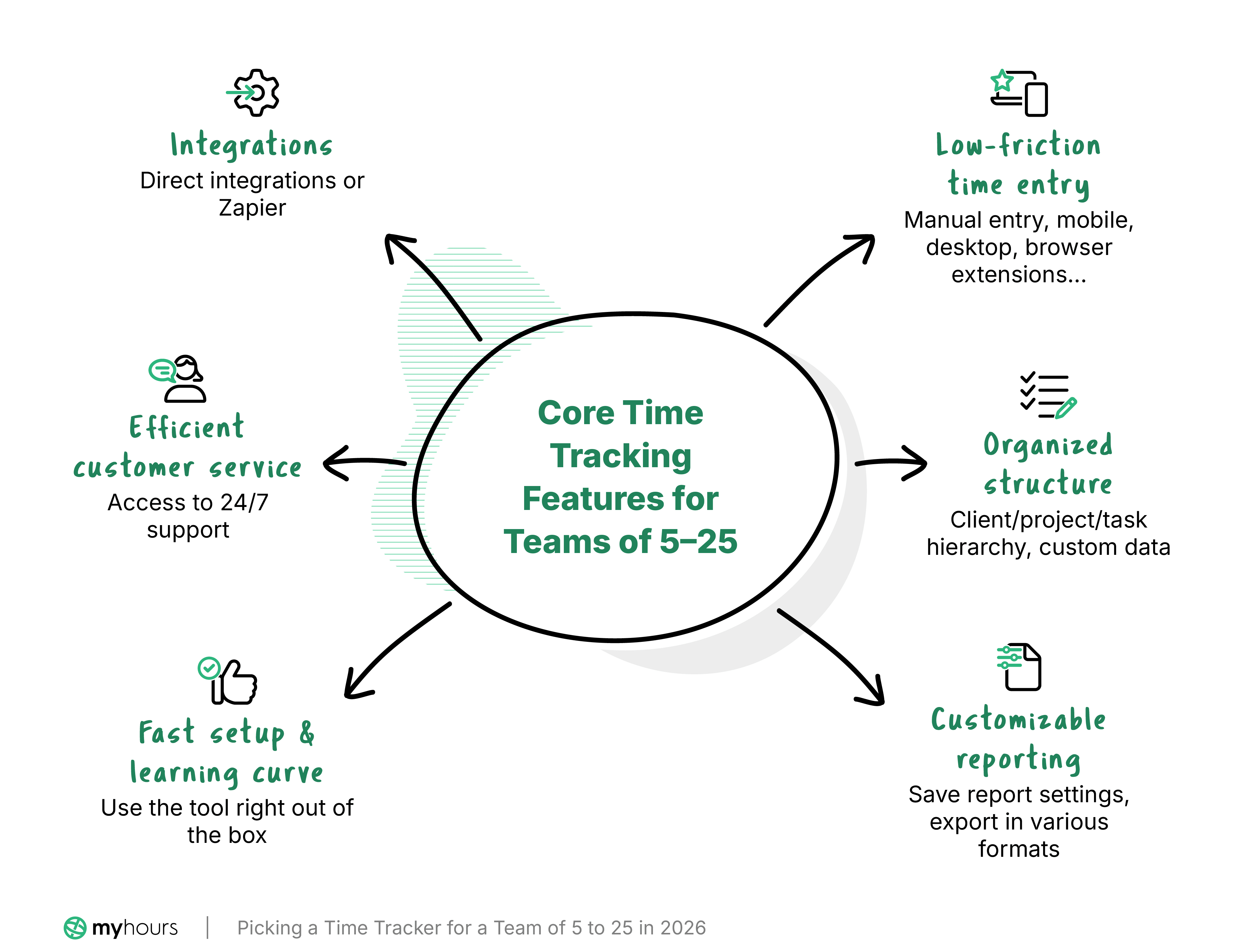
All tracker app websites list an enormous number of features. From AI assistants to activity monitoring and everything in between, it can quickly get overwhelming.
However, several absolute must-haves ensure the software will actually be used consistently by your team:
- Low-friction time entry: If logging time feels like a chore, people simply won’t do it properly. Platforms that offer multiple ways to track time (manual entry, mobile, desktop, browser extensions, etc.) make accurate logging easier. The more reliable the input, the more useful the reporting data.
- Organized structure: A good time tracker should allow you to organize work according to a client/project/task hierarchy, with the ability to add custom data. Users must be able to track time against their deliverables so hours are assigned correctly.
- Customizable reporting: Reports should be generated within a few clicks, with the ability to save report settings and export them in various formats.
- Fast setup and learning curve: Apart from a few minor tweaks, you should be able to use the tools right out of the box. Users should get started without having to study lengthy guides and walkthroughs.
- Efficient customer service: Access to 24/7 support is ideal. If there’s an issue, waiting several days for a response quickly becomes frustrating.
- Integrations: For a time tracker to be truly efficient, it needs to work with your existing tools. Look for one that offers direct integration with your preferred platforms, or, at least, the ability to connect via Zapier.
What Problem Are You Trying to Solve?
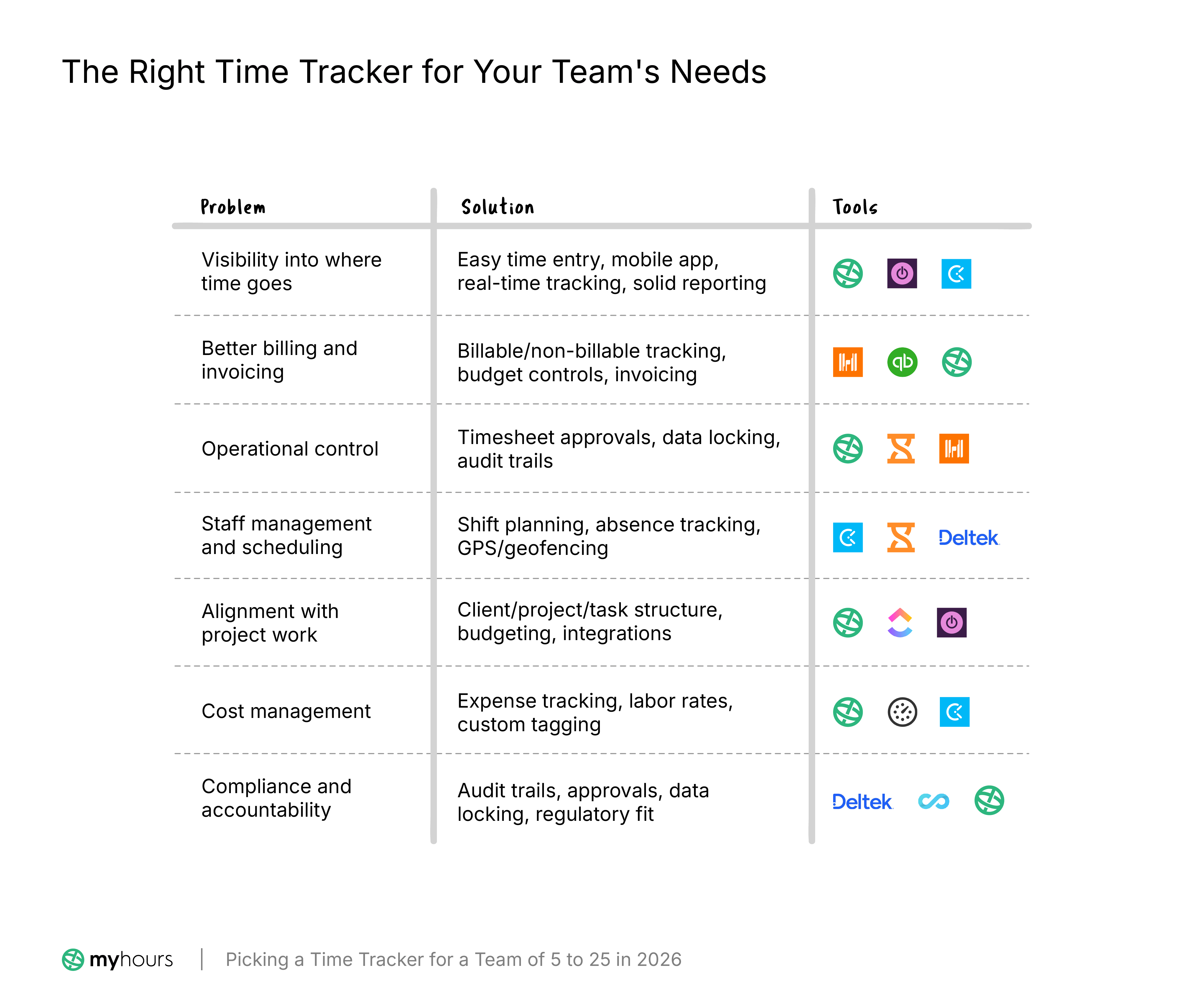
Time tracking is the obvious reason, but what’s driving the need? Identifying the specific problem to solve reveals which features matter beyond the core feature set.
1. Visibility into where time goes
Some teams need a clearer picture of how work is distributed. In that case, simplicity should take priority over advanced functionality.
Look for fast, easy time entry and real-time tracking. Mobile app and browser extensions are a must, and solid reporting features will provide the required insight.
A system with minimal setup requirements and one that gives managers clear visibility into resource allocation and team workloads is the right starting point.
Tools worth considering for time visibility
Pick a platform with a long history of time tracking reliability. Toggl Track and Clockify are excellent picks for their ease of use. My Hours is also incredibly user-friendly and also gives you granular reports for time analysis.
2. Better billing and invoicing
Agencies, consultancies, and law firms depend heavily on accurate billing.
That means your time tracking software must precisely track billable and non-billable work and give you clear insight into profitability. Budget controls and in-built invoicing are also essential, along with a way to keep client data separate.
Tools worth considering for billing and invoicing
Harvest is the go-to app for invoicing, since it has advanced features in this area. If you use the QuickBooks ecosystem, QuickBooks Time will fit seamlessly into your existing workflows.
For strong billable time tracking, My Hours offers flexibility, especially for tagging and organizing time entries for billing purposes.
3. Operational control
As a team grows, consistency in time tracking becomes much harder to maintain. At this point, workflows around timesheet validation and role-based permissions become necessary.
Look for features such as timesheet data locking, managerial approvals, and audit trails to keep reporting accurate.
Tools worth considering for operational control
My Hours gives you robust controls and audit trails without complexity. For multi-level approval workflows, Jibble is a good option. Harvest also offers customizable validation workflows.
4. Staff management and scheduling
If your team works rotating schedules or covers multiple locations, scheduling and staff planning features become important. Many apps include calendar management, absence and attendance tracking, and shift planning tools.
Field-based teams may also benefit from GPS tracking, geofencing, or remote clocking in/out systems.
Tools worth considering for staff management
For lightweight staff management, Clockify gives you the basics. If you’re a larger company, Deltek Replicon has in-depth, multi-jurisdiction capabilities. For employee attendance, we recommend Jibble.
5. Alignment with project work
For project-driven teams, time tracking should connect directly to how work is planned and delivered.
A clear distinction between clients, projects, and tasks is needed for time entries, so look for flexible project billing and budgeting structures. Some apps also include kanban-style planning or sprint workflows alongside calendar management.
Integration capabilities are also worth studying to confirm compatibility with your existing project software.
Tools worth considering for project work
ClickUp is a well-rounded project management tool with built-in time tracking. For an integratable option, Toggl offers a large range of native integrations with project apps.
Smaller teams might find My Hours a more user-friendly alternative.
6. Cost management tools
For many businesses, time tracking is closely tied to expense management and departmental budgeting. If this is you, you need a platform that can track labor rates as well as support expense uploads.
Some businesses also need to separate CapEx from OpEx, so look for custom tagging capabilities to filter the data for reporting purposes.
Tools worth considering for cost management
My Hours is the strongest all-round pick, combining receipt-based expense tracking, labor-cost rates, and budget alerts with standout CapEx/OpEx categorization. Everhour is also excellent, with deep expense tracking and flexible budgets that show true revenue-vs-cost profitability. For the most budget-friendly route, Clockify's Pro tier covers the full cost stack at the lowest price.
7. Compliance or accountability
Most teams have compliance requirements, but it’s especially important for those working on government contracts, R&D projects, or within tightly controlled industries, like healthcare.
Here, accountability is key. Look for detailed audit trails and approval workflows. The time tracker should also document and timestamp data edits and lock data when necessary.
Choosing an app that already complies with relevant regulatory bodies (DCAA, GDPR, etc.) avoids the challenge of fitting an unsuitable tracker into a rigid compliance framework.
Tools worth considering for compliance
Deltek Replicon is known for its compliance engine and is suitable for large organizations. Additionally, ConnectTeam specializes in compliance across specific industries.
For general compliance needs, My Hours fits most major compliance frameworks.
Why Built-in Scalability Matters
With five employees, almost any tracking tool can feel manageable. At 15 or more, operational complexity increases. More users, projects, and deliverables put pressure on the system and the managers overseeing it.
Without built-in scalability, teams usually reach a point where the software no longer supports the way they operate.
Because of this, you must consider future needs and the features required to support them.
That doesn’t mean you should immediately go out and purchase enterprise-level software. But the time tracker you choose must offer the features you are likely to need further down the line, such as role-based permissions, approval workflows, and built-in compliance mechanisms.
Doing so avoids the hassle of changing providers when a team outgrows the current platform’s capabilities.
The good news is that many time trackers already have this in mind. You can start on a basic plan with minimal features, then upgrade to access advanced tools when the time is right.
Free vs Paid Time Tracking Software in 2026
While you shouldn’t choose a time tracker purely based on cost, it’s still an important factor to consider. For teams in the 5-25 size range, the decision between using free and paid tools deserves careful consideration.
Free plans are changing
If you’re determined to find a free plan, there are some important factors to keep in mind.
First, a limited feature set that might not fit your use case. For many teams, free plans are only suitable for simple tracking needs and basic data visibility.
Free plans are also gradually becoming less generous. As referenced earlier, Clockify’s April 2025 changes removed many free features and introduced a five-user cap. What’s more, some platforms are moving away from free plans entirely and shifting toward a free trial model instead.
The user limit is also a major sticking point for teams of five to 25. Most free plans cap at five users or fewer. If you’re a team of five, you can just about squeeze onto a free plan, but what happens when your team grows? Are you prepared to upgrade to a paid plan?
The takeaway here is that if you do opt for a free plan, go in with the mindset that you’ll eventually have to upgrade. And check that the upgraded plans actually contain features you’ll need.
How cheap can become operationally expensive
If your team doesn’t fit into a free plan, it’s tempting to look for the cheapest option. While a low subscription fee is attractive, it usually doesn’t account for operational cost.
If employees find the platform unintuitive or time entry takes too long, they’ll start avoiding it. Others might bulk fill timesheets from memory, resulting in unreliable data.
The resulting cost is hours spent correcting inaccurate timesheets, chasing workers for missing data, and manually reorganizing projects, cost categories, tags, etc. At this point, a spreadsheet may have been just as effective.
In the end, the cheap option becomes more expensive than a properly structured yet slightly pricier paid platform. Saving a few bucks each month on a subscription means little when billable time is being lost.
Suitability first, then budget
When browsing paid plans, the right approach is to shortlist suitable options first, based on feature set, usability, and scalability. If all those elements check out, it’s a viable platform.
Only then should your budget be used to narrow the shortlist. This way, you’re not sacrificing suitability for budget or vice versa.
A Practical Decision Framework for Choosing the Right Time Tracker
The following checklist can be used to determine which time tracker is the right one for your team.
- Define your primary reason for tracking time (the problem you are trying to solve):
- ☐ Understanding where time goes
- ☐ Client billing and invoicing
- ☐ Staff management
- ☐ Project delivery
- ☐ Cost control
- ☐ Compliance
- ☐ Another reason (detail here): __________________________________
- How much structure and control does your team need to manage time tracking?
- ☐ Low structure: Best for small teams of 5-10. Look for flexible time entry, basic reports, and minimal setup.
- ☐ Medium structure: Best for growing teams of 11-20. At this point, project organization, team reporting, and basic approval workflows become necessary.
- ☐ High structure: Best for teams of 21+. Role-based permissions, compliance features, audit trails, and advanced reporting are needed.
- ☐ Create a shortlist of potential time trackers. Look for options that strongly support your use case and structure requirements.
- Does the time tracker integrate with existing tools?
- ☐ Does it offer integrations with core systems, like accounting, payroll, ERP, and project management?
- ☐ Are integrations native?
- ☐ If integrations are not native, are you comfortable using Zapier to connect them?
- ☐ How reliable and frequent are data syncs?
- ☐ Do integrations require ongoing maintenance or custom development?
- ☐ Is API access supported if needed later?
- Define future needs. What features will you need once your team grows? Check if the shortlisted platforms can:
- ☐ Add more users easily
- ☐ Manage more complex projects and multi-departmental setups
- ☐ Use more advanced integrations
- ☐ Implement additional security measures or compliance requirements
- ☐ Customize reports, dashboards, and platform setup to fit workflows
- Does the pricing model make sense long-term? Compare costs between platforms and ask:
- ☐ Do the free plans support the current team size and essential workflows?
- ☐ Do paid plans offer a realistic upgrade path while still fitting budget constraints?
- ☐ Are essential features locked behind expensive plans?
- ☐ Will you eventually have to switch time trackers because high-tier plans are too pricey?
- ☐ How much admin time will the tool save?
- ☐ What is the cost of inaccurate tracking or missed billable hours compared to the cost of the plan?
- ☐ Are there any hidden costs, such as premium support or API access?
- Will your team actually use it? Gather a test group to try out the shortlist of platforms and get their feedback. In particular, you need to know the following:
- ☐ Can a new user understand it without extensive training?
- ☐ Are there multiple ways to enter time, depending on different work situations?
- ☐ Does it fit naturally into existing workflows?
- ☐ Does it reduce admin work rather than create more?
- Administrative overhead. While testing platforms, understand what the ongoing management requirements are.
- ☐ Are approval workflows automated?
- ☐ Are there controls to prevent incomplete or incorrect time entries?
- ☐ Are users automatically alerted or reminded to complete their timesheets?
- ☐ How easy is it to identify and correct errors?
- ☐ Can you enforce time entry policies, like daily logging or cutoff periods?
- ☐ Is there a complete audit trail?
- ☐ How easy is it to adjust user roles, permissions, and access controls?
- ☐ How accessible and responsive is customer service if there is an issue?
Making The Final Decision
After working through the checklist, you should have narrowed your options down to a couple of platforms that match your requirements.
But how do you decide on the one?
At this point, here’s what you should consider:
- Which one requires fewer workarounds? Small compromises during the trial period can become huge frustrations after the time tracker is established.
- Which one gives clearer information? How fast can the tool answer important questions, and how easy is it to interpret the data?
- Which one best fits how your team naturally works? The tool people find easiest or the least admin-intensive is often the one that will deliver the most accurate data.
- Which provider feels like a long-term partner? Look beyond the time tracker itself. Consider the quality of customer support and how frequently the platform is updated. You should also determine if the provider appears to be developing their product in a direction that matches your future needs.
If you end up with two platforms that tick all the boxes, choose the one that creates the least friction among users. Over the months and years, those small differences in usability will have a much bigger impact than one extra feature on a comparison chart.
Where Does My Hours Fit?
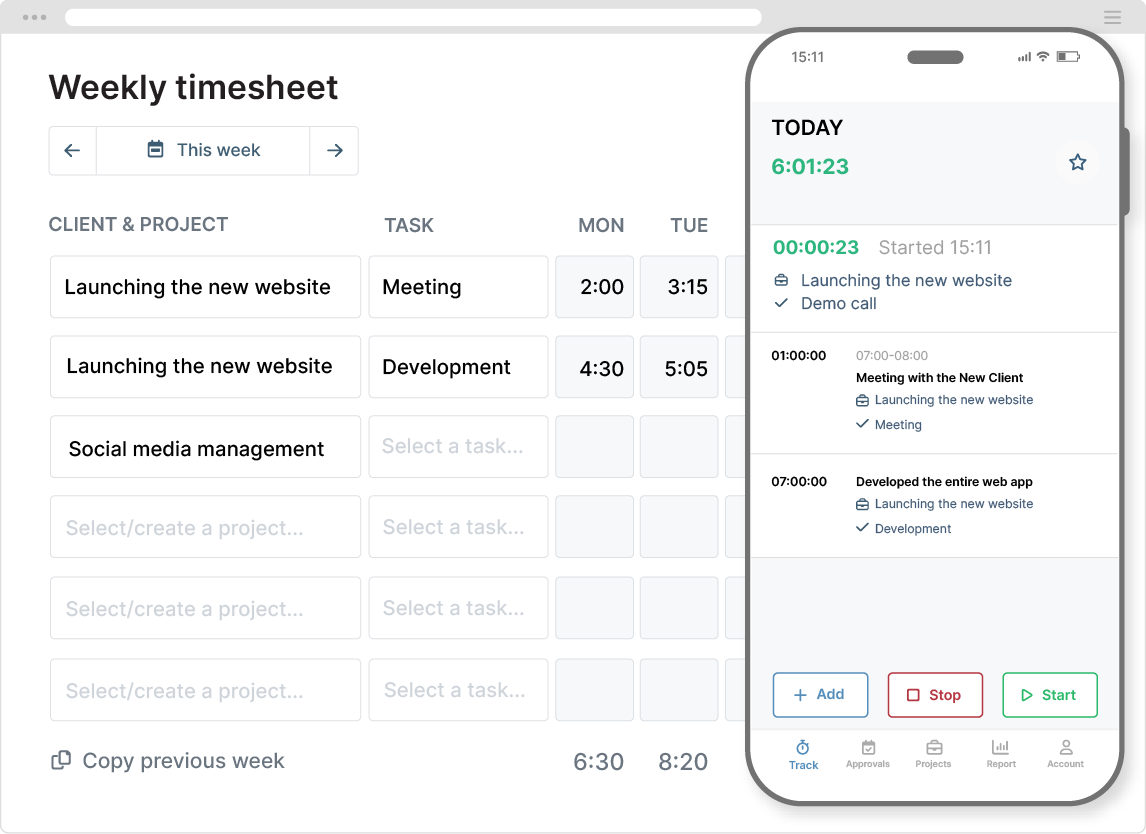
My Hours is an established time tracking app that is particularly strong for growing teams of 5 - 25.
Along with time tracking on any device, the platform excels in billable time and project cost capture. It also offers watertight validation workflows and detailed audit trails, fitting naturally into compliance frameworks.
My Hours is also scalable, with straightforward plans that accommodate your needs as you grow.
For teams in the 5–25 user range, it aligns particularly well with the needs highlighted throughout this guide. Yet, it also provides the structure growing teams need without the complexity of enterprise software.
If you worked through the checklist and identified billing, project delivery, cost control, compliance, or a combination of these as key priorities, My Hours is likely to be a strong fit for your shortlist.
Start with a free plan and test how My Hours performs in your day-to-day operations before making a final decision.
Final Thoughts
It’s easy to underestimate the importance of picking a time tracker. On the surface, they all look similar. However, unreliable data can affect all areas of business, from workload distribution to revenue and profitability.
Taking the time to work through the decision properly, narrowing down the options, and ensuring the chosen tool ticks all the boxes makes the difference between a system that gets used and one that gets abandoned.


