
.png)
The Scary Facts About Spreadsheets
Despite the multitude of software options available today, our attachment to Microsoft Excel holds firm. So much so that 58% of finance leaders still rely on Excel sheets for automation, 96% for planning, and 93% use them for reporting purposes.
But spreadsheets have become a liability. Research confirms that over 95% of them contain errors.
Humans have an error rate of around 1% - 5% per spreadsheet cell. This doesn’t sound like much, but it means that a sheet with a few hundred cells is almost guaranteed to contain several mistakes.
To compound the issue, users typically find around 40% - 90% of errors during inspection. Finding 90% is very rare, which means many errors go undetected.
In the experiment linked above, 1,025 participants found an average of 60% of the errors in the spreadsheets they examined.
This suggests that it might be time for you and the spreadsheet to part ways.
Why the Spreadsheet is Error-Prone
1. Manual input increases mistakes
Even small input errors can distort results, and spreadsheets still rely heavily on manual data entry.
2. Structural complexity leads to formula errors
Common issues include hard-coded values, broken references (#REF!), incorrect formula ranges, and overwritten or mislinked formulas.
3. Poor collaboration and no single source of truth
When multiple teams use separate spreadsheets, data becomes fragmented, inconsistent, and difficult to reconcile.
Spreadsheets were never designed for structured, reliable financial tracking across teams.
These errors are a big problem…
Apart from the fact that no one wants to spend their workday finding and fixing spreadsheet errors, these mistakes have a huge cost to the business.
One famous case involved J.P Morgan and is known as the “London Whale” incident. In 2013, a spreadsheet error within their Value at Risk model underestimated a significant risk, resulting in $6.2 billion in losses plus $920 million in fines.
In another example, a spreadsheet error allowed Lazard to undervalue the company SolarCity by $400 million during Tesla’s 2016 acquisition.
These errors prove precisely why we shouldn’t be relying on spreadsheets, even if the figures at stake aren’t in the millions.
Misclassification creates real financial consequences:
- CapEx recorded as OpEx can understate taxable income and increase audit risk.
- OpEx recorded as CapEx delays deductions and increases short-term tax burden.
- Financial metrics become distorted, including profit margins, EBITDA, asset values, and cash flow.
- Leadership loses visibility into true investment levels, leading to poor budgeting, ROI analysis, and strategic decisions.
So, what’s the answer?
Spreadsheets are not designed for consistent CapEx and OpEx tracking, especially in ongoing workflows.
They lack structure, auditability, and reliable integration with payroll and accounting systems.
Instead, use purpose-built time tracking software that acts as a single source of truth and ensures costs are accurately classified, recorded, and ready for financial reporting.
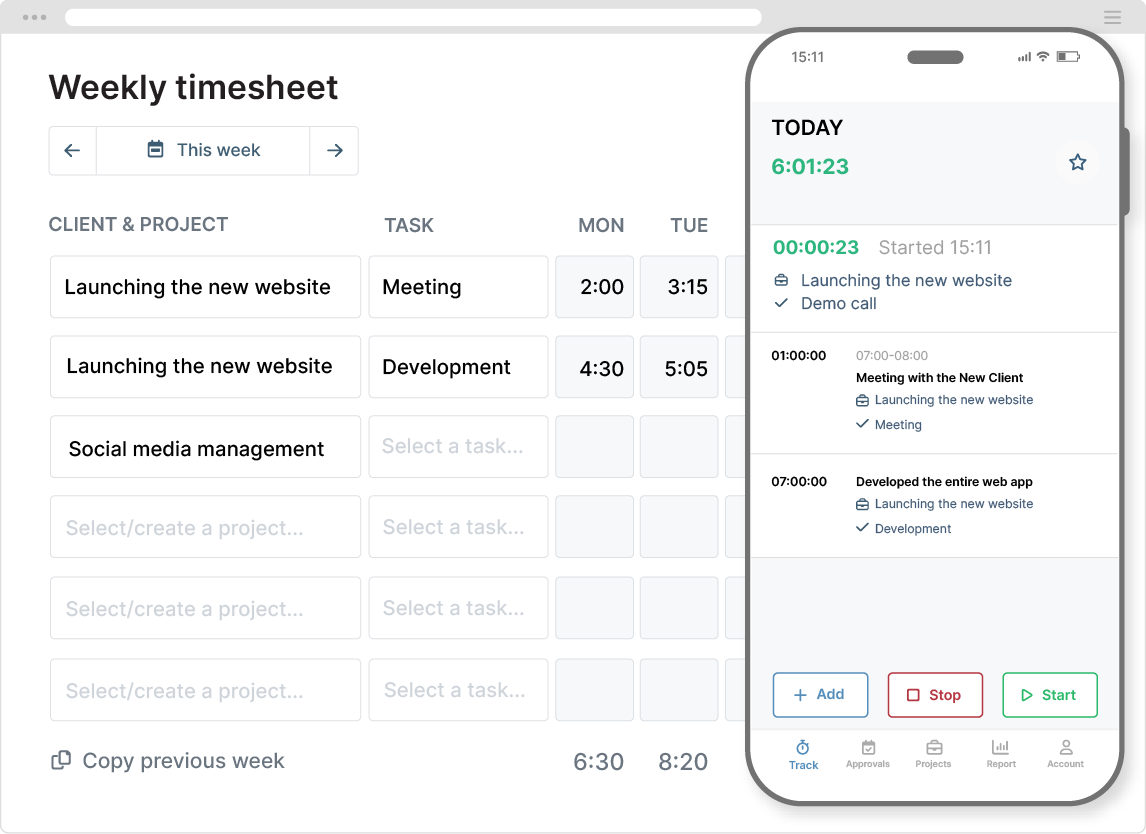
How Time Tracking Software Prevents CapEx and OpEx Classification Errors
The right software enables clean classification of CapEx/OpEx in a finance-ready format.
Ease of use
Unlike a spreadsheet, time tracking software is very easy to use, which means every member of staff can use it properly and consistently.
The simple, intuitive interface and mobile app also make it more likely that time is recorded accurately and contemporaneously, and that it becomes part of the normal workflow.
There are no complicated formulas, no tricky cells, and zero pivot tables to deal with.
Workers track their time (in real time), assign the correct project, task, and tags, and that’s it. Very simple!
Links hours to specific deliverables
Finance needs to understand the type of work being produced. They need to know whether it’s part of routine operations (OpEx) or developing something of long-term value (CapEx).
Time tracking software connects hours directly to projects and tasks that already carry that meaning. These connections allow finance to determine which category each deliverable belongs to.
It also helps to set up separate projects exclusively for CapEx and OpEx work because this makes the distinction even clearer. Plus, it prevents staff from accidentally mixing and misclassifying the two work types.
Uses predefined labels to classify work
Custom tags are used to label time entries with the correct classification.
You don’t need a vast list of tags; a handful will do. Create them in a finance-first format that explains whether it’s CapEx or OpEx, plus a quick descriptor of the type of work carried out.
For example:
- CapEx – New Feature Development
- CapEx – Material Enhancement
- OpEx – Maintenance & Bug Fixes
- OpEx – Operational Support
These predefined tags provide a consistent way to label time entries without errors. And they can be used in reporting to filter the data for whatever finance requires.
Enforces required descriptors
Every time entry includes a description field to provide more context around the type of work carried out.
These brief yet meaningful descriptions explain what was done and why, ensuring each recorded hour carries enough detail to justify its financial treatment.
If this information is missing, then finance will typically default the entry to OpEx.
Additionally, these descriptors are essential for auditors. When scrutinizing the data, they want to see that every entry is justified and includes the evidence to support it.
Captures labor rates alongside time
Time tracking software captures labor rates for each time entry, providing an immediate calculation of CapEx/OpEx labor costs.
You can set unique hourly labor rates for each user, which means accurate costs are recorded as they track time, down to the second.
This removes the need for finance to perform manual cost reconstruction during the month-end close. With a spreadsheet, you’d require a lot more human intervention and checks to ensure the data is accurate (spoiler alert: it’s probably not!).
Enables approval workflows for correctness
Although the margin for error is significantly lower in time tracking software, mistakes still occur. Typical errors include incomplete timesheets (not enough hours logged) or incorrect tags being applied.
Approval workflows create an extra layer of protection to ensure timesheets are correct before finance gets their hands on them.
This is how it works:
- Timesheets are submitted, and supervisors are notified
- The supervisor then reviews the data
- Any errors or gaps in the time data are rejected and sent back to the user for correction
- Once corrected, the timesheet is approved, and the data is locked, preventing further edits
This preventive mechanism is far more efficient than fixing mistakes after reporting. Plus, it keeps finance happy.
Produces structured reports
Well-designed reports transform raw data into accounting-ready outputs.
Finance teams can use these reports to separate CapEx data from OpEx, generate capitalization schedules, and for other purposes.
Time tracking software enables you to create customized reports that are aligned with accounting requirements. All you do is define the data columns and apply the required filters.
Report settings can be saved, so future reports can be regenerated in a single click. Data is exported in PDF and XLS formats, which are compatible with payroll and accounting systems.
Maintains a clear audit trail
Audit readiness depends on traceability.
Time-tracking software records who performed the work, when it occurred, how it was classified, and any approvals or edits made along the way. Everything that happens inside the system is available to view inside the audit report.
This transparent history demonstrates consistency and control, which auditors expect when reviewing capitalization decisions.
Supports consistency across workflows
Finally, you can integrate time tracking software with the workflows you already use.
For instance, you can connect it with project management tools to ensure consistency across project and task titles and tagging processes.
Equally, the software integrates with payroll, accounting, and business information systems, so data can be effortlessly transferred. This prevents errors and losses from occurring when the data is in transit
Final Thoughts
Spreadsheets worked when technology was more primitive, and automation didn’t exist.
They were flexible and could manage complex data in ways that had never been possible before.
But, like most software from a decade or two ago, they are no longer fit for purpose, especially when better and more efficient solutions exist.


