

13 Best Time Management Apps for 2026
We put our 20 years of experience to good use and tested dozens of time management apps to find which ones actually improve productivity and save time. The result is this shortlist of what we consider to be the best.
We focused on three specific categories: time trackers, project and task planners, and focus improvement.
After evaluating each app's features, pricing, and real-world performance, we selected only those that provide genuine value.
*Updated: June 2026*
Content overview

Top 6 Time Tracking Apps
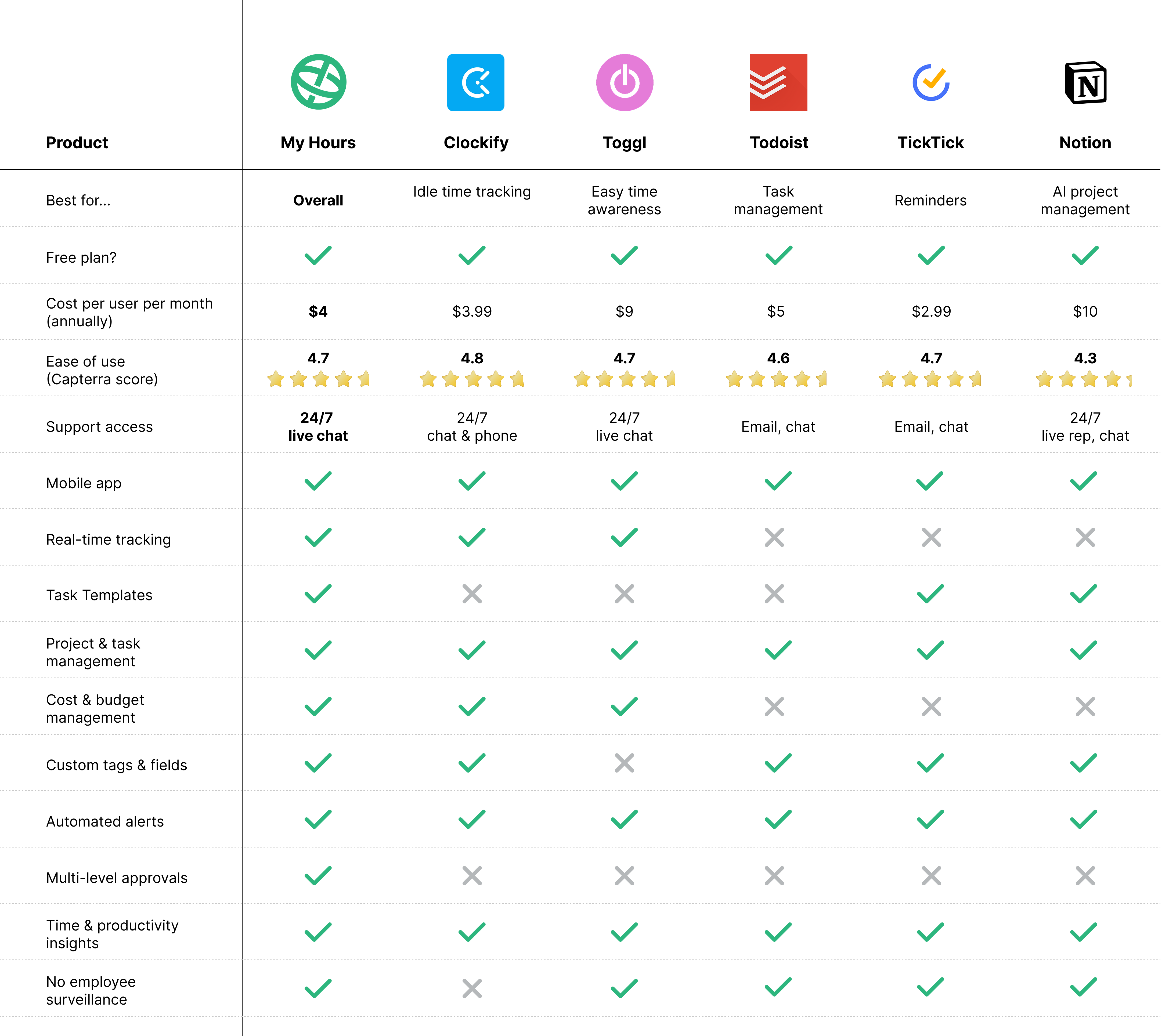


1. My Hours: Best overall
Price:
- Free (5 users)
- $5 - $9/per user (paid monthly)
- $4 - $8/per user, per month (paid annually)
- Enterprise pricing available
Available on: Desktop, Android, iOS, Browser extensions
Category: Time tracker
 User-friendly interface
- Automated timesheet approvals
- Track costs and budgets
- Automated alerts
- In-depth reporting

Perfect for medium sized businesses, My Hours offers a user-friendly way to track unlimited projects and tasks in real time. Simply click the start/stop timer (on mobile or desktop) and assign the time log to whatever project or task you were working on.
Use custom tags to highlight priorities, status, and organize workloads in ways that fit your workflow.
My Hours lets you set unique billing rates for different users and track billable hours with precision. The flexible project costing enables you to track according to how your contracts are priced, and when tracking expenses on time logs, you can set monetary budgets to keep expenditure on track.
To assist with time management, you can set a time-based budget for each project or task. As users log their time, it counts against the budget, so you can immediately see if you’re on track or need to adjust resources.
You can also set a daily target number of work hours for each user, and My Hours will send an alert when they have logged over or under their target.
The granular reporting is another useful feature, and it gives you deep insights into productivity. For instance, you can view team timesheets to analyze resource and workload allocation, and review project time and cost data to see what is affecting your profitability.
In summary, it’s the perfect time management tool for those who need to capture billable hours accurately.

2. Clockify: Best for tracking idle time
Price:
- Free (up to 5 users)
- $4.99 - $15.99/per user (paid monthly)
- $3.99 - $12.99/per user, per month (paid annually)
- Enterprise pricing available
Available on: Android, iOS, Desktop, Browser extensions
Category: Time tracker
- Idle time detection
- Clocking in/out kiosk
- Staff scheduling and time off planning
- Pomodor timer
- Track billable rates
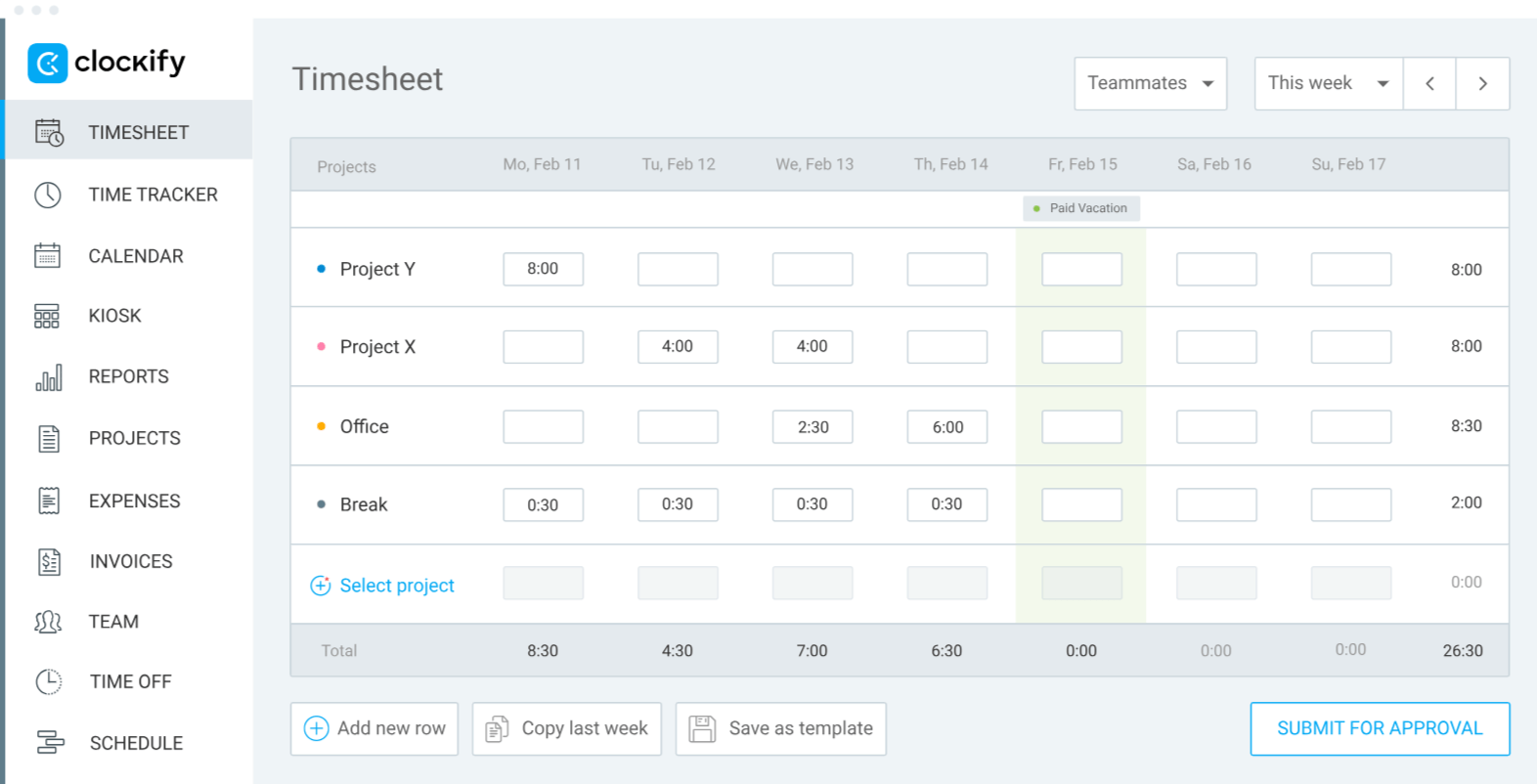
Clockify is a popular time tracking app and remains so, even though its free plan was recently reduced from unlimited users down to five max.
Time is tracked using the start/stop timer, automatically, or via the clocking-in/out kiosk, making it a good option for mobile teams.
The interface features a calendar view to plan workloads, while paid plans unlock extra features like staff scheduling, budget and expense tracking, invoicing, and billable rates tracking.
What makes Clockify particularly useful is its idle time detection feature.
Essentially, if you step away from your computer and forget to stop the timer, the system flags it as idle time and sends you an alert. You can then decide to discard or keep the idle time for your timesheets. This can be really useful for revealing which activities you are wasting time on.
Reports are detailed, giving you insight into team or individual productivity and how that translates into project profitability.
We also like that you can set time and budget estimates, so you can track progress against them.
While we appreciate most features, the screenshot monitoring function can feel intrusive as an employee monitoring tool, though it can help you remember what you were working on during specific time periods.

3. Toggl Track: Best for easy time awareness
Price:
- Free (5 users)
- $10 - $20/per user (paid monthly)
- $9 - $18/per user, per month (paid annually)
- Enterprise pricing available
Available on: Desktop, Web, iOS & Android
Category: Time tracker
- User-friendly interface
- Calendar timeline views
- 100+ integrations
- Track profitability
- Automated reminders
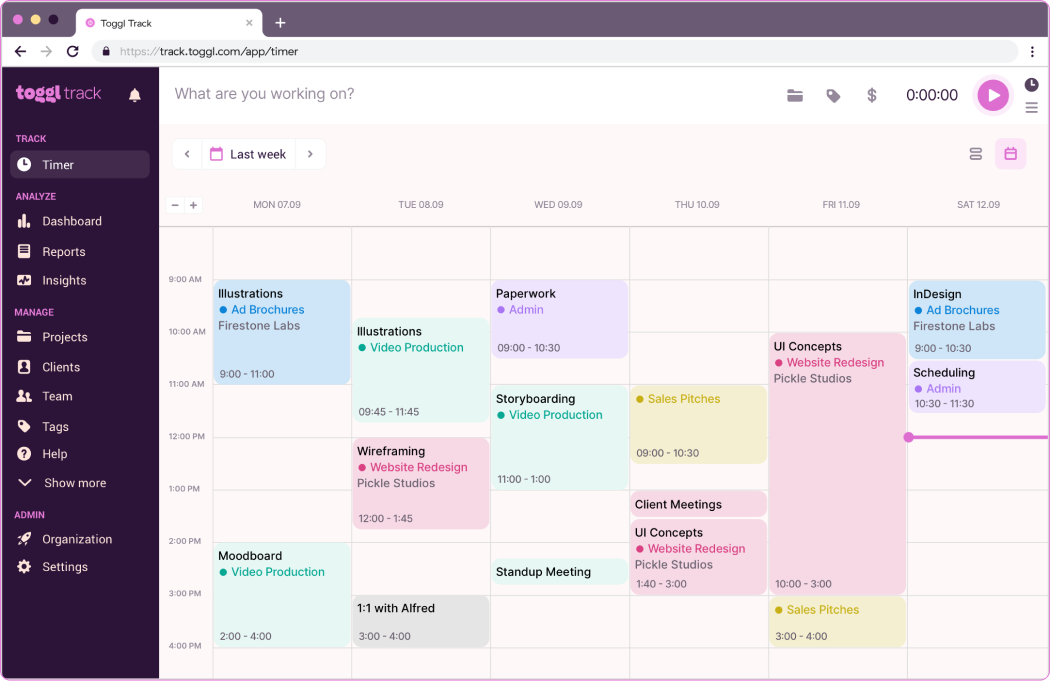
Toggl is the time tracker for those who want clear time tracking without dealing with complex features.
The platform is incredibly user-friendly and keeps things simple: Hit the timer, perform the work, stop the timer. That’s it.
Toggl also gives you easy ways to understand exactly how you spend your time.
Time reports are highly visual, allowing you to track project performance, team workloads, and productivity levels. With this information, you can identify which workflows need adjustment and where your time provides the most value.
Toggl can also alert users if they haven’t logged enough hours or have logged too many. For this, you can set target hours that help keep everyone on track.
The handy calendar view lets you plan workloads and prioritize tasks, giving you a realistic picture of available capacity.
For client billing, Toggl captures billable hours and expenses, plus includes a basic invoicing tool to speed up the payment process. Its budget tracking features, however, are pretty lacking.
Another thing we like is the large number of integrations that Toggl supports. This makes data syncing and tracking across apps far simpler.
Although Toggl is not as advanced as other trackers, its visual interface is definitely appealing to those looking for a straightforward time management app.

4. Todoist: Best for task management
Price:
- Free account (1 user)
- $5 - $8/per user (paid monthly)
- $7 - $10/per user, per month (paid annually)
Available on: Desktop, Browser extensions, Android, iOS
Category: Task and project management
- Automatic task categorization and labeling
- Recurring reminders
- Calendar, board, and list views
- Goal setting and tracking
- Productivity points
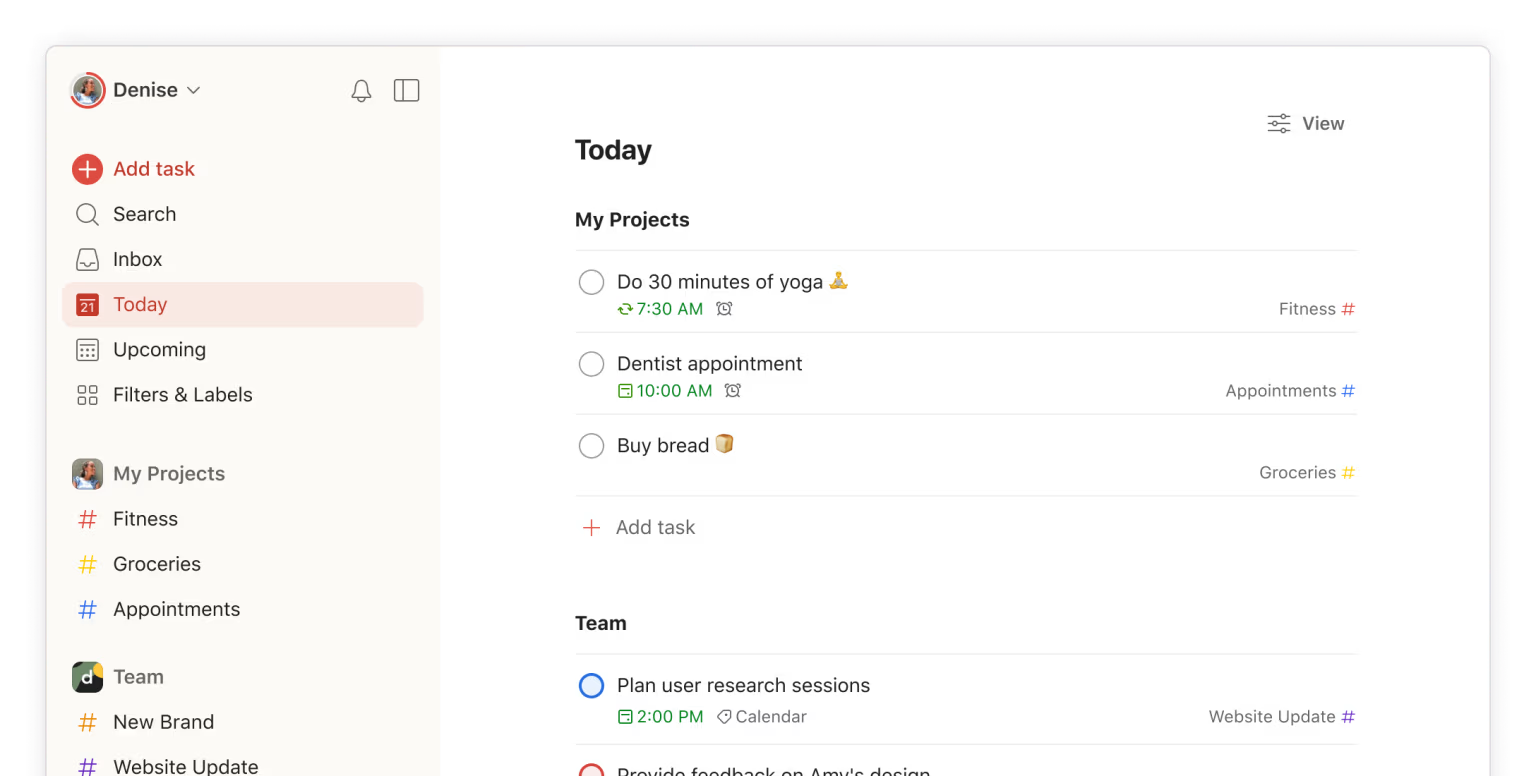
Todoist turns the humble task list into a smart organizational system that helps you prioritize and manage your workload effectively.
Use the clean daily calendar view to create and organize tasks and the color-coded priority list to mark what’s most important.
The system can also pull in tasks from emails and other applications, reducing the manual work of task entry. Additionally, AI uses natural language processing to create tasks from voice notes.
Set automatic reminders for tasks that can’t be missed and input deadlines for project milestones. Recurring tasks are easily set up and great for tracking habits.
Daily digest emails give you your scheduled task list and are useful for prioritizing your workload.
Todoist works just as well for teams as it does for individuals, thanks to its collaboration features such as shared lists, responsibility assignment, and on-task commenting.
We like the gamified habit-building tools. You can set daily or weekly goals and earn points for being productive. Those points convert into higher levels of achievement to keep you motivated.
It’s also easy to track your progress and identify trends in how you manage your time. From there, you can make improvements.
Todoist works well at both individual and team levels, particularly for people managing multiple projects and tasks who want organization without overwhelming features.
5. TickTick: Best for reminders
Price:
- Free account (1 user)
- $3.99/per user (paid monthly)
- $2.99/per user, per month (paid annually)
Available on: Desktop, Android, iOS
Category: Task and project management
- Calendar sync
- Reminders and notifications
- Clean calendar view
- Habit tracker
- Pomodoro timer
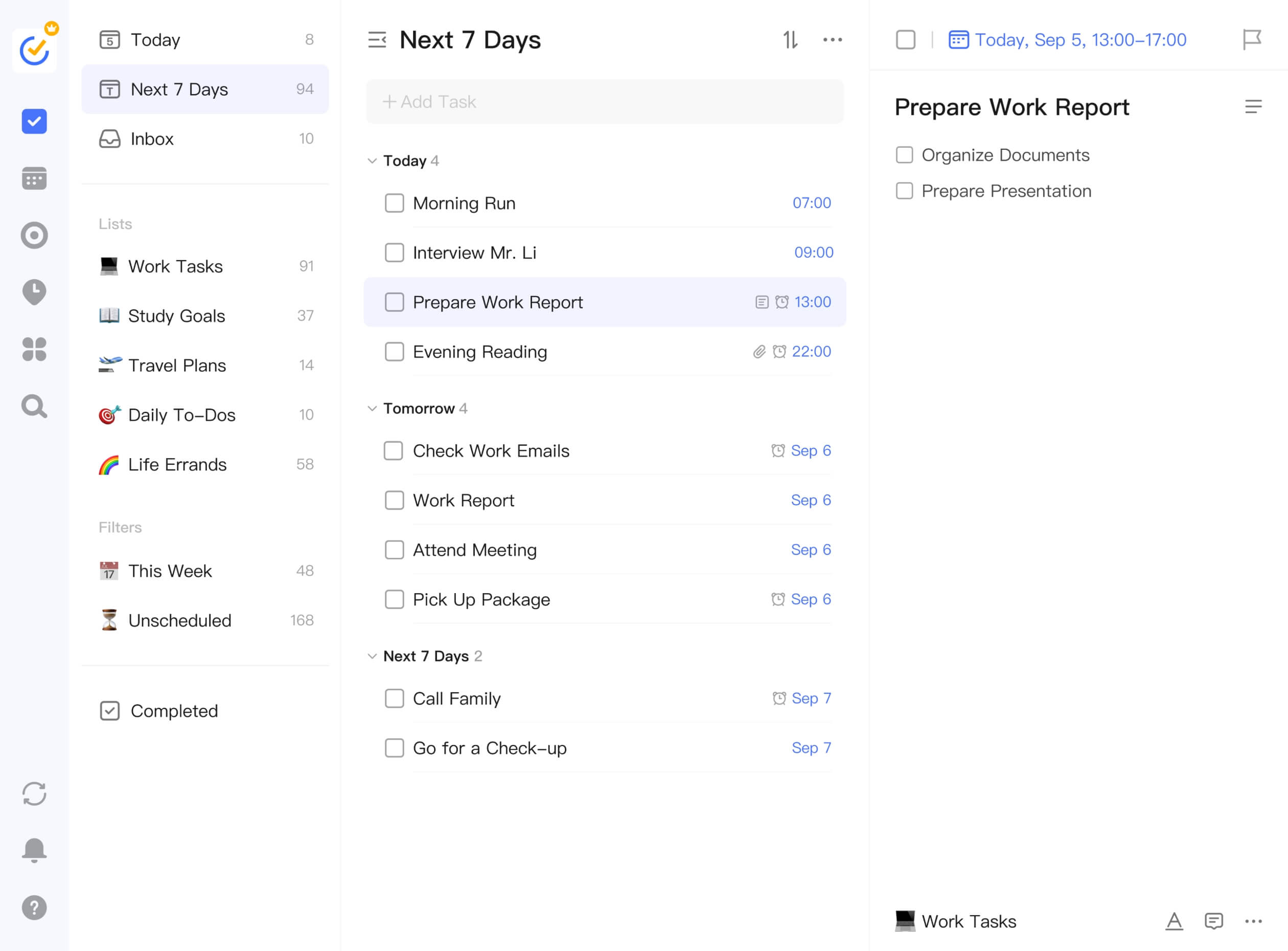
TickTick is another to-do list organizer with an intuitive drag-and-drop interface. Create calendar views or Kanban-style agendas and simply move your tasks into the right timeslot.
For focused work, you can use the Pomodoro timer to stay productive without burning out. We also like the Eisenhower matrix board that lets you arrange tasks according to their importance and urgency.
“Sticky” notes for quick lists can be pinned to your desktop for fast reference.
Multiple reminder types ensure you don’t miss anything important. For instance, lock screen alerts (on iOS) keep important tasks visible, while constant reminders and repeat alerts handle critical items that need immediate attention.
The location reminder alerts you when you arrive at a specific place, and you can use the daily or email reminders for the less urgent tasks.
Progress trackers keep you on track and show you what percentage of a task is complete, complete with achievement scores for productivity. Task tagging helps you categorize work by type, giving you insights into how you spend time across different kinds of activities.
Overall, TickTick is a great tool if you have time-sensitive deliverables or tend to forget or miss deadlines.

6. Notion: Best for AI project management
Price:
- Free (1 user)
- $12 - $24/per user (paid monthly)
- $10 - $20/per user, per month (paid annually)
- Enterprise pricing available
Available on: Desktop, Web, Android, iOS
Category: Task and project management
- AI-assisted platform
- Email with automatic organization
- Calendar with built-in scheduling and project timelines
- Project roadmaps
- Document organization
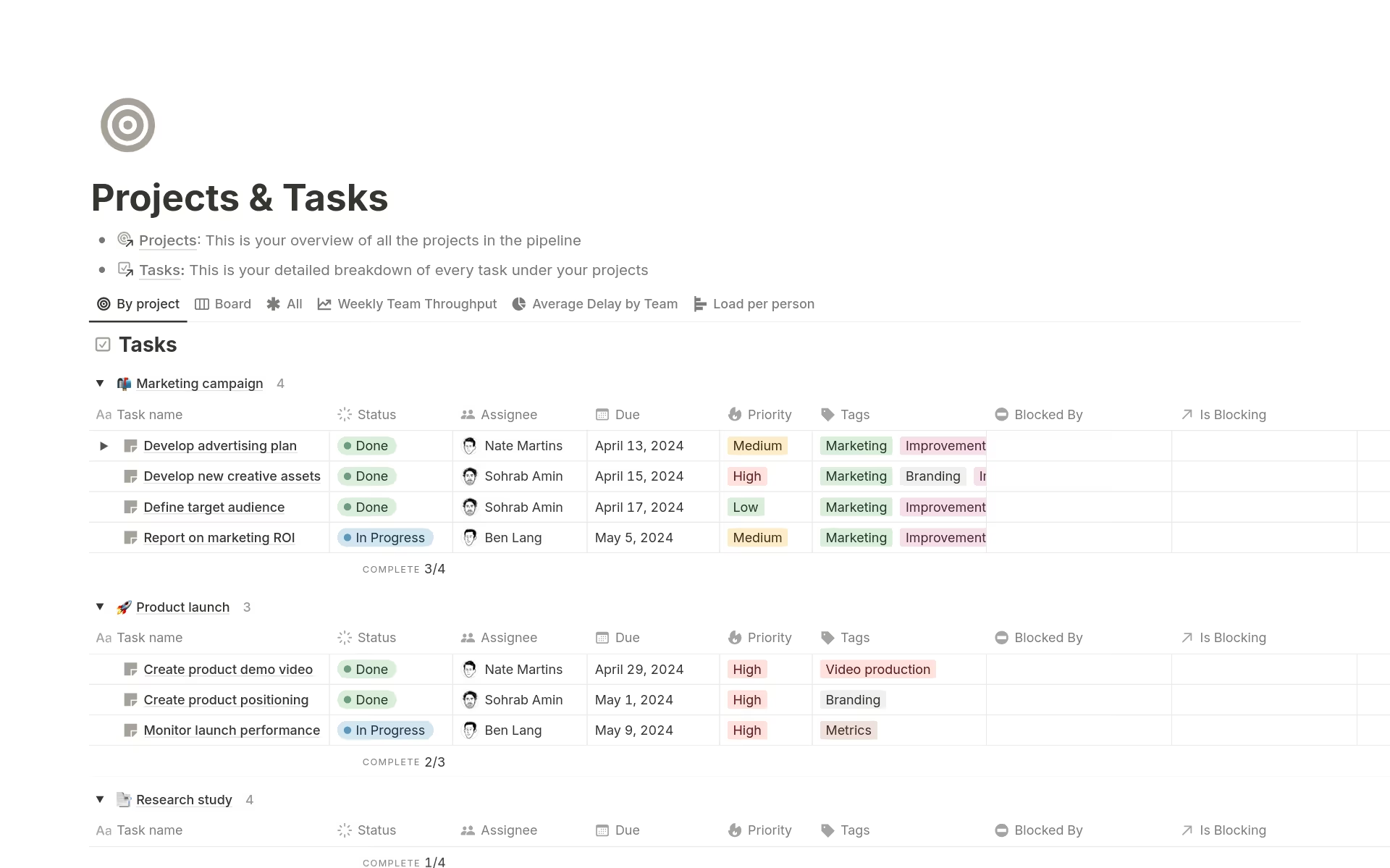
Notion is a powerful AI-assisted platform that helps you manage projects, knowledge bases, and teams efficiently.
Its AI agents can perform a multitude of time-consuming tasks, freeing you to focus on more productive work.
For instance, the AI can take all the information within your workspace and use it to create a full onboarding guide for a new hire, or organize scattered information into searchable databases that save hours of manual filing.
Also, rather than having to scour 100s of documents, just tell Notion what you need and it’ll bring up the right information, saving you a ton of time.
Project tasks are easy to track with tags for status, priority, and type. You can also view them as a full timeline so you know what should happen and when.
We also like that the Kanban-style boards are highly customizable, showing you precisely the data you need.
Overall, Notion gets better the more you use it (since the AI learns from what you add), so while it might not save time initially, it will definitely do so later down the line.

7. Motion: Best for tracking idle time
Price:
- $29 - $69/per user, per month (paid monthly)
- $19 - $39/per user (paid annually)
Available on: Desktop, Android, iOS
Category: Task and project management
- Enterprise-grade AI agents
- Calendar scheduling and task prioritization
- CRM and lead management
- Resource and capacity planning
- Knowledge and document management
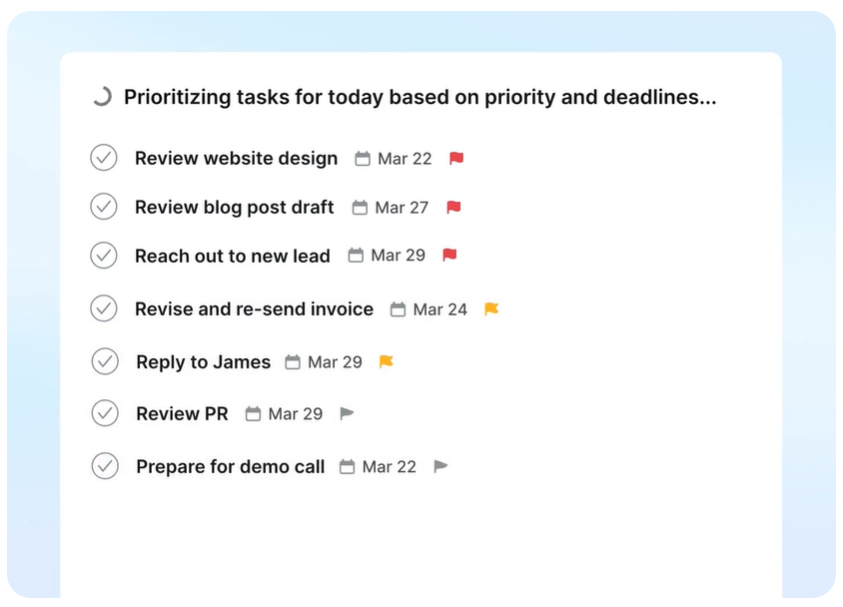
Motion features several AI employees that exist to save you time and perform repetitive or admin tasks on your behalf.
For example, Alfred is the AI executive assistant that performs calendar scheduling, task prioritization, and note-taking, while other AI agents automate different aspects of business operations.
Additionally, you can create your own AI agents, tailored to handle specific workflows within your business.
All of this automation frees up your time to concentrate on more productive tasks, and this is something that the AI task manager can help you with. It can prioritize your tasks and auto-schedule your day, optimizing it so you make the best use of the available time.
It’ll also transform deadlines into actionable plans with live updates and flag risks (like bottlenecks) early on so you can take action.
Motion makes meetings more efficient, too, by scheduling them at the most convenient times and placing caps on the number of daily meetings.
While it can get pricey, Motion is one of the most complete AI business management systems on the market.

8. Trello: Best for remote team productivity
Price:
- Free (10 users)
- $6 - $12.50/per user (paid monthly)
- $5 - $10/per user, per month (paid annually)
- $17.50/per user for Enterprise
Available on: Desktop, Android, iOS
Category: Task and project management
- Kanban-style project boards
- Centralized inbox
- AI task capture
- Automated workflows
- 200+ integrations

Trello is the ultimate platform for Kanban-style planning. It’s a visual project management tool with simple drag-and-drop layouts for organizing tasks and workloads.
Integrating with over 200 apps, the system automatically converts emails, Slack messages, and other communications into task cards, which the AI then places into organized to-do lists.
The planner tool lets you schedule tasks and events, allowing you to map out your day in the most effective way. Plus, pretty much every action in Trello can be turned into an automated workflow.
Trello is also smart. The AI recognizes repetitive actions and makes suggestions for automations that will take the work off your hands.
Projects can be assigned deadlines and due dates, with automatic reminders and updates to keep you on track. Highlight tasks according to priority and “check” them off when they’re done.
Custom buttons, fields, and other elements enable you to set up tasks and boards in exactly the way that fits your workflow.
Invite team members to your project boards and assign them roles. Real-time chat can take place within any of the task cards, keeping all communications in the right places.
Thanks to its visual and user-friendly interface, Trello is ideal for busy teams that don’t want to spend hours planning or updating their work pipelines.

9. Asana: Best for enterprise-level time management
Price:
- Free (2 users)
- $13.49 - $30.49/per user (paid monthly)
- $10.99 - $24.99/per user, per month (paid annually)
- Enterprise pricing available
Available on: Desktop, web, Android, and iOS
Category: Task and project management
- Complete project management system
- Goal setting and tracking
- AI and automated workflows
- Capacity and workload planning
- 300+ integrations

Asana is a platform purpose-built for structured project management. It cleanly organizes work into projects, tasks, and sub-tasks, giving you a clear hierarchy of what needs to be done and when.
Real-time tracking is included, which you can use to compare actual progress against your initial estimates. Data-driven insights help you understand productivity patterns, resource utilization, and capacity constraints across different teams and projects.
Automation comes as standard and is designed to save you time by updating tasks and project statuses and sending alerts for deadlines and urgent priorities.
Various views give you the tools to plan effectively. For example, use the timeline view to understand critical deadlines, the calendar view to organize workloads, or the workload view to plan resources.
Reporting dashboards give you a bird's-eye view of everything from overall progress to operational issues like bottlenecks.
Additionally, the AI Studio handles content creation, task assignment for incoming requests, and stakeholder updates.
Asana also features a staggering amount of integrations, so no matter what your tech stack looks like, Asana will fit right in. Therefore, we feel it’s a good fit for enterprise-level organizations that need a time management tool that fits into existing workflows.

10. Sunsama: Best for individual focus
Price:
- $22/per user (paid monthly)
- $17/per user, per month (paid annually)
- Enterprise pricing available
Available on: Desktop, Android, iOS
Category: Focus improvement
- Daily planner and priority lists
- Track task progress
- Email and calendar integration
- Weekly goal setting
- Pomodoro timer
.svg)
Sunsama is a streamlined smart task management and focus tool that helps you get more done without feeling overwhelmed.
Plan out your workload by setting daily or weekly goals and adding tasks. The interface is highly visual, featuring easy drag-and-drop functionality. Prioritize tasks by color-coding them, so you can see what matters most.
Additionally, Sunsama integrates with your favorite tools, like project management platforms and email, calendar, and messaging apps. It will pull through key information and transform it into tasks and/or calendar entries.
Each day begins with guided planning that helps you think through your workload realistically, and ends with reflection time where you can review what you accomplished.
A start/stop timer lets you track time for each task, which you can then view against the estimated time to understand if it fits within your existing workflow or if adjustments are needed.
The app also includes automated alerts that remind you to take a break or shut down for the day. And to increase focus, you can block certain websites and apps and use the Pomodoro timer or timeboxing mode.
The only downside is that Sunsama does not include any team collaboration tools. It’s specifically for individual users rather than teams, making it ideal for freelancers, remote workers, and anyone who wants better personal productivity.

11. Forest App: Best for gamified focus
Price:
- Free (Desktop only)
- Approximately $3.99/iOS and Android (one-time purchase, price varies by region/platform)
Available on: Android, iOS
Category: Focus improvement
- Gamified focus tools
- Website blocker
- Goal setting and to-do lists
- Pomodor timer
- “Plant” real trees

Forest is an interesting concept. It encourages you to focus by “planting” virtual trees. As you work, your tree grows. However, if you leave the app before the focus session is finished, the tree dies.
If you manage to complete your focus session, the fully-grown tree gets added to your “forest,” and the more you focus, the more tree varieties you unlock.
By tagging focus periods, the detailed statistics give you a breakdown of how you split your time, plus they reveal your most productive periods of the day.
If you want to add an element of competition into the mix, Forest lets you add other users as friends and challenge them to focus sessions.
Using Forest has wider benefits, too. The app’s team partners will plant real trees on your behalf. The more focus time you log, the more real trees are planted, which we think is a really great way to incentivise people.
The different focus modes include a Pomodoro timer, timer mode, and stopwatch mode. There’s also a count-up timer for habit tracking.
In all, it’s a really visual and unique way to manage your time.

12. RescueTime: Best for reducing distractions
Price:
- $9 - $18/per user (paid monthly)
- $7 - $16/per user, per month (paid annually)
Available on: Desktop, Web, iOS
Category: Focus improvement
- Automatic time tracking
- Website and app blocking
- Focus mode and goal setting
- Automated reminders and alerts
- Calendar integration
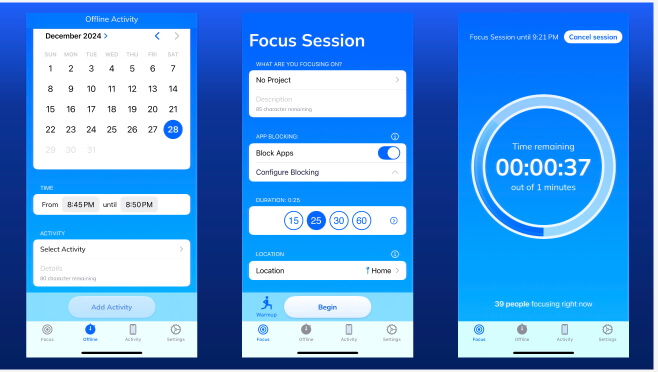
RescueTime is a time tracker and focus tool all rolled into one.
It runs quietly in the background as you work, tracking the time spent on various applications. Then, it transforms all the information into a timesheet so you can see exactly how your day was spent.
Detailed insights show productivity trends over specific time periods, focus level patterns throughout the day, and which applications or websites consume the most time.
From this, you can understand what is eating up your time and how you should adjust your workflows.
RescueTime also has handy features to support focus. For instance, you can block certain websites and applications for a set amount of time. This helps prevent you from getting distracted by things like social media or news sites.
You can also set goals, and the system will track your progress and provide real-time updates. Automated alerts are available to keep you on the right track.
We like the live guided sessions that run periodically throughout the week, enabling you to focus within a virtual co-working space.
While RescueTime works well for individuals, teams might find better options among the more collaborative time management tools.

13. Beebole: Best for Cost Control
Price:
- Free, up to 5 users
- $10 – $20/per user (paid monthly)
- $9 – $18/per user, per month (paid annually)
Available on: Web, Android, iOS
Category: Time tracking and Project financial management
- Track billable & non-billable hours
- Set budgets & monitor project costs in real time
- Resource planning connects directly to the timesheet
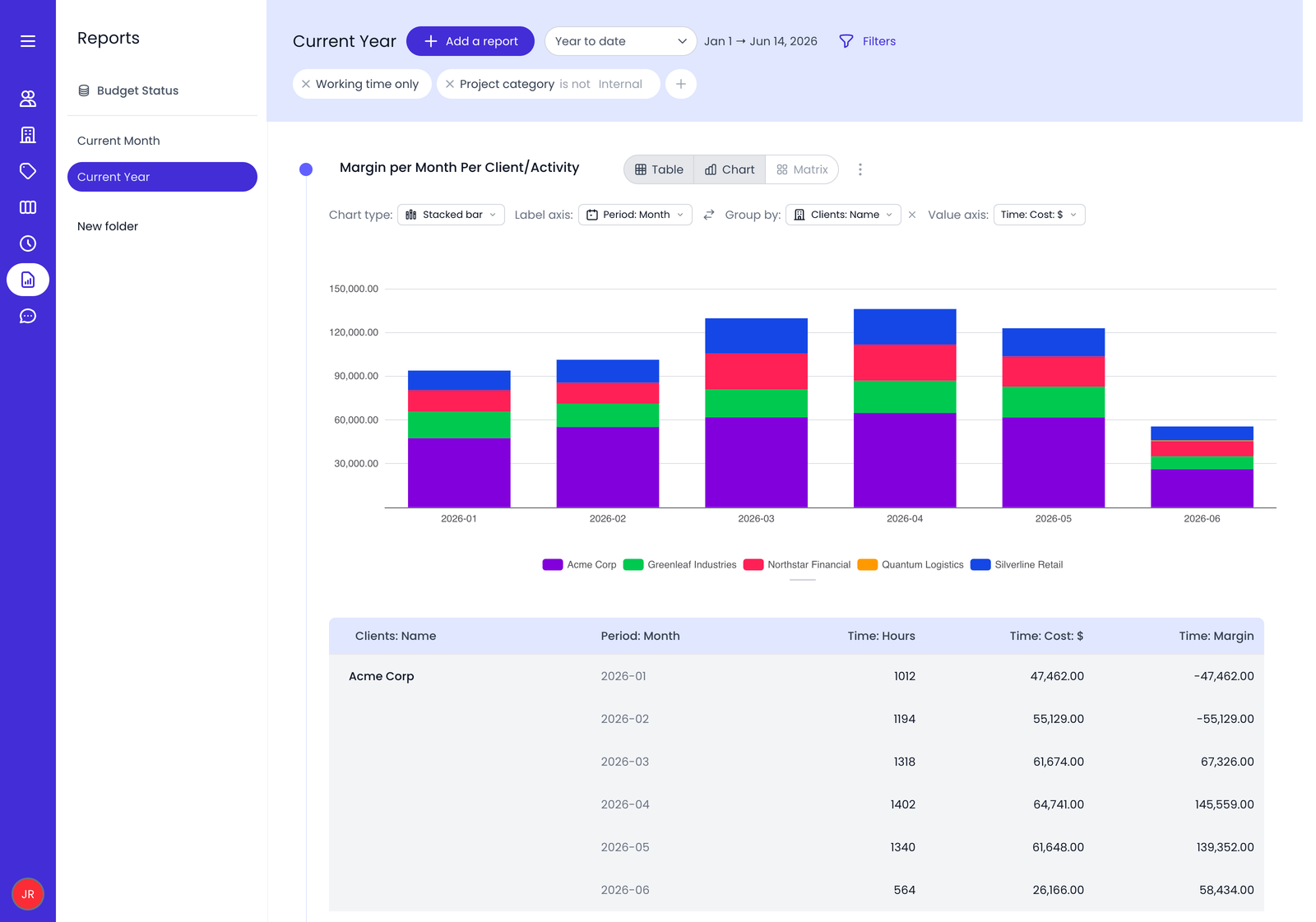
Beebole is a time tracking and project financial management platform built for organizations that need detailed visibility into how time and money are spent.
Employees can log time against projects, sub-projects, tasks, and custom dimensions, while managers gain real-time insight into project progress, budgets, and costs.
The platform goes beyond simple time tracking with flexible billing rates, labor costs, and project budgets that can be configured at multiple levels. This makes it easy to compare planned and actual costs, monitor project profitability, and keep spending under control as work progresses.
Reporting is one of Beebole's strongest features. Reports are highly customizable, with multiple chart types, advanced filters, and the ability to schedule reports or export data directly to Excel and Google Sheets. Organizations can also tailor the platform with custom fields, configurable approval workflows, and role-based permissions to match their internal processes.
We also like how flexible Beebole is when organizing work. Projects can be broken down into sub-projects, tasks, and tags, allowing teams to track time at a very granular level without forcing a rigid project structure.
While Beebole offers reliable time tracking, it is best suited to businesses that want deeper control over project budgets, labor costs, and financial reporting rather than simply recording hours.
How to Choose the Right Time Management App
If you’re still struggling to choose, here are some tips:
- Start with your needs: Figure out if you need better task planning, accurate time tracking, distraction reduction, or team coordination. Different apps excel in different areas, so identifying your main challenge helps narrow the options significantly.
- Simple or powerful? A simple app is easier to use, while a more powerful app takes more effort but may serve you better. Think about what you’re likely to use consistently rather than what sounds impressive.
- Workflow fit: Look for an app that fits into your existing workflow and aligns with your preferred work style. For instance, if you bill clients, pick an app that supports billable hours tracking.
- Cross-device compatibility: Do you want mobile only? Or, does it need to work and sync across desktop and other devices?
- Essential integrations: These save time by pulling in calendar entries, project details, and other data, so check whether the app you choose works with the platforms you use.
- Team or individual? Some apps on this list are only suitable for individual use, while others have team features. If you work in a team, identify which collaboration tools matter most.
- Offline use: Do you need to manage time while offline? If so, your chosen app needs to support this.
- Price: There are all sorts of pricing tiers out there, ranging from free to expensive. Although the price has to fit the budget, it must also fit the need, so make sure your chosen plan carries the right features.
Lastly, test drive a few apps before committing. All offer a free plan or a free trial, so take advantage and evaluate whether it’s something you or your team will actually enjoy using.
Frequently Asked Questions
Which time management app can I use for free?
There are plenty of time management apps that you can use for free. Some popular options with decent features (and time tracking) include My Hours, Clockify, and Toggl.
For streamlined task management, try the free versions of Todoist, TickTick, Trello, and Notion. The Forest App is great if you want free features to help you focus.
Which time-management app is actually the best?
There isn’t a universal “best” app for time management because they all serve different purposes. The “best” one will contain features that fit your use case.
For example, My Hours is considered one of the best apps for time tracking, TickTick is one of the best for task management, and Forest is one of the best for retaining focus.
What’s the simplest time management app that won’t overwhelm me?
The simplest way to perform time management is to set up Google Calendar alerts or Apple Reminders. However, if you want a specific app, My Hours, Todoist, and Forest are all extremely user-friendly with a very short learning curve.
How do I stay consistent once I pick a time management app?
To maintain consistency with your chosen time management app, keep it simple. Pick one or two core features and start using them daily.
Once you get into the habit of using them, it will become routine and fall into place within your workflow.
What’s the best way to track where my time really goes?
The best way to track where your time goes is to use a time tracking app like My Hours, Clockify, or Toggl.
These apps let you track in real time and assign time entries to projects and tasks. Once your timesheet is complete, you can analyze it to understand exactly how your day is spent.
Which time management app works best with my calendar/email/project tools?
All time management apps offer integrations with third-party software. However, Asana, Trello, and Toggl are known for having over 100 integrations available (Asana has over 300), so it’s likely they’ll connect with your favorite software.
If a native integration for your favorite time management app isn’t supported, you can use Zapier to connect two platforms together.
What is the best personal time management app?
The Forest App is one of the best apps for personal time management because it’s incredibly simple and makes the experience fun. For broader capabilities, TickTick supports personal to-do lists and task management, and My Hours is great for time tracking on any device.
What is the 7 8 9 rule for time management?
The 7 8 9 rule is a simple time block structure for time management. It breaks down a 24-hour period in the following way:
- 7 hours for sleep
- 8 hours for work
- 9 hours for everything else
It’s a good framework to use when you need a reminder to balance time, instead of letting one category overwhelm another.
Are time-management apps worth it?
Yes! Time management apps are definitely worth it if you remember to use them consistently. They’re great for achieving your goals by organizing projects, tracking time, and retaining focus. The more you use them, the more they’ll help you understand your work patterns and make productive improvements to how you spend your time.

Waste no more time,
jump right in!

All rights reserved.