Time Tracking Software for Architecture Firms

Accurately bill every deliverable, every revision, every hour

  • Track billable hours across clients, projects, and tasks
  • Set billing and labor rates by user, project, or task
  • Generate client reports and invoices from logged time
  • Full audit log for transparency and compliance

Get started - it’s free
No credit card needed.

1 in 4 My Hours users on Capterra
is a consultant

Based on 149 reviews over the past 3 years.
Consulting
24%
IT & Software Development
15%
Creative & Design
12%
Entrepreneurs / Owners
10%
Others
38%
TypeFox logo
KPMG logo
Impartner logo
Semaphore logo
Aurora logo
Manpower logo

Timesheet software built for architecture firms

Track daily with timer

The right architecture time tracking software helps ensure accurate billing across projects and revisions.


My Hours gives architectural firms a structured way to track projects in real time, control project budgets, and monitor profitability from one platform.

Project Organization

Architectural projects move through different stages, such as schematic design, design development, construction documents, and construction administration. Tracking time should be granular enough to reflect the work done at each stage so budgets and billing are accurate.

Classic timesheet report
My Hours uses a client > projects > task lists > tasks hierarchy. Set up projects as client engagements and use task lists for each stage, such as Schematic Design, Design Development, and Construction Documents.
Tasks break down each stage into specific deliverables, such as site analysis, drawings, or client presentations.

Staff log time only against assigned tasks, so hours automatically go where they belong.

Capterra logo
"I spent a lot of time searching for the most useful time tracker app from a wide offer on the web, but overall I found MyHours the best on the market, and that fully meets my needs and requirements. The team, listening to customers, constantly updates the app by adding new features, perfecting and expanding its potential."
- Luca M., architect, Architecture & Planning

Track Revisions Without Losing the Fee

Most architectural commissions involve multiple rounds of revisions, and it’s easy to lose sight of which were part of the original scope and which weren’t.
Analyze cost of projects and budgeting
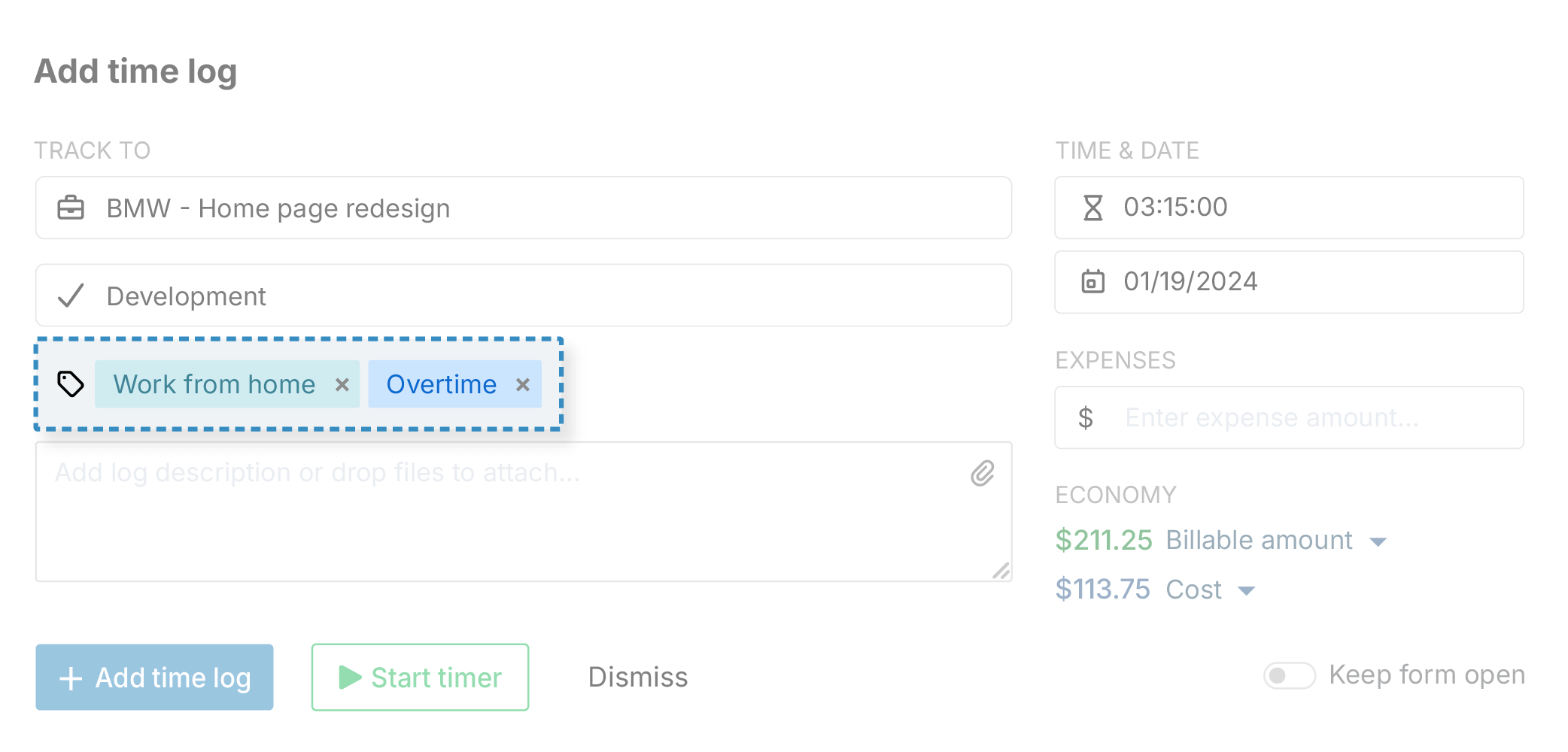
Create a task or custom tag for each revision round, and start the timer against it as the work happens. Anything logged within the agreed scope stays billable.
Flag anything outside the agreed scope with a separate task or tag, so unpaid hours don’t slip through.
Capterra logo
"Once you set it up, inputting project info, specific tasks, and hourly rates, you just need to open it up and go. I just list my projects alphabetically, so it's easy to enter in the project. I have a pretty complete list of tasks for each project, and of course, the times are at your fingertips, so all that info gets loaded in quickly and recorded."
- Tohmm C., Principal Architect/Owner

Flexible Billing Structures

Project commissions don’t always follow the same pricing model. Some firms bill hourly, others charge a flat fee per task. Many run a combination of both within the same commission. 

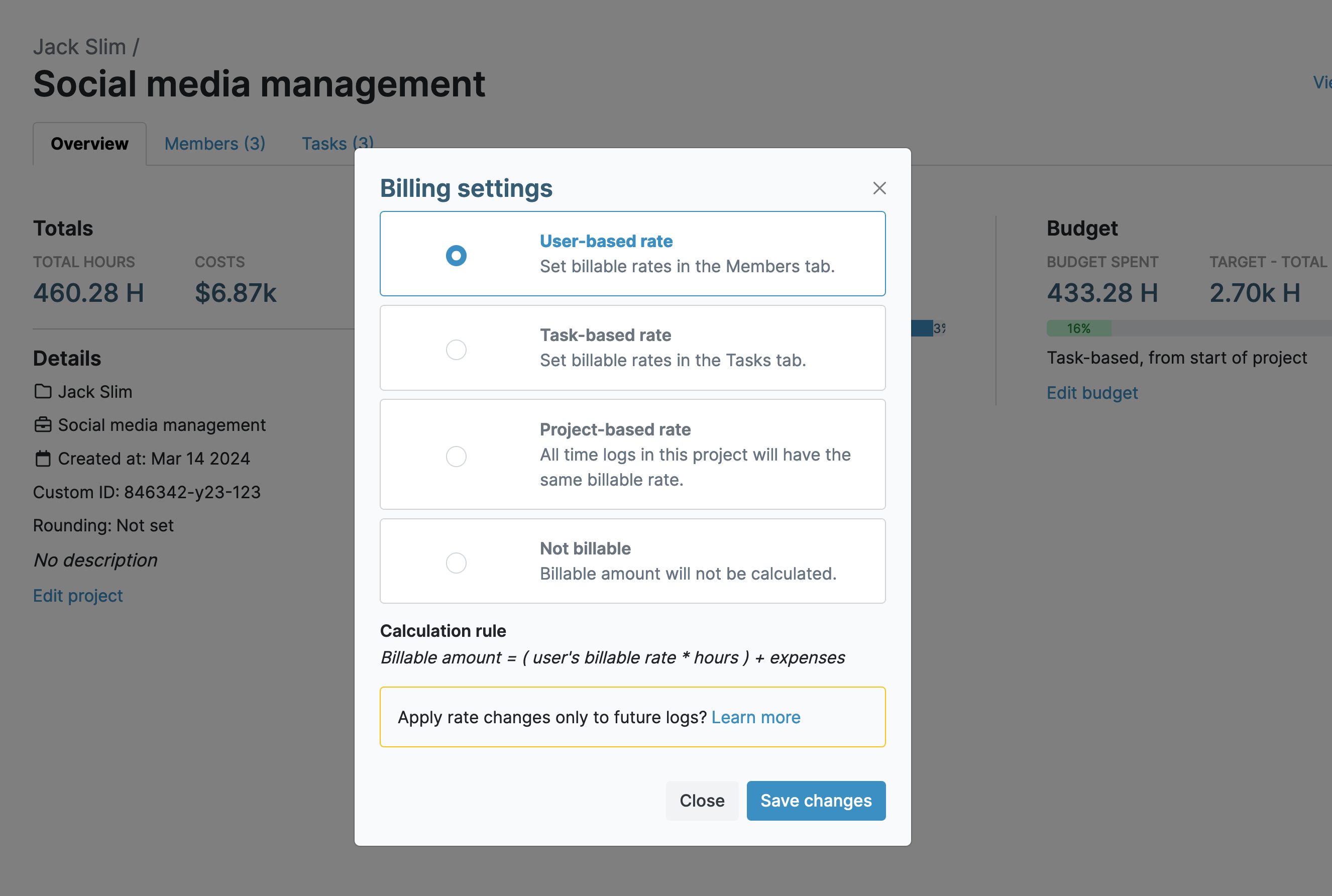
My Hours lets you adjust billing options as needed.
Work timer
Set task-based billable rates for specific services, project-based rates for set hourly fees, or user-based rates to automatically apply each team member's individual hourly rate as they track time.
Mark work as non-billable at the project, task, or time log level, so internal work never gets invoiced by mistake.
Capterra logo
"My Hours was the first system I found that let me really customize my solution the way that I wanted and needed it for my own tracking. I love the fact that I can have clients with different rates, team members with different rates, multiple projects for clients, and tasks under those projects. It's incredible the amount of customization on such an easy-to-navigate product."
- Sabrina G., Founder and CEO, Human Resources

Keep Fixed-Fee Phases On Budget

Missed deadlines aren’t the only way commissions lose money. Hours that go unmonitored, whether from a fixed-fee task or an unflagged client revision, can affect profitability just as fast.
Work timer
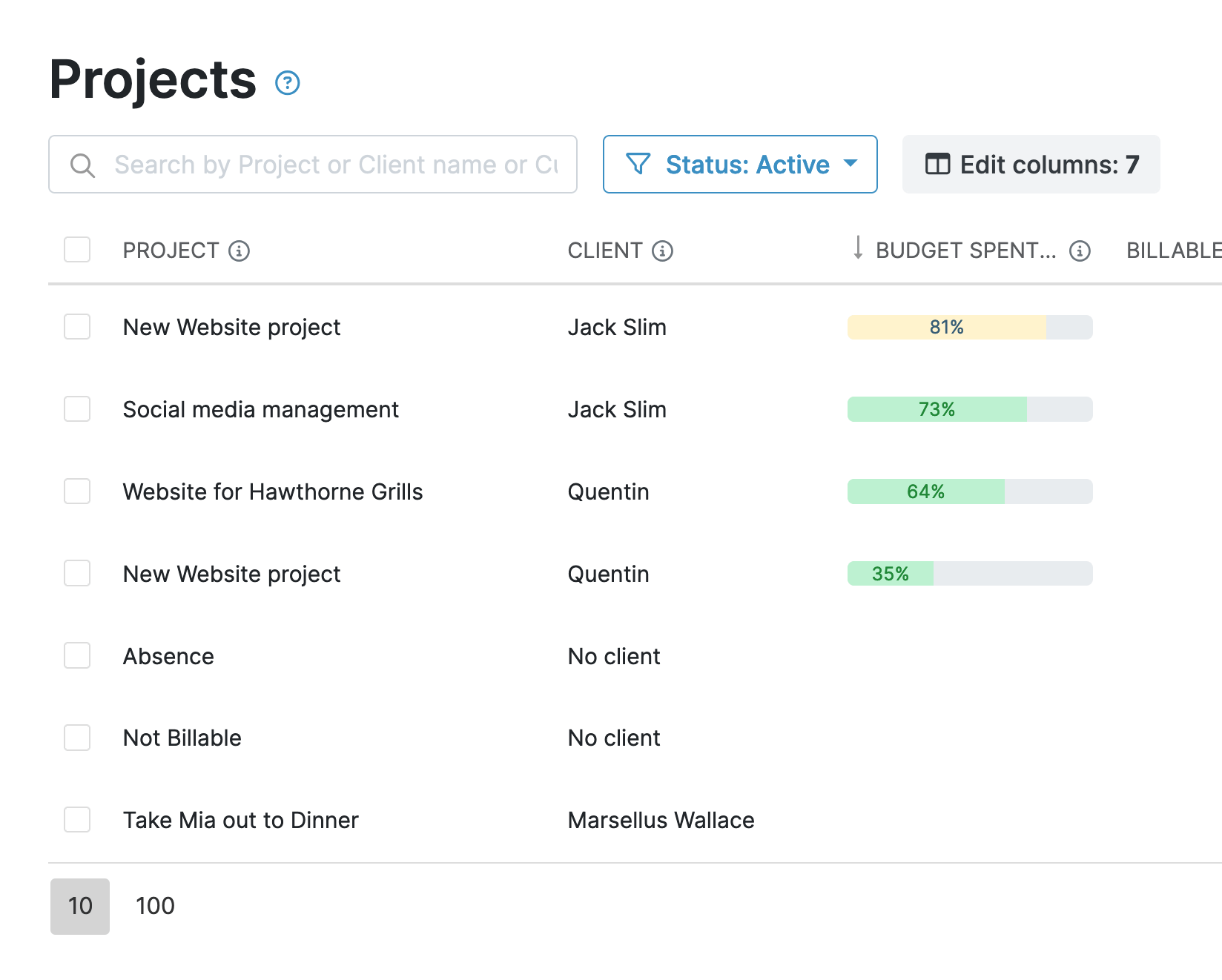
Set target hours or monetary budgets for each project or task, depending on how the commission is structured.
Progress bars provide an instant view into budget consumption, while automated alerts notify managers before a budget threshold is exceeded, helping teams keep fixed-fee work profitable.
Capterra logo
"The time tracking, billing, and report making. Pretty much all in one, and so far I really don't have to use any other app."
- Kadek Ary W., Architectural Designer, Architecture & Planning

Track Time From Any Device

Architects split their time between the studio, client meetings, and site visits, and time tracking needs to keep pace.

Work timer
Track time using the Android and iOS apps.
Log time from a computer using browser extensions for Chrome and Firefox, or the desktop app.
Capterra logo
"I’ve been using My Hours for several years now, at previous firms and now for my own practice. It’s a very easy-to-use and customizable interface. It makes daily task logging a breeze."
- Mandy P., Architect, Architecture & Planning
Unlimited clients keep every project separate, regardless of whether it’s billed hourly, at a fixed fee, or on retainer.
For ongoing retainer clients, recurring budgets reset each period automatically, so tracking doesn’t need to be rebuilt from scratch every month.
Capterra logo
"I am an independent consultant and use My Hours daily to track my work time for several clients. I am able to create tasks specific to my work/industry and thus can track HOW I spend my time for each client. Additionally, I can easily and efficiently generate invoices at the end of each month and attach detailed reports to detail my work."
- Cathi S., Owner, Principal Consultant, Biotechnology

Track Expenses

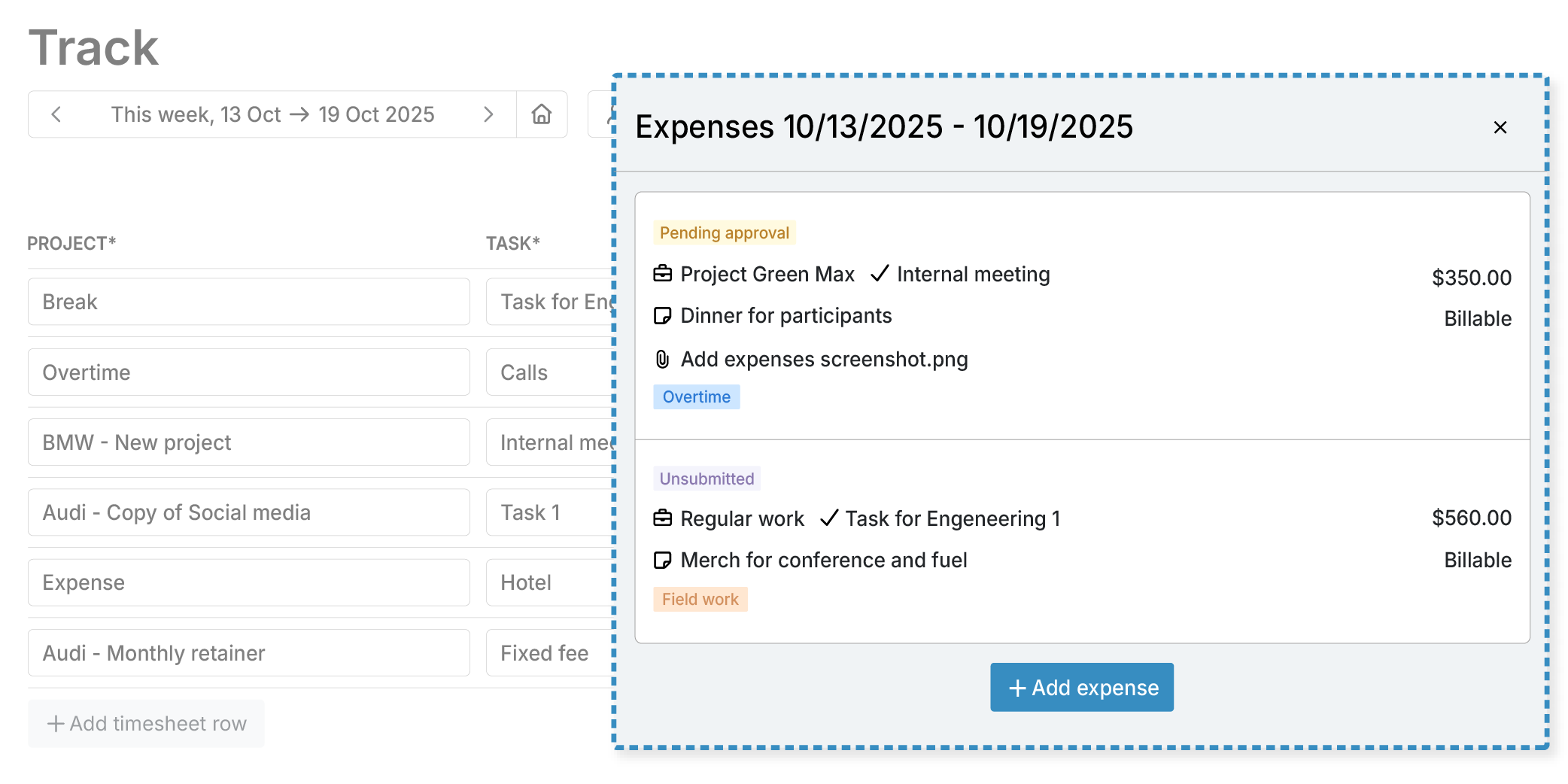
Labor isn’t the only cost associated with commissions. With My Hours, you don't need a separate tool to track expenses, such as site visits, printing, models, and materials.
Work timer
Log expenses directly against a project or task, instead of maintaining separate spreadsheets or reimbursement records. Then, upload receipts and other supporting information as proof.
Categorize each expense as billable or non-billable. Billable expenses count towards the project budget and flow directly into the client invoice.
Capterra logo
"As a freelance designer, I needed a way to keep track how much time I was spending on multiple jobs at once. And at different rates. But the feature that sold me on My Hours was the budgeting. [...] Plus seeing the additional expenses (like purchased software, stock art, website themes) added in helps me get a much better overall feel for how my little business is doing. It's so easy to use and I haven't even dug into all that is here yet."
- Carol G., Graphic Designer, Design

Client Reporting

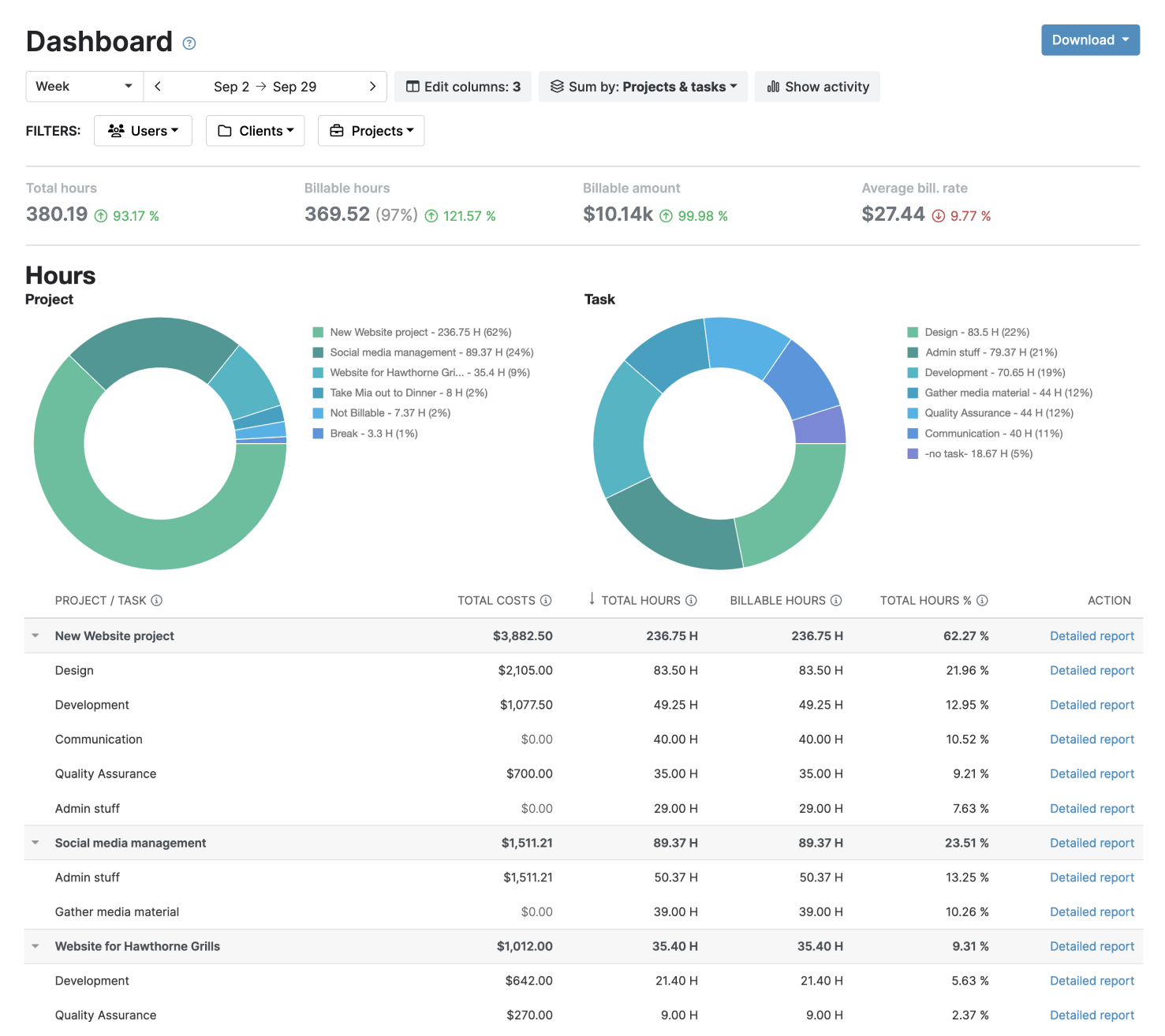
Clients expect clear, regular updates, and My Hours makes it easy to generate reports to keep them informed.
Work timer
The Dashboard reports give high-level overviews; detailed reports offer fully customizable insights into time entries, tasks, costs, and billable work; timesheet reports summarize team hours and activity across the commission.
Filter reports by client, project, team member, or billable status. Export as PDF or XLS, save custom report settings, and schedule reports to send automatically.

Every action is recorded in an audit log, giving both your team and clients a transparent record of changes.
Capterra logo
"My Hours is super easy to view, learn, and use. Clocking in and clocking out as a way of tracking time is easy, or time can be manually logged with a project name and description about the work done. The Reports generated by the system are well-organized, easy to read, and are easy to send to show time worked."
- Abrielle D., Executive Coordinator, Media Production

Streamlined Invoicing

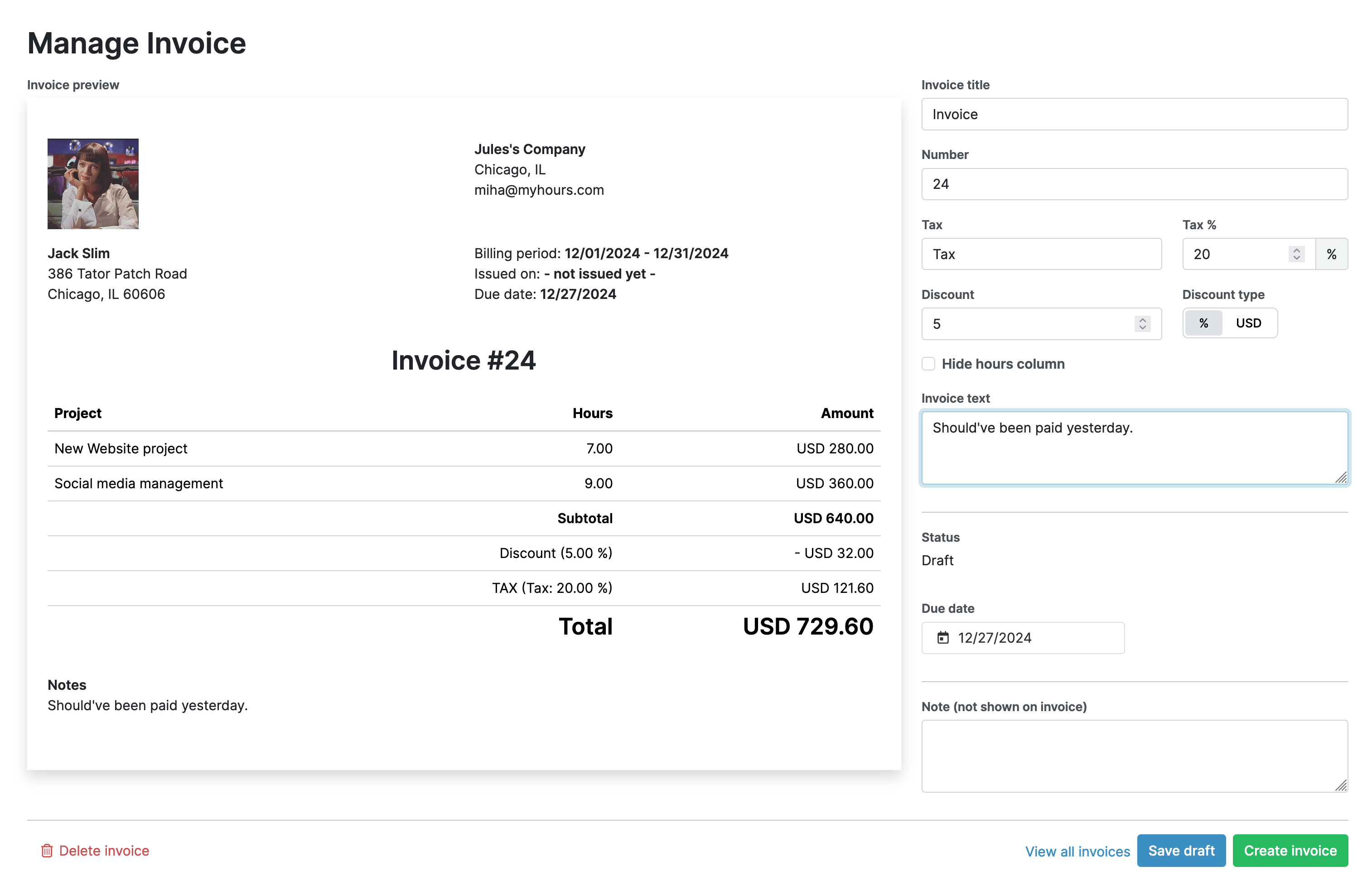
Since billable hours and expenses are pulled directly from approved time entries, you don’t need to re-enter data, calculate totals separately, or reach for another tool.
Work timer
Pull billable hours and expenses directly into an invoice, customize the content, such as title, tax, discounts, and notes, and send it straight from My Hours. To modify the layout, you’ll need to export and adjust the invoice in Excel and download it as a PDF.
The uninvoiced tracker highlights billable work that hasn’t been included in an invoice yet.
My Hours holds ISO 27001, ISO 27017, and ISO 27018 certifications, the international gold standards for information security, cloud security, and cloud privacy, with all data hosted on Microsoft Azure in the EU.

Your data stays protected and compliant at every step.

Microsoft Azure logo
ISO-27001 certification logo
ISO-27017 certification logo
ISO-27018 certification logo

Frequently Asked Questions

What is architecture time tracking software?
Do architecture firms really need dedicated time-tracking software?
How do architecture firms track billable hours by milestones?
How should revisions be billed on an architecture project?
Is My Hours free for architecture firms?
Is My Hours suitable for multi-phase architecture projects?
Is My Hours secure for architecture client data?
Do architecture firms working on government contracts need to follow DCAA or FAR requirements?

My Hours time tracking features

Timer or weekly timesheet

Track time with our seamless timer or enter your time through our keyboard-friendly timesheet. Add a description and custom inputs.

Set billable rates and budgets

Automate calculation of billable amounts by setting precise hourly rates by project, task or team member. Add a project budget to monitor its progress.

Analyze logged hours & expenses

With the Dashboard you’ll get a bird’s-eye view of billable vs non billable hours, earned income by project, under- or over-utilized employees and more.

Generate custom reports

Detailed reports are completely customizable and display as much  information as needed. Print to PDF, export to XLS or send schedule it via email.

Manage tasks

Add and assign tasks with an estimated budget. Create templates when identical tasks appear across projects.

Submit and approve timesheets

Supervisors get email whenever timesheets are submitted. Each timesheet can be approved or rejected with an email message.

Set flexible roles

Invite your team to track time on their projects without seeing each other’s hours and rates. Designate managers to oversee their team and  manage their work.

Prevent inconsistent reporting

Lock team’s time logs to prevent editing or adding new logs in a selected period. Download the audit log report to keep your books in order.

Streamline invoicing

Create numbered invoices straight from hours logged. Integrations with the most popular invoicing apps are available to all customers.

Integrate with other tools

Connect My Hours data with other tools or vice versa through Zapier connectors. Alternatively, use our API to develop your own integration.

Access from anywhere

My Hours is a cloud-based app with nothing to install. View and manage your hours from any web browser or install our native mobile apps.

Secure infrastructure

My Hours is hosted in Microsofts Azure cloud and we are proud of 99.95% uptime. We perform regular security checks to keep your data in safe hands.

Highest praise from our customers

4.7
rating on all review portals

“Best time tracker app out there”

"My Hours does everything I need it to do, and is in an easy to use and functional format with a clean, uncluttered interface. It's become an indispensable tool for me."

Brian S. | Marketing and Advertising

“Couldn't do my job without My Hours”

"My Hours saves me a ton of time tracking projects. My Hours makes it easy to assign multiple tasks to multiple projects. I also like that I can organize reports by client or project."

Cheri G. | Graphic Designer

“Great for tracking time on tasks and projects!”

"Love this software! I don't bill for my time, but I do need to keep track of time spent on various projects and on tasks within those projects. Easy to set up projects that you need track your time on."

Jenifer H. | Business Analyst

“Great Time Tracking Software”

"My manager wanted me to track the amount of time I spent on different tasks so we could better define the role. I tried a few different things before I found My Hours, and I've been using it ever since. I love it!"

Bonnie L. | Multimedia Content Developer

“Best Hours Tracking Tool”

"I like how easy it to use but has features to do custom reporting. It's always available, in 2+ years I've used it, it's always up. I totally rely on it to track hours and there has never been a hiccup."

Lori A. | Software Engineer

Waste no more time,
jump right in!

Get started - it’s free
My Hours is free for teams of up to 5 users.