
DCAA compliant time tracking software
Create a DCAA Compliant Timekeeping Process with My Hours!
The DCAA strongly recommends that government contractors use digital time tracking software.
My Hours is built to meet those requirements, giving employees a straightforward way to log time and your organization audit-ready time and cost data.
Beyond time tracking, we’ve created FREE downloadable resources and templates designed to help you fulfil your obligations.
From training slides to policy templates, this is your go-to page to get your organization fully up to speed.


Trusted by more than 100.000 businesses worldwide


How to Stay DCAA and FAR Compliant Using My Hours
Create a strong timekeeping policy and train all staff
Your timekeeping policy sets expectations and makes it clear how everyone should track their time. The DCAA requires that all staff receive training on the timekeeping process.
 My Hours can’t write a policy for you, but we can walk you through how to write a timekeeping policy and train staff. This article gives you a great framework you can build your documentation around.
- If you’re not sure what to write, our free timekeeping policy template and training deck are ready to use. Just download them, tweak the information to suit your organization, and you’re all set!
Enforce daily time entry
Daily time entry is non-negotiable for anyone involved with government-contracted work. That means time must be completed in real-time or at the end of each workday.
- The start/stop timer allows real-time tracking on any device.
- Download the fully-featured Android and iOS apps or use the Chrome, Firefox, or Edge extensions for desktop work.
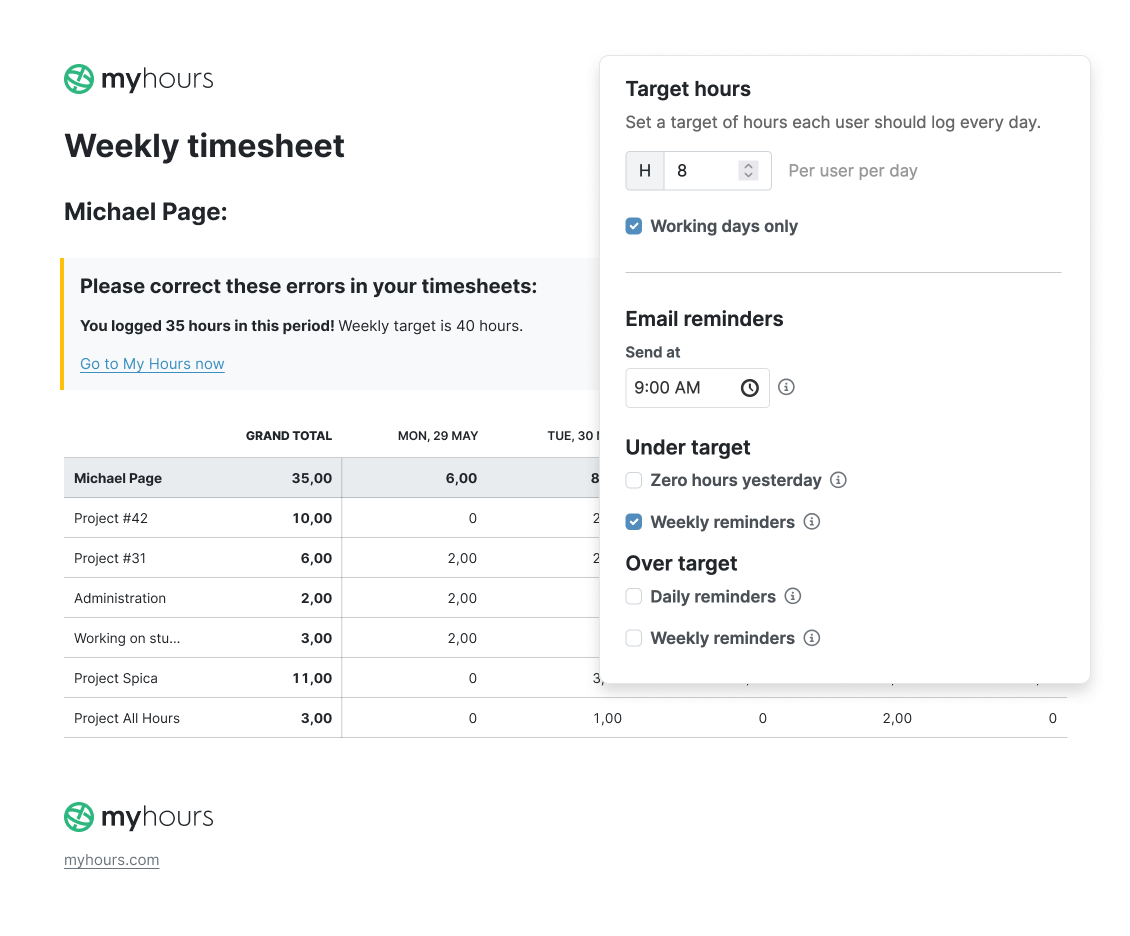
- Daily, automated reminders prompt workers to complete their timesheets.

Record overtime and all time off
During an audit or review, the DCAA expects to see evidence of Total Time Accounting (TTA). This means you have to track all time, including time off and overtime (whether it’s compensated or not).
- Use My Hours’ projects and tasks to record time off. Simply create a project titled “Absence,” and then a task for each absence type (sick, vacation, etc.).
- Track overtime by creating daily target hours for each user. When users exceed their target hours, they can receive an automated alert.
- Use custom tags to label time entries as overtime.
Link time entries to charge codes and contracts
A big part of compliance is connecting time to the right code and project. The DCAA wants to see time entries linked to deliverables and the appropriate charge code applied.
- Set up mandatory project and task allocation for time entries to ensure these are not missed.
- Enforce a time entry description of work carried out
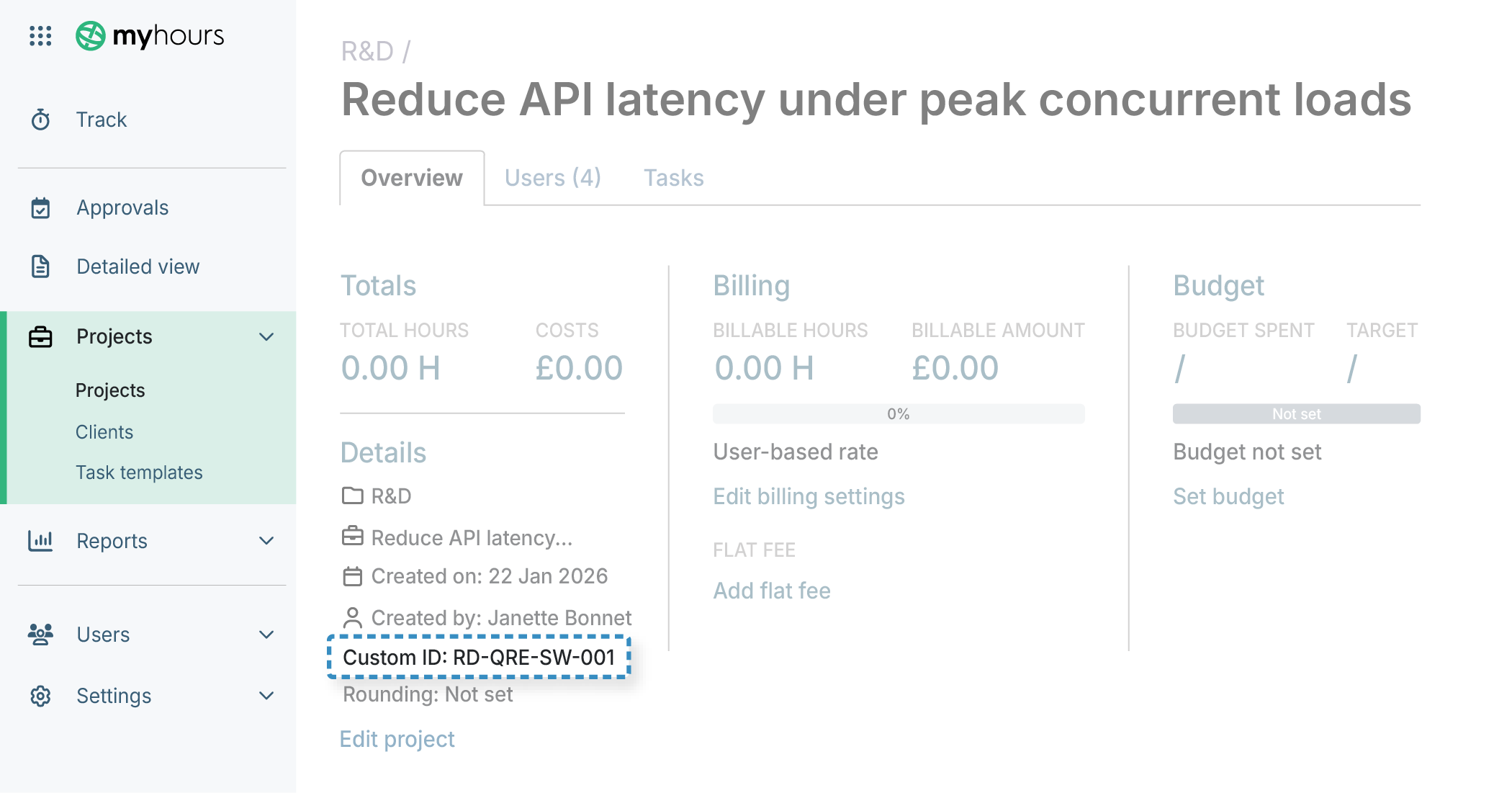
- Custom tags enable users to assign the correct charge code.
- All tags can be filtered in the reporting feature.
- There’s also a custom ID field on projects
Distinguish direct vs. indirect work
Direct labor refers to hours worked on government-contracted deliverables, while indirect labor supports multiple projects and operations that aren’t charged to the contract.
- Create separate projects and tasks for indirect vs. direct labor
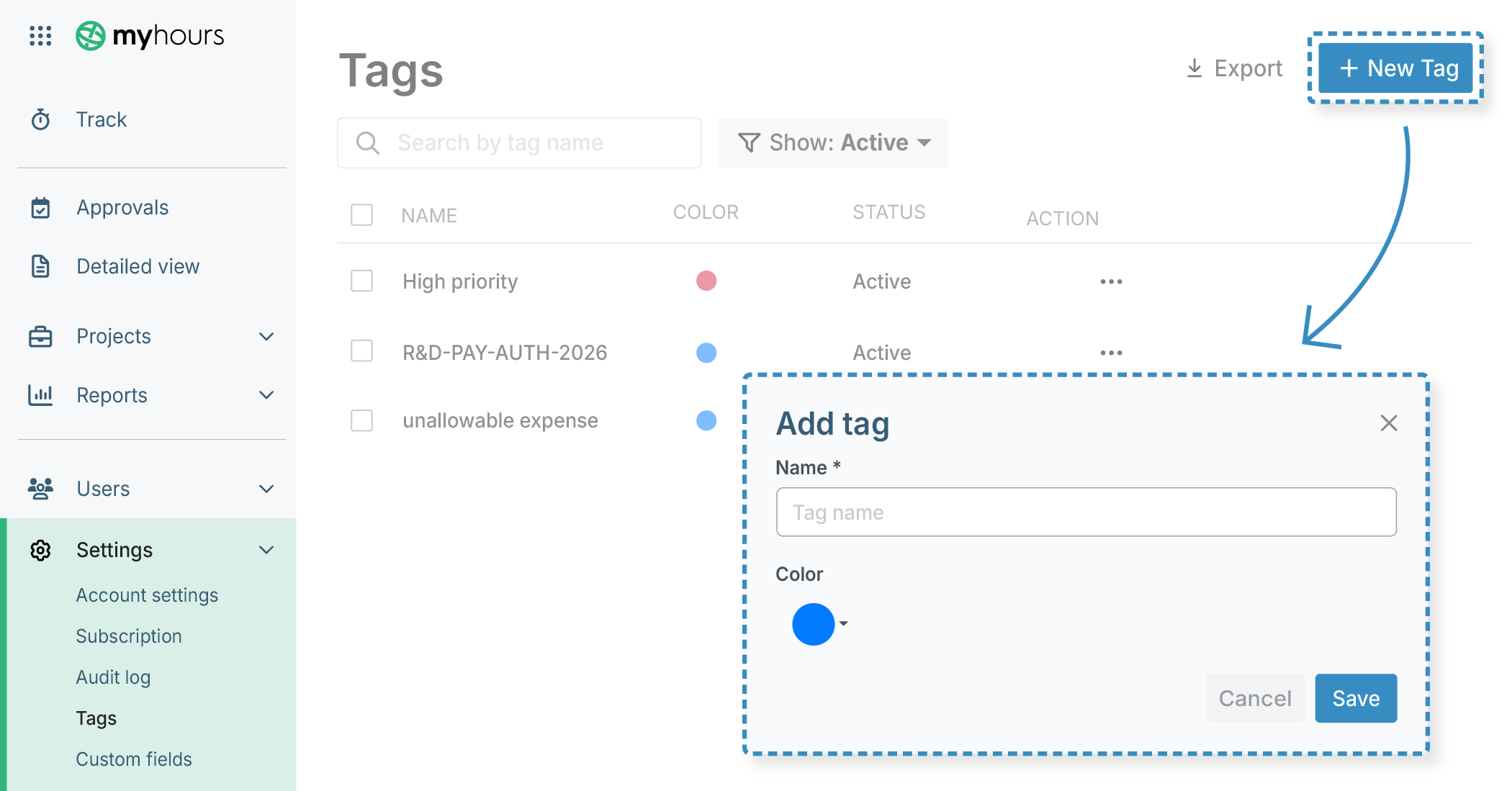
- Set up custom tags for direct and indirect labor
- There is no limit to the number of tags you can create
Connect time to labor costs
Time has to be aligned with labor costs because labor is billed, allocated, and audited based on hours worked. If the hours don’t tie cleanly to payroll, then auditors assume there’s a risk of mischarging.
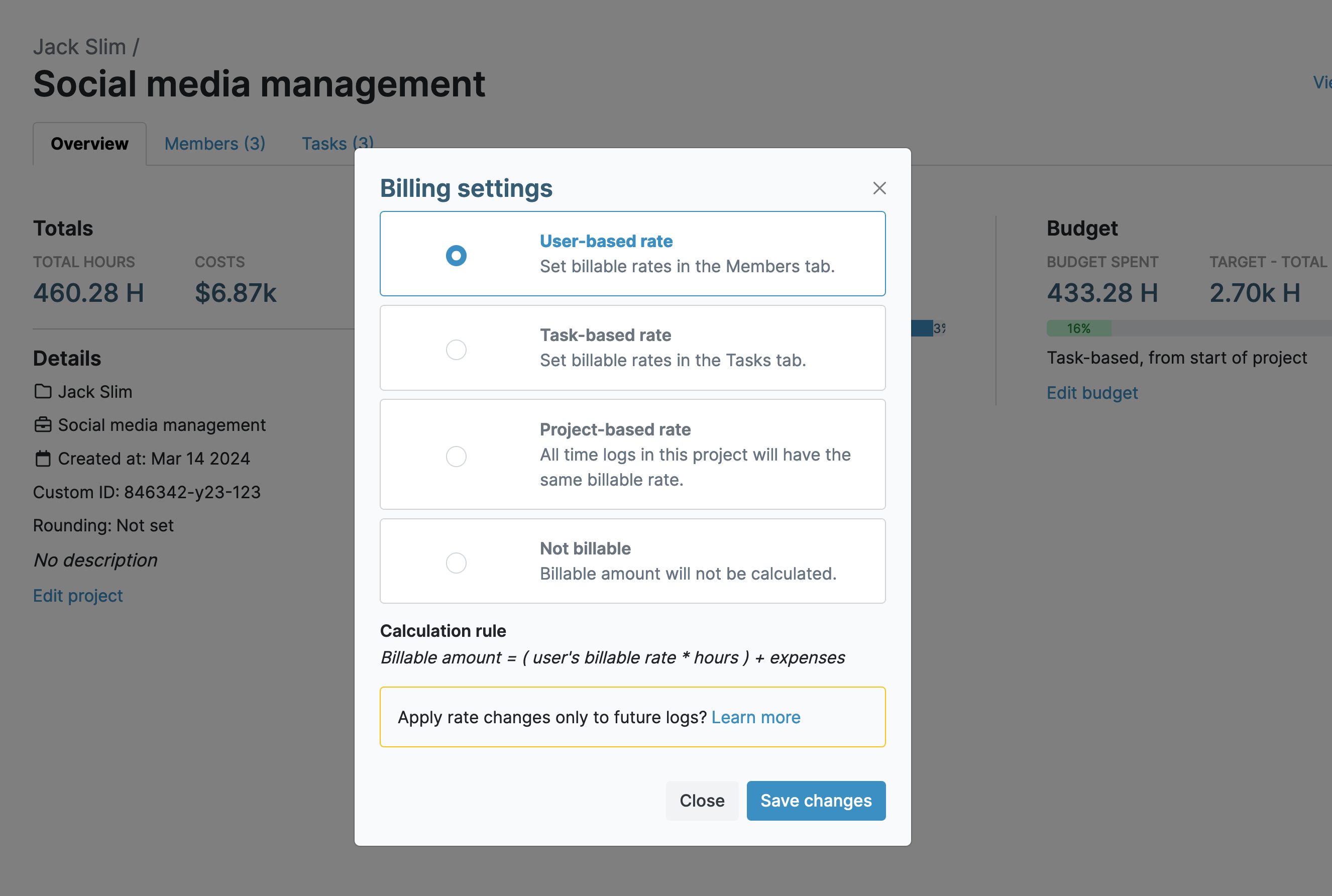
- Every My Hours user can be assigned a unique hourly labor rate.
- As time is tracked, so is the rate (down to the second), providing accurate costs for each time entry
- Projects can be assigned a blanket hourly rate that applies to all users
- Different hourly rates can be assigned to individual tasks within a project
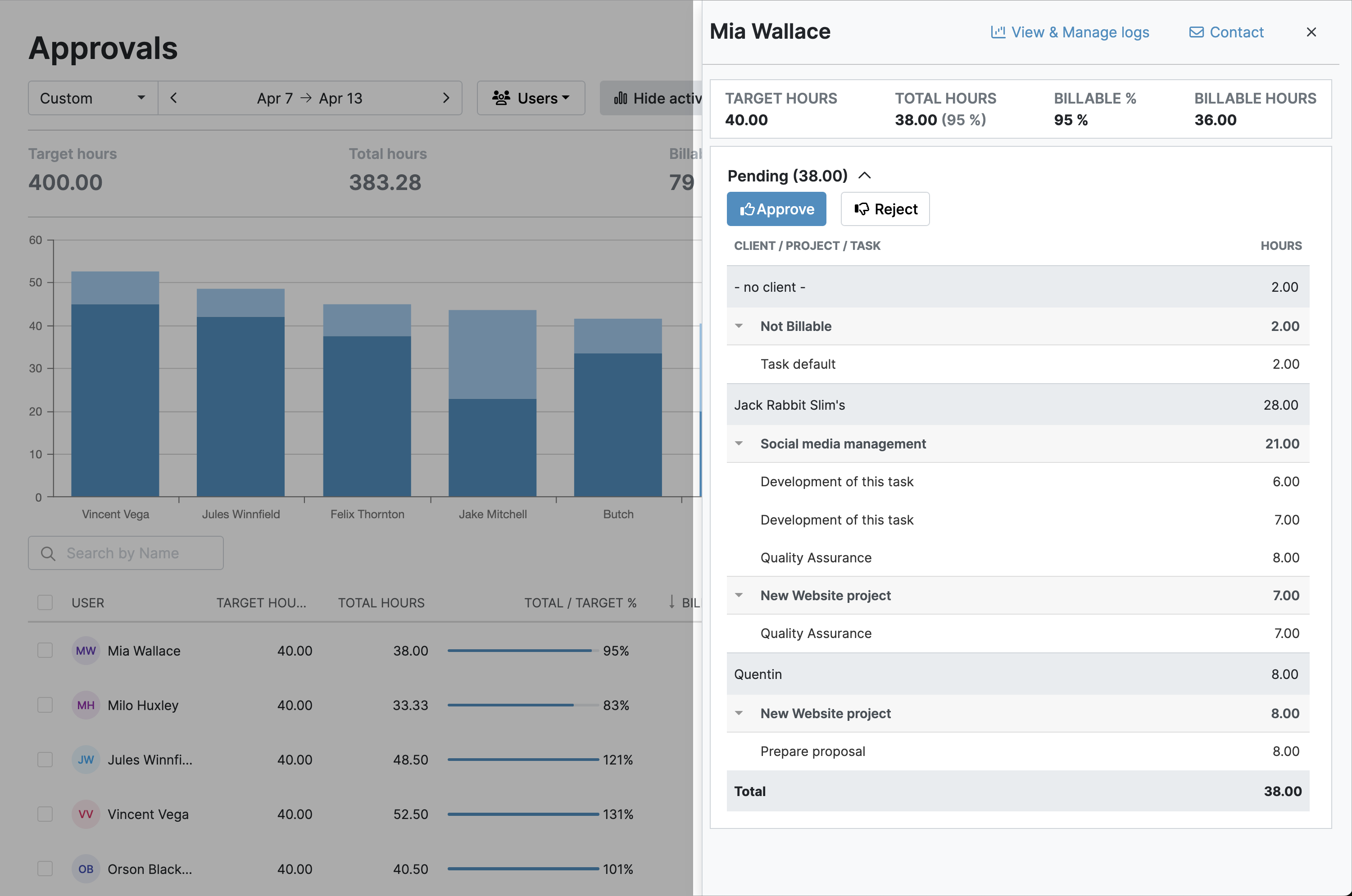
Approve all timesheets
All timesheet data has to be vetted and approved by supervisors. This ensures completeness and helps prevent mistakes.
- My Hours features an automated approval workflow
- Once a timesheet is submitted, the supervisor is notified, and they can approve or reject the data
- Entire timesheets or individual time logs can be approved or rejected
- Any rejected data gets sent back to the user for correction before going back to the supervisor for final approval
Document and track adjustments and corrections
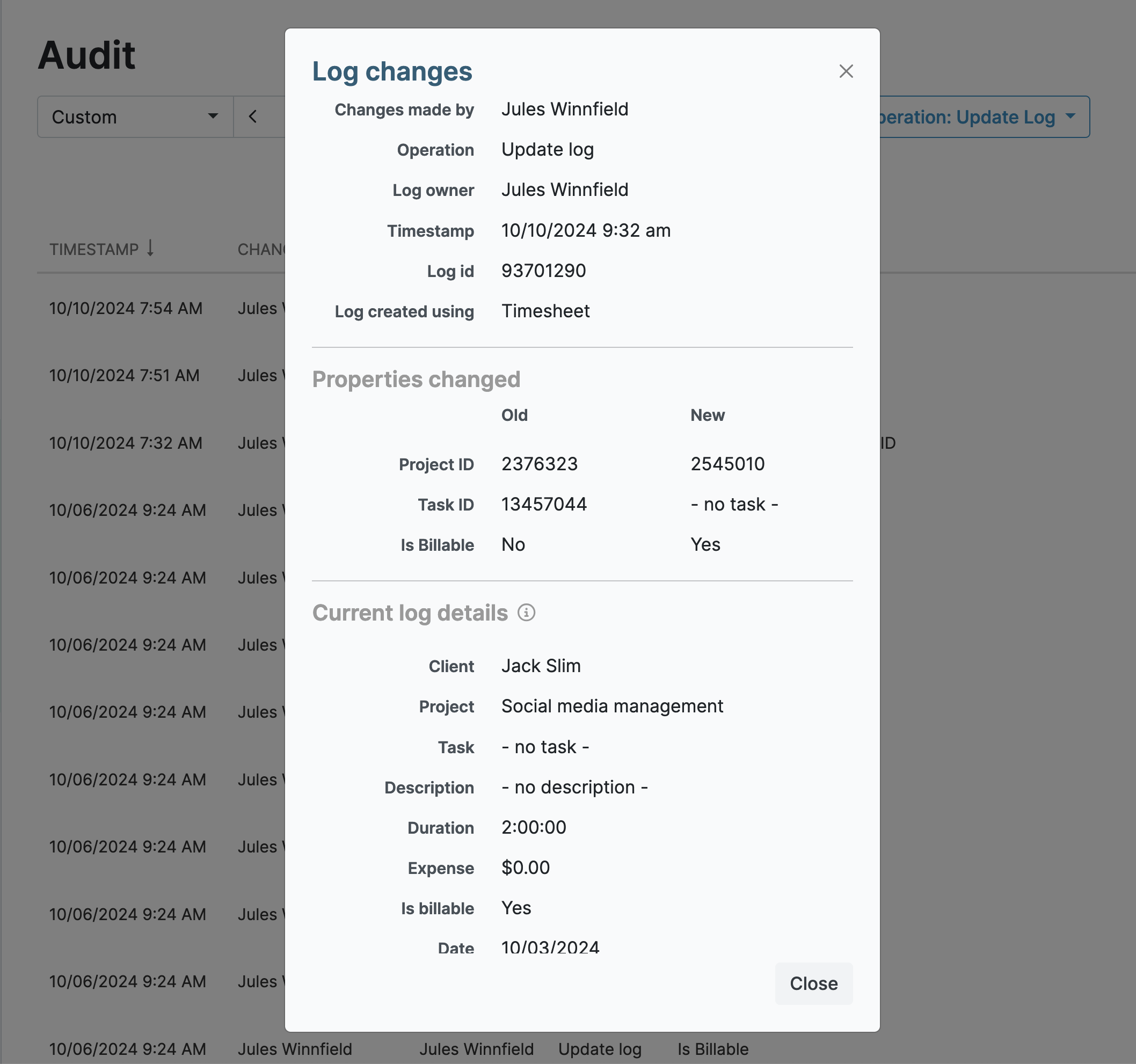
Everything must be documented and timestamped. Therefore, if there’s an error in a timesheet, a specific correction process has to be followed.
- My Hours includes a mandatory field for supervisors to add a reason why a time entry was rejected
- Equally, users must provide a note on what information they changed
- All timesheet corrections are timestamped and tracked in the audit log
- Approval data can be exported into an XLS file for archiving
Generate regular reports
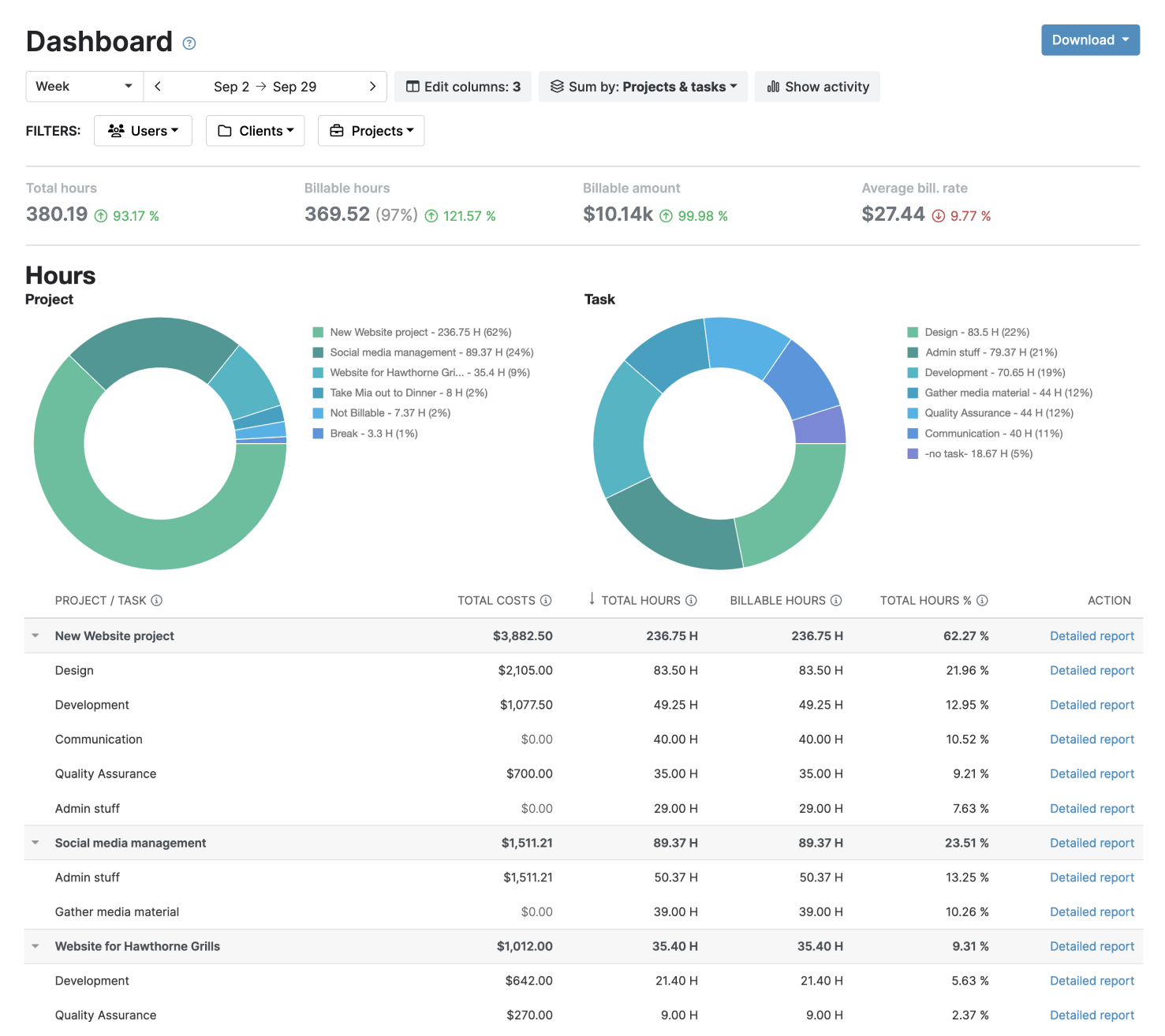
The DCAA thrives on data, and you’ll have to provide a lot of it! Required reports include timesheet summaries, labor distribution, indirect vs. direct costs, and a range of other documentation.
- My Hours has several reporting options, ranging from detailed reports to dashboard overviews
- Choose the data columns and apply the filters to get the required information
- Report settings can be saved to generate additional reports in one click
- Reports are exportable in PDF or XLS format. They can also be emailed to relevant parties automatically from within My Hours
Maintain segregation of duties
A clear separation between timekeeping, supervision, and payroll must be maintained to prevent conflicts of interest and reduce the risk of labor mischarging.
- Flexible role-based permissions separate employees, supervisors, and administrators.
- Payroll personnel can be restricted from editing or approving time entries.
- Once timesheets have received supervisory approval, the data is locked, preventing further edits

Keep data secure
The DCAA expects timekeeping records to be tamper-resistant and stored securely. It is forbidden for a worker to enter time on another’s behalf or falsify the information (like assigning labor as direct when it should be indirect).
- Workers can only enter time for themselves, preventing entries on behalf of others.
- Time can only be logged to assigned projects or tasks, reducing the risk of cross-charging.
- Unique user credentials ensure accountability for every time entry.
- Detailed activity logs track all changes, creating an audit trail for floor checks and formal audits.

Maintain audit readiness
Audits are part of being a government contractor. Whether it’s a surprise floor check or an announced visit, the DCAA expects you to have all documentation present, correct, and readily available.
A good way to stay audit-ready is to perform internal audits. We have a full floor check self-audit checklist that you can download and use for this purpose.
We also have a DCAA audit packet download. This handy checklist tells you exactly which files and records you should retain and in what format.
Retain all records
Finally, timekeeping records have to be retained for at least three years after the final contract payment, while accounting and payroll records must be retained for at least four years.
- As long as you hold an account with My Hours, the data will stay put and won’t be deleted.
- Schedule reports to send automatically. You choose the recipients and sending frequency; My Hours does the rest. This allows you to receive, file, and archive records as needed.
Further information
Do you have questions that this page doesn’t answer? Check out our additional articles on DCAA compliance, and you’ll likely find what you are looking for.
We want to help our users as much as possible, especially when the compliance obligations are so strict.
- A handy guide to FAR vs. DCAA, vs. your internal timekeeping policy
- Frequently asked questions about the more intricate components of DCAA time tracking
My Hours time tracking features

Timer or weekly timesheet
Track time with our seamless timer or enter your time through our keyboard-friendly timesheet. Add a description and custom inputs.

Set billable rates and budgets
Automate calculation of billable amounts by setting precise hourly rates by project, task or team member. Add a project budget to monitor its progress.

Analyze logged hours & expenses
With the Dashboard you’ll get a bird’s-eye view of billable vs non billable hours, earned income by project, under- or over-utilized employees and more.

Generate custom reports
Detailed reports are completely customizable and display as much information as needed. Print to PDF, export to XLS or send schedule it via email.

Manage tasks
Add and assign tasks with an estimated budget. Create templates when identical tasks appear across projects.

Submit and approve timesheets
Supervisors get email whenever timesheets are submitted. Each timesheet can be approved or rejected with an email message.

Set flexible roles
Invite your team to track time on their projects without seeing each other’s hours and rates. Designate managers to oversee their team and manage their work.

Prevent inconsistent reporting
Lock team’s time logs to prevent editing or adding new logs in a selected period. Download the audit log report to keep your books in order.

Streamline invoicing
Create numbered invoices straight from hours logged. Integrations with the most popular invoicing apps are available to all customers.

Integrate with other tools
Connect My Hours data with other tools or vice versa through Zapier connectors. Alternatively, use our API to develop your own integration.

Access from anywhere
My Hours is a cloud-based app with nothing to install. View and manage your hours from any web browser or install our native mobile apps.

Secure infrastructure
My Hours is hosted in Microsofts Azure cloud and we are proud of 99.95% uptime. We perform regular security checks to keep your data in safe hands.
Highest praise from our customers


Waste no more time,
jump right in!

All rights reserved.