
.png)
DOWNLOAD FREE R&D TIME ENTRY TEMPLATE
What Must Be Included in an R&D Time Entry?
For strong R&D tax credit support, each time entry must contain the following core elements:
- Employee name and role: This shows that the individual is directly engaged in qualifying research rather than working in a non-qualifying role like admin or HR.
- Date and duration: The date and hours (or minutes) spent on the qualifying task.
- Project identifier: The project name or code that corresponds with the R&D project list used for the credit.
- Project and task details: A detailed activity description (more on this below).
- Supporting documentation: Upload documents or provide links to the relevant document folders.
- Cost and expense details: Labor costs must be tracked, and if the activity incurred additional expenses, you must include receipts, amounts, and the reasons why they were incurred.
Why must this information be included?
Treasury Regulation 1.41 - 4 requires taxpayers to:
“Retain records in sufficiently usable form and detail to substantiate that the expenditures claimed are eligible for the credit.”
Additionally, the IRS instructions for completing Form 6765 (Credit for Increasing Research Activities) detail that taxpayers must keep:
“Records that substantiate the qualified research activities and associated QREs.”
So, while there is no definitive list of what should go on a timesheet, what does go on there must be defensible and contain sufficient detail to substantiate the claim.
How to Write R&D Time Entry Description
While you’re not expected to write an essay, you must be very specific and show exactly how the time entry contributed to the R&D project.
Essentially, if an auditor reads the time entry and can reasonably think, “This could just be admin or routine work,” then the entry won’t qualify for the tax credit.
Take these phrases as examples. They might sound specific at first glance, but they're far too vague:
- “Reviewed performance issues.”
- “Worked on improvements.”
- “Tested new approach.”
- “Researching solutions.”
- “Project support.”
In contrast, a strong R&D entry clearly answers four questions:
- What technical problem was the individual working on?
- What was the uncertainty?
- How did they try to resolve it?
- What changed or was learned?
Avoid jargon
Another important thing to note is that you must avoid industry, internal, or technical jargon that makes it difficult for a reader to understand what actually happened.
Here’s what you must avoid:
- Using acronyms instead of writing out the full terms or explaining them properly.
- Phase labels (phase 2, sprint 5, stage B, etc.) since they say nothing about the work involved.
- Words without context (optimization, cleanup, test, etc.). All actions must be explained in context.
- Internal project or model names (Project Hercules, Model X, Platform Starburst, etc.). Same as phase labels, they mean nothing outside your organization.
- Follow-up terms (as discussed, per meeting, follow-up, etc.). Meetings are not R&D, and time entries are not emails.
Before submitting a time entry, the golden question to ask is:
“Would this still make sense if the project name were removed?”
If the answer is “no,” check for jargon and replace it with plain English.
Good vs. Bad R&D Time Entry Examples
To illustrate this, here are several examples of vague versus specific language for various job roles:
Software engineer:
- Bad example: Worked on backend API
- Good example: Investigated performance bottleneck in payment authorization API by testing alternative caching strategies and refactoring query logic. Latency was benchmarked under simulated peak load to determine the feasibility of reducing response time below 200ms.
QA engineer
- Bad example: Testing new features
- Good example: Designed and executed exploratory test cases to identify edge-case failures in asynchronous job handling after introducing new queue prioritization logic. Documented failure patterns to inform architectural changes.
Research associate:
- Bad example: Data analysis
- Good example: Analyzed experimental datasets to assess unexpected variance in compound efficacy. Tested alternative statistical models to determine whether observed effects were artifacts or biologically significant.
Biotech Scientist:
- Bad example: Lab work
- Good example: Optimized assay conditions to improve signal-to-noise ratio by systematically varying reagent concentrations and incubation times. Evaluated reproducibility across three experimental runs.
Food & Beverage Product Developer:
- Bad example: Recipe testing
- Good example: Experimented with emulsifier ratios to improve the shelf stability of plant-based sauce without compromising texture. Conducted batch comparisons to assess separation over a 14-day storage period.
Mechanical Engineer:
- Bad example: Prototype work
- Good example: Developed and evaluated three prototype hinge geometries to address premature fatigue failure under cyclic load. Conducted stress simulations and physical tests to compare lifespan variance across designs.
The Defensible R&D Time Entry Recipe (For Any Industry)
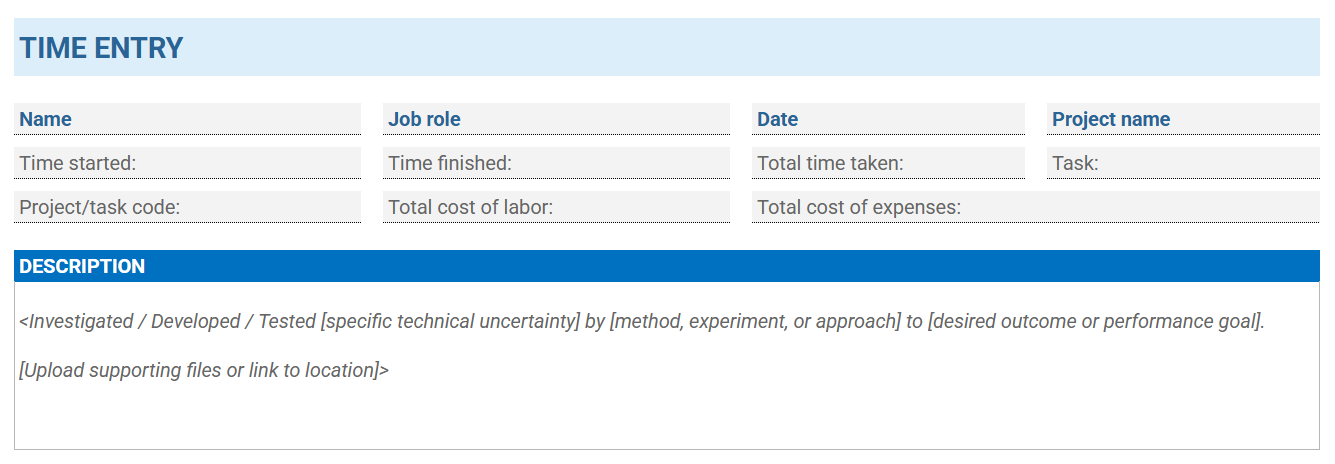
Whatever the role and industry, this template works and is compliant with R&D requirements. It’s short and practical, but most importantly, it’s specific and defensible:
DOWNLOAD FREE R&D TIME ENTRY TEMPLATE
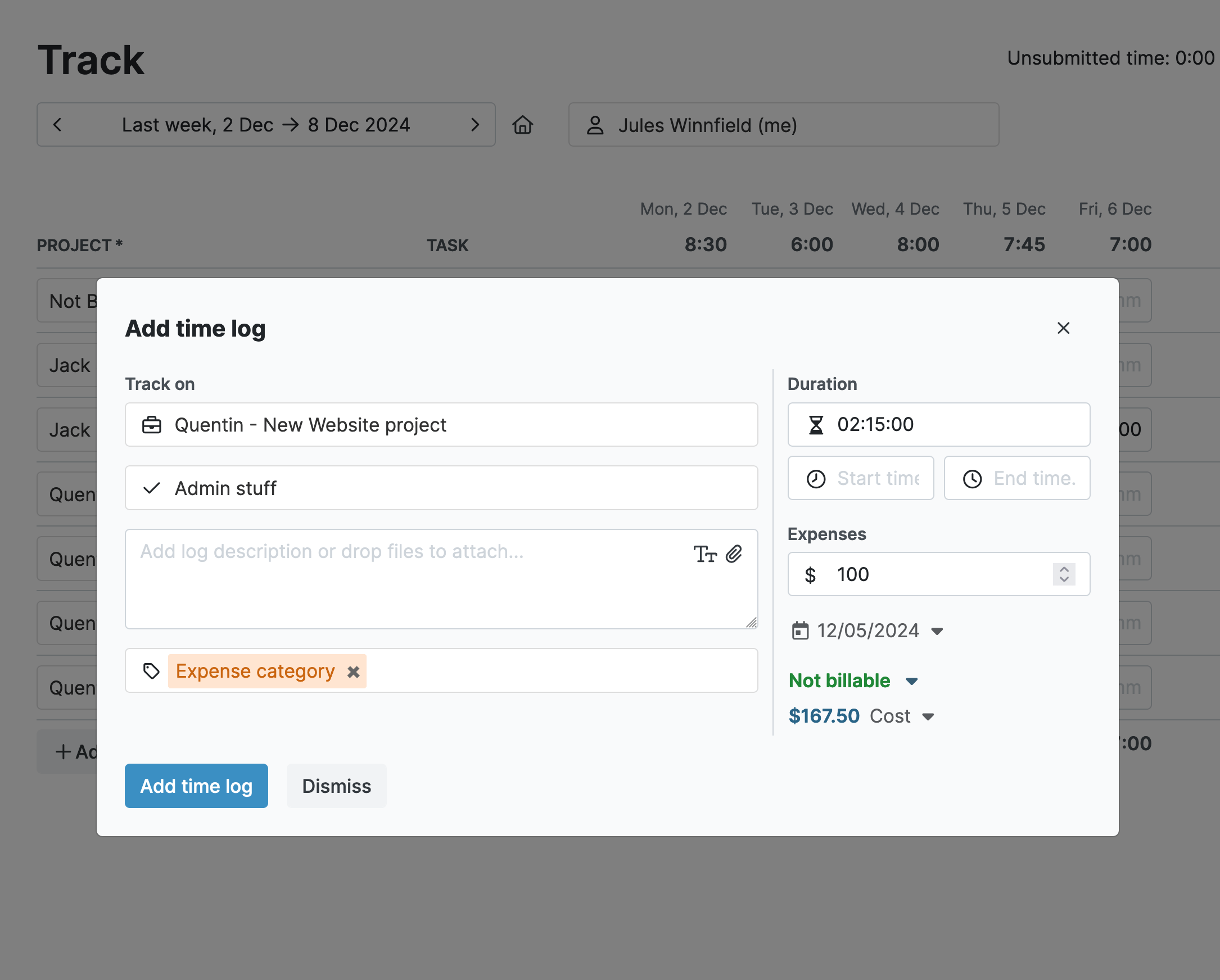
In time tracking software, the process is easier because the template is already there for you.
Common R&D Time Entry Pitfalls to Avoid (And How Time Tracking Software Helps)
The best way to avoid mistakes is by using a consistent and clear approach.
Time tracking software is your biggest ally here. It’s accurate, easy to implement and use, and allows you to quickly create compliant R&D time entries for claiming the R&D tax credit.
Here are the most common R&D time entry pitfalls to stay mindful of and how time tracking software can address them:
1. Using an inconsistent process across teams
One team uses spreadsheets, another jots their entries down on paper, and a third team uses a template.
This lack of consistency leads to errors and makes it hard to link time entries to technical evidence.
Instead, adopt a standardized approach across the entire organization, so everyone uses the same method.
Using time tracking software is your best option here. You gain a “single source of truth” for R&D time data and can generate necessary reports at the click of a button.
2. Logging time without capturing costs
When claiming the tax credits, authorities want to know exactly how much each minute of research costs. And since labor makes up most of the cost of R&D, capturing this information is essential.
Time tracking software records both time and costs simultaneously.
By assigning hourly rates to each user, the cost of their time is accurately recorded with each time entry.
Or, you can choose a different setup if necessary. For instance, My Hours allows you to set unique hourly rates per project or per task.
3. Not linking time to a specific R&D project
Time must be allocated to the right project and tasks so it can be qualified for the tax credit.
Failing to do this, or using vague terms like “R&D research,” will see your claim quickly added to the rejection pile.
Be very specific about what each project is called (it’s also a good idea to use project codes) and break each project down into specific tasks or phases.
You can set up hierarchies like this within time tracking software. For example, My Hours lets you set up clients > projects > tasks. Time entries cannot be created unless they have been assigned a project or task, forcing users to allocate their entries to the right deliverables.
Furthermore, use custom fields and tags to assign other information, like job or department codes. The added advantage is that these can be filtered in reporting to generate data in specific areas.
4. Logging time without role context
The same entry means very different things depending on who wrote it.
For instance, “testing model stability” could mean R&D if the entry was from a senior scientist, but less so if it was created by a technician following a standard operating procedure.
Using time tracking software allows you to create role-based user profiles that clearly define what each individual does. Furthermore, you can create and add users to teams, so the department they work in is also identifiable.
5. Bundling multiple activities into a single entry
This is a big no-no for claiming the tax credit because each activity must be defined.
Unless the user genuinely spent the entire day working on a single activity, each task worked on must have its own separate time entry.
This sounds like an administrative burden, but time tracking software makes it much faster.
My Hours lets you track in real time with a start/stop timer (offline and on any device). Once the timer stops, the user simply adds in the supporting information, and the whole process can take less than a minute.
The platform also enables task switching, so if the user is rapidly moving from one activity to another, they can click a button to switch tasks rather than having to reset the timer each time.
6 Writing entries after the fact
Writing time entries after the work is completed is notoriously unreliable. It’s easy to forget what you’ve been working on and for how long.
This leads to gaps in time data and other inaccuracies. It also creates compliance issues if the timesheet data is audited.
Besides real-time tracking, My Hours also includes automated reminders to nudge users to track their time.
By setting user target hours, the system will flag individuals when they fail to fulfill them. This ensures that timesheets are complete before the information is forgotten.
7. Mixing R&D and non-R&D work in a single entry
Combining qualifying and non-qualifying work in one entry is a major compliance risk, since non-R&D activities do not qualify for the tax credit.
The most reliable solution is structural separation at the admin level.
Administrators should set up dedicated clients, projects, and tasks that are predefined as R&D or non-R&D and assign custom project IDs for clear classification.
Eligibility decisions are made centrally — not by employees. Users are simply allocated to specific projects and log time against them.
Tags (e.g., “Section 174,” “Section 41,” “Non-R&D”) can provide an additional filter layer, but since they’re applied by users, they should support — not replace — the predefined project structure.
This allows you to filter eligible work accurately and maintain a defensible audit trail.
8. Failing to back up entries with technical evidence
All time entries must be linked to evidence that the work was carried out. If they’re not, they won’t be accepted.
It’s likely highly impractical to upload an entire project's worth of files to a time entry; however, there are solutions.
For instance, My Hours integrates with popular project management tools, allowing you to connect time entries to project data. Another alternative is to include a link to the relevant document repository within the time entry description.
Either method quickly connects the time spent to the supportive evidence.
9. Not validating timesheets
If no one reviews each individual’s timesheets, then you’ll end up with vague, incorrect, or non-compliant entries.
Instead, set up an approval workflow so each timesheet is checked and validated by each user’s supervisor.
This catches the issues and enables correction before they become a bigger problem.
You can automate timesheet validation in My Hours. When timesheets are submitted, managers are notified by email, and they can then approve or deny a time entry in one click.
Most crucially, timesheets are locked after validation, preventing any further adjustments.
10. Allowing workers to log time in non-eligible categories
It happens. Workers create a time entry, then assign it to the wrong project or task. The result is skewed data, especially if R&D time gets assigned to a non R&D task or vice versa.
My Hours helps avoid this problem by only allowing users to track time against the tasks to which they’ve been assigned. This prevents everyone from logging entries to activities they don’t work on.
Final Thoughts
It doesn’t take much to create compliant R&D time entries, but it does require a consistent approach along with specific entry information.
Our advice is to adopt time tracking software to reduce admin and standardize the process. Then, train your staff on what is expected from a time entry and make it part of your onboarding process.
Once you get into the flow of time tracking, you’ll discover its other benefits, too, such as workflow optimization, resource management, and improved productivity.
All save time, save money, and lead to a more efficient workforce.


