

My Hours brings every client, project, task, and tracked hour into one place, giving agency owners a clear view of account profitability. Billing rates, budgets, and reports all draw from the same data, so there’s no need to maintain separate systems as your agency grows.
“[...] Doing company-wide activity reports and sending invoices consumed a full day before My Hours. We estimate we are completing activity reports and invoicing in about three hours, not eight.”
Steve S., President, Public Relations and Communications
Organize Every Client, Campaign and Deliverable in One Place
No two client accounts are structured the same. A single agency roster can involve everything from a quick landing page build to a long-term retainer with multiple campaigns.
My Hours keeps that work organized by giving every account its own dedicated folder.
- Clients: Each client gets its own account on your roster, whether they are a long-standing retainer or a one-off project. This keeps billing and reporting separate for every account, so nothing gets mixed up across clients.
- Projects: Every campaign, website build, or product launch sits within the client account with its own scope and timeline. This way, you can easily see how each piece of work is performing without digging through unrelated data.
- Task lists: Group related work within a project. This makes it easier to organize campaigns that involve strategy, creative, media, and other teams working together. It gives you a clear view of where time is going across each part of a campaign.
- Tasks: Mark each activity as billable or non-billable, so client calls, internal reviews, and creative revisions are tracked accurately. Invoices stay accurate, and internal work never ends up on a client's bill.
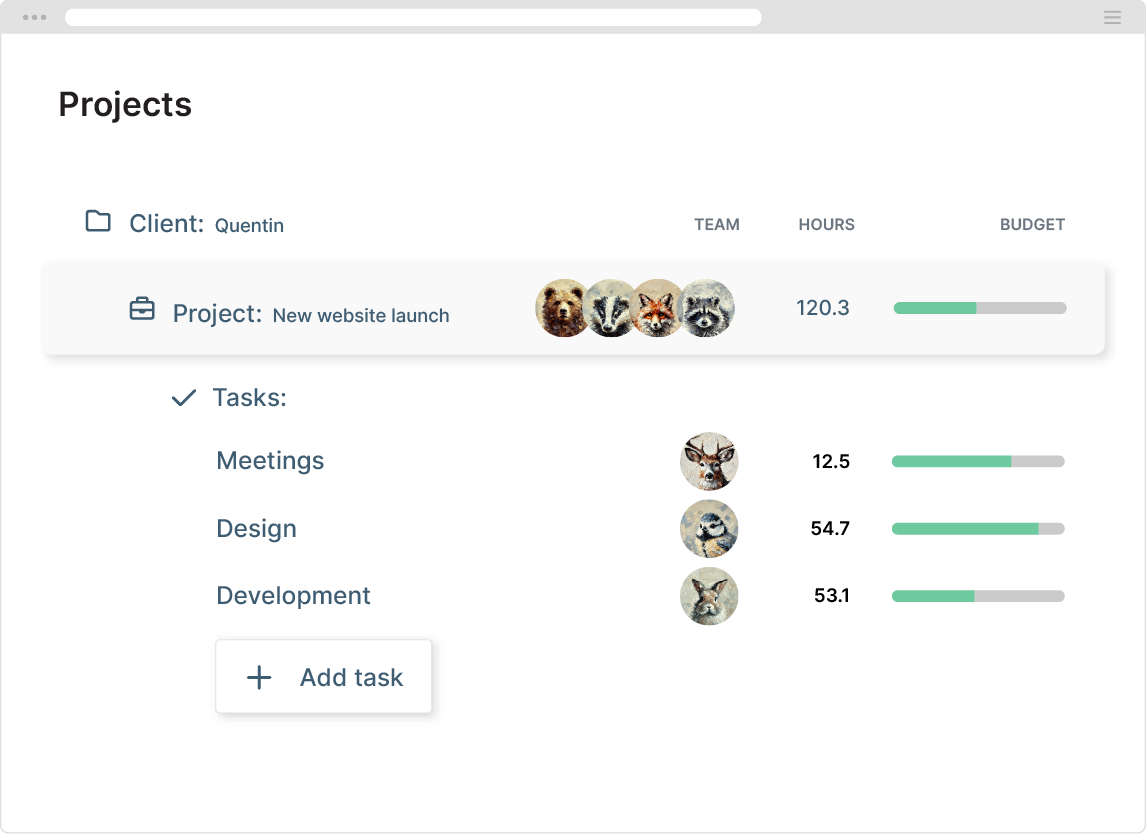
Both projects and tasks also carry a default custom ID field. Add your internal account code or job number there, and it stays attached to every hour logged against it.
Set Billing Rates to Match Each Client
Agencies don't bill every client the same way.
My Hours supports different billing structures so you can match the way each engagement is priced.
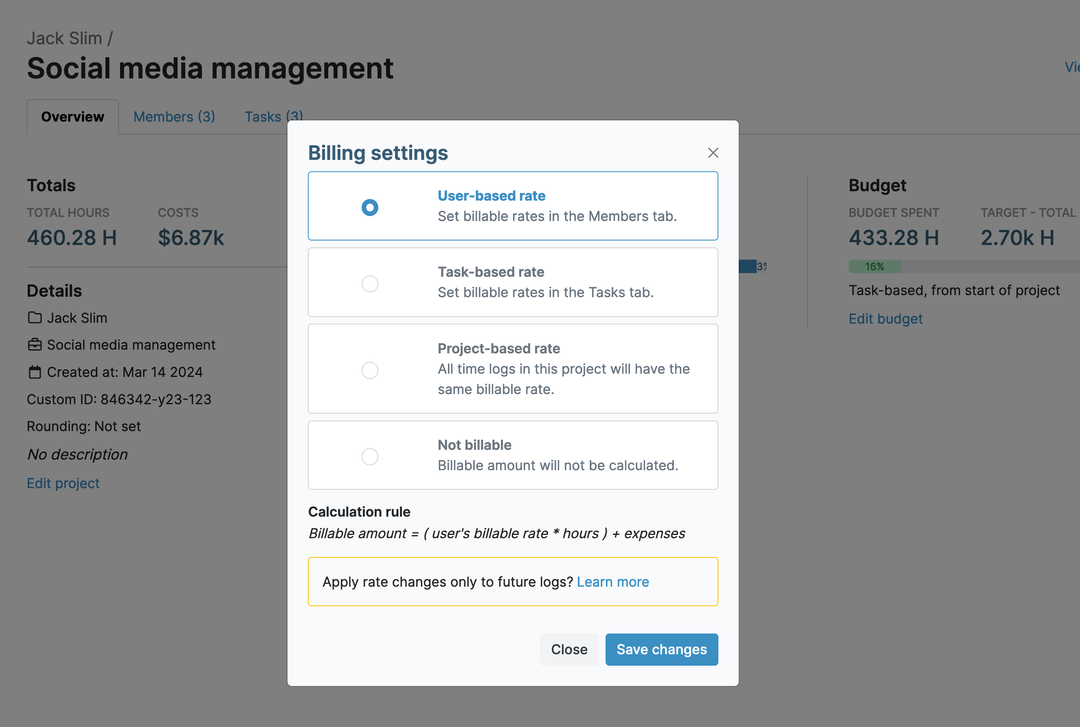
- User-based rate: The billing rate follows the person who logged the time. It is useful when senior or junior staff bill at different rates on the same account.
- Task-based rate: Assign different rates to different types of work. It makes it easier for strategy, design, development, and production to have their own billing rate within one project.
- Project-based rate: Apply one hourly rate across the entire project, regardless of who logs the time or which task they work on.
- Flat fee: Charge a fixed price for a retainer or project. Then use fixed-fee project profitability analysis to see whether the hours behind it still leave room for margin.
- Not billable: Track internal work, such as business development, team meetings, or administrative tasks, without adding it to the invoice.
Time rounding is also available.
If your agency bills to the nearest quarter (15 minutes) or another interval, My Hours rounds entries automatically, so no one has to manually adjust them before invoicing.
Profit Margins by Client and Project
A profitable client at kickoff can turn unprofitable months later. You need to see it while the work is still running.
- My Hours tracks billable rates and labor costs separately, so client revenue and the cost of delivering the work never mix into a single figure.
- Profit margins stay visible for every client and project while work is still in progress, so issues can be caught before they affect the bottom line.
- Historical project data also helps you price future work with more confidence. Pull reports from similar projects to see how much they actually cost to deliver, then use the insights to build more accurate quotes.
Keep Retainers From Slipping Into the Red
Retainers and fixed-fee projects put the client at ease, since the cost is agreed upfront. For agencies, every extra hour comes straight out of the project’s margin.
My Hours lets you monitor project budgets in several ways:
- Total hours budget: Set a limit based on the number of hours your team can log against a project.
- Billable amount budget: Define a monetary budget that decreases as billable time is tracked.
- Cost budget: Monitor labor rates and expenses together in a single running total. This is used for fixed-fee work.
- Rolling budget: Restart hours, billable amount, or costs budgets automatically each month. This is designed for ongoing retainers, not one-off projects.

Budget alerts help you stay ahead of overruns. Set a threshold between 50% and 90% of a budget, and My Hours sends an email as soon as a project reaches it.
Breaking work down by task also shows you where retainer hours are going.
If revisions consistently take more time than strategy or production, you’ll see the pattern early enough to address it with your client.
Capterra
“It added to our billable hours and improved and sped up our invoicing as well. Less time is used for administrative, non-billable hours.”
Oliver S., CEO, Design
Balance Workload Across Your Team
Agencies run lean, and one overloaded account manager or designer can put a client relationship and a delivery deadline at risk.
- My Hours’ team utilization and productivity analytics help you spot workload imbalances before it affects your clients.
- Set daily or weekly target hours for each team member, as an agency-wide standard or tailored to roles.
- Compare logged hours against those targets in the reporting tool to see who’s consistently over or under, and get an automated alert when someone falls outside their target.
- Filter the same report by billable versus non-billable time to see whether hours are going towards client work or being absorbed by internal or admin activities.
.png)
Tip: Run this report by team instead of users when you need a department-level view across multiple client accounts.
Approve Time Before It’s Billable
Invoices are built on time entries. My Hours adds an approval step so a manager or project lead can review timesheets before they become billable.
Approve or reject individual entries, and include a comment so the team member knows what to correct.
Once approved, lock the timesheet to keep the numbers behind every invoice consistent. Administrators can make changes, but approved entries will be locked for whoever submitted them.
Every correction is also timestamped, giving you clear history whenever you need to review a line item.
Share Reports With Clients
Client reporting and transparency show clients where their hours went, so they question the invoice less.
My Hours turns tracked time into reports that show where time is spent and how work is progressing.
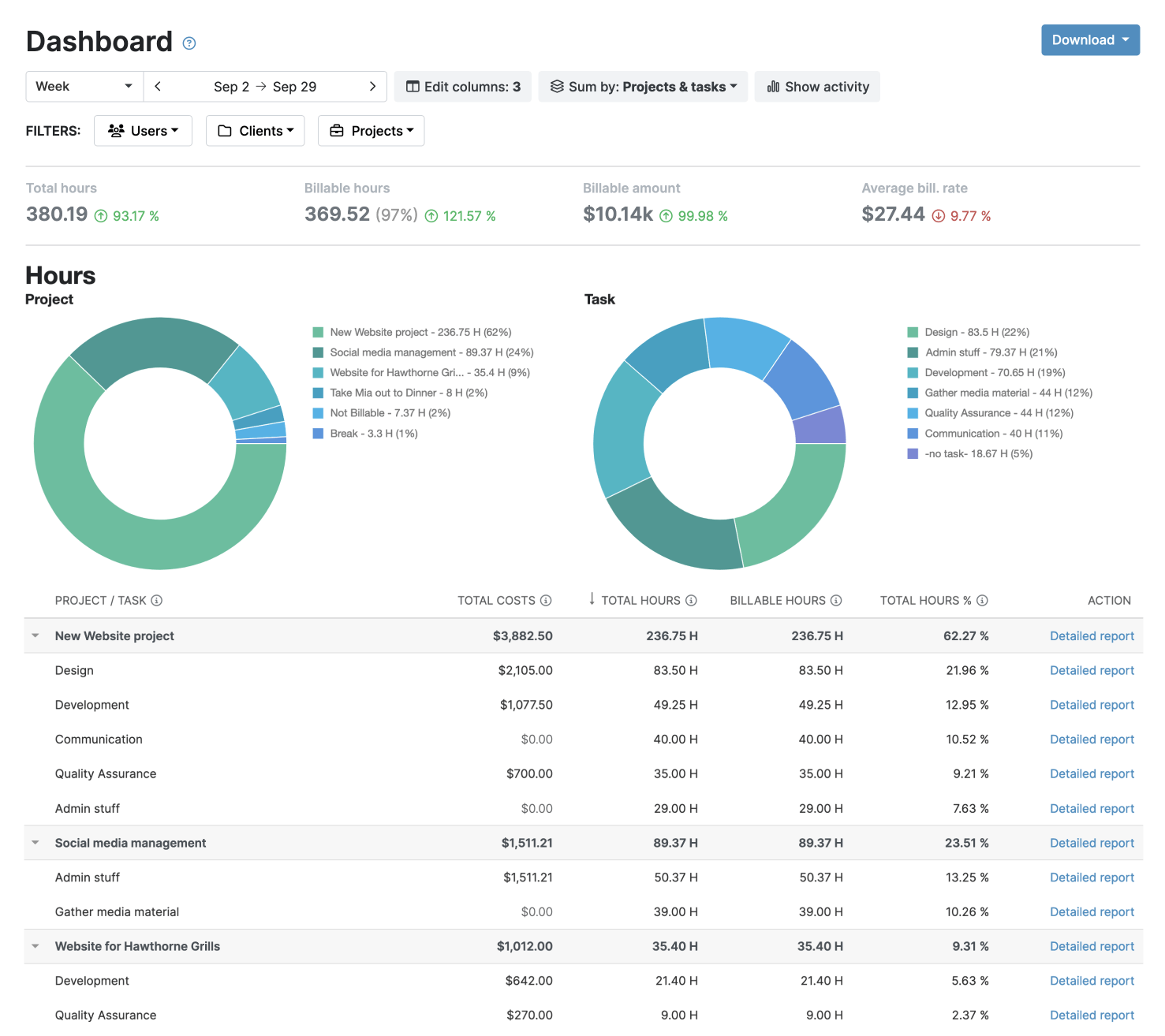
- Dashboard report: A high-level view of hours, billable amounts, costs, and profitability by client, project, or team. It is well suited for regular client updates.
- Detailed report: Filter your data down to the task level and customize the columns shown. You can use this when the client asks specific questions, or you need to review time entries.
- Timesheet report: Review time by person or team to understand how work is distributed. It works best for internal workload reviews.
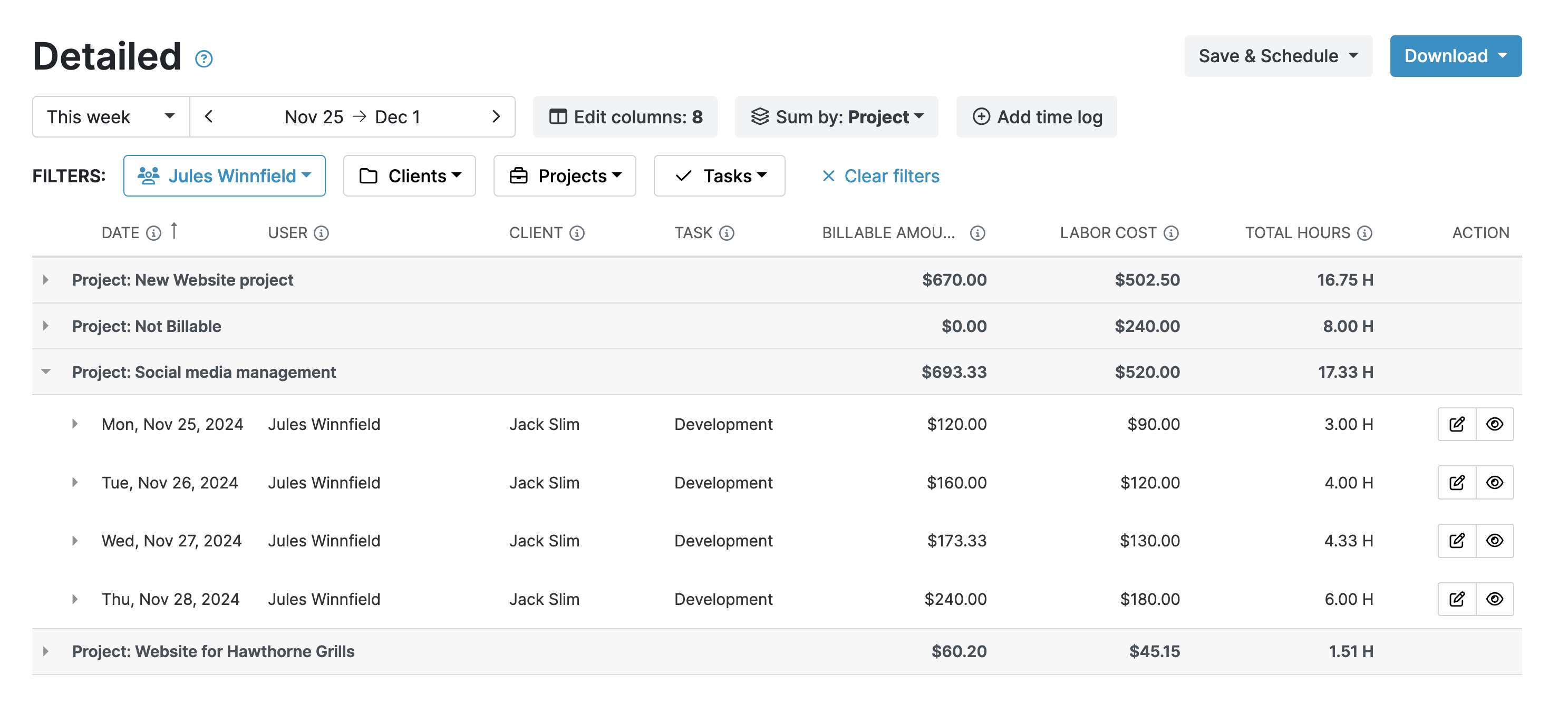
Save any report settings as a template, then generate future reports with the same filters in just a few clicks. Export them as PDF or XLS or schedule automatic delivery on whatever interval your client expects.
Track Expenses by Client and Project
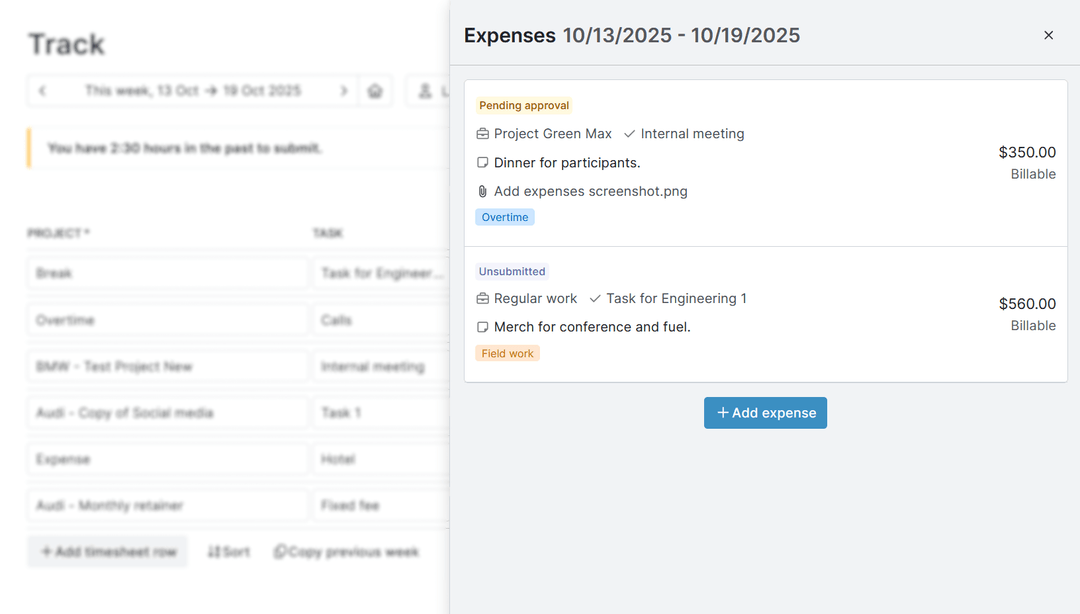
Labor makes up the biggest part of a project’s cost. However, ad spend, stock assets, contractor invoices, travel, and software also contribute to it.
Each expense needs to be assigned to the right client, and My Hours keeps every expense connected to the work it supports.
- Log each expense against the relevant project or task, with a short description and the amount.
- Attach the receipt or invoice so the record and supporting documentation stay together.
- Mark expenses as billable or non-billable to control what is passed on to the client. Billable expenses are included on invoices and count towards the budget (except when the budget is set in hours).
Invoice Directly From Tracked Time
Once time is tracked and approved, it becomes a billable invoice without exporting data or re-entering hours in a separate system.
- Select a client, choose the billing period, and pull in the billable hours and expenses to create a draft invoice.
- Add taxes, discounts, and payment terms, then download the finished invoice as a PDF or send it directly to your client.
- Update invoice status as payments come in. Mark it as paid or partially paid, so the agency has a current view of what’s outstanding.
Connect the Tools Your Agency Uses
Agencies already rely on project management, creative, accounting, and reporting tools. My Hours fits into that workflow without adding another process to manage.
- Integrate with Asana, Monday, Basecamp, ClickUp, Jira to keep projects and tasks in sync. Azure DevOps is also supported on request.
- For accounting, use QuickBooks and Xero, while Microsoft Power BI provides deeper reporting and analysis
- Need another integration? Zapier extends My Hours to more than 1000 additional apps, making it easy to automate workflows across your existing tools.
Try My Hours For Free
Since 2002, My Hours has given agency owners one place to track client work and control billing. More than 100,000 businesses now use the platform to keep billing accurate and see which accounts are actually profitable.
Your data stays secure every step of the way, backed by multiple ISO 27001 certifications: 27001:2022, 27018, and 27017, along with 24/7 customer support whenever you need it.
Start with a free 14-day trial of the Pro plan, or choose the Free plan for teams of up to five users. You can also check out our affordable Basic plan or book a demo for the Enterprise custom plan.
Capterra
“I’ve used My Hours for years to track hours put into projects, send and track invoices, and prepare annual docs for tax preparation. There are continual improvements and the team is always there to help on the rare instances I need help or advice.”
Jen H., Owner, Marketing and Advertising

