


8 Timely Alternatives (Free & Paid) for 2026
The eight best alternatives for Timely users who want a free plan, room to grow, or billing tools without moving up a plan.
Timely is built around automatic time tracking.
In the background, its Memory Tracker records the apps and websites you work in, and AI turns that record into draft timesheets that you can review and approve.
The platform also includes project budgets, planned time, reporting, and workspace capacity management.
A solid platform overall, but there are some major hiccups. There’s no free plan, the cheapest plan (Starter) caps you at 5 users and 20 projects, and task management features are a $5 per person add-on, not part of the whole package.
Read on to learn why the time tracker apps in this guide make good Timely alternatives, and how to pick the right option.
*Last updated: October 2026*
Content overview

Why Look for a Timely Alternative?
Timely is a strong option if you want automatic time tracking with minimal manual input. However, its plan limits may make other tools a better fit for some teams.
Here are the main reasons teams look for an alternative to Timely:
- No permanent free plan: Timely offers a 14-day trial with full feature access. After this, you need a paid plan. Starter costs $9 per user per month, billed annually.
- Starter caps you at 20 projects: Even on the first paid tier, you can only run 20 projects. Unlimited projects require the Premium plan ($16 per user per month, billed annually), which is $7 more per user than Starter.
- The five-user limit gets expensive fast: Starter supports up to five users, and Premium supports up to 50. Five annual Starter users cost $45 a month. Add a sixth person, and you have to move to Premium, which costs $96 a month (annually).
- No expense tracking: Timely doesn’t give you a built-in way to track costs like travel, materials, or software, so a separate tool is required.
If you want automatic tracking above everything else, Timely still does that well.
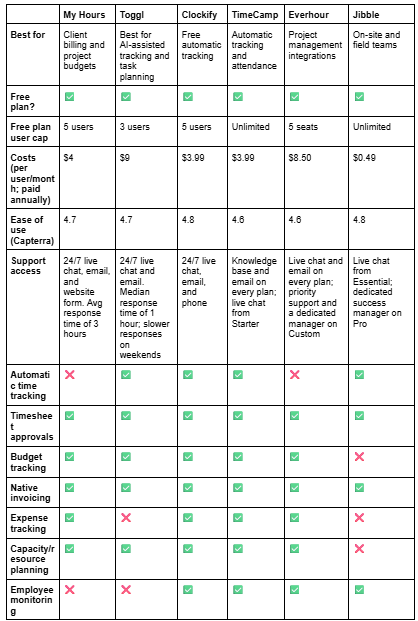
The table below gives a quick overview of the Timely alternatives covered in this guide. Each one gets a closer look further down, including what makes it a good fit for teams switching from Timely.
Top 6 Timely Alternatives at a Glance

1. My Hours: Best for client billing and project budgets
Price:
- Free (5 users)
- $5 - $9 per user (paid monthly)
- $4 - $8 per user, per month (paid annually)
- Enterprise pricing available
Available on: Desktop, Web, browser extension, iOS & Android
Pros:
 Free plan for up to 5 users with unlimited clients, projects, and tasks
- No user limit on paid plans, so you pay per user as your team grows
- Built-in task management with task lists, assignments, and templates, with no add-ons
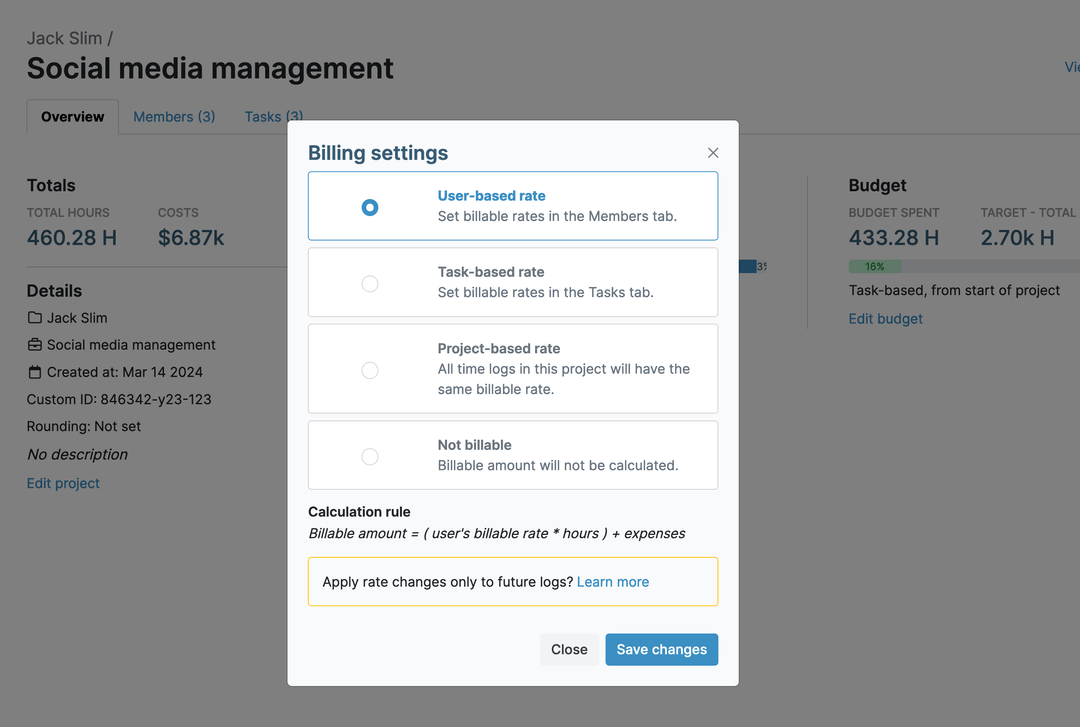
- Billing rates by user, task, or project, plus budgets in hours, billable amounts, or cost on Pro
- Invoicing, timesheet approvals, and auto-locking on Pro
Cons:
 No automatic activity tracking, so time is logged with a timer or manually
- No screenshots or employee activity monitoring for teams that want that
- Online payment collection isn’t built into My Hours’ invoicing

.png)


Why Choose My Hours Over Timely?
One advantage of picking My Hours is that, unlike Timely, you get a free plan that covers up to five users for an unlimited time with unlimited projects, tasks, and clients. You won't hit a project cap as your client list grows.
Also, none of My Hours' paid plans have a user limit.
Task management is built in, too. You can group tasks into task lists, assign them to team members, set task budgets or estimates, and reuse templates for recurring work.
Timely sells its Tasks feature as a separate add-on at $5 per person. My Hours has no add-ons, so the plan price is the only fee you pay.
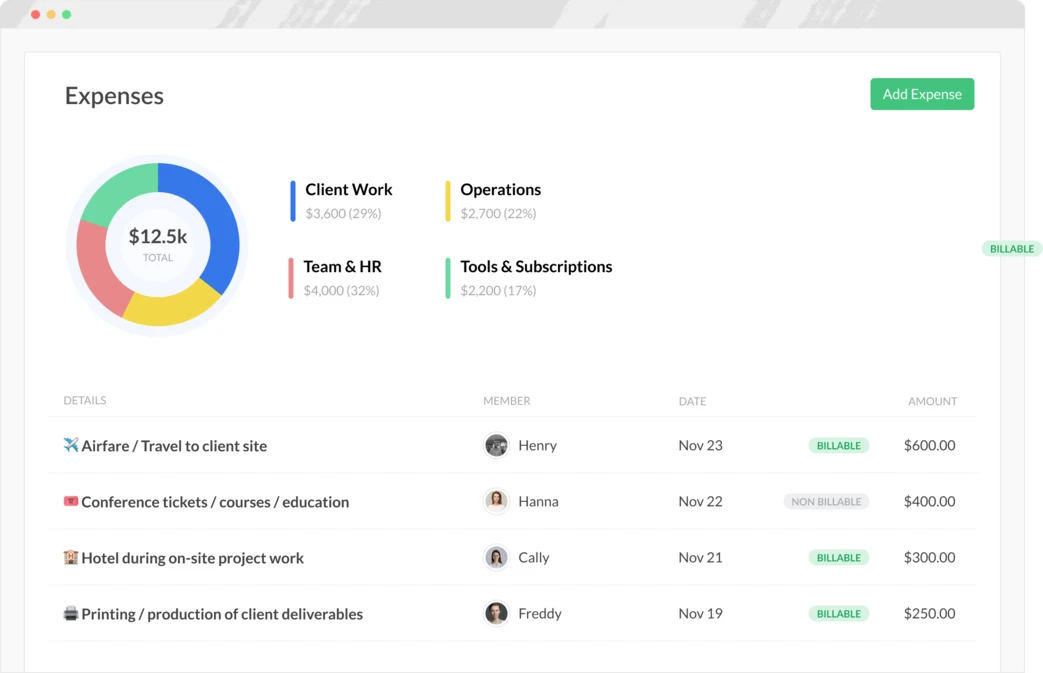
With My Hours, expenses are available on every plan, so you can log costs like travel or materials against a project while tracking time. Attach the receipt from your phone, and the cost shows up in your reports next to your hours, making it a good fit for agencies and professional service teams.
Try My Hours for yourself - no credit card needed.
Timely's Drawbacks:
1. No permanent free plan
Timely only offers a 14-day trial. Paid plans start at $11 per user (billed monthly), or $9 per user (billed annually).
How My Hours solves this: My Hours has a free plan that includes five users for an unlimited time, along with unlimited projects, tasks, and clients.
2. Starter caps you at 20 projects
Even on a paid tier, Starter caps users at 20 projects. For more, you need Premium at $16 per user per month, billed annually.
How My Hours solves this: Every My Hours plan has unlimited projects, including the free one.
3. The five-user limit gets expensive fast
Five users on Starter cost $45 a month (billed annually). Add a sixth person, and the whole team moves to Premium at $96 a month (billed annually).
How My Hours solves this: Paid plans have no user cap, and they cost much less than Timely. Billed annually, that’s $24 per month for six users on Basic or $48 per month on Pro.
4. No expense tracking
Timely has no built-in way to log costs like travel, materials, or software. Those costs end up in a separate tool, away from your hours.
How My Hours solves this: You can log expenses against projects right from the free plan and attach receipts from the mobile app.
5. Task management costs extra
Timely sells its Tasks feature as a separate add-on at $5 per person, on top of the plan price.
How My Hours solves this: Task management comes with My Hours at no extra cost. You can group tasks into task lists, assign them to team members, set task budgets or estimates, and reuse templates for recurring work.
Bottom Line Comparison

 14-day free trial, no free plan
- Automatic activity tracking with AI-drafted timesheets
- Starter capped at 5 users and 20 projects
- Project budgets, planned time, and capacity features
- Task management as a $5 per person add-on
- No expense tracking
- Free plan for up to 5 users with unlimited projects
- Paid plans with no user cap
- Built-in task management, no add-ons
- Expense tracking with receipt uploads
- Native invoicing on Pro plans

2. Toggl: Best for AI-assisted tracking and task planning
Price:
- Free (3 users)
- $12 - $24 per user (paid monthly)
- $9 - $16 per user per month (paid annually)
- Enterprise pricing available
Available on: Web, Windows, macOS, browser extensions, iOS & Android
Pros:
- Free plan for up to 3 users
- Tasks, boards, and task estimates on the free plan
- Automatic tracking and personal reports on every plan
- Private activity tracking that lets you choose what becomes a time entry
- Draft projects to see how new work would affect schedules
Cons:
- Capacity management costs an extra $5/user/month
- Timesheet approvals are only available on Premium
- Native invoicing is only a downloadable PDF
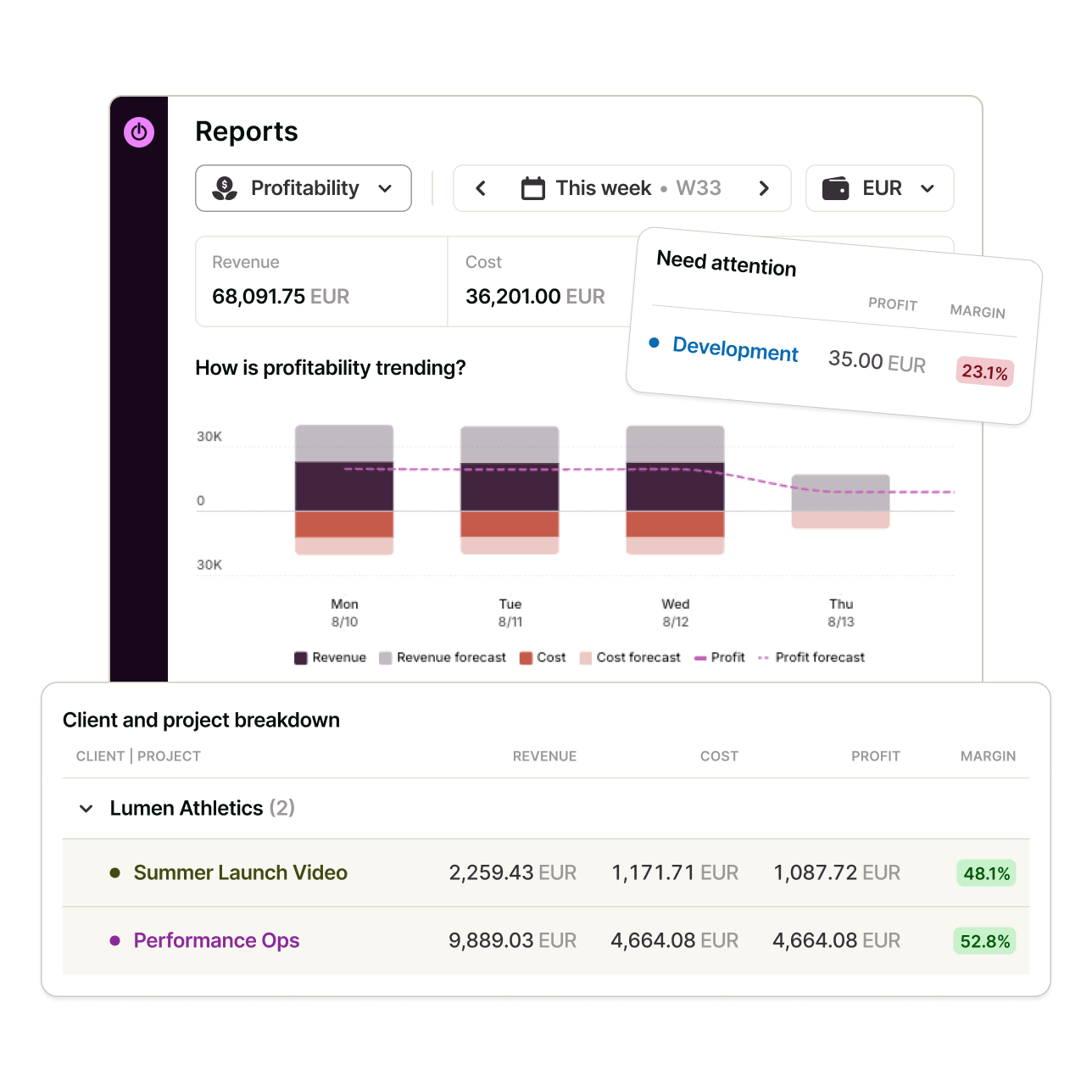
Why Choose Toggl over Timely?
Toggl lets you start for free, covering up to three users, while Timely only offers a 14-day trial. Also, there are no user limits on its paid plans.
Like Timely, Toggl tracks time automatically, and it does so on every plan. So you won’t be losing this capability if you switch.
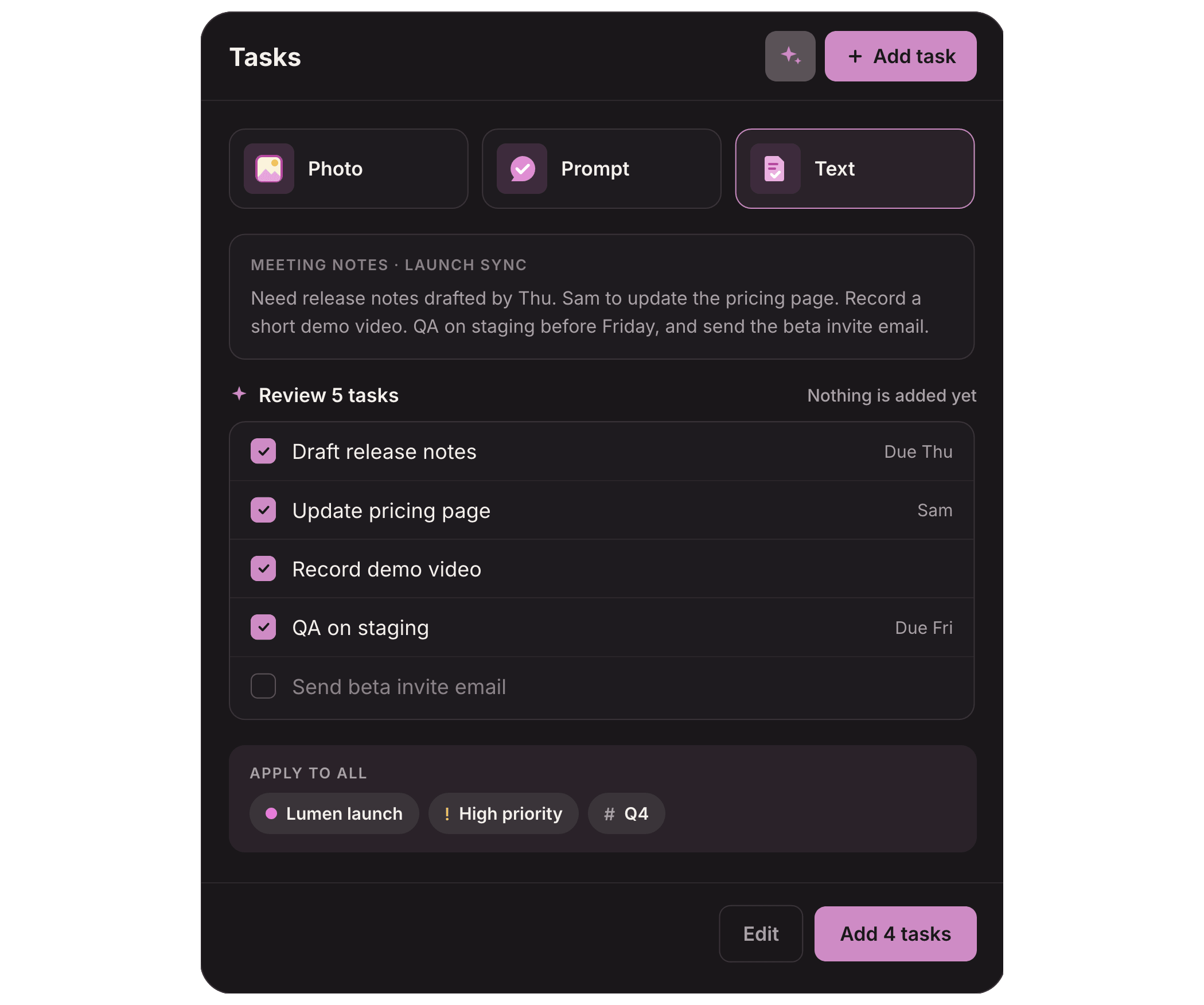
One advantage Toggl has over Timely is that task planning comes free. On the free plan, you can create tasks, organize them on boards, and add estimates, so planning and tracking happen in the same place. Timely, by contrast, sells its Tasks feature as a $5-per-person add-on.
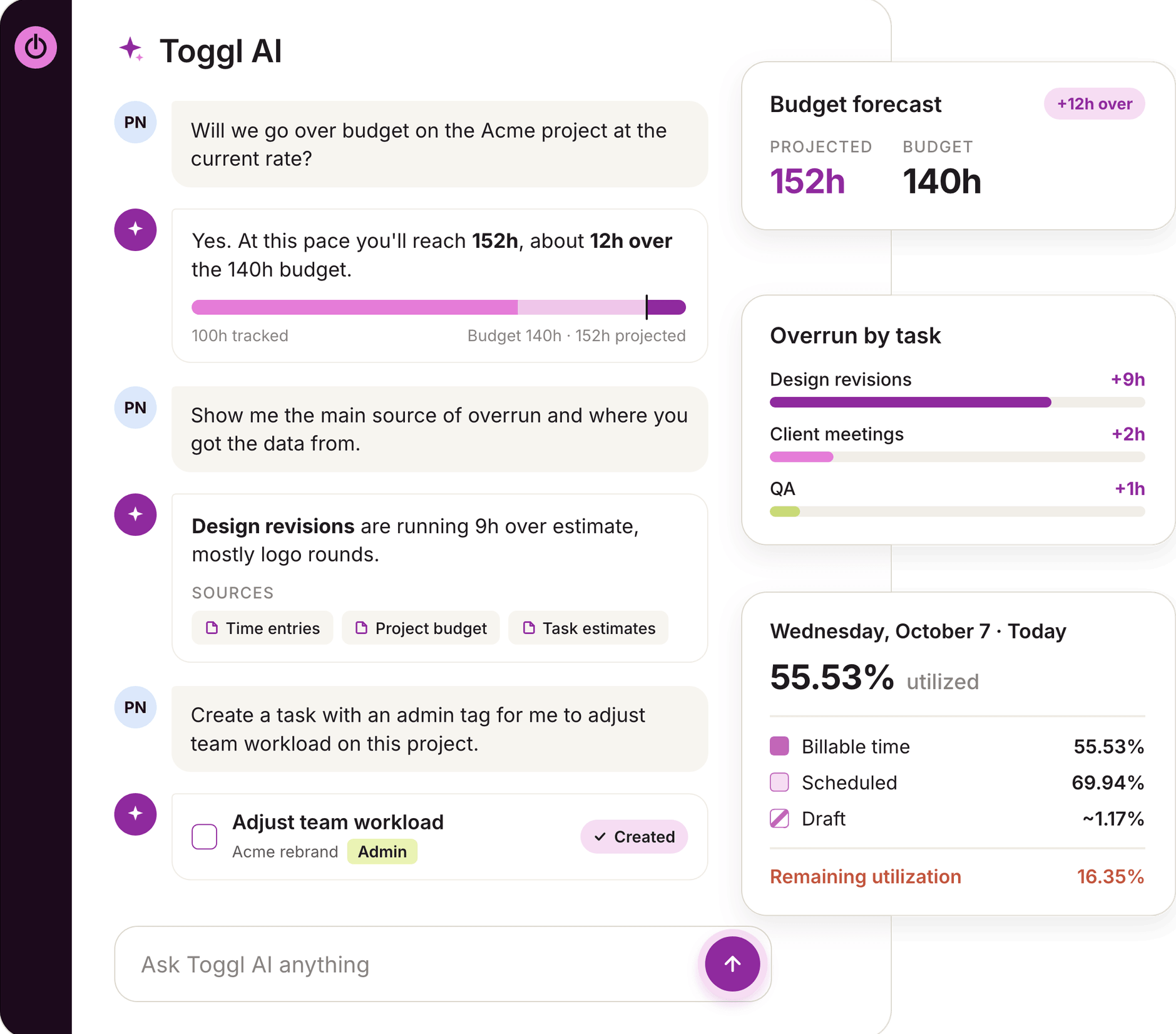
The AI works differently as well. Timely uses AI to draft your timesheets from tracked activity. Toggl AI answers questions about your data in plain language, like which projects went over estimate or who hasn't tracked time this week. It can also log time or set up projects for you.
Toggl also has an official MCP server so that you can manage time entries, tasks, projects, and reports from AI tools like Claude. Timely doesn’t have an MCP server.

3. Clockify: Best for free automatic tracking
Price:
- Free (Up to 5 users)
- $4.99 - $14.99 per user (paid monthly)
- $3.99 - $11.99 per user per month (paid annually)
- CAKE.com bundle: $15.99/user/month (billed monthly), or $12.99/user/month (billed annually)
- Enterprise pricing available
Available on: Desktop, Web, browser extension, iOS & Android
Pros:
- Free plan for up to 5 users, with Auto Tracker included
- Kiosk clock-in from a shared device, with PIN and break tracking from Basic
- Time off, locked timesheets, invoicing, and overtime from Standard
- Expense tracking with receipts on Pro
- Idle detection and reminders on Free tier
Cons:
- Free plan reports are limited to a 31-day date range
- Billable rates are only available on paid plans
- Invoicing and timesheet approvals require Standard
- Budgets, labor costs, forecasting, and activity monitoring come with Pro
Why choose Clockify over Timely?
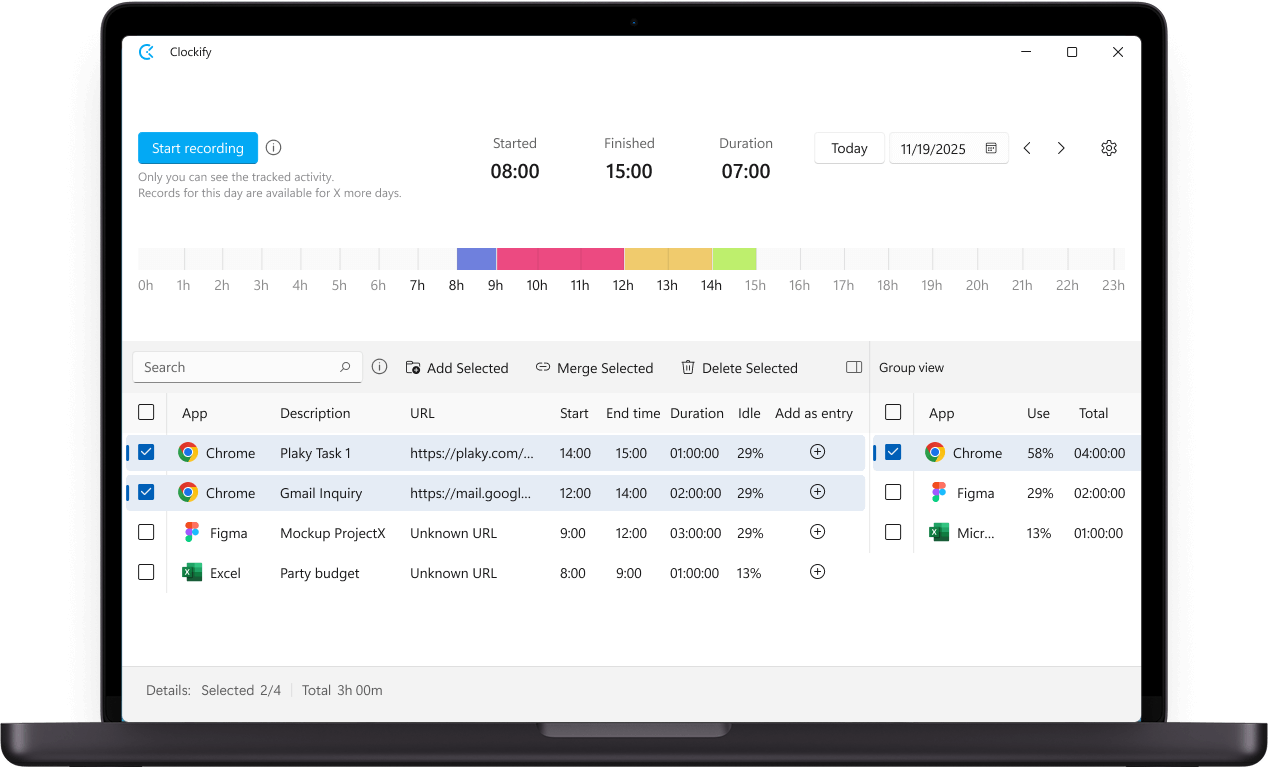
With Clockify, you get a generous free plan that covers up to five users and includes automatic tracking.
Like Timely, it has an auto tracker that records the apps, websites, and documents you work in, so you won’t be losing that capability if you switch. In fact, Clockify’s auto tracker is available from the free plan, whereas you’ll need to pay at least $9 per user per month (annually) for this feature on Timely.
One thing you get with Clockify that you don't get with Timely is a kiosk. Your team can clock in and out from a shared device using a personal PIN, and track breaks, too. Kiosk QR codes are available from Standard, and photo capture at clock-in is available from Pro.
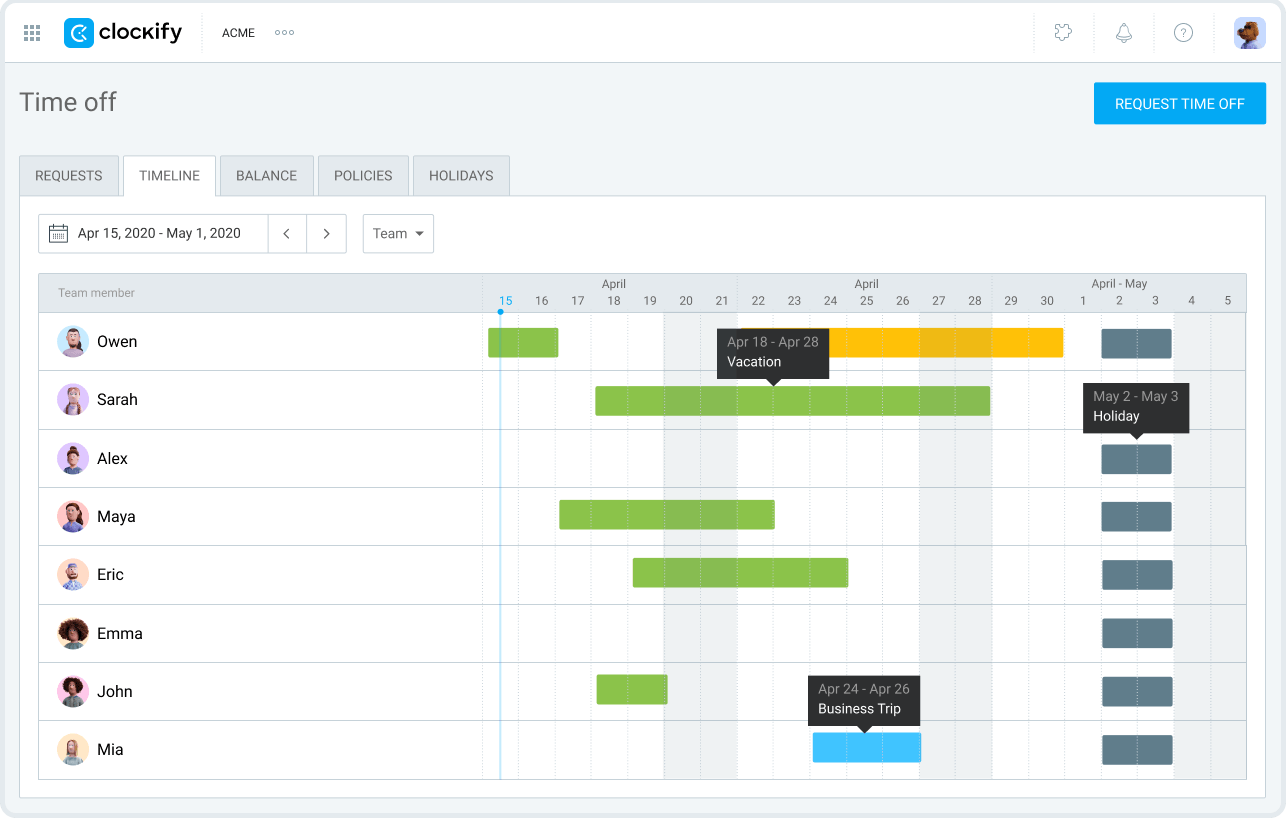
Time off is also built in with Clockify. From the Standard plan, you can set leave policies and holidays, handle time off requests, and track how many days each person has left. In Timely, managers log vacation hours by hand.
Clockify’s Standard plan also lets you lock timesheets and track overtime. Timely only offers locked time and overtime tracking on its Unlimited plan (which starts from $22 per user per month, billed annually).
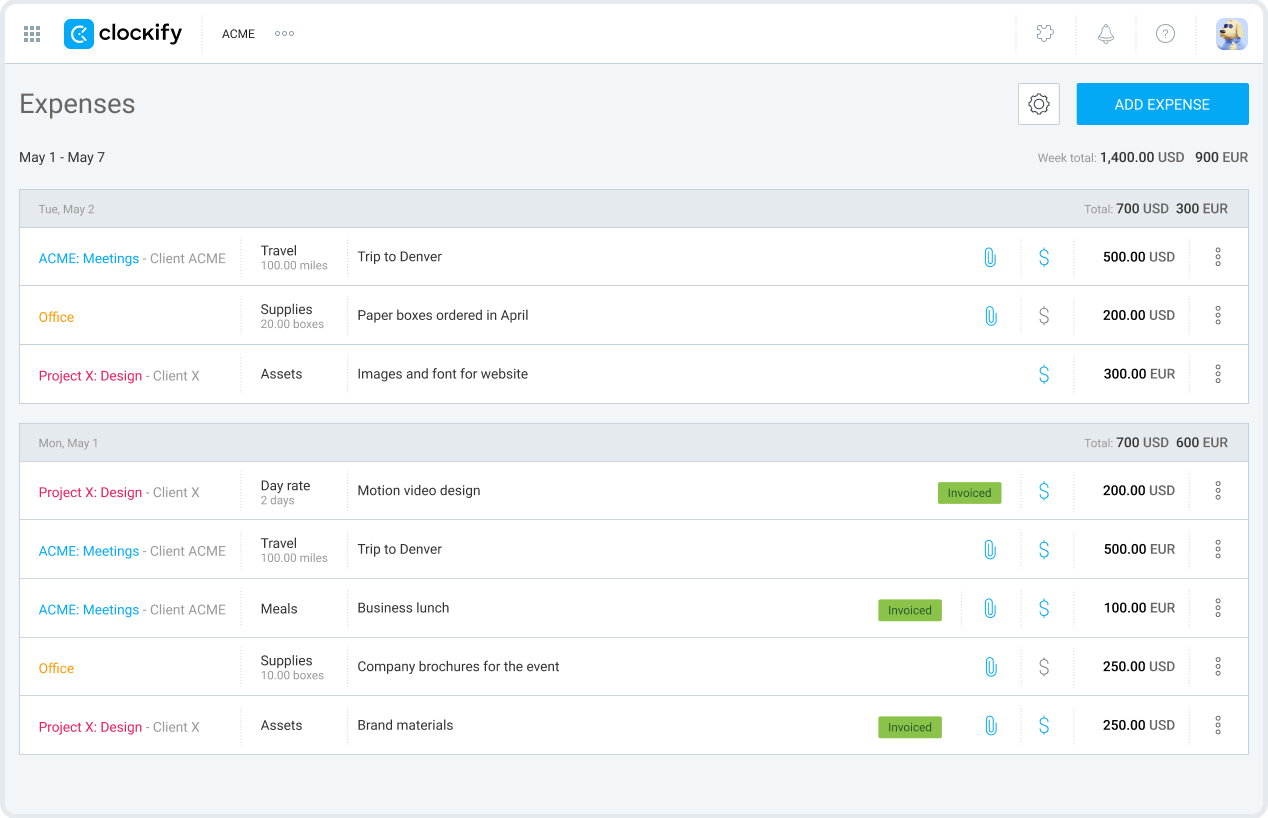
With Clockify, expense tracking and receipt attachments are available from the Pro plan, unlike Timely, where there’s no way to log expenses.
Another thing you can get with Clockify but not Timely is team location tracking. Timely's mobile app does track your GPS location, but it's for your own use. It logs places you stay for more than five minutes to your timeline, so you can turn them into time entries.
With Clockify's Pro plan, you can record where people clock in and see who's where on a map. You can also replay your mobile team's daily routes, review every job site they visited, and check who's currently clocked in at each one.

4. TimeCamp: Best for automatic tracking and attendance
Price:
- Free forever plan (unlimited users and projects)
- $5.49 - $13.99 per user (paid monthly)
- $3.99 - $9.99 per user per month (paid annually)
- Enterprise pricing available
Available on: Web, desktop, browser extensions, iOS & Android
Pros:
- Unlimited users and projects on the Free plan
- Automatic time tracking through the desktop app
- Attendance, time-off, and overtime tracking available from Starter
- Invoicing from Starter
- GPS location tracking on paid plans, supported by an administrator
- 100+ integrations across paid plans
Cons:
- Timesheet approvals are only available on Ultimate
- Screenshots and employee monitoring are available on Ultimate and Enterprise
- AI Time Tracker is an optional paid feature that uses separate, usage-based credits
Why choose TimeCamp over Timely?
TimeCamp's free plan gives you unlimited users and unlimited projects, while Timely has no free tier.
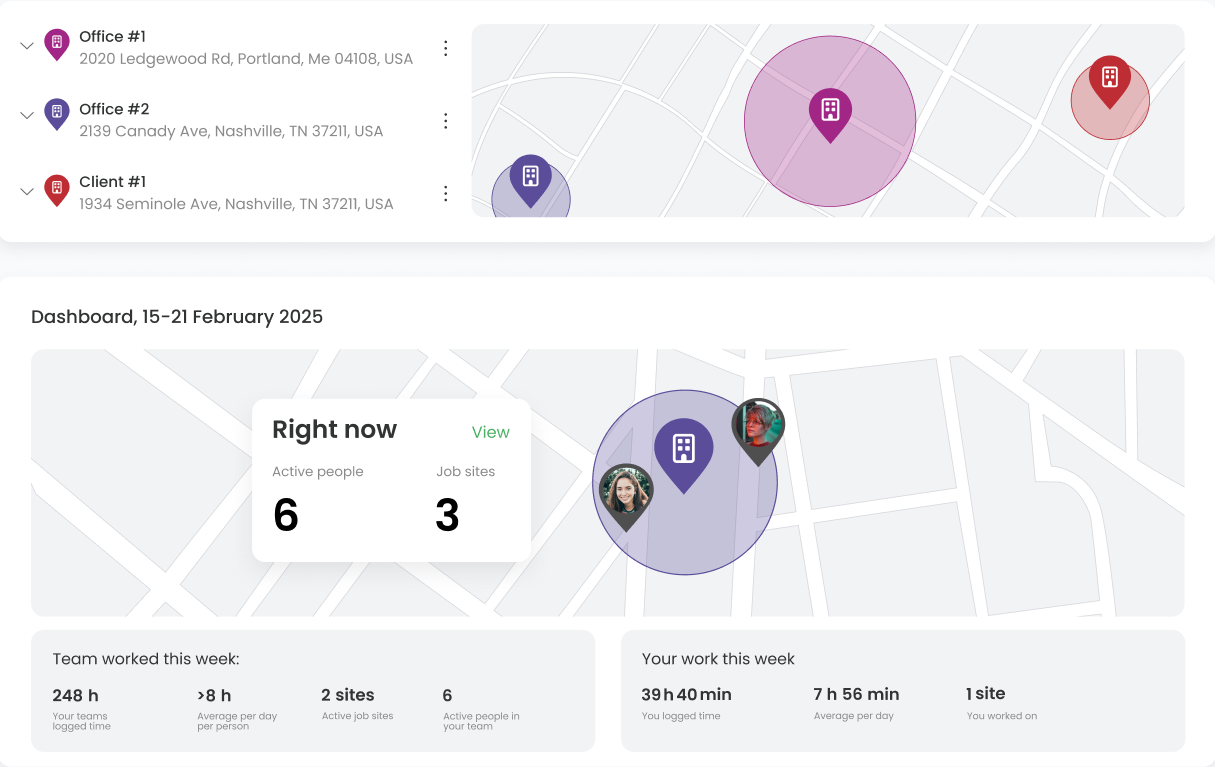
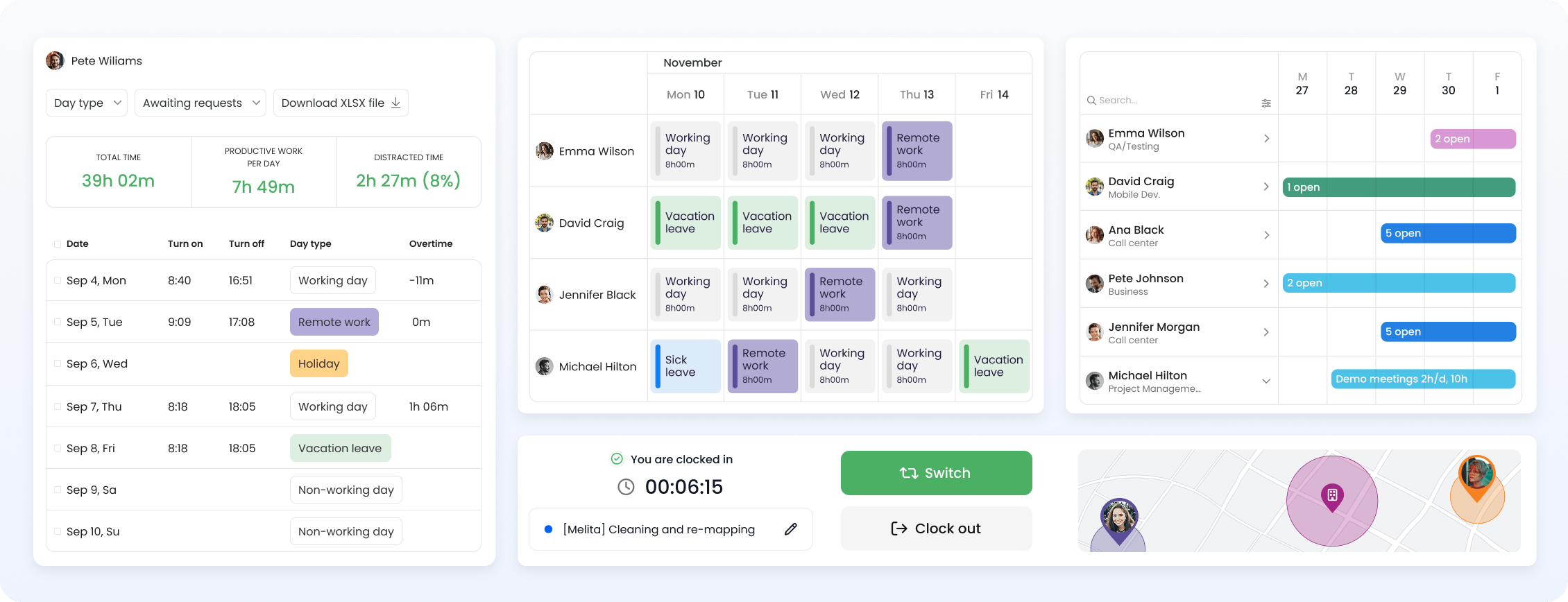
Leave management is another one. Timely doesn't have a leave management system. TimeCamp's Starter plan includes time off and an Attendance Calendar. Your team requests leave in the app, and you approve or reject it with one click.
The calendar then shows who's in and who's off or working remotely. You can also set public holidays ahead of time so they don't clash with deadlines.
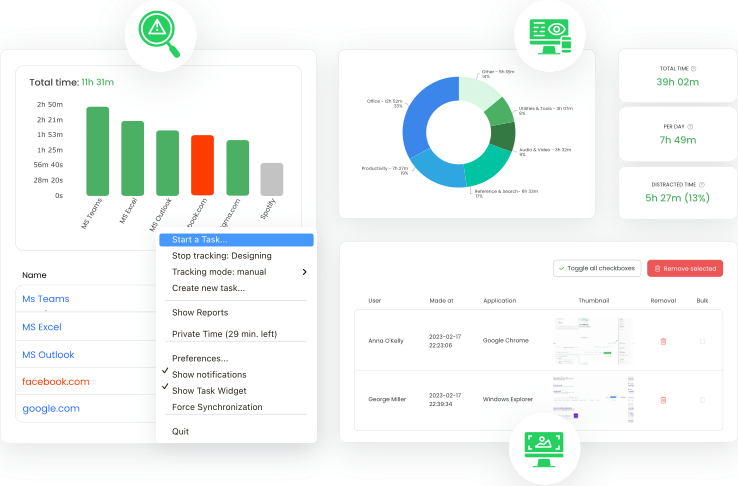
Both platforms use AI to draft timesheets from your activity, so you review entries instead of typing them out.
However, TimeCamp is ahead in this area. Its AI agent flags problems without being asked, like an entry that looks misassigned or logged time that falls short of the estimate. It also has an official MCP server, so you can log hours, start timers, create projects, and pull reports just by chatting with Claude, ChatGPT, or Cursor.
With TimeCamp, you also get expense tracking on the Ultimate plan, where you can log project costs, attach receipts, and add billable expenses to your invoices. Timely has no equivalent.

5. Everhour: Best for project management integrations
Price:
- Free (up to 5 seats)
- $10 per seat (paid monthly)
- $8.50 per seat per month (paid annually)
- Enterprise pricing available
Available on: Desktop, Web, Apple Watch, iOS & Android
Pros:
- Every feature included in one paid plan
- Built-in project management with list and board views
- Native integrations with Asana, ClickUp, Jira, Trello, and Monday
- Expense tracking with receipts and unit pricing
- Time off with multiple leave types and automatic accruals
Cons:
- Paid plan requires at least 5 seats
- Budgeting, invoicing, time approval, and expense tracking aren’t on Free plan
- AI-powered tracking is still a Mac-only private beta
- Desktop app is Mac-only, with Windows "coming soon"
Why choose Everhour over Timely?
Besides having a free plan for up to five seats, Everhour keeps its pricing simple. There's one paid plan, Team, plus a Custom plan for larger organizations.
So you don't have to compare tiers or work out which plan unlocks the feature you need. Team includes every feature and costs $8.50 per seat per month, billed yearly.
The only catch is that Team requires at least five seats. So, even if your team has three people, you'll pay for five. On yearly billing, that's $510 a year, or $42.50 a month.
Regardless, Everhour is still a strong Timely alternative.
One big reason is project management. Timely's project dashboard tracks hours, budget usage, and planned vs. logged time, but managing tasks needs its $5-per-person Tasks add-on.
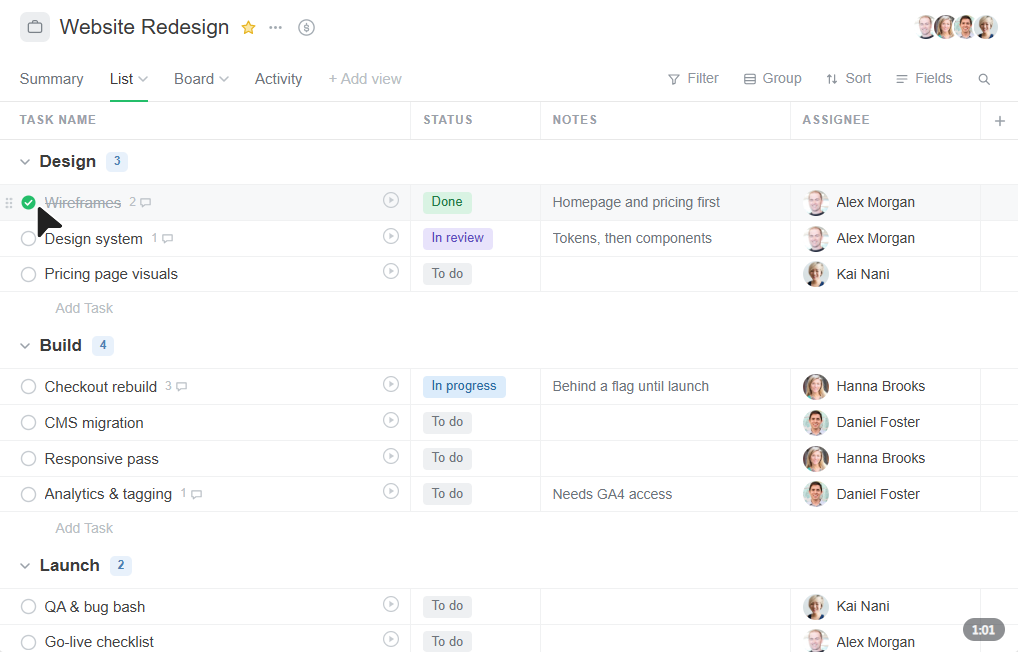
Everhour's Team plan lets you create tasks with estimates, group them into sections, and switch between list and board views. You can also add custom fields, attach files, and comment on tasks. Already using Asana, ClickUp, or Jira? Sync your tasks from there instead.
Everhour also tracks expenses, which Timely doesn't.
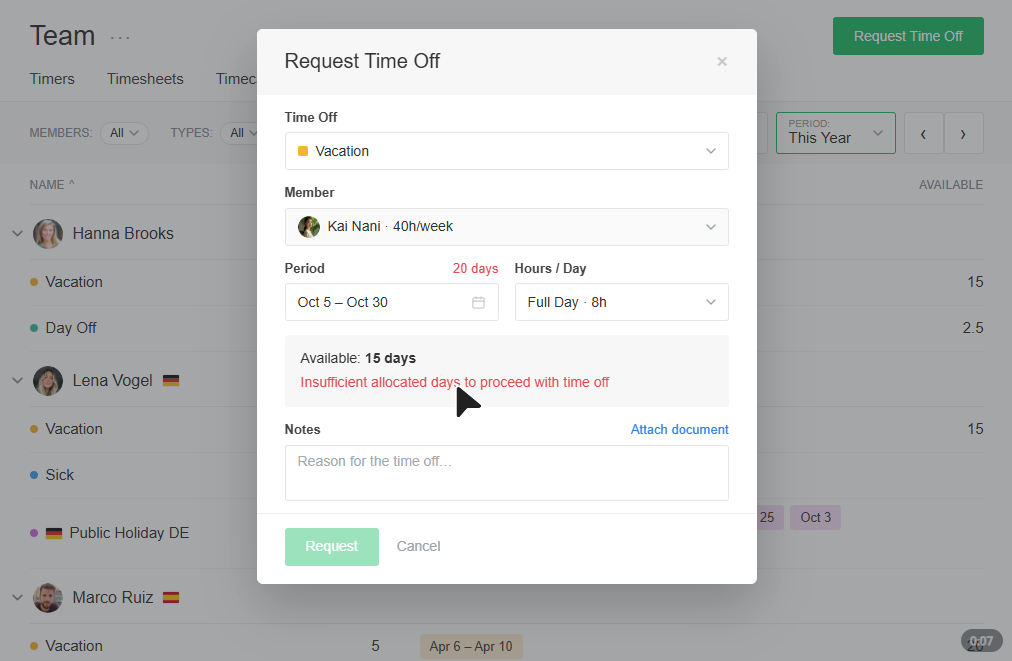
Then there's time off. While Timely has no leave management, Everhour lets you create leave types like vacation and sick days, each with its own accrual rules, and balances update automatically.
You can approve requests in one click or auto-approve them. It also flags when too many people request the same dates.
Heads up: unlike Timely, EverHour lacks automatic tracking, so users have to rely on timers and manual time entries.

6. Jibble: Best for on-site and field teams
Price:
- Free (Unlimited users)
- $0.79 - $2.49 per user (paid monthly)
- $0.49 - $1.99 per user per month (paid annually)
Available on: Desktop, Web, browser extension, iOS & Android, kiosk
Pros:
- Free plan for unlimited users
- Paid plans from $0.49 per user per month (billed annually), with no seat minimum
- Face recognition and GPS-verified clock-ins on the free plan
- Geofencing with automatic clock-in and clock-out
- Kiosk mode with face, PIN, QR code, or NFC clock-ins
- Offline tracking that syncs once you're back online
Cons:
- No expense tracking
- Advanced leave management and unlimited job sites need the Growth plan
- Live location tracking needs the Pro plan
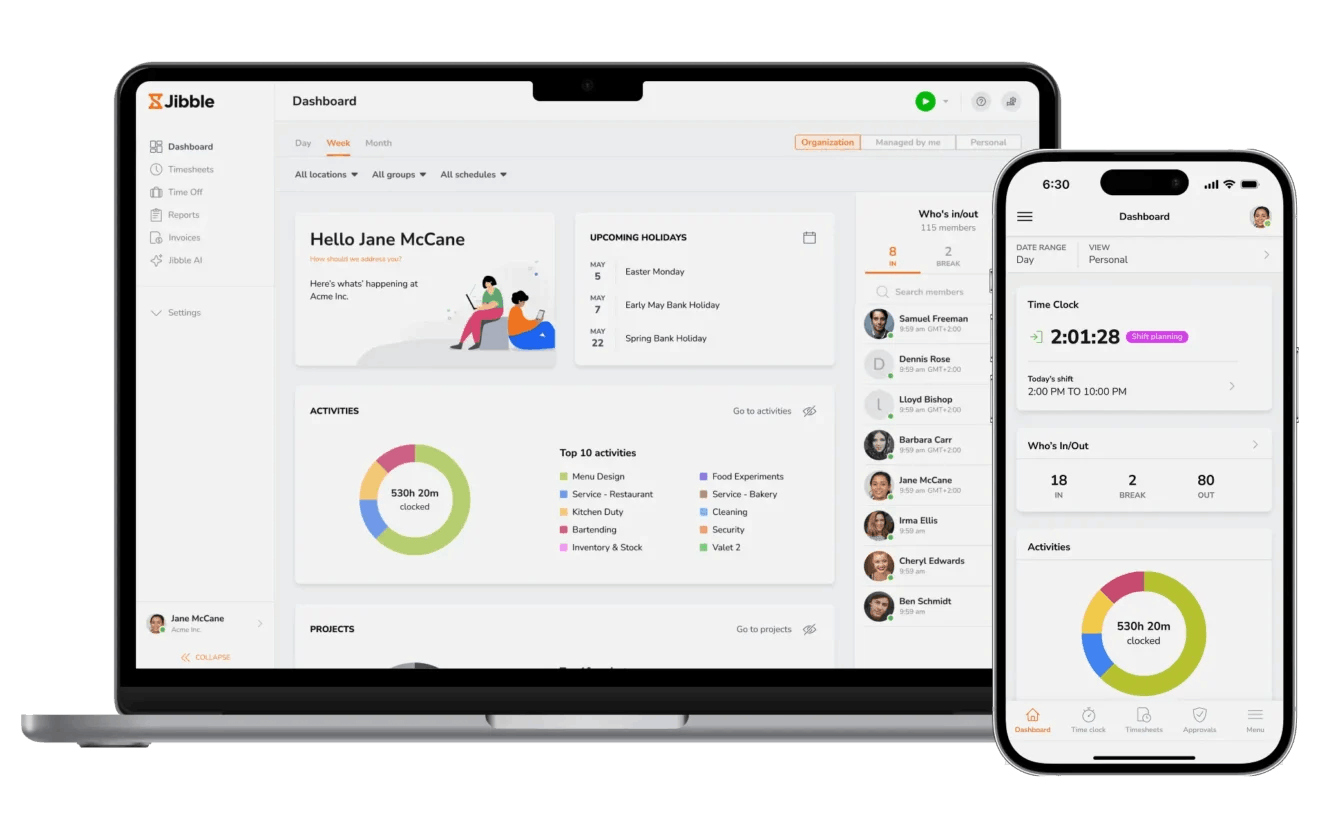
Why choose Jibble over Timely?
Jibble’s a great Timely alternative because its free plan covers unlimited users. Even the paid plans are very affordable, ranging from $0.49 to $1.99 per user per month on annual billing. And you don't have to buy a minimum number of seats either.
It's a solid fit if you need a platform that focuses on verifying who's clocking in, where, and when, especially for on-site and field teams.
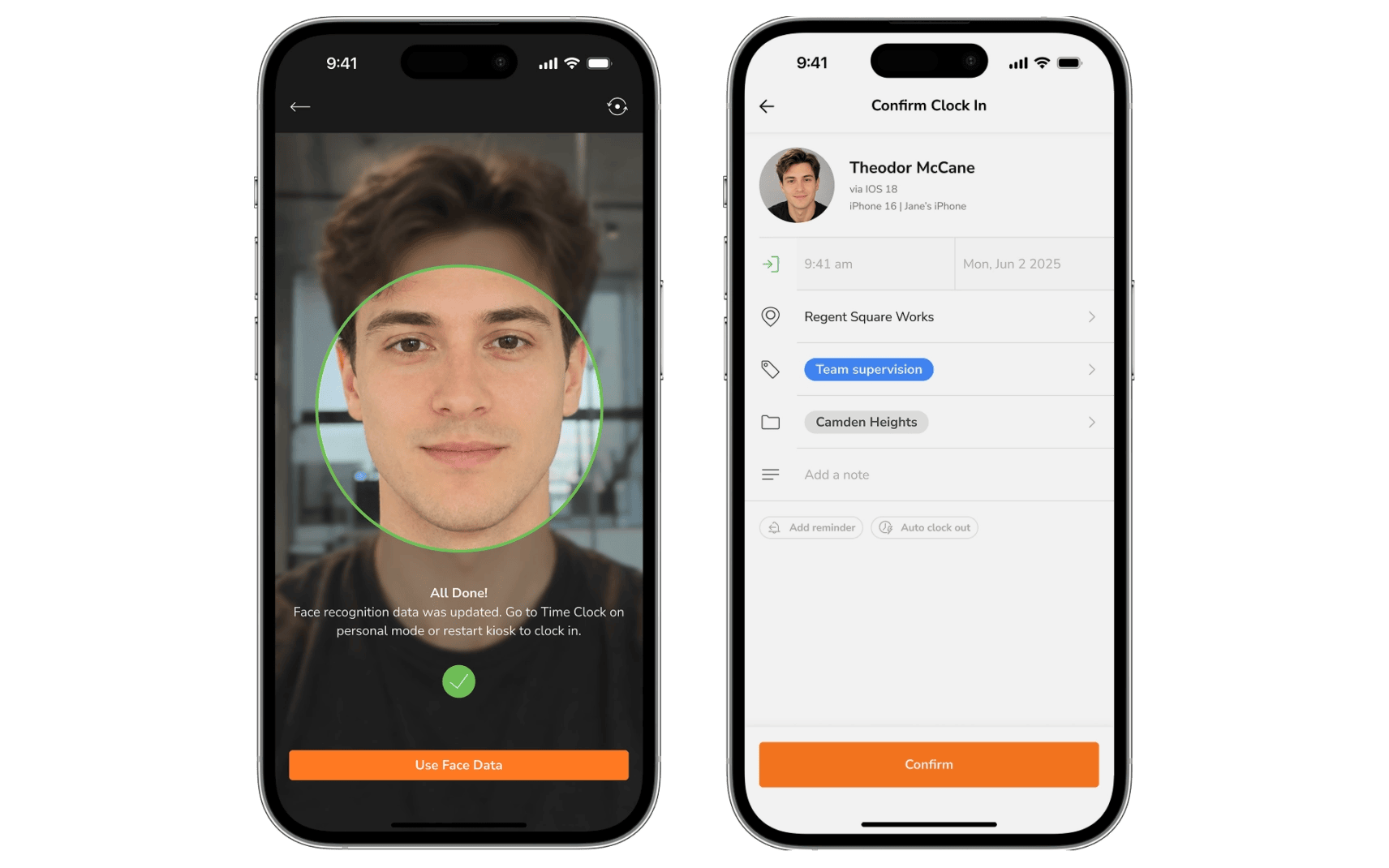
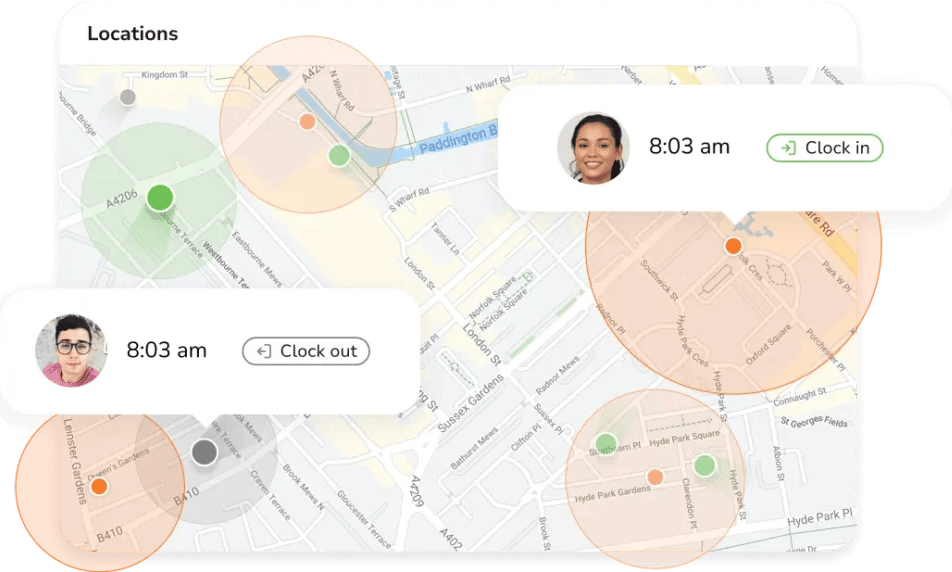
From the free plan, you can verify clock-ins with face recognition so nobody clocks in for a coworker. You can also set geofences so people can only clock in at approved sites, or have Jibble clock them in and out automatically when they arrive and leave.
Timely's mobile app logs your GPS location, but only to help fill in your own timeline.
There's also a kiosk mode that turns a shared tablet into a clock-in station. Your team can clock in with their face, a PIN, a QR code, or a tap of an NFC card, and the kiosk keeps working offline.
On Jibble’s Pro plan, managers can also see where field staff are in real time and replay the routes they took.
Leave management is built in too. Timely has none, so managers log vacation hours by hand. In Jibble, your team can check their balances and request time off from any device, and also create custom leave types.
The main downside is expenses. Like Timely, Jibble doesn't have expense tracking, though that’s one of the planned features.
More Timely Alternatives

7. Harvest: Best for invoicing and online payments
Price:
- Free (1 seat, 2 projects)
- $11 - $17.50 per seat per month (billed monthly)
- $9 - $14 per seat per month (billed annually)
- Enterprise pricing available
Available on: Web, Windows and Mac desktop apps, iOS & Android
Pros:
- Invoicing with online payments through Stripe and PayPal from the Teams plan
- Recurring invoices and late payment reminders
- Expense tracking with receipt uploads
- Free plan with time tracking, expenses, and up to 4 custom reports
- Profitability reports to track project margins on the Enterprise plan
Cons:
- Free plan is limited to 1 seat and 2 projects
- Usage-based fees for extra invoices, projects, clients, and tasks
- No background activity tracking
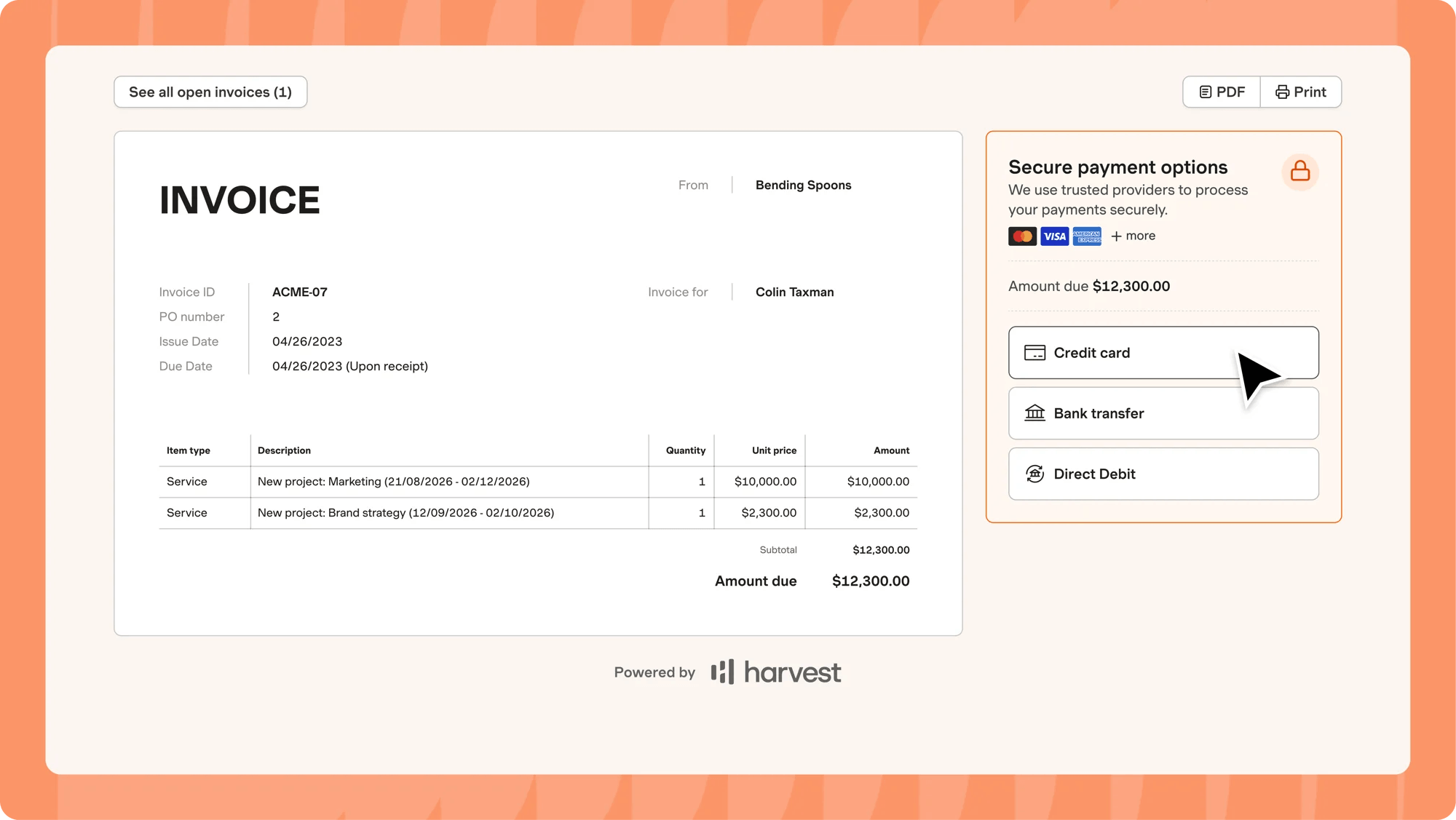
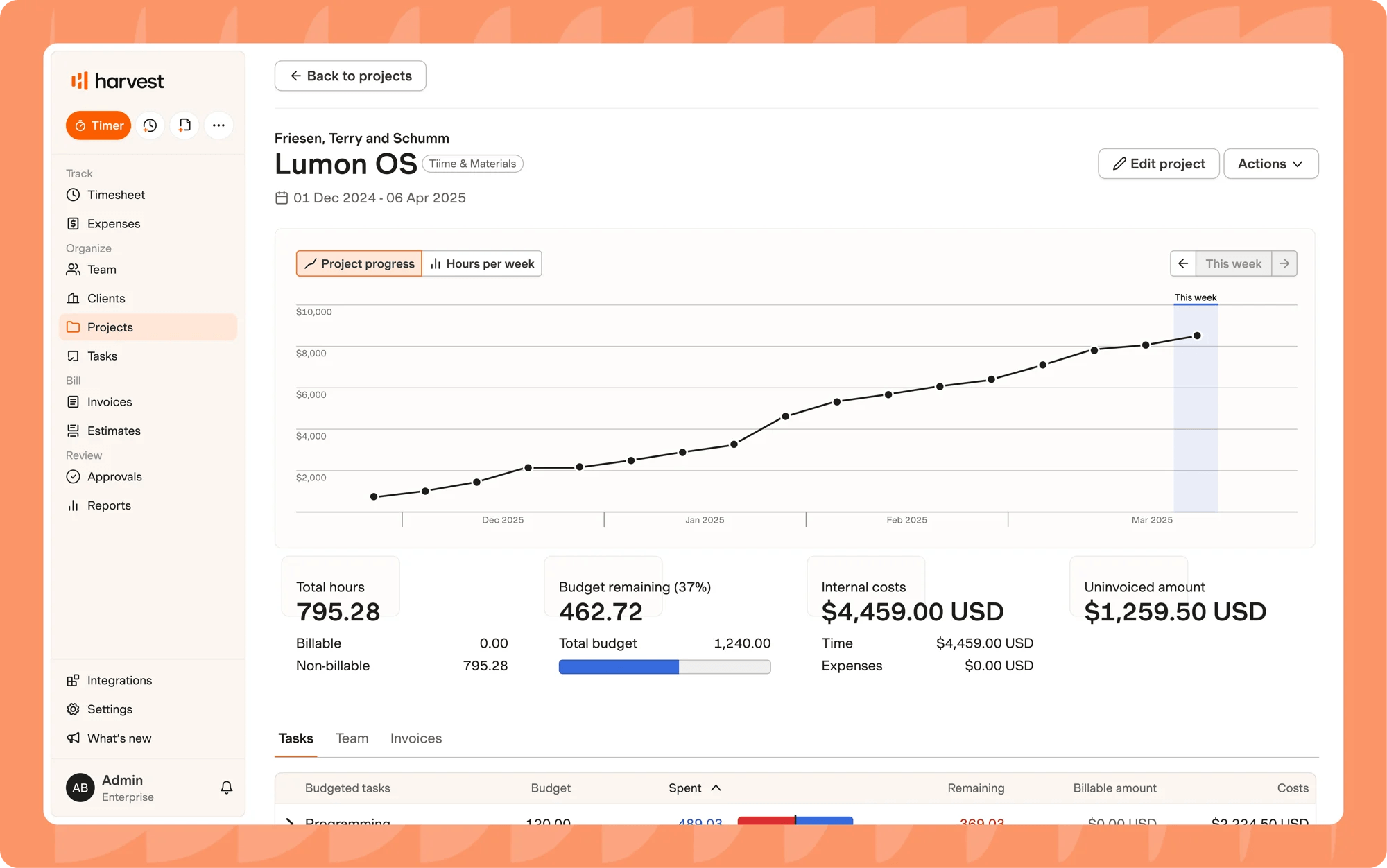
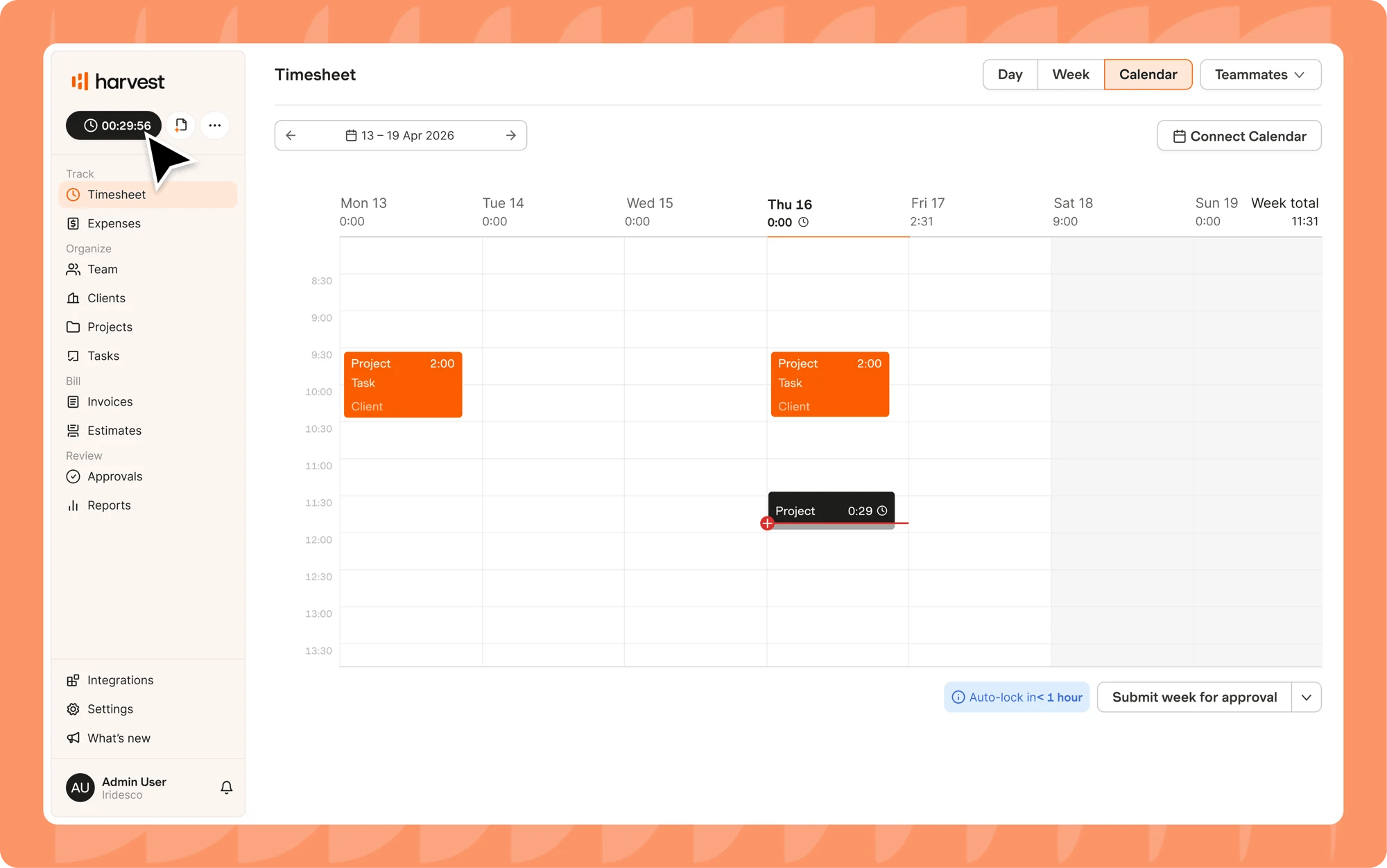
Why choose Harvest over Timely?
Unlike Timely, Harvest has a free plan that comes with one seat and two projects. That tier is ideal for solo freelancers and includes time tracking, expense tracking, and invoicing.
One of Harvest’s strongest selling points is billing. Both tools turn tracked time into invoices and sync with QuickBooks Online, but Harvest goes further.
On the Teams plan, clients can pay straight from the invoice through Stripe or PayPal, and you can set up recurring invoices and late payment reminders. It also syncs invoices and payments with Xero.
If you're in the US or Canada and use Stripe, you can even pass the processing fees on to your client, so you get the full invoice amount.
You can add expenses to invoices too, with photos of receipts attached. Timely can't do this, since it has no expense tracking.
Just know that you'll be giving up automatic tracking. Timely records your work in the background, while Harvest relies on timers, timesheets, and calendar imports.
Another caveat is that Harvest applies usage fees beyond the base subscription. As your team grows, extra invoices, projects, clients, and tasks are billed based on what you use.

8. Beebole: Best for resource planning and time off
Price:
- Free (Up to 5 users)
- €10 - €20 (~$9 - $18) per user (paid monthly)
- €9 - €18 (~$10 - $20) per user, per month (paid annually)
Available on: Web, iOS & Android
Pros:
- Free plan for up to 5 users, with resource planning included
- Planned hours pre-fill timesheets, ready to confirm or adjust
- Time off, public holiday tracking, and resource planning from the Free plan
- Multi-level timesheet approvals from the Essential plan
- Monitor budgets and project costs in real time (Advanced plan)
Cons:
- No automatic background tracking
- Expense tracking, budgets, and profitability need the Advanced plan
- No built-in invoicing
Why choose Beebole over Timely?
Unlike Timely, Beebole has a free plan, and it covers up to five users. That plan also comes with resource planning and basic time off tracking.
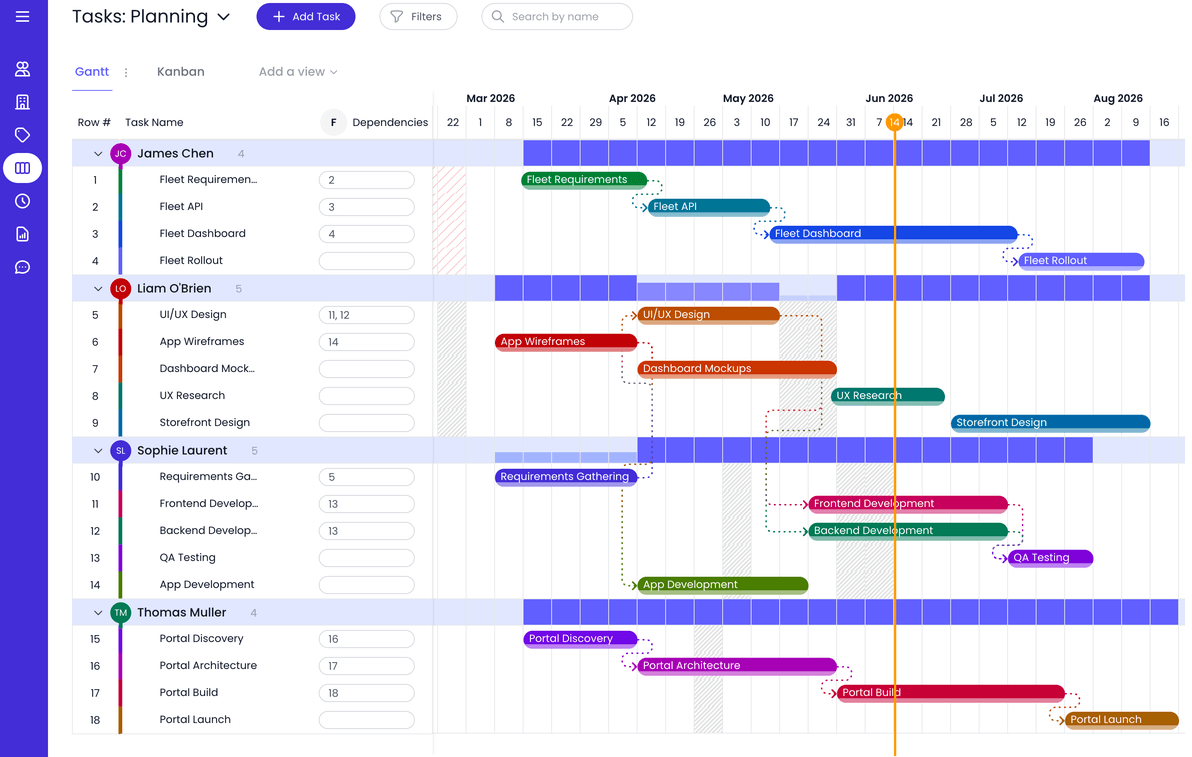
Timely's resource planning lets you plan hours ahead and see how they compare with what your team actually logs. Beebole goes a step further. When you schedule someone's hours on a project, those hours land right in their timesheet as planned entries. All they have to do is confirm them or make a quick change.
Need someone for a new project? You can search for who's free in a given week, filter by skill tags, and schedule people with tentative bookings until the plan is locked in.
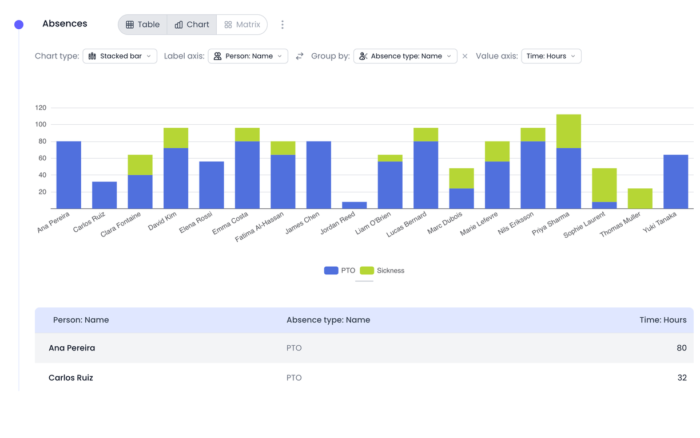
Time off is built in too, so you don’t have to manually log vacation hours. Beebole handles requests and keeps track of everyone's balances. On the Essential plan (€9 or ±$10 per user a month, billed annually), you can set time off allowances. You can also set up accrual policies and choose what happens to unused days at the end of the period.
Public holidays are already filled in by country. And once someone's time off is approved, it shows up in the resource planner, so you won't accidentally book them while they're away.
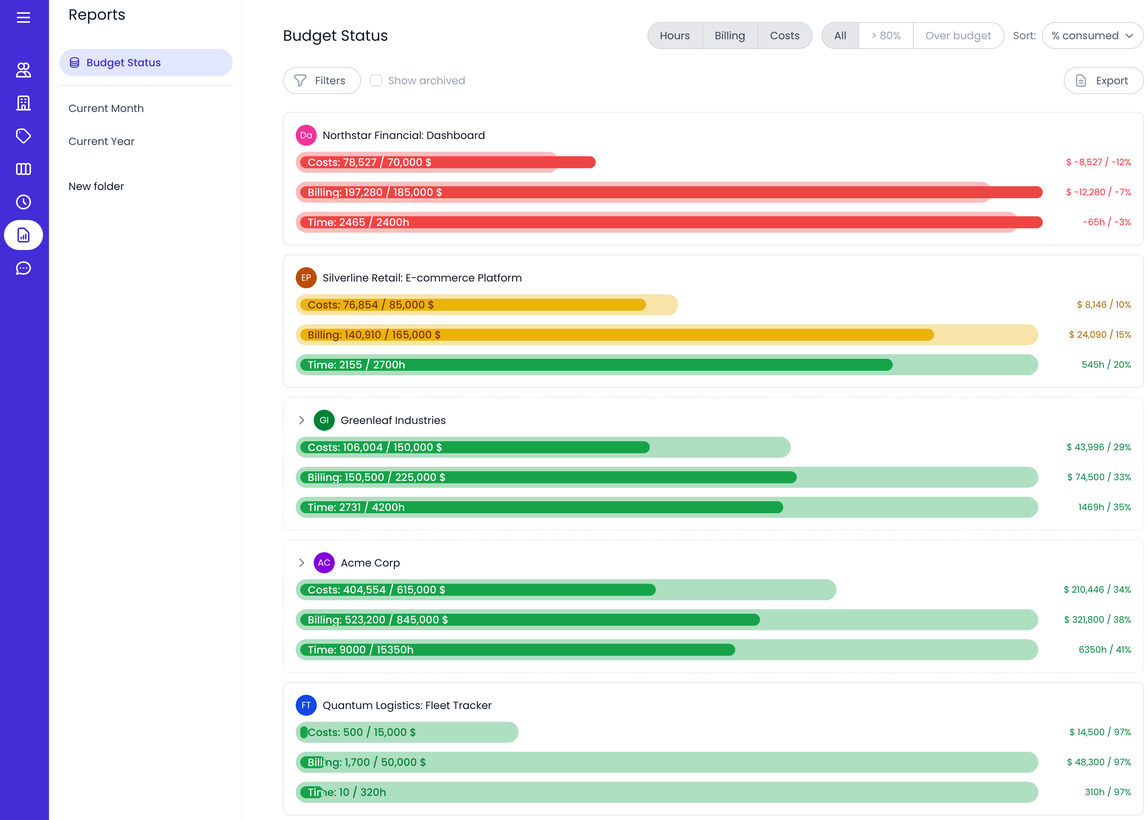
Need to track project costs? The Advanced plan (€18 or ±20 per user a month, billed annually) adds expense tracking, which you won't get with Timely.
Keep in mind that Beebole doesn't record your activity in the background as Timely does. Your team still logs time in timesheets, though its planned entries system handles part of that task.
Best Timely Alternatives by Team Type and Size
Matching your time tracker to your team size can narrow the shortlist. What works for a freelancer may limit you if you have several people tracking time across multiple clients and projects.
Best Timely Alternatives for Freelancers and Solo Consultants (1-5 people)
At this size, you probably don't need to pay for a time tracker, and the platforms we’ve reviewed are viable options, as they all offer free plans that cover a small team.
The decision point then is: What do you need yours to do?
If you juggle several clients, My Hours is a good place to start. The free plan covers up to five users with unlimited clients and projects, so you won't hit a cap as you take on new work. You can also log expenses against a project from day one.
Want automatic tracking like Timely's? Clockify's free plan includes its Auto Tracker for up to five users, while Toggl tracks automatically for up to three.
Solo freelancers who mostly need to get paid should look at Harvest. Its free plan is limited to one seat and two projects, but clients can pay invoices online through Stripe or PayPal.
Best Timely Alternatives for Agencies and Consultancies (6-25 people)
This is where Timely gets expensive. The Starter plan stops at five users, so a sixth hire moves your whole team to Premium. Agencies at this stage usually care a lot about billing and budgets.
My Hours fits this well. On Pro, at $8 per user a month (billed annually), you get invoicing, timesheet approvals, labor costs, and budgets in hours, billable amounts, and cost. Six users come to $48 a month, half of what the same team pays on Timely Premium.
If your team already plans work in Asana, ClickUp, or Jira, Everhour lets you track time inside those tools. Its five-seat minimum isn't an issue once you're past five people.
Toggl is worth a look if forecast planning is your headache. Its draft projects show how new work would affect everyone's schedule before you say yes.
Best Timely Alternatives for Larger Professional Services Teams (26+ people)
Bigger teams need more control over approvals, time off, and who's free before the next project lands.
Beebole is built for this. Planned hours pre-fill each person's timesheet, and approvals can run through several levels. Approved time off also shows up in the resource planner automatically.
My Hours scales well too. Every timesheet change is recorded in an audit log, and anyone can sign in with their Microsoft account on any plan. The Enterprise plan adds a dedicated customer success manager and lets you require Microsoft sign-in for everyone and turn off password logins completely.
Harvest's Enterprise plan ($14 per seat a month, billed annually) adds timesheet approvals, an activity log, and SAML-based SSO. Everhour also has a Custom plan for 50+ seats, with volume discounts and a dedicated manager.
If part of your team works on-site or in the field, Jibble verifies clock-ins with face recognition and geofencing. Clockify is another option for mixed teams, with kiosk clock-ins, time off, and locked timesheets from the Standard plan.
TimeCamp works if you'd rather combine attendance, time off, and automatic tracking in one tool. Just budget for Ultimate if you need approvals and SSO.
How to Choose the Right Timely Alternative: Essential Checklist
The checklist below can help you narrow down the options and pick a Timely alternative that matches how your team works.
1. Define your use case:
Start with why you are looking for a Timely alternative, what problem you are trying to solve, and what you need the time tracker to handle.
- How many people need to use the platform?
- Do you need time tracking for a freelancer, small team, growing business, or larger organization?
- Do you need to track billable time and invoice clients?
- Do you need project budgets or profitability tracking?
- Do you need automatic activity tracking?
- Do you need attendance, scheduling, or PTO tracking?
- Do you need capacity or workload planning?
- Is employee monitoring important to your workflow?
- Do you need project management or task-tracking features?
- Do you need integrations with the tools your team already uses?
- Do you need to report time data to clients, managers, or other stakeholders?
2. Weigh up features and tools
Look for the features that match your team’s day-to-day process, such as:
- Manual, automatic, or real-time time tracking
- Billable and non-billable time
- Project budgets and cost tracking
- Invoicing and expense tracking
- Timesheet approvals
- Capacity and workload planning
- Attendance and scheduling
- Employee monitoring and activity tracking
- Project and task management
- Mobile, desktop, and browser access
- Reporting and analytics
- Third-party analytics
3. Compare your shortlist
Once you’ve outlined your use case and features that matter the most, compare the following:
- Pricing: Don’t stop at the advertised starting price. Confirm how many users or seats are included, whether there is a free plan, and which features are available at each price point. Look out for minimum seat requirements, usage-based charges, or other costs that could affect your total.
- Ease of use: Your team should be able to use the platform without constantly figuring out how it works. Capterra’s ease of use rating can give you a useful starting point. You can also read reviews from teams with a small size and workflow.
- Support access: Find out how you can contact the service provider when you need help. Check whether support is available through live chat, email, or a support form, and whether response times or the support options vary by plan.
- Integrations: Your time tracker should fit into the tools you already use. Check for integrations with your project management, accounting, payroll, calendar, or other business software. If an integration is important to your workflow, confirm what it supports before switching.
- Data migration: Switching platforms may mean moving years of time entries, projects, clients, and reports. Before you commit, check what data you can export from Timely and what your new platform can import. If there is no direct migration option, find out what you’ll need to move manually.
A feature list can only tell you so much. Use a free plan or trial to set up a real project, track time, run reports, and test the workflows that matter to your team.
If you have a large team, test it with a few people first. It gives you a chance to spot problems before moving everyone else.
Frequently Asked Questions

Waste no more time,
jump right in!

All rights reserved.