
With a few simple checks, you can determine whether your approval workflows are working for or against you.
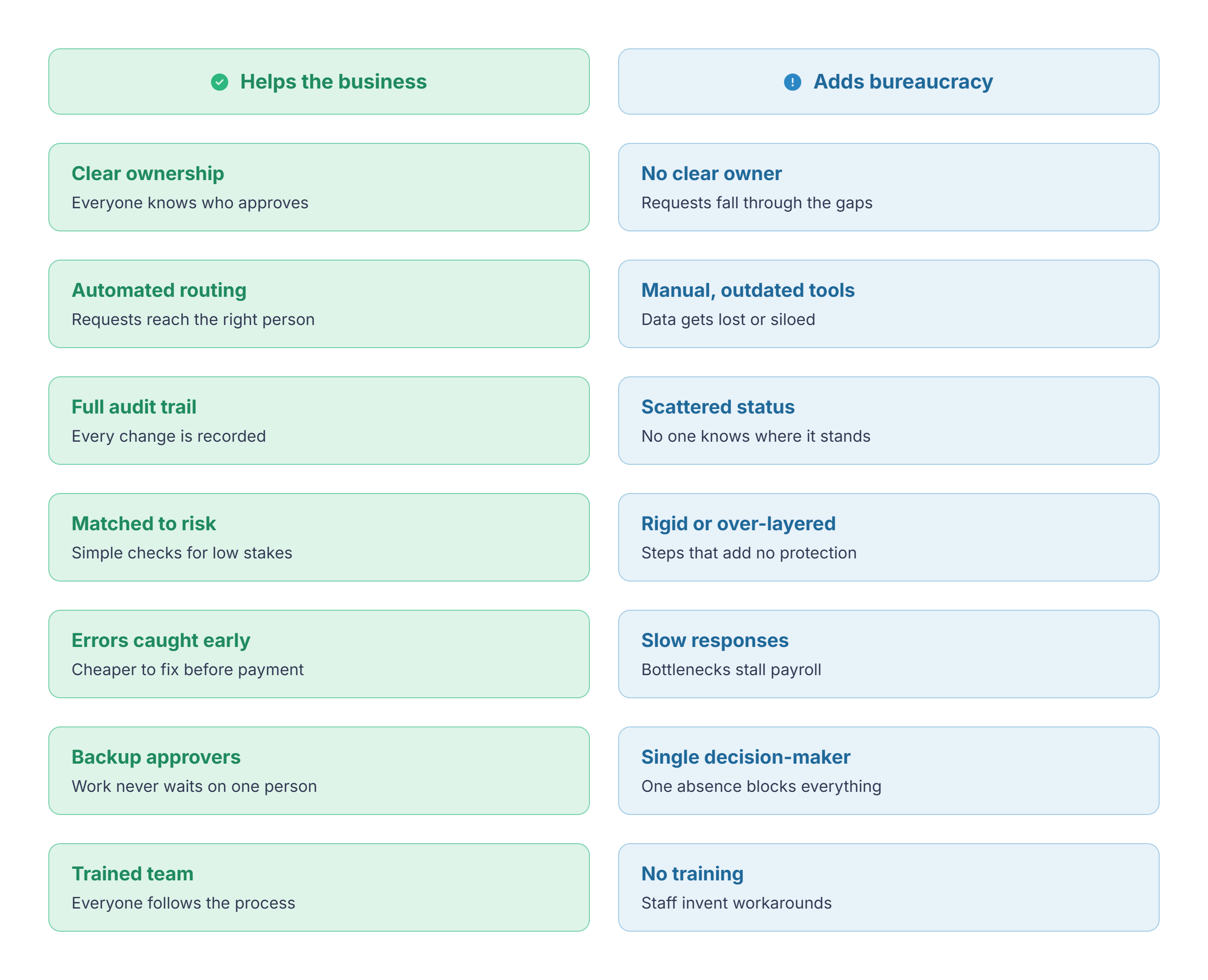
To help, we’ve also included a best practices checklist at the bottom, a diagnostic for timesheet approvals, and useful metrics to monitor workflow effectiveness.
What is an Approval Workflow and Why Does It Matter?
An approval workflow is a predefined process that routes a request, document, or other piece of work to one or more people for review before it can move to the next stage.
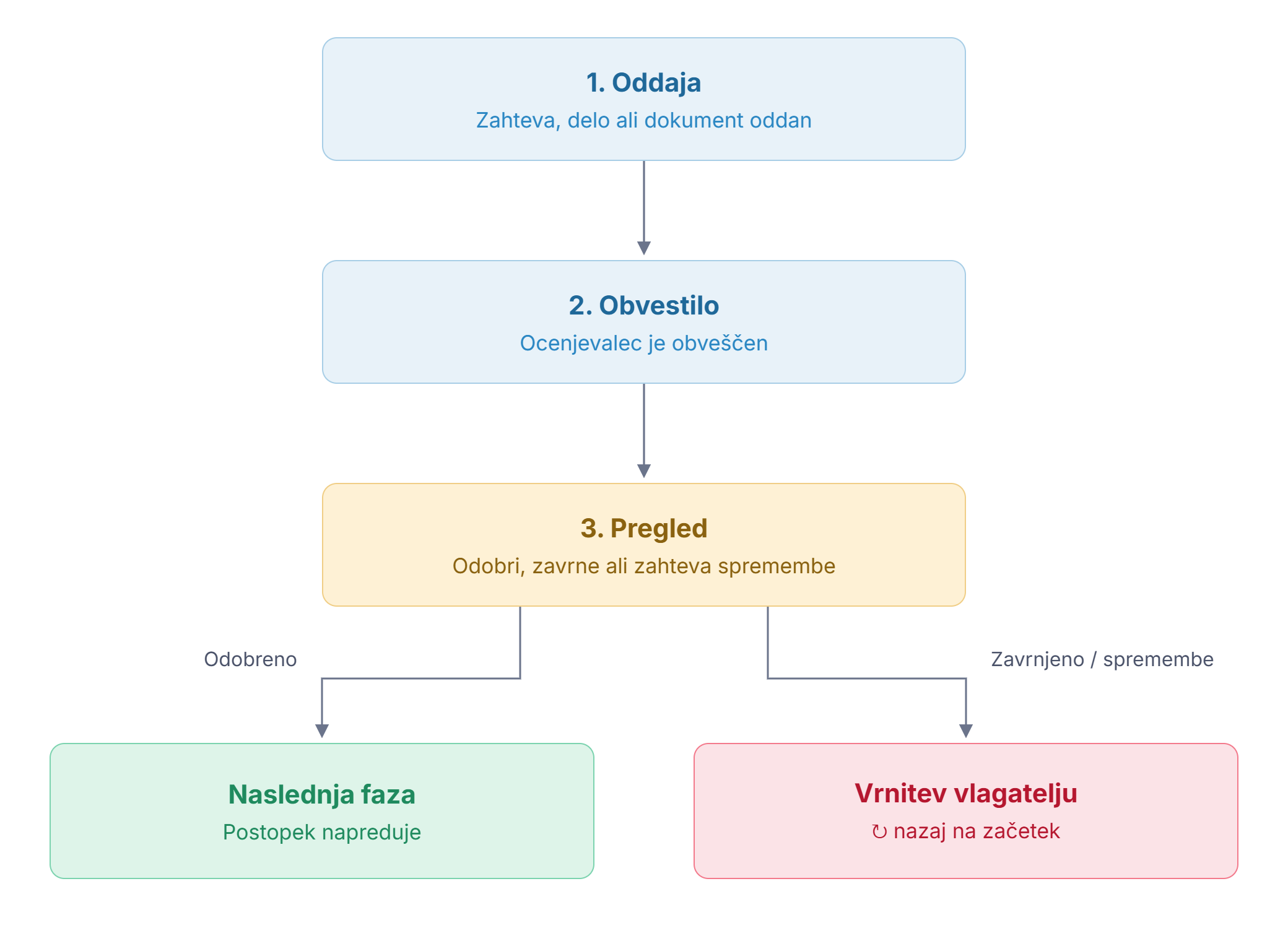
Most workflows follow the same basic pattern:
- Request/work/document is submitted
- The reviewer is notified
- The reviewer approves, rejects, or requests changes
- The workflow either progresses to the next stage or returns to the original requestor
The main purpose of this workflow is to ensure that important information or decisions are reviewed consistently or that work or documents are up to a specific standard.
Instead of relying on informal conversations or individual judgement, the approval workflow creates a standardized process that everyone can follow.
Approval workflows are used across almost every business function. Finance teams approve expenses and invoices while HR departments review leave requests and overtime.
From a time tracking perspective, approval workflows are used to verify the data for accuracy before it feeds through to invoicing and/or payroll. Ultimately, the process adds a layer of protection to ensure that the numbers are correct before they reach the finance department.
In practice, this often looks like a manager reviewing weekly timesheets in a time tracking tool such as My Hours, checking for missing projects or unusual overtime before the data is sent to payroll.
When done right, approvals can save a lot of time and bureaucracy later down the line. Fixing an issue at the review stage is usually far easier than correcting it after the request has already progressed several stages.
When the Bureaucracy Creeps In
Most workflow bureaucracy stems from bottlenecks or inefficiencies in the process.
This generally occurs when the approval workflow doesn’t match the business risk or when it becomes more complex than it needs to be. The process takes longer or creates more manual work. In the end, the workflow becomes a barrier to productivity because it prevents the request from moving to the next stage.
It has to be noted, though, that a slow approval process isn’t necessarily a bad one.
Sometimes delays are unavoidable, particularly when they involve high stakes. The problems arise when approvals slow work down without actively reducing risk or improving accuracy.
When this starts happening, it’s important to review the existing workflows before they start having a larger impact on business operations.
When Approval Workflows Actually Help
The easiest way to understand what a useful approval workflow looks like is to look at the areas where it adds the most value.
Clarifies Ownership and Deadlines
Unclear ownership is one of the quickest ways a workflow can fail. For instance, if several people assume that someone else will approve a request, then you can bet that it won’t happen at all.
A helpful workflow is very clear on who owns each approval. For example, it’s common for team leaders to have ownership over their team’s approvals. Senior leadership then might have ownership over team leaders, and so on.
The workflow is even more effective when everyone fully understands when each approval must be completed and what happens if the deadline is missed.
Best practice in this area would be to:
- Assign an owner to each approval stage
- Establish escalation rules if deadlines are exceeded.
- Define backup approvers for cases when the primary approver is unavailable.
Enforce Compliance
A lot of approval processes exist due to obligations of a legal, financial, or contractual nature.
Timesheets usually fall under the financial category, since it’s important to verify working hours for payroll purposes.
But some organizations use them to meet operational or regulatory requirements as well.
Government contractors, for example, have to include very specific information on timesheets to comply with regulatory bodies, such as DCAA compliance. In this case, the approval workflow ensures timesheets meet the strict standards.
An efficient workflow supports compliance without relying on extensive manual input. Approvals should, therefore, have controls in place to prevent any breaches, likerejecting a timesheet that is missing mandatory project information.
Reduce Errors
Mistakes like incomplete forms, missing signatures, incorrect figures, outdated client information, and so on, can and do happen, and part of the reviewer’s role is to identify them before they become an expensive problem.
These seemingly small issues are far easier and cheaper to correct before payment, publication, or delivery is completed.
The key here is to ensure that approvers are checking for specific criteria. On a timesheet, it may be necessary to verify that hours don’t exceed a certain threshold or that overtime is kept within certain limits.
If approvers know precisely what to look for, they can conduct a meaningful review that reduces business risk instead of simply clicking “approve” because it’s something they have to do.
Automate Routing and Reminders
We all know how easy it is to lose information among massive email chains or lengthy exchanges. Or how easily spreadsheets can become messy and riddled with errors.
Approval workflows work best when they’re automated. This means using appropriate software to automatically assign requests to the correct approver and notify them immediately.
Automated reminders also prevent delays in the process. Not only at the approval end, but also at the issuer end.
Time tracking software, for example, can notify users if their timesheets are missing data before they are sent to the approver. This makes the workflow even more efficient because it reduces the risk of their timesheets being rejected.
Provides Transparency and Auditability
Approvers can immediately see when a request is waiting, who owns it, and how long it has been outstanding. Additionally, all comments or requested changes are recorded, providing a complete digital footprint of the process.
Additionally, using a centralized system creates a single source of truth rather than having information scattered across various formats (emails, messages, etc.). This way, it’s much easier to track down what you need.
This digital audit trail can be crucial for compliance when it’s essential to prove why or when data was changed.
Match Workflow Complexity to Risk
All workflows should be appropriate to the risk they carry.
For example, approving a $500 purchase likely doesn’t require the same scrutiny as approving a six-figure capital investment.
As such, organizations should scale approvals according to financial value, legal implications, and operational consequences.
For timesheet approvals, the workflow should be straightforward. Usually, one layer of approval (managerial sign-off) is enough, and should be quick to carry out.
At the other end of the scale, a huge investment likely requires several layers of approval with the involvement of multiple stakeholders. Because of this, the process takes a lot longer compared to a timesheet.
That said, the workflow shouldn’t necessarily be complex because the risk is higher. The goal is to make the workflow as simple as possible while still maintaining an appropriate amount of protection for the business.
When Approval Workflows Add Bureaucracy
Let’s now look at the bottlenecks that lead to a bureaucratic approval workflow.
Unclear Processes and Poor Planning
If workers don’t know what information is required or when approvals are needed, then the process quickly becomes more bureaucratic. Every time a document goes back and forth, you’re piling on unnecessary delay that could be quickly solved with a clear process.
To avoid this problem, all approval workflows should be clearly documented so everyone knows what they must do and how to go about it.
Use standardized templates for submission requests and be very specific about the channels through which requests can be made. Also, define who is responsible for each approval workflow, deadlines, and the escalation process when the deadline is not met.
Single Decision-Makers
When one senior manager is responsible for every sign-off, the approvals will start piling up at some point. This is especially true for larger organizations. It’s simply not feasible to have one individual in charge of approvals.
Instead, delegate approvals to the appropriate individual(s). Team managers can approve timesheets, while six-figure investments should require oversight from the CFO and senior management.
Slow Responses
If responses are slow, then the whole system breaks down and things start escalating.
For instance, if a timesheet isn’t approved, then the payroll team can’t calculate how much the worker is owed. Chasing the information may result in a delay in wage payments. This delay could then have legal implications from a labor law or compliance standpoint.
Approval cycle times have to match their surrounding ecosystem (remember, it’s all about balancing complexity with risk).
While a timesheet approval might need to be completed within one or two days to meet the payroll deadline, a large purchase might take a couple of weeks if it requires several layers of approval.
Relying on Manual Processes or Outdated Tech
Manual processes create more work and require more time, which could be better attributed elsewhere. Similarly, outdated or legacy tech leads to fragmented or siloed data where it’s hard to keep track of what’s going on.
Dedicated platforms exist for approval workflows, with detailed tracking, automated notifications, customization, and other useful features. Examples of such platforms include ApproveIt and Kissflow.
For simpler approval workflows or if you just need approvals for a single use case, look for software that includes them on their platform. Most good time tracking apps, like My Hours, include timesheet approvals as standard.
Limited Visibility and Inefficient Communication
When the whole workflow is not visible to a user, then it creates more work, especially when there are rejections and corrections to find and track.
As we’ve mentioned, this is especially the case when using emails or chat messages.
This feeds into the communication aspect of the approval workflow. The approval might have started off via email, but was then discussed in person or over the phone.
The problem is that this does not create a clear record of the process. In the end, no one is sure if the request has been reviewed, whether or not it’s waiting for adjustments, or what its current status is.
Particularly with phone or in-person communication, there may be no clear record of what was said or agreed. Resolving disputes over what happened can take considerable time and create compliance risks.
Again, a centralized system is the way forward, with clear dashboards that display approval statuses. All communication surrounding the approval must take place within the system, leaving no doubt over what happened.
Lack of Training
Even with a documented process in place or a dedicated software, problems will continue if your staff do not know how to follow it or use it properly.
Any process rollout has to be accompanied by training, and it should also be embedded in your onboarding process so newcomers are informed.
If training is lacking, then staff will just find a workaround, resorting to email or other methods, which creates more work.
It’s the same at the other end of the process. All approvers have to be fully informed and knowledgeable about what they are approving. They have to know what they are looking for and the reasons why a request might be rejected.
Inflexible Workflows
Businesses grow, and processes change. What might have worked for a five-person team probably won’t be suitable for an organization with 30+ staff.
Beyond the increased headcount, larger organizations usually have to deal with increased regulation and compliance.
If your approval workflow is rigid, then it just won’t work. Instead, give your workflow room to adapt as your company changes. Regularly reviewing the rules will help you remove outdated steps while ensuring that new risks are properly addressed.
A useful rule of thumb is to review approval workflows at least annually or after any major organisational change.
Metrics to Measure Your Approval Workflow Efficiency
Monitoring your approval workflow is almost as important as the workflow itself since this allows you to spot bottlenecks much earlier. Continuous review also enables you to adjust and improve the workflow so it continues to align with business needs.
Here are the metrics you should keep a close eye on:
- Average cycle time: The amount of time a request moves from submission to final approval. If the figure starts increasing, it can be a sign that workloads, approval paths, or the number of approvers should be reviewed.
- First-pass approval rate: How many requests are approved the first time. A low rate typically indicates that requests are often missing essential information or that workers need clearer guidance on submission requirements.
- Overdue approvals: Requests that are not approved within the cycle’s deadline. This can occur for the same reasons that lengthen the average cycle time. Alternatively, it could be a sign that the approval deadline is too tight.
- Rejection reasons: Why a request was rejected. Look for patterns or trends and rectify by providing additional training.
- Where requests spend the most time: If approvals repeatedly stall at the same workflow stage or with the same approver, then you’ve identified a bottleneck that can be resolved through delegation or automation.
A Quick Diagnostic: Is Your Time Tracking Approval Workflow A Help or a Bottleneck?
Use the questions below to perform a quick diagnostic on your existing approvals process.
Answer with a simple “yes” or “no.”
- Are timesheets automatically routed to the correct approver?
- Are workers trained on the approvals process and exactly who is responsible for approving their time?
- Are approvals usually completed before payroll or invoicing deadlines?
- Can managers easily see which timesheets are awaiting approval and for how long?
- Are approvals automatically reminded when requests are waiting?
- Can another approver easily step in when the primary approver is unavailable?
- Are approvers equipped with clear review criteria for approving timesheets?
- Is all approval history, including adjustments, comments, and timestamps, stored in one place?
- Does every approval stage serve a genuine business, financial, or compliance purpose?
If you answered “yes” to most of these questions, your time approval workflow is likely supporting your business rather than creating additional bureaucracy.
If you answered “no” to more than one question, you need to look closely at where the delays are occurring. In many cases, a few small tweaks, like automating reminders, can significantly reduce turnaround times and manual intervention.
Approval Workflow Best Practices Checklist
When setting up your approval workflows, use this checklist to ensure they align with best practices. It’s suitable for all types of workflows, including timesheets.
Workflow Design
☐ Each approval workflow has a business, financial, or compliance purpose
☐ Workflow complexity matches the level of risk
☐ Approval paths are based on risk and responsibility as opposed to job title or seniority
☐ Approval workflows are fully documented
☐ All employees have been trained on the approval workflow and know how to use it, including related software
☐ The training exists within the onboarding process for new hires
Roles and Responsibilities
☐ Each approval stage has an assigned owner
☐ Backup approvers are available when the primary approver is absent
☐ Approvers understand exactly what they are expected to review before approving a request
Automation and Visibility
☐ Requests are automatically routed to the correct approver
☐ Reminders are sent before deadlines are missed
☐ Escalations exist for overdue approvals
☐ Appropriate persons can view approval statuses and who owns the next step
☐ All approval data and history are stored in a centralized system
Efficiency
☐ The minimum number of reviewers are involved in each workflow
☐ Routine approvals are automated wherever possible
☐ Employees and approvers rarely need to chase for updates
☐ Approval cycle times are monitored and regularly reviewed
Governance and Continuous Improvement
☐ Each approval generates a complete audit trail
☐ Approval rules and stages are regularly reviewed and updated as needs change
☐ Workflow performance is measured using metrics (see below)
Final Thoughts
As a final word of caution, one of the biggest misconceptions about approval workflows is that adding more approval layers automatically reduces risk.
In a lot of cases, the opposite is often true. As workflows become more complex, approvers can experience fatigue where they begin approving requests out of habit rather than carrying out a meaningful review.
The most effective workflows are designed to direct attention where it matters most, not to maximize oversight. Their success isn’t measured by the number of checkpoints, but by whether each one contributes to better decisions or business outcomes.
If an approval stage doesn’t improve accuracy, reduce risk, or support compliance, it’s time to question whether it belongs there at all.


