
.png)
Why Timesheet Governance Becomes Necessary at 50+ Employees
As organizations grow, time data becomes a critical input for payroll, billing, and reporting across multiple teams. Without a defined process, inconsistencies and delays quickly impact downstream operations.
Timesheet governance introduces structure and accountability. It ensures that time is recorded consistently, submitted on time, and validated before it reaches payroll or reporting systems.
6 Core Components of Weekly Timesheet Governance
Effective timesheet governance doesn’t require complex systems—just a clear, repeatable structure.
These six components form the foundation:
- Submission deadlines: Define when timesheets are due and how they must be submitted.
- Automated reminders: Prompt users to log and submit time on schedule, reducing manual follow-ups.
- Approval workflows: Managers review and validate time entries before approval.
- Escalation process: Ensure missing or incorrect timesheets are addressed before reaching payroll.
- Data security: Lock approved timesheets to prevent edits and protect data integrity.
- Reporting oversight: Use reports and metrics to identify gaps and improve processes.
The Weekly Timesheet Cycle Blueprint
One of the simplest ways to enforce governance is to implement a consistent weekly rhythm.
Again, keep it simple enough to follow and easy for workers to stick to. Here’s a helpful blueprint that you can adapt:
- Friday (end of workweek): Workers complete their final time entries for the week.
- Monday morning: Submission deadline; all workers must submit their timesheets by lunchtime.
- Monday - Tuesday: Manager review and verification.
- Wednesday: Escalations for missing or incorrect time data.
- Thursday: Deadline to receive all timesheet corrections and modifications.
- Friday: Final approvals are made, timesheet data is secured, and weekly reports are generated and sent.
Clear Timesheet Submission Rules to Apply
Employees must know that they are accountable for their own timesheet data. Therefore, set clear expectations over what should go on a timesheet and how to create time entries:
- Workers should write their time entries daily to prevent reconstructing information at the end of the week. It’s actually faster to do it this way (because it’s still fresh in the mind) and also more accurate.
- Time entries should include start and stop times, the task or project worked on, and any accompanying information, like project or charge codes.
- Workers must not knowingly submit incomplete timesheets and must confirm that their timesheet is accurate upon submission.
- Timesheets must be submitted via the approved channels only. Whether this is to a dedicated email inbox, HR portal, or alternative method, it prevents timesheets from being stored in unapproved locations.
A Foolproof Reminder System
Manual follow-ups from supervisors are time-consuming and don’t scale well in larger organizations.
Instead, create automated reminders that prompt workers to complete or submit their timesheets. This will help develop weekly timekeeping habits among your workforce and reduce the need for management interventions.
You can use a method of your choice, such as email, Slack notifications, software notifications, etc.
We recommend including:
- Daily prompts: Daily reminders to log sufficient hours
- Pre-deadline alerts: A weekly reminder to submit timesheets before the deadline
- Later reminders: Alerts for when a timesheet has missed the submission deadline
Note: Most dedicated time tracking software has automated alerts built into the system. They are intelligent, only alerting a user if they have logged fewer hours than their daily target.
Timesheet Approval Workflows
To set up approval workflows, you must establish the role each worker plays within the organization.
Supervisors and managers should be responsible for approving their team’s timesheets, and senior management should be responsible for approving supervisor timesheets.
To prevent a conflict of interest, payroll staff must not be able to approve timesheets. Although it seems like this job fits naturally into their role, they don’t have any way of validating whether or not the work was performed.
Additionally, for certain organizations, like government contractors, it’s forbidden for payroll to edit or validate timesheet data.
An approval workflow generally looks like this:
- Workers submit their timesheets before the given deadline.
- Managers check that hours appear reasonable and accurately reflect the work performed.
- After checking, managers either approve or reject timesheets.
- Rejected timesheets are returned to the employee for correction, with a documented reason why.
- Approved timesheets are entered into an approval log (a record of who approved a timesheet and when).
How to Escalate Missing or Late Timesheets
Despite using reminders and having a clear process, timesheets will still be forgotten or delayed.
Using an escalation framework will ensure that these issues are resolved quickly and before the data is sent to payroll.
A typical escalation process might look something like this:
- Automated reminder: A notification is sent to the worker soon after missing the deadline.
- Manager intervention: If the notification is ignored, the worker’s manager must investigate the reason why.
- Department escalation: If delays are persistent, it is flagged to department leadership.
- Operations/HR escalation: Repeated non-compliance becomes a performance issue and may enter the organization’s disciplinary process.
A common question from organizations is what happens if a worker is off sick or absent and can’t submit their timesheet?
In the case of an unplanned absence, the supervisor should submit the timesheet on behalf of the employee.
If the absence was planned time off, then timesheets can be pre-filled and submitted in advance.
If prefilling timesheets is not permitted (some regulators do not allow this), the supervisor must approve it on behalf of the individual, and when the employee returns to work, they can review and edit the data if it is incorrect.
When to Secure the Data
Employees should not be able to edit past timesheets. Therefore, to protect data integrity, once a timesheet has received managerial approval, the data should be secured and editing access prevented.
If you use time tracking software, it can lock timesheet data to prevent further edits.
If you use a manual timekeeping process, then we recommend exporting and saving approved timesheets in PDF format. For an extra layer of security, save the PDFs in a password-protected folder.
If a time entry correction is required after data has been secured, it should follow a documented change process. This ensures that any adjustments are transparent and properly recorded.
Recommended Reporting Cycles
Reports are extremely useful, not just for sending data to payroll, but also for monitoring the governance process itself.
It allows you to spot any gaps in the process or repeated issues that must be resolved.
We recommend generating the following reports:
- Weekly operational report: With data that shows submission completion rates, approval statuses, and missing time entries.
- Monthly management reports: Useful for reviewing broader trends, such as departments with consistently late submissions or averages in approval timelines. It can also reveal patterns in labor allocation and tasks that are taking up more resources than they should.
5 practical metrics to track for improvement
To expand slightly on reporting, some metrics are more useful than others for improving timesheet governance.
This small set of indicators will show you how your timesheet processes are performing:
- On-time submission rate: The percentage of workers submitting their timesheets before the deadline vs. those who aren’t.
- Approval turnaround time: How long, on average, managers take to complete the timesheet approval process.
- Approval compliance: The percentage of timesheets that are approved and validated within the designated timeframe.
- Rejected timesheets: The number of entries returned back to employees for adjustment. For deeper insight, you can also analyze the reasons why.
- Missing timesheets: The number of timesheets that were not submitted at all, and the reasons why.
How to Create a Timesheet Accountability Culture
Accountability only works when employees understand why timesheet governance matters. If time tracking is seen as just admin work, compliance will slip.
Training should explain not only how to track time, but how it impacts payroll, billing, and planning. Managers must also understand their role in validating data.
To support this, implement :
- A strong written timekeeping policy.
- Provide system and approval training.
- Include it into the onboarding process.
- Run regular refreshers.
How Time Tracking Software Establishes Governance for Larger Organizations
The larger an organization grows, the more necessary it is to streamline and simplify processes. Otherwise, the admin burden gets too much, staff become unhappy, and mistakes start to happen.
Switching to time tracking software is a great solution for organizations with 50+ staff because it comes equipped with governance tools, including multi-team oversight.
For example, My Hours has built-in approval workflows (with timesheet data locking) and automated reminders. Plus, it automatically submits timesheets, completely removing the need to oversee submissions.
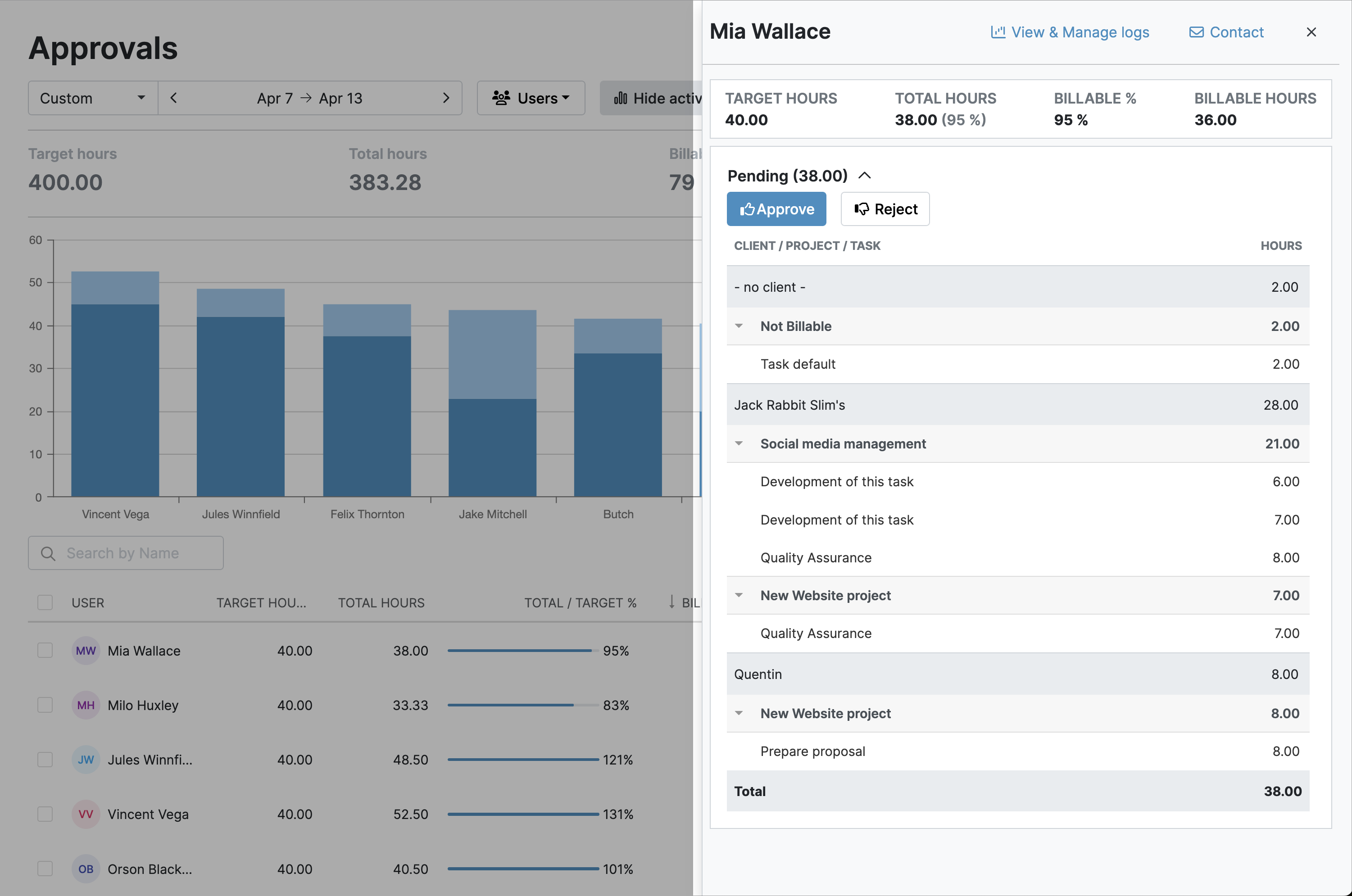
Quick and customized reporting options let you view key metrics, and with real-time tracking, it’s a tool that workers genuinely won't mind using.

Essentially, the right software provides the governance that larger businesses need. Additionally, it complies with stricter governance requirements, like DCAA compliance.
Final Thoughts
However your organization chooses to track time, we hope this article has provided useful guidance. You should now have the knowledge to put real timesheet governance in place.
It might take a hot minute for workers to get used to the new system. But once they’re in the swing of it, the whole organization can enjoy accurate payroll and billing data with better regulatory compliance.


