


My Hours vs. Paymo for Compliance-First Time Tracking
Choosing the right software for regulated industries
Time tracking is a requirement for many regulated industries and for compliance with labor laws. However, it usually means more than simply recording the hours worked.
Regulatory frameworks want to see a clear link between time and activity, plus a breakdown of costs and a reliable audit trail with documented timestamps.
Both My Hours and Paymo provide time tracking, but they serve different priorities. Paymo focuses on project delivery and productivity, while My Hours offers stronger controls for cost tracking, financial transparency, and audit-ready records.
*Last updated: September 2026*

My Hours vs. Paymo: At a Glance

1. Time Entry Controls
My Hours
My Hours provides several controls to help organizations maintain accurate time and cost records.
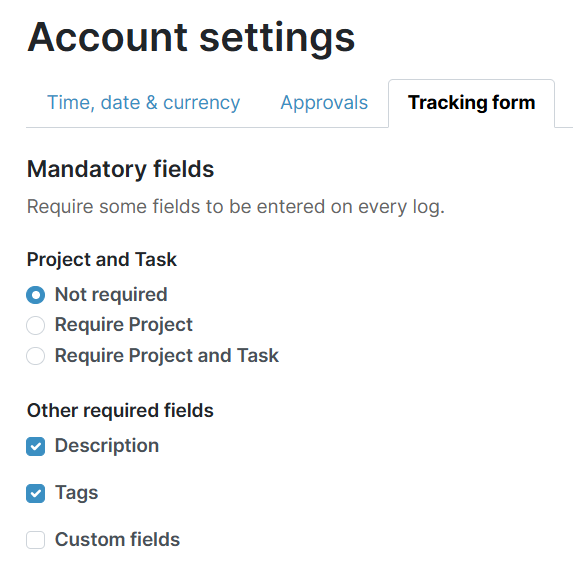
The time entry form is customizable, with the option to make certain fields, like project and task assignment, descriptions, and tags, mandatory. This ensures that each time entry is linked directly to a deliverable, providing a fully mapped record of where time was spent.
Additionally, you can prevent the use of manual time entry. Users can only use the start/stop timer, preventing time records from being created after the fact.
Automated reminders prompt users to complete their timesheets. This lessens the likelihood of receiving incomplete timesheets, and timesheet data can be locked daily, so no further edits can be made.
Paymo
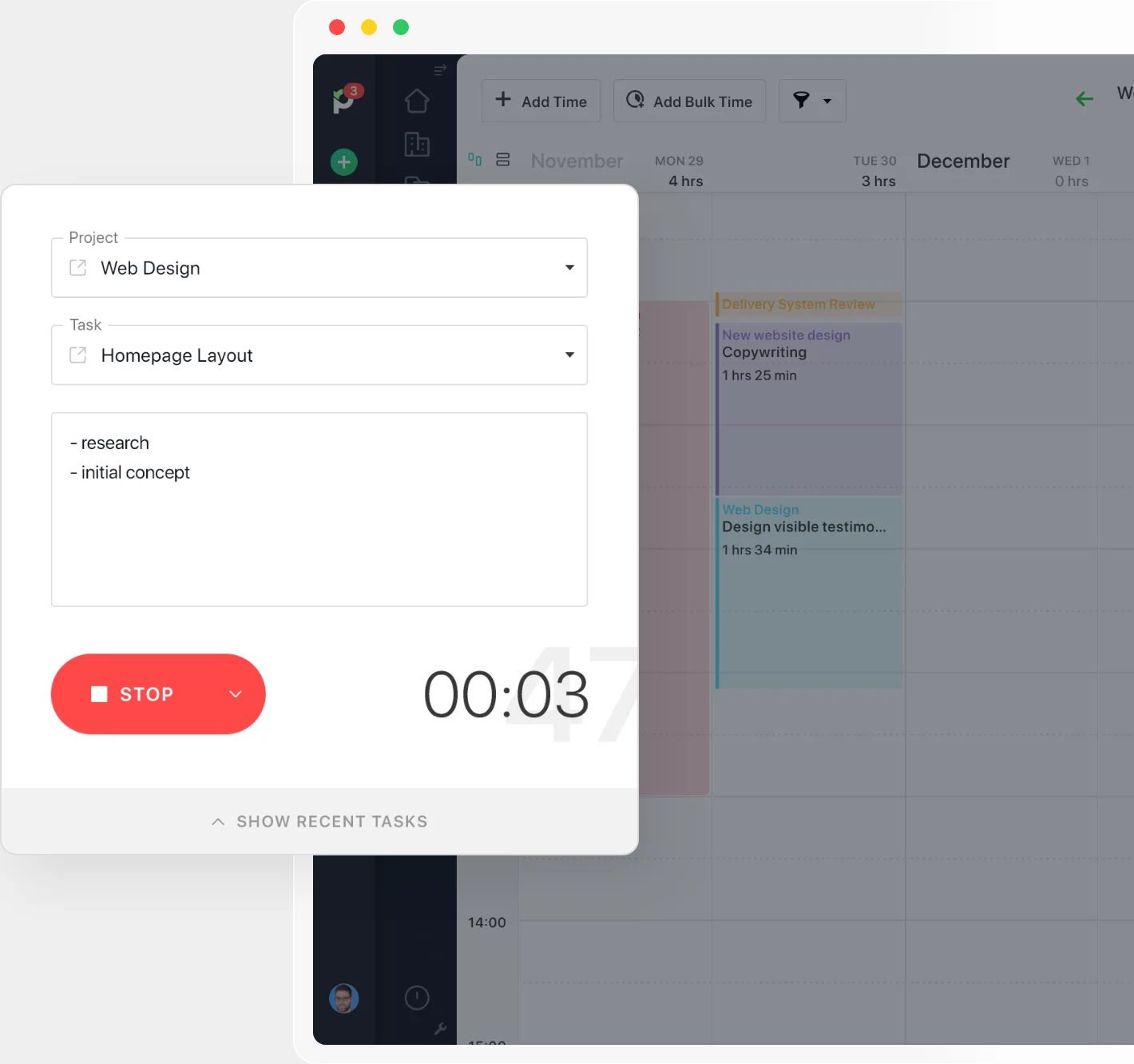
Paymo doesn’t offer any customization for time entries; however, it’s not possible to create one unless you first assign a project and task. This ensures that all time entries are mapped to deliverables, no matter what.
Although time entries can be supported with a description, you can’t enforce entry, like you can with My Hours.
Users can log time any way they choose, since you cannot restrict any of the options.
Like My Hours, Paymo includes automated alerts for timesheet completion, and you can choose the time of day they are sent, making it useful for organizations that don’t work standard hours.
Time entry control verdict
My Hours offers much stronger controls for time entry completion, enabling you to adhere to strict compliance requirements as to what must be included on a timesheet.
Additionally, where contemporaneous time tracking is required, such as R&D tax credit claims, My Hours enforces this by preventing manual time entry.
Paymo is pretty weak in this respect. Although it enforces the allocation of a project and task, beyond that, you’re relying on the user to input correct information and use the real-time trackers.
2. Cost Allocation
My Hours
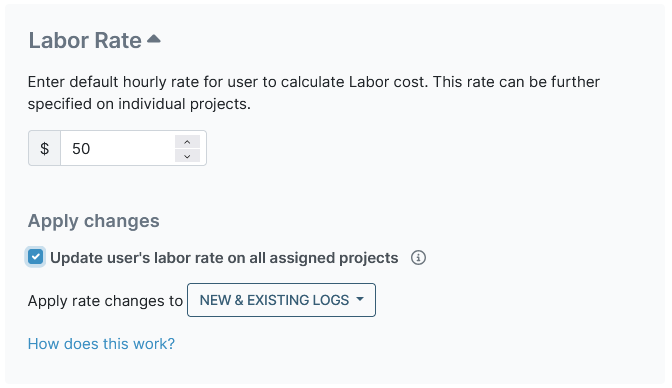
To enable cost allocation, each user in My Hours can be assigned an hourly labor rate and an hourly billable rate (if required).
As time is tracked, so are the rates. And since each time entry is linked to a client, project, and task, it shows a clear breakdown of costs per deliverable.
If you operate on a different cost model, it’s possible to set up projects with a custom per-hour rate. Or you can assign a specific hourly rate at the task level. My Hours also enables you to set a fixed fee for projects.
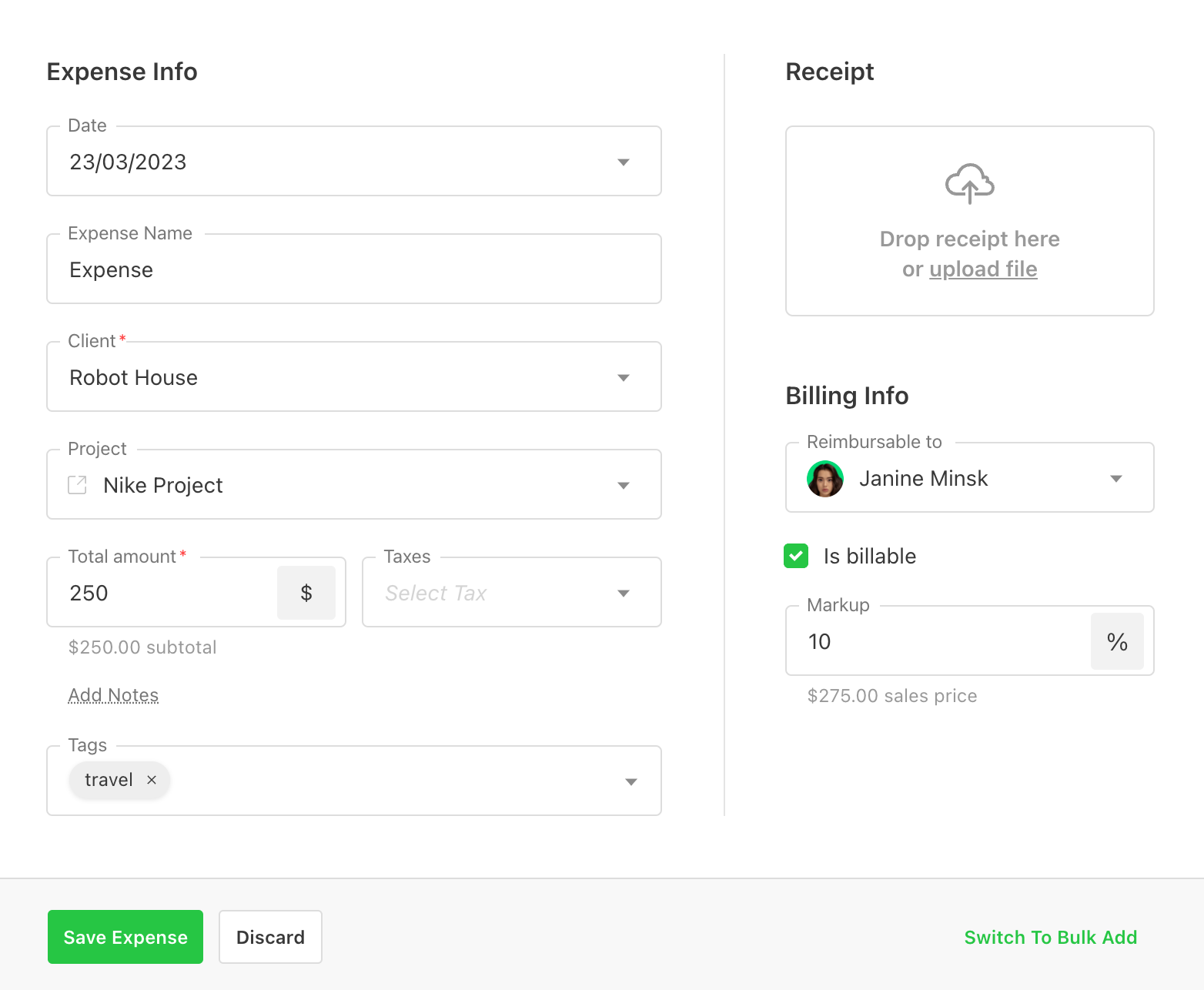
Expense entries operate much like time entries. You assign them to a project and task, and you can choose whether they are billable.
Each expense entry can be supported with evidence by uploading a copy or image of the receipt.
Paymo
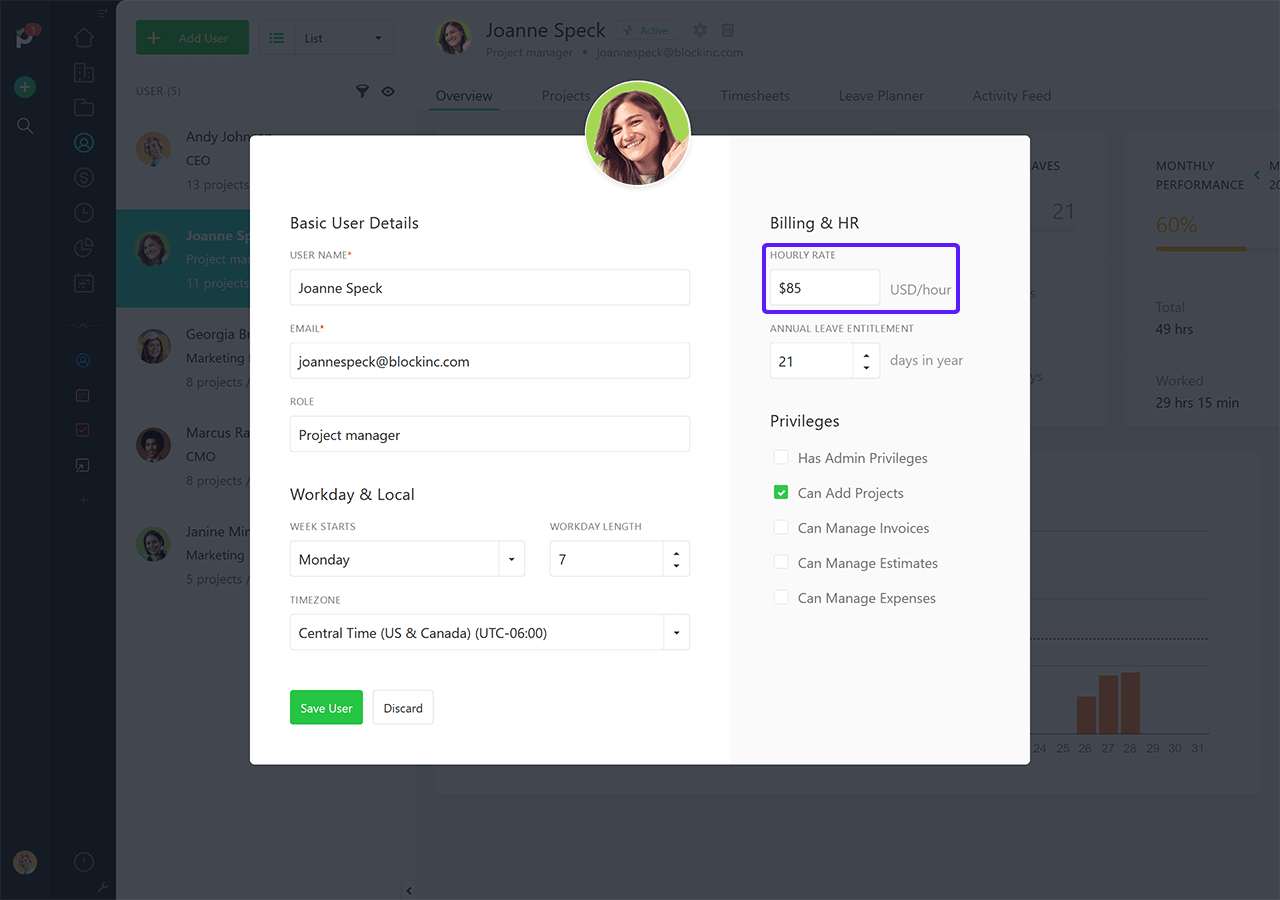
Like My Hours, you can input the billable and labor rates for each user.
Project pricing is also flexible and supports time and materials billing, flat rates, and retainers. You can also choose a project or task hourly rate. There’s also the inclusion of a company hourly rate, so if you have a specific rate for a client, you can pick this option.
Expense uploads are linked to projects and tasks, and include a field for adding any applicable taxes and another for including a markup.
Receipt uploads are also possible.
Cost allocation verdict
Both platforms are equally strong for tracking costs against deliverables. The flexible rates allow you to accurately capture labor costs, billable work, and expenses, regardless of your billing model.
This level of detail is particularly important for compliance as it creates a clear audit trail showing how costs were allocated. This helps support financial audits, grant reporting, or tax claims where cost attribution is essential.
3. Custom Fields and Tags
My Hours
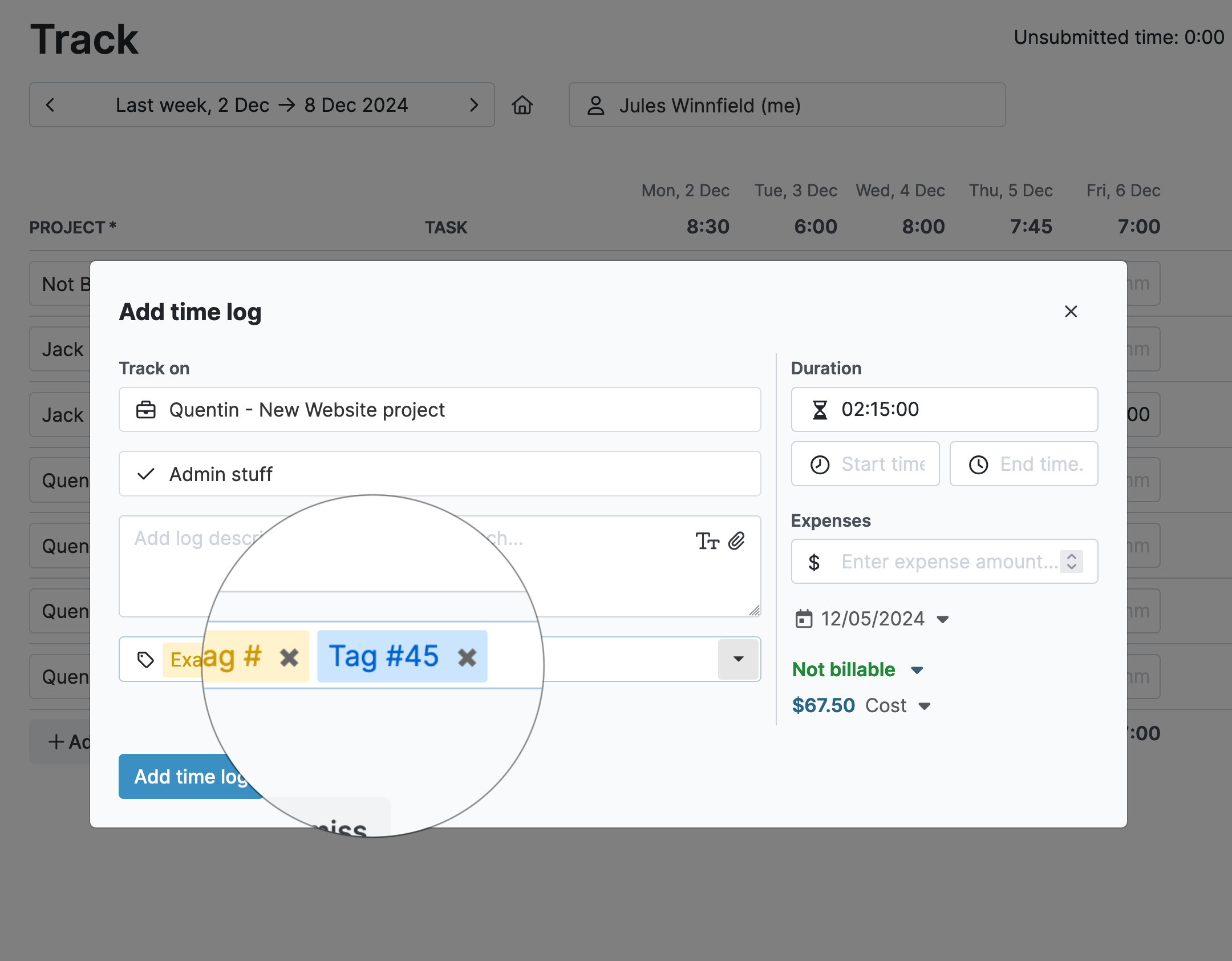
Create unlimited sets of custom tags in My Hours. These can be assigned to time and expense entries as needed.
While users, clients, projects, tasks, and time and expense entries include a field for a custom ID, you can also create up to two additional custom fields per entity, with configurable limits on the Enterprise plan.
You can pick from text, numerical, or dropdown custom fields, making them a very useful way to capture essential information like job codes, cost centers, and more.
Both tags and custom fields can be filtered in the reporting tool, giving you specific data breakdowns.
Paymo
Paymo is very limited in terms of adding customized data. It includes custom tags, but they can only be assigned to expense entries, not time entries.
There are no tools for adding custom fields, so, as mentioned, you’re relying on the description field to capture any additional information.
Custom fields and tags verdict
For organizations that must clearly define work types, such as indirect/direct labor and CapEx/OpEx, the ability to add tags to time entries is crucial.
And rather than relying on a freehand text box, custom fields provide a more controlled way to add specific data for compliance purposes. This makes My Hours the stronger tool in this respect.
There are workarounds in Paymo. For example, you could set up specific projects and tasks to separate different work types, and you can add job codes, etc., to the project and task names. However, it’s not ideal, and it would be better if Paymo supported more custom data options.
4. Timesheet Approval Workflows
My Hours
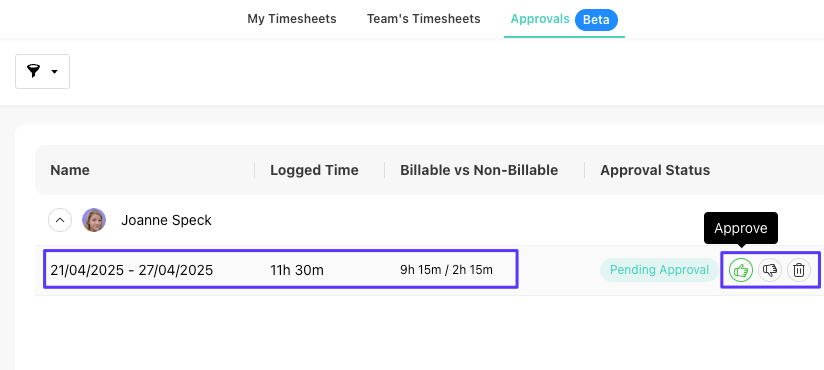
My Hours features a robust approval workflow that ensures time data is accurate and complete before being sent to payroll or transformed into reports.
Team managers receive an email alert as soon as the timesheet has been submitted. They can then approve or reject entire timesheets or individual time entries in one click.
Any rejected data goes back to the user, who can then make the necessary adjustments. Any edits are fully documented with a reason for the change and timestamped.
To make the approval workflow seamless, you can enable automatic timesheet submission. This prevents forgotten submissions and ensures all data is ready and waiting before any deadlines.
.png)
Paymo
Paymo has a basic timesheet approval workflow. You can allow admins to approve timesheets, and they will receive an email when one is ready for validation.
The issue is that any admin can approve any timesheet, whereas in My Hours, you can assign team managers who can then only approve timesheets for their team.
Adding a reason for a timesheet rejection is optional, so it can also be easy for admins to forget to do this.
There is also no data locking mechanism, meaning users can edit timesheets whenever they want. From a compliance perspective, this can be problematic.
Timesheet approval verdict
My Hours’ approval workflow is much more robust compared with Paymo’s. You get more control over who can approve what, and the data lock prevents any unauthorized changes.
5. Audit Trails
My Hours
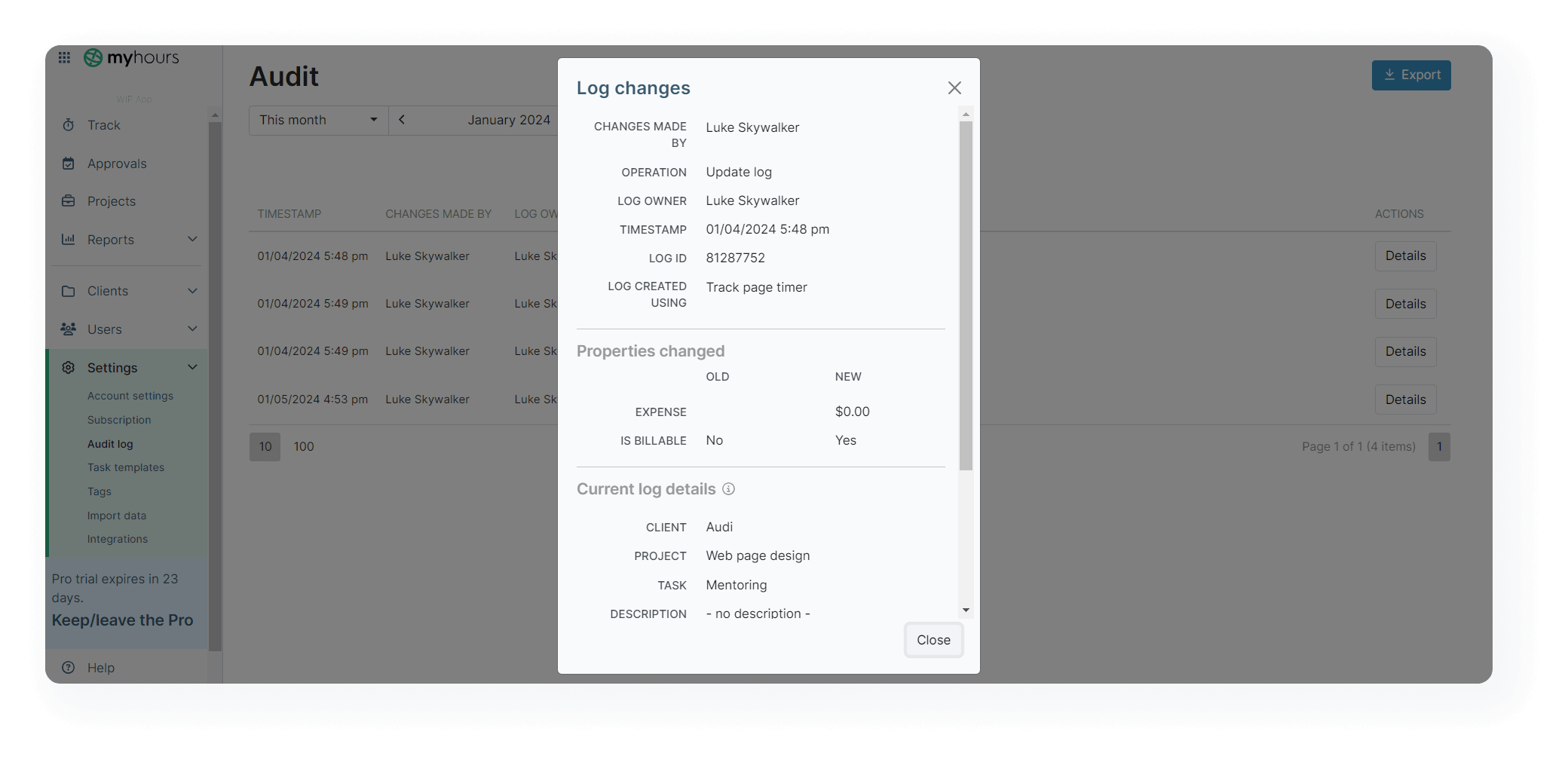
A full audit trail is available on My Hours’ platform, allowing you to view all changes and actions made. Each action is timestamped, and you can pull up the details to view exactly what happened.
You can choose from a custom date range and filter by user, team, or operation.
My Hours stores up to 90 days of audit logs as standard. To maintain complete records, all you have to do is regularly export the data in XLS format.
Paymo
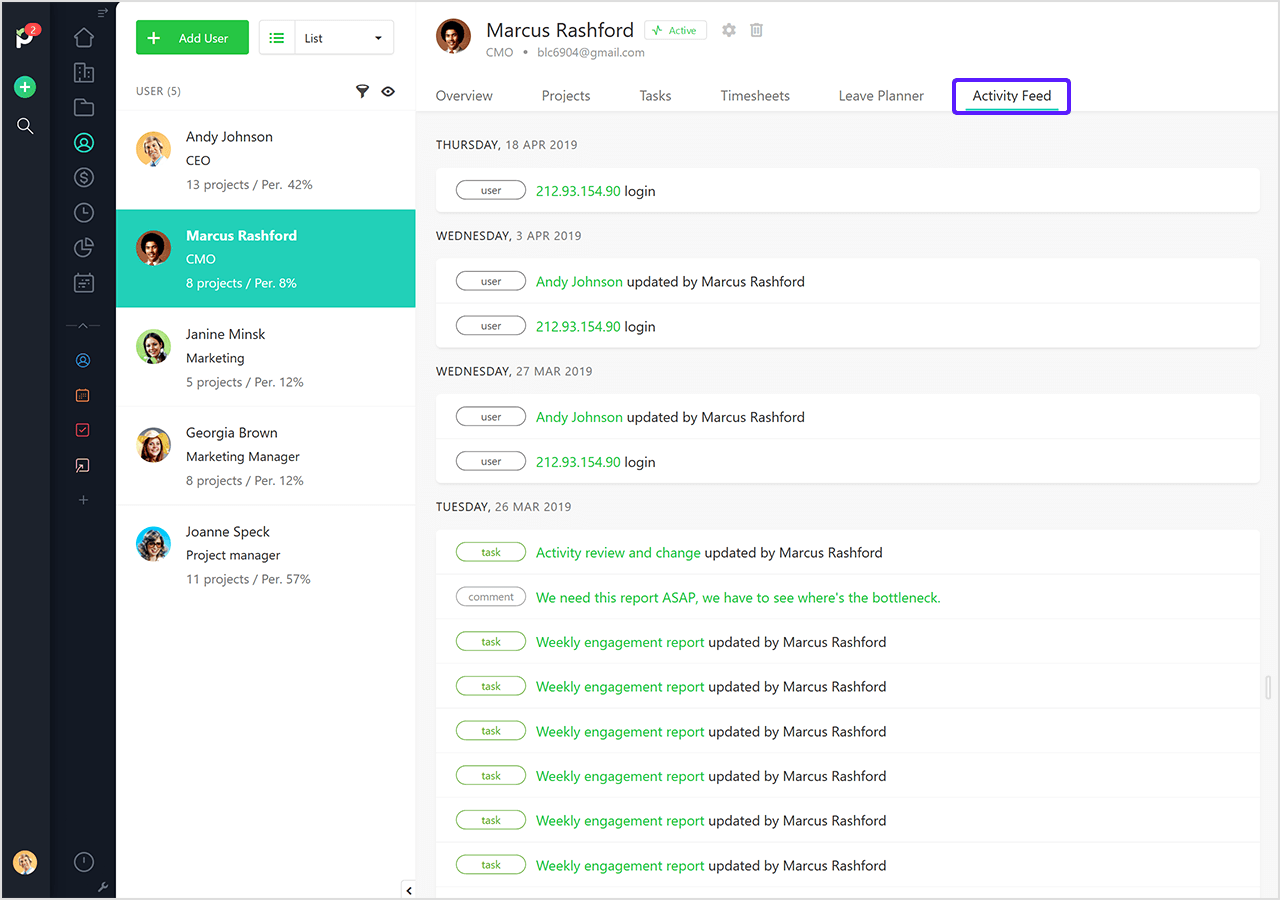
Paymo doesn’t have an audit log available on its platform. Instead, it has an activity feed for each user and project that shows what actions have taken place within each entity.
The problem is that none of the actions are timestamped and they only show a very basic level of detail. They also don’t capture any actions that have taken place outside of projects and tasks.
Audit trail verdict
Since My Hours offers a true audit log, it’s accepted by regulatory authorities should they request it. It would be stronger, though, if it stored more than 90 days’ worth of data, since you wouldn’t have to rely on having to download the report to retain the information.
While Paymo’s activity feeds are useful, the lack of detail and timestamps means they won’t stand up during an audit inspection.
6. Reporting and Audit Readiness
My Hours
Beyond the audit log report, My Hours has a full range of reporting options, allowing you to present data in a fully transparent format.
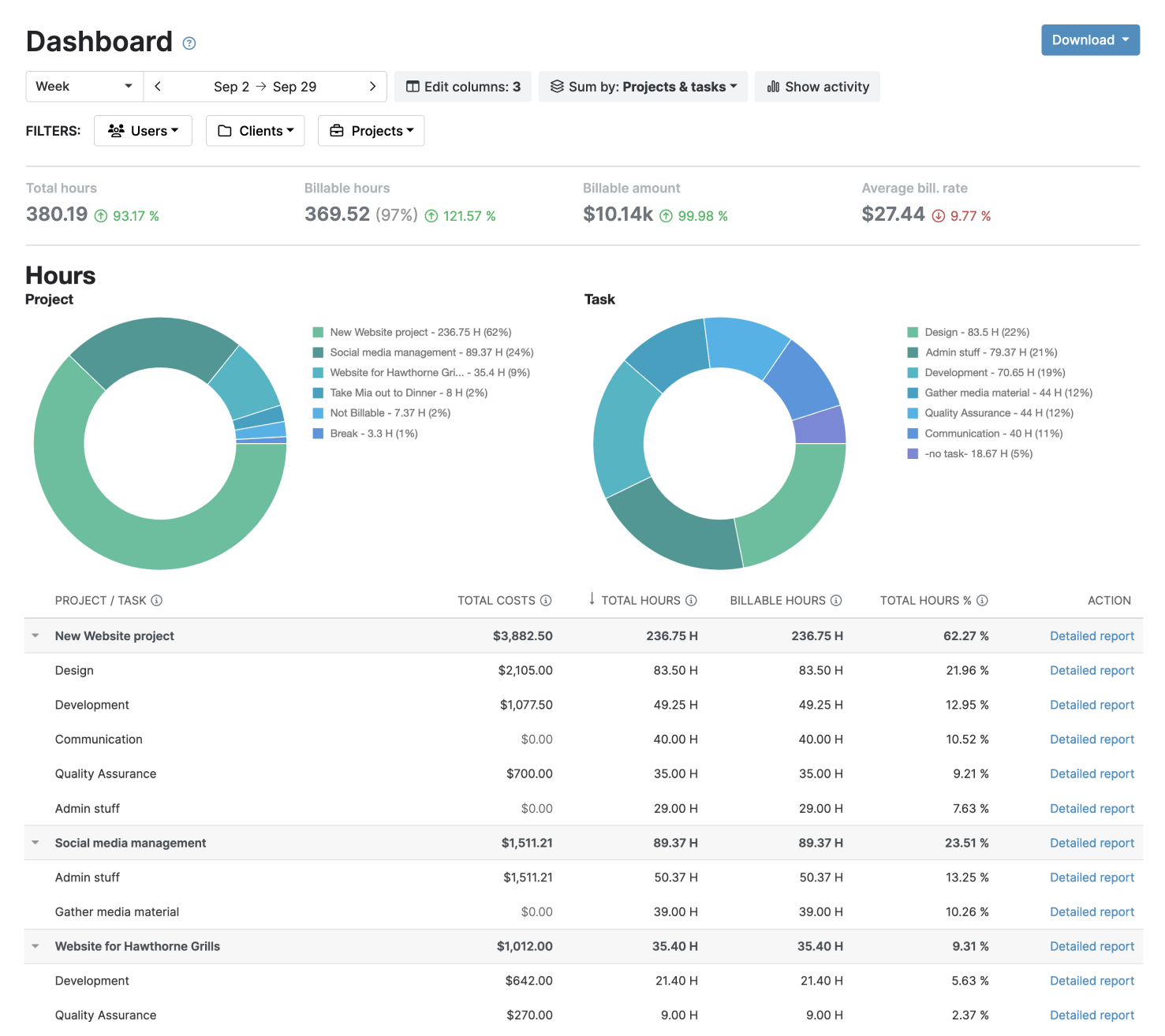
For regular compliance reporting, the Dashboard report provides visual overviews of time and cost data, while the timesheet report provides breakdowns of team and individual user data.
For audits or more comprehensive reporting requirements, you can use the Detailed report. This gives you the full range of data columns and filters, which you can customize as required.
Save report settings to generate compliance reports in one click. Additionally, they can be automatically sent to regulators at regular intervals. Alternatively, export the data in PDF or XLS format whenever you want.
Paymo
Paymo has a single reporting tool with all the available filters and columns, allowing you to select the data you want to see. Reports cannot be scheduled, but they can be shared via a permalink or exported in PDF, PNG, ZIP, or CSV format, depending on the type of data you want to export.
You can create as many reports as you need and save the settings for on-click generation.
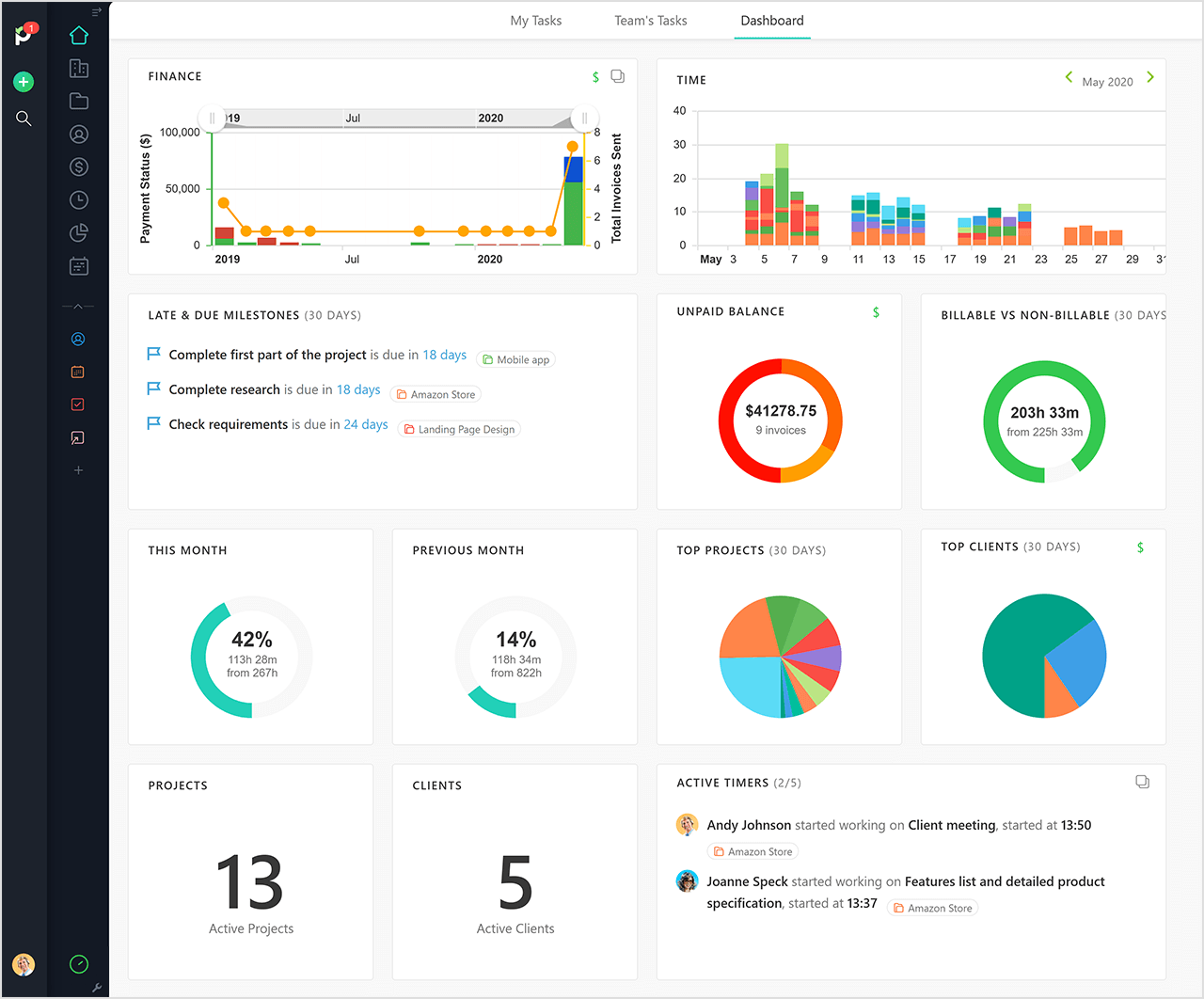
The project dashboard is also useful for viewing essential data, like financials, in visual format. It’s just a shame that it can’t be exported as a report.
Reporting verdict
Both platforms have great reporting features that provide access to the required data.
My Hours offers more granularity and the different reporting options allow you to provide both visual overviews and deep data.
7. Built-In Compliance
My Hours
My Hours holds a range of certifications and follows a very high standard for data security.
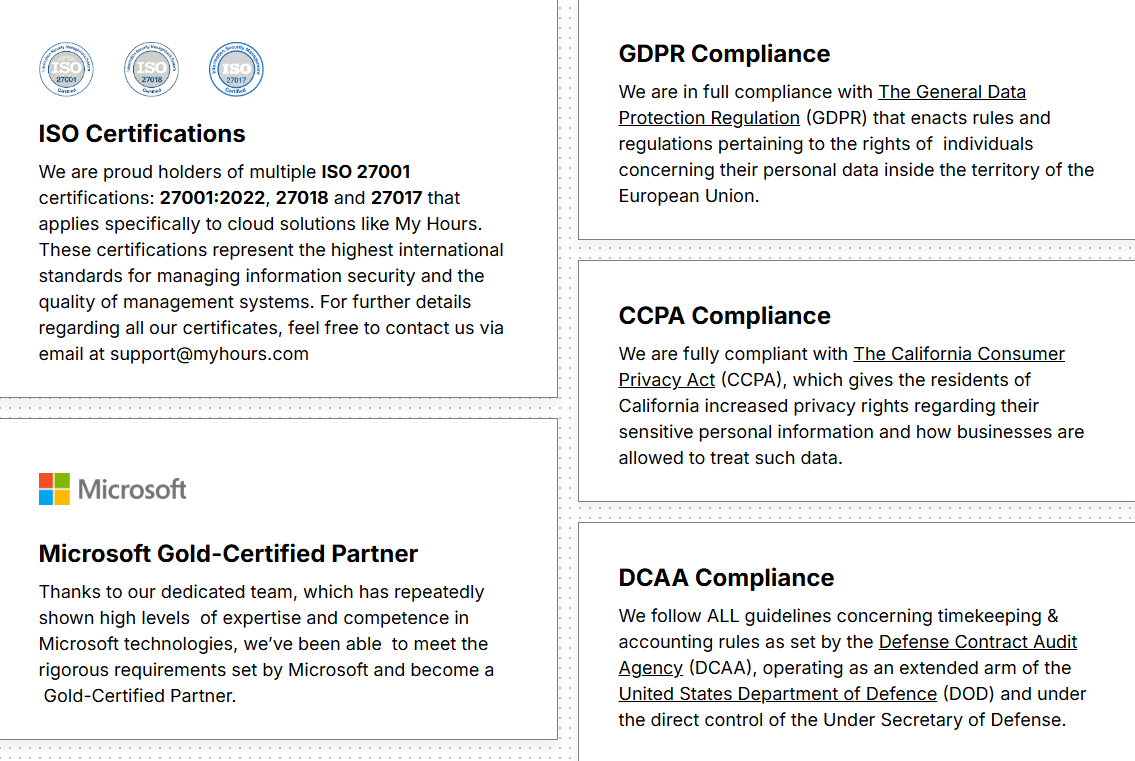
The platform is fully compliant with the General Data Protection Regulation (GDPR) and the California Consumer Privacy Act (CCPA).
It also follows all guidelines and rules as set by the Defense Contract Audit Agency (DCAA) and the United States Department of Defense (DOD) for US-based government contractors.
My Hours also holds multiple ISO 27001 certifications for information security and is a Microsoft partner. All data adheres to the newest TLS 1.3 security protocol, and Single Sign-On is available for user verification.
Paymo
Unfortunately Paymo does not hold any data security certifications and refers you to their standard privacy policy if you ask them for more information.
While it does adhere to GDPR rules, it does not state anywhere that it is compliant with CCPA or DCAA.
Compliance verdict
My Hours is very upfront and transparent about its built-in compliance capabilities. It has incredibly strong security controls and takes data privacy seriously.
Paymo is less upfront about its level of compliance and security, which can be a cause for concern if you work in a heavily regulated industry.
Overall, My Hours offers more reassurance that it features the necessary compliance controls for multiple industries.
My Hours vs. Paymo: Pricing Comparison
Quick overview
Note: Paymo offers a limited discount for monthly subscriptions. Users pay the annual payment price for the first three months, after which it reverts to full monthly pricing.
My Hours offers custom pricing for enterprise-level organizations.
Comparison
Both platforms offer a basic free plan, with My Hours being the more generous since it includes up to five users. Paymo’s free plan is only suitable for solo users.
My Hours is also significantly cheaper than Paymo, which costs roughly double, depending on which plan you choose. But, you have to keep in mind that Paymo’s higher-tier plans include a lot of project management tools, which can save you from purchasing separate software for this purpose.
However, if we look at it purely from a time and cost tracking perspective, My Hours is budget-friendly and, therefore, offers better value compared to Paymo.
If you do decide to go for Paymo, it’s worth paying for the annual plan, since the discount can reach up to 44%.
Pros and Cons of Each Tool
My Hours
Pros
 Strong compliance controls
- Detailed audit logs
- Custom fields and tags
- Robust approval workflows
- Granular reporting
- Lower pricing
Cons
 Audit log limited to 90 days
- Fewer project management features
- No built-in scheduling or time off tools
Paymo
Pros
- Strong project management tools
- Flexible billing and expense tracking
- Detailed project dashboards
- Generous annual discounts
Cons
- Limited compliance controls
- No true audit log
- Limited custom data capture
- Expensive for time tracking alone
Bottom Line
For compliance-first time tracking, My Hours is an excellent candidate. Its flexibility over data capture and controls over time entries mean it’s suitable even for strict regulations and compliance requirements.
Organizations that need accurate and audit-ready records will find it easy to set up and manage in My Hours.
Paymo remains a good choice for teams prioritizing project management and collaboration, but for regulated industries it falls short.

Waste no more time,
jump right in!

All rights reserved.