

For example, you charged a client $100 per hour, then later increased your rate to $150. Should the hours you logged at $100 suddenly be worth $150? With the right system, old entries should still be valued at $100.
The fix is to use a time-tracking system that locks a rate to the work once it's logged and lets you set an effective date for any new rate. That way, a rate change only affects what comes next, not what's already been billed.
If your historical billing data no longer matches what the client actually paid, it’ll be harder to reconcile invoices, review project profitability, or explain past billing records. It can also create confusion when you need to review the work you completed under an older rate.
So, how should you handle billing rate changes? And what should you look for in a time-tracking system to keep historical data intact? This guide covers all of these details and more.
Why Do Billing Rates Change?
There are various reasons why billing rates can change, including:
- Rates can increase as your experience, expertise, or costs evolve.
- A client may agree to a new rate for future work.
- Different projects may have different rates based on their scope or requirements.
- Market rates can shift, causing a business to adjust its own pricing.
- Some roles or types of work may be billed at different rates.
- A contract renewal or change in terms can result in a new billing rate.
Of course, rate changes aren’t an issue, as long as the new rates don’t affect past entries.
How Time-Tracking Software Handles Billing Rate Changes
Most time-tracking apps support billing rates, but they differ in how rate changes affect historical entries, which can also impact things like reporting and profitability forecasts.
Approach 1: The New Rate Updates Existing Data
Some platforms apply a new billing rate to time that’s already been logged. When you change the rate, the system recalculates the value of connected entries.
Which entries actually get updated depends on the system.
It could be all time logs using that rate, or just the ones tied to a certain person, project, task, or date range. Some systems also use a rate hierarchy, where a more specific rate takes priority over a general one.
This approach can be useful when you intentionally need to correct historical data. For example, the wrong rate may have been entered for a group of time entries, or you realize that a new price should have applied to work from a few weeks back.
In such cases, updating the rate is faster than individually correcting the affected entries.
However, if applied wrongly, this same behavior can unintentionally change data you never meant to touch, leaving your reports out of sync.
Before you touch a billing rate, check whether the change only affects future entries, or everything you've already logged too.
Approach 2: Historical Rates Are Preserved
Other systems keep the rate that you used when the work was tracked. Once it's logged, that number doesn’t change unless you say otherwise.
A new rate only applies where you tell it to.
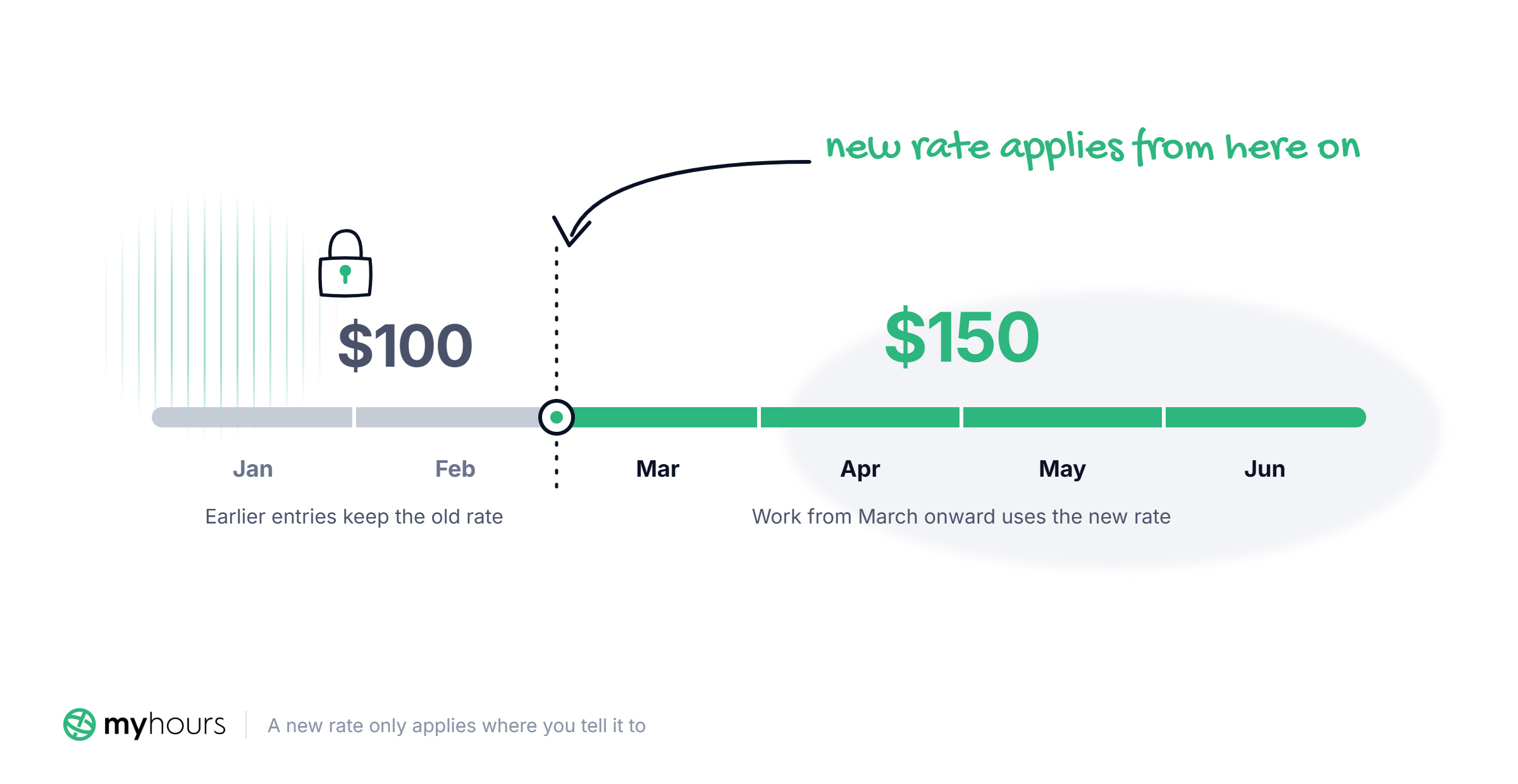
For example, if you charged $100 per hour in January and February and $150 per hour from March onward, the earlier entries keep the old rate. Of those three, only March's work uses the new one.
Systems retain the historical rates in different ways:
- Some time-tracking tools let you set what dates the new rates should kick in, and everything before that date is left alone.
- Others save the billing rate directly with each time entry. Once the entry has been recorded, approved, or invoiced, future changes to the current rate won’t change the rate attached to that entry.
Either way, the result is the same: your records remain consistent. Go back and check an old invoice months later, and the numbers still line up, even if your current rate has changed over and over again.
Why Historical Billing Data Should Stay Historical
Here are some reasons why you should use a time tracker that keeps historical billing data intact:
- Invoices stop matching your own records: If a client was billed at one rate and your system shows a different number later, you’ll have to explain the discrepancy to them.
- Reports lose their consistency: Clients use reports to see how their budget is being spent, and mismatches in report data can lead to issues.
- It becomes hard to trust your profitability numbers or quote future work: Accurate quotes depend on historical data, and it can be difficult to rely on that data if old projects no longer reflect what actually happened.
- Audit trails depend on it: A rate change that overwrites an old entry destroys the one thing an auditor needs: proof of what the original charge was. DCAA allows corrections, but only when the original charge, the corrected charge, and the employee's sign-off are all still on record, which a system that preserves historical rates by default makes easy.
Example: Say a government contractor updates a billing rate mid-year after a comp review. Months later, a DCAA audit requests time and cost records for that same period.
If the system recalculated old logs when the rate changed, those records would no longer match what was invoiced at the time. The contractor would be stuck explaining a discrepancy that shouldn’t exist.
With rate history intact, there’s nothing to explain. The records pulled for the audit are the same ones the client and the government agency already saw.
How to Change a Billing Rate Without Rewriting History
Changing a billing rate involves going to your time-tracking platform and entering the new number. But that shouldn't be your first step.
Below is an effective process that can make the change more manageable:
- Check how your platform handles rate changes before updating anything so you know whether it will also affect existing time entries that have been approved, locked, or invoiced.
- Decide when the new rate should take effect based on the date you and your client agreed on, especially if the change happens during an ongoing project.
- Apply the new, agreed rate to all future logs or set it to be activated from a specific date.
- Check your approved and invoiced time to make sure none of it gets changed by the update.
- Review a few old entries and some new ones after the change to confirm that old ones remain unaffected and that new rates have taken effect.
- Keep a record of the new rate, the effective date, and any agreement with the client for future reference.
What to Look For in Time-Tracking Software
The software you use has a direct impact on how you change billing rates and what happens to your historical data and audit trail when you do.
The right system should give you enough control to make rate changes without creating unnecessary changes to your records.
Here are a few things to check for when choosing a time-tracking solution:
- Does updating a rate touch anything you've already logged? Some platforms recompute past entries while others lock their values in place.
- Can you set an effective date on a rate change? If you're moving a client from $100 to $150 starting next month, you should be able to schedule it, instead of the update applying the second you save it.
- Are locked, approved, or invoiced logs actually protected? Rate changes shouldn’t affect time entries that have been billed.
- Can you set rates at different levels? Check whether you can assign a rate per user, per project, or per task, and whether a more specific rate takes priority over a general one. This gives you more control and reduces the risk of unintended changes.
- Can you override a rate for a single client or project? You shouldn't have to change what you charge everyone else just to adjust one engagement.
- Does switching billing methods affect old data? Moving from a user-based rate to a project-based one, or vice versa, shouldn’t affect existing logs.
- Does the platform offer a free plan or trial? This way, you can test rate changes before committing. Update a rate on a project with older entries, then check what happens to previous data.
How My Hours Handles Billing Rate Changes and Invoice History
My Hours lets you control when and how new billing rates take effect. When you update a rate, you can apply it to new logs only, new and existing logs, or logs created from a specific date onward.
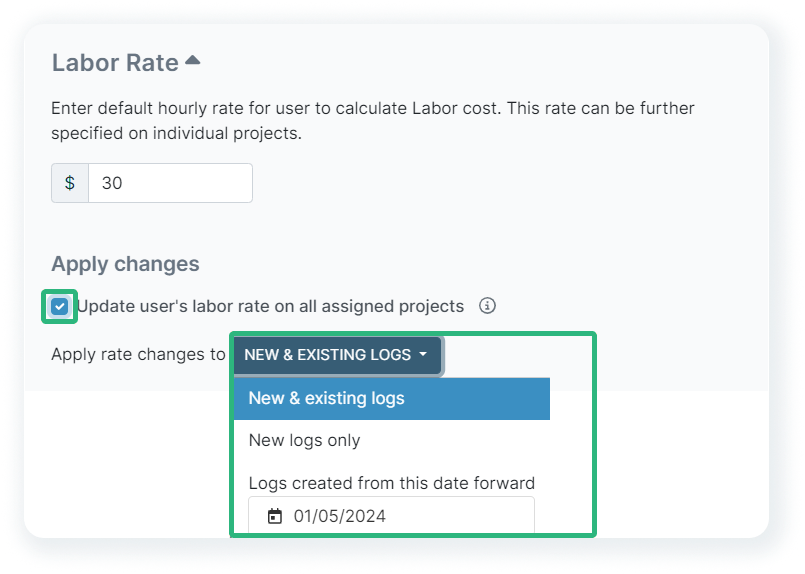
Rate changes never update locked, invoiced, or approved logs, no matter which option you choose. That protection applies in every case.
Beyond that, the choice is yours. Applying a change to new logs means the new rate affects nothing you've already tracked, only rates after the update. Applying it to new and existing logs means the new rate reaches past entries too, as long as they aren't locked, invoiced, or approved.
Setting an effective date works the same way, even a date in the past only updates entries from that point forward that haven't already been locked, invoiced, or approved.
My Hours also lets you use user-, task-, or project-based billing rates. A user’s default billable rate can be overridden on a specific project when the engagement calls for a different number, so one project can bill at a different rate without changing what that person charges everywhere else.
Users can also separate labor rates from billable rates. One reflects what an employee actually costs you, while the other is what you charge the client for their work. Updating one never changes the other.
To see how My Hours keeps your billing rate history intact, sign up for a 14-day free trial.
Bottom Line
You should be able to change billing rates without creating mismatched invoices or reports that no longer reflect past work. A rate update is a normal part of running a business, and shouldn’t put your records at risk.
With the right time-tracking tool and a consistent process for making changes, a new rate only affects what comes next. Everything you've already approved, invoiced, or locked stays exactly as it was.
With a platform like My Hours, you get full control over when a new rate takes effect, allowing you to update your pricing going forward without affecting the work you've already billed.
Frequently Asked Questions
How do you communicate a billing rate increase to clients?
Send the client a message about the new rate and the date it will take effect.
For example, you could say, “Starting [date], our hourly rate will increase from $[X] to $[Y]. This new rate will apply to all work completed from [date] onward.”
Give the client enough time to review the change and ask questions. Only start billing at the new rate once the client has agreed to the change.
Rate changes may also require a new contract or an amendment to an existing agreement. If so, complete the necessary legal process and have the updated agreement signed before applying the new rate.
Can changing a billing rate change an old invoice?
Yes, it can, depending on the time-tracking software you use. Some platforms automatically apply a new billing rate to existing time entries, which can change the figures used in past invoices or reports.
Others preserve the original rate on historical entries, so changing your current rate won't affect work that was already billed.
The exact behavior can also depend on whether the invoice has been finalized, approved, or locked. That's why it's important to check how your time-tracking software handles rate changes before updating a billing rate.
What is the difference between a billing rate and a labor rate?
A billing rate is what you charge a client for billable work, while a labor rate reflects how much that work costs your business, like what you pay an employee for their time, effort, and expertise.
You can structure these rates in different ways, including hourly (the most common), fixed project fees, recurring retainers, or per-unit pricing such as per word or per page.
Can I set different billing rates for different projects or clients in the same account?
Yes. Many time-tracking systems let you set different billing rates for individual clients or projects. They also let you define a default billing rate that applies to your standard work, so you only need to override it when a particular client or project has a different rate.
How often should you review or update your billing rates?
A common practice is to review billing rates at least once a year, though there’s no fixed schedule you have to follow. You can do it whenever your costs, responsibilities, services, or market rates change significantly.
A review doesn’t always mean you need to increase your rates. Sometimes your current pricing still makes sense, and other times they no longer reflect the value or cost of your work.


