


My Hours vs. Toggl Track for Agencies
Choosing the right software for growing agencies
As agencies grow, they take on more clients, manage more projects, and expand their teams. But that growth also makes it harder to maintain visibility over how work is progressing and whether projects are still financially healthy.
Both My Hours and Toggl Track help agencies track time, but they support growth in different ways. Toggl Track prioritizes simplicity, while My Hours goes a step further by offering additional tools to manage costs and profitability as operations scale.
Last updated: July 2026
Content overview

My Hours vs. Toggl Track: At a Glance

1. Track Budgets
My Hours
My Hours offers comprehensive budgeting options, with user-friendly tools that make it easy to monitor expenditure based on project type and scope.
You can choose to set a single budget for the entire project or break it down into mini budgets per task for more control.
From there, you have three budget-setting options:
- Time-based budgets (total hours)
- Billable amount budgets
- Cost-based budgets (covering time, billable hours, and expenses)
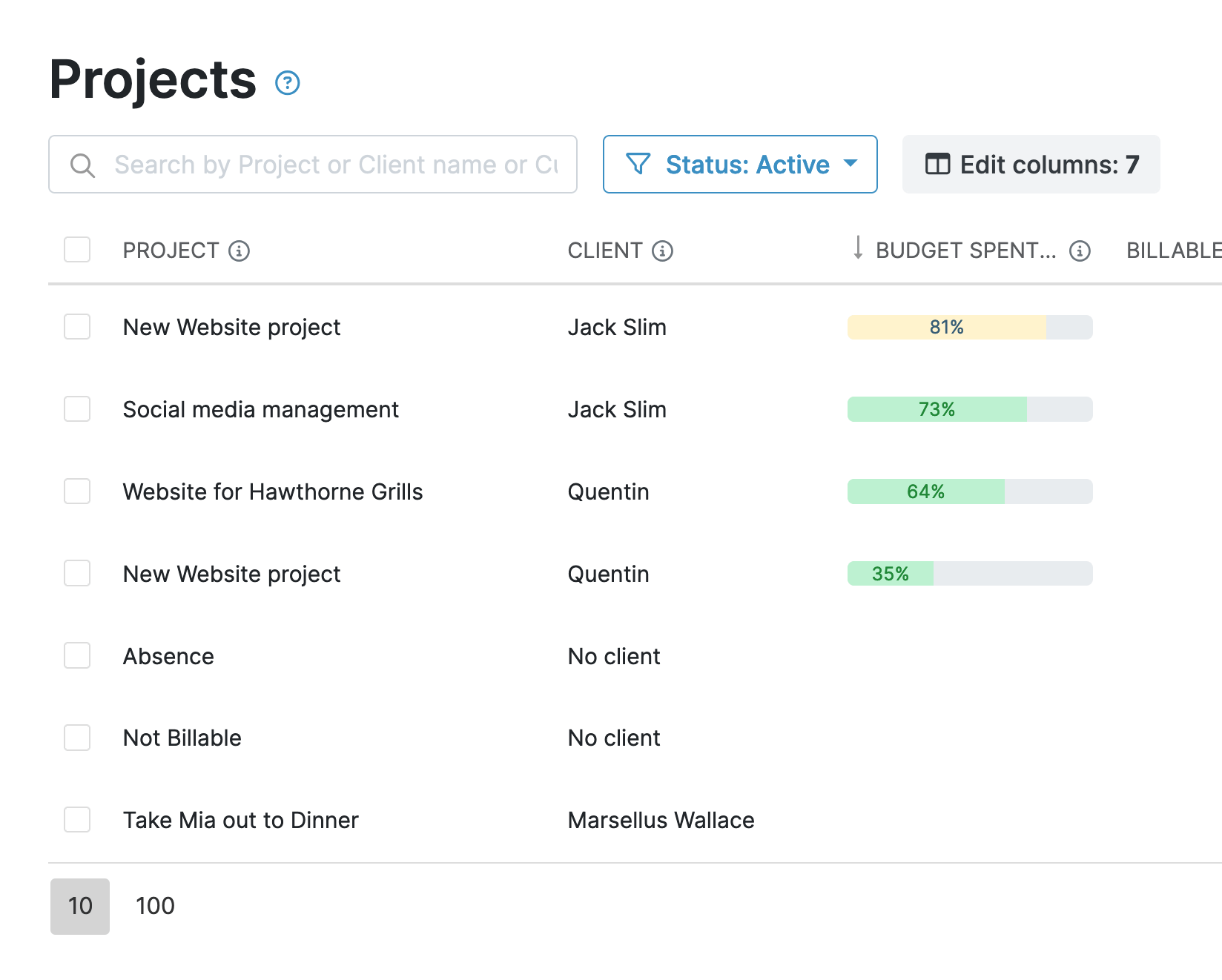
Once you have set the budget, a handy progress bar will show you expenditure at a glance. Plus, for added oversight, you can also set an automated alert to ping you when a certain percentage has been spent.
Budgets can be a one-off thing or set to restart each month, making them suitable for both fixed and recurring projects.
Toggl Track
This is one of Toggl’s weakest areas, since the platform offers no monetary budget tracking options.
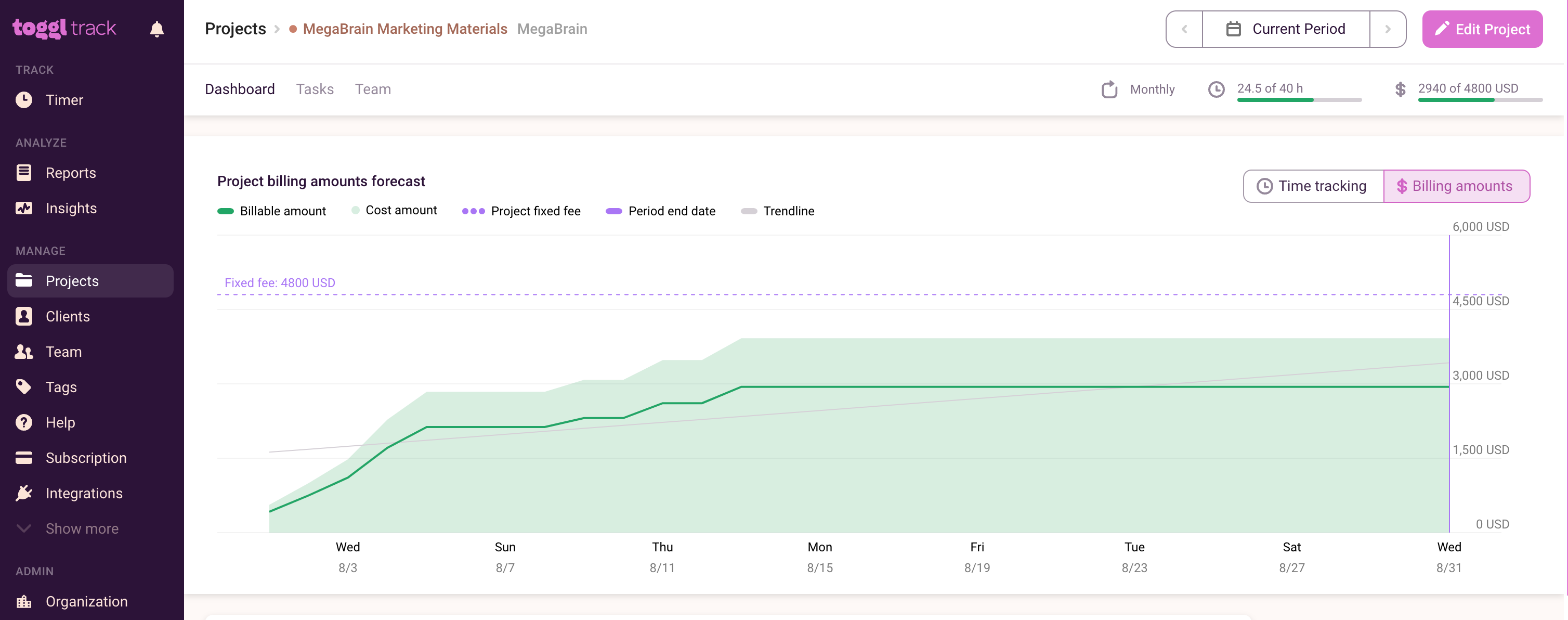
The only thing that comes close is the ability to set time estimates. This allows you to input the number of hours you think a project will take. As time is tracked, the project screen will tell you how much time is remaining.
You can also track expenditure for flat fee projects and set up an alert to notify you when a certain amount has been spent. However, it’s not a budget per se, and you can’t divide it between tasks.
Budgets verdict
There’s no competition: My Hours wins hands down for budget tracking. So, if this is an important part of agency financial management, you’ll likely become frustrated with Toggl’s limitations.
2. User Billable Rates and Cost Capture
My Hours
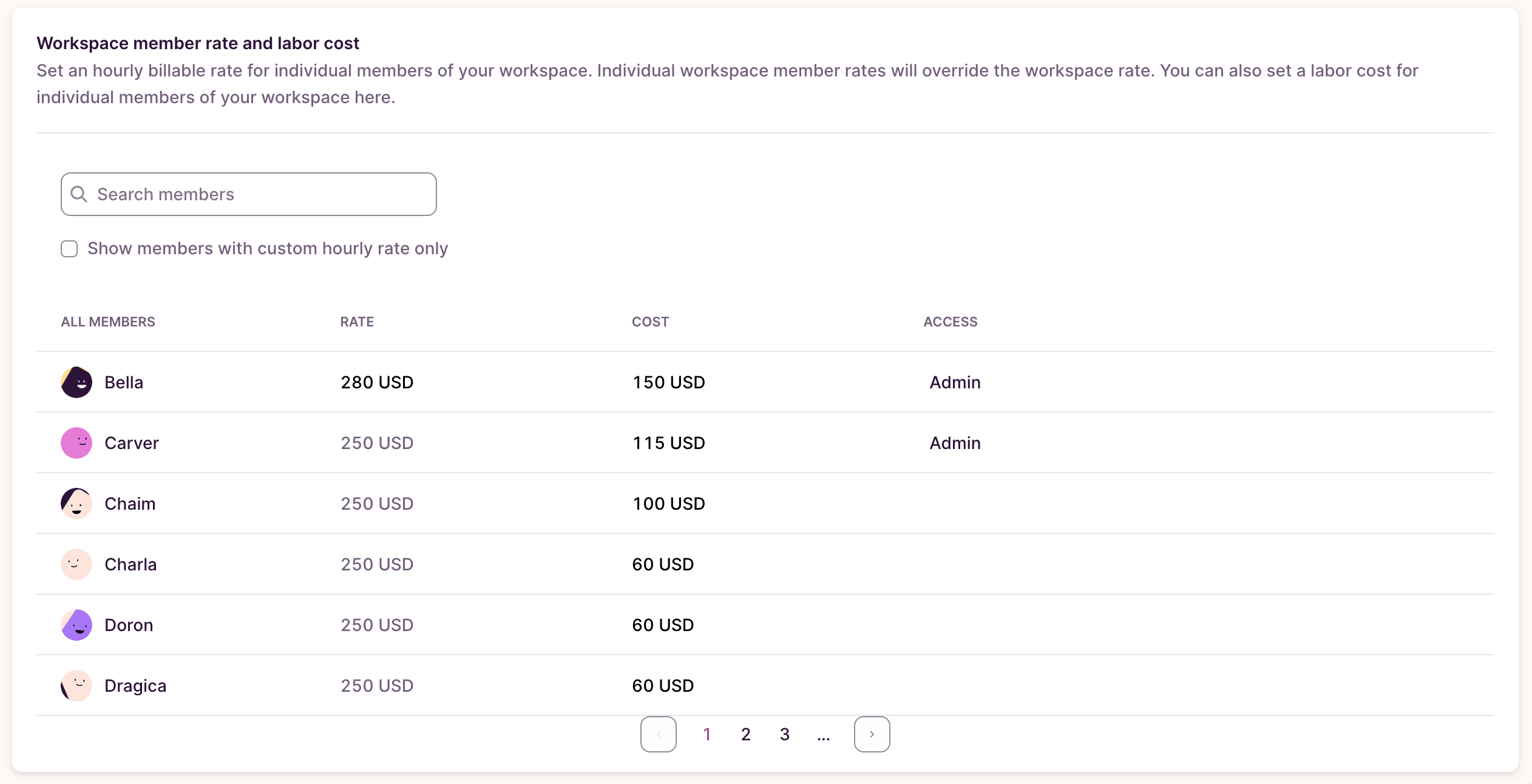
With My Hours, capturing billable rates is simple. Set a labor rate and billable rate per user, and you’re good to go. If you need to adjust the user billable rates according to different projects, then you can do this when assigning users to a project.
As time is tracked, so are the labor rate and billable rate, giving you real-time insight into profitability.
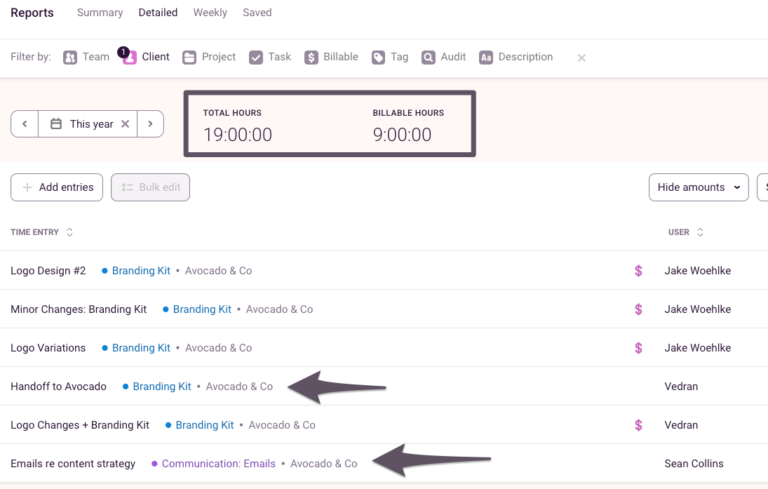
Additionally, users can mark time entries as billable or not, which is useful when a user completes project-related work that isn’t billable to a client.
For expenses, users create an entry the same way they would for time. Each expense is linked to a project and/or task, along with the amount and an uploaded copy of a receipt or invoice.
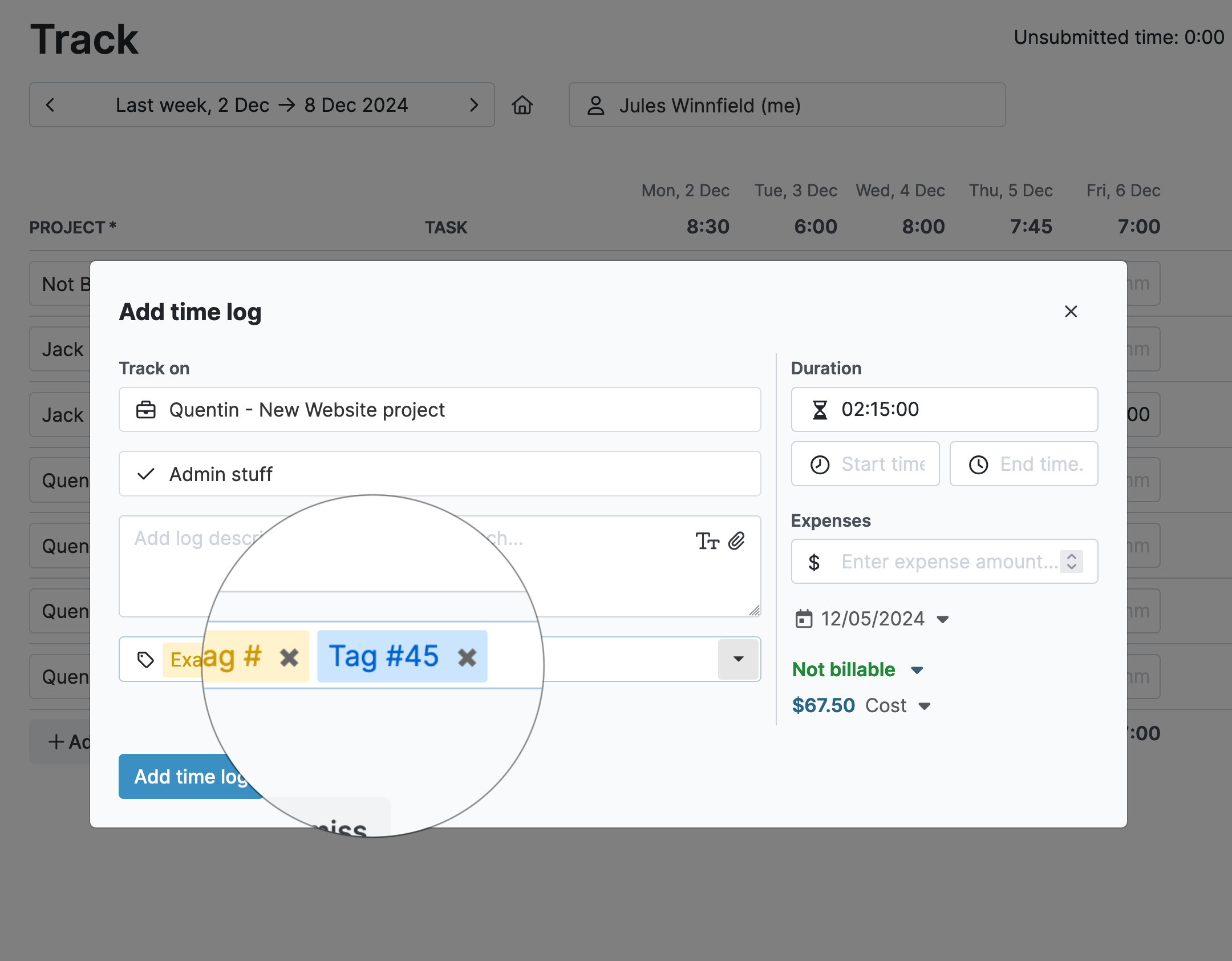
Like time entries, expenses can be marked as billable or non-billable. Plus, for supporting information, you can add a description and any relevant tags.
Toggl Track
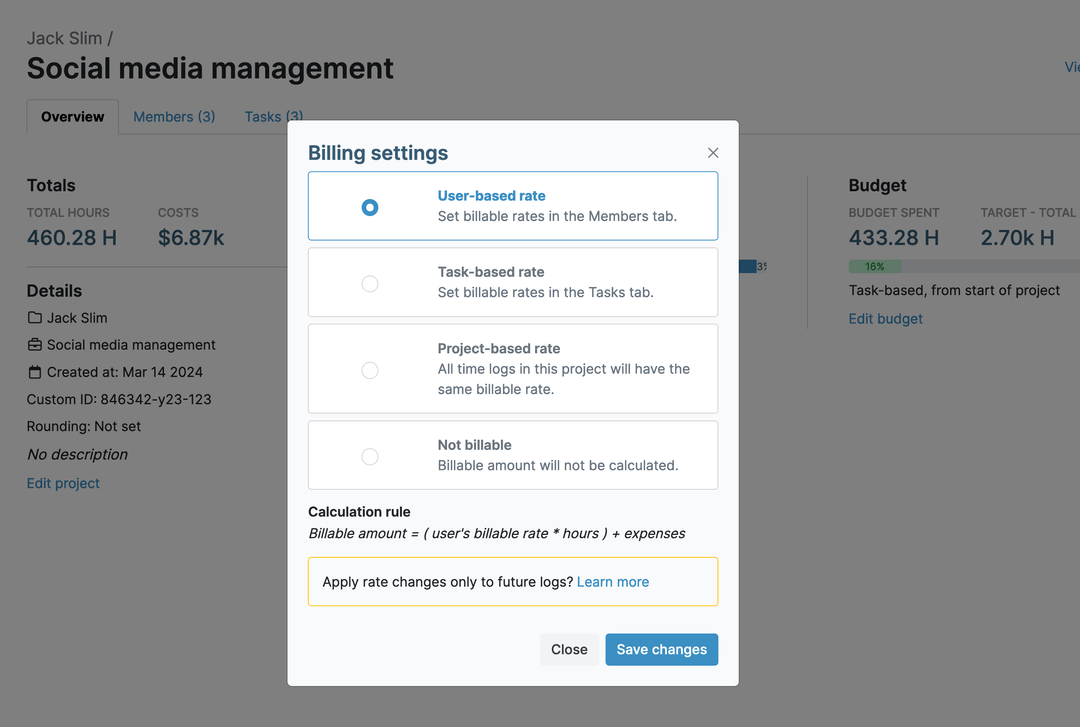
Toggl also allows you to set user billable rates and labor rates, but access is split across plans. Billable rates are available on the Starter plan, while labor rates are locked behind the Premium tier, which can feel unnecessarily restrictive.
Like My Hours, you can configure unique user rates at the project level and mark time entries as billable or non-billable.
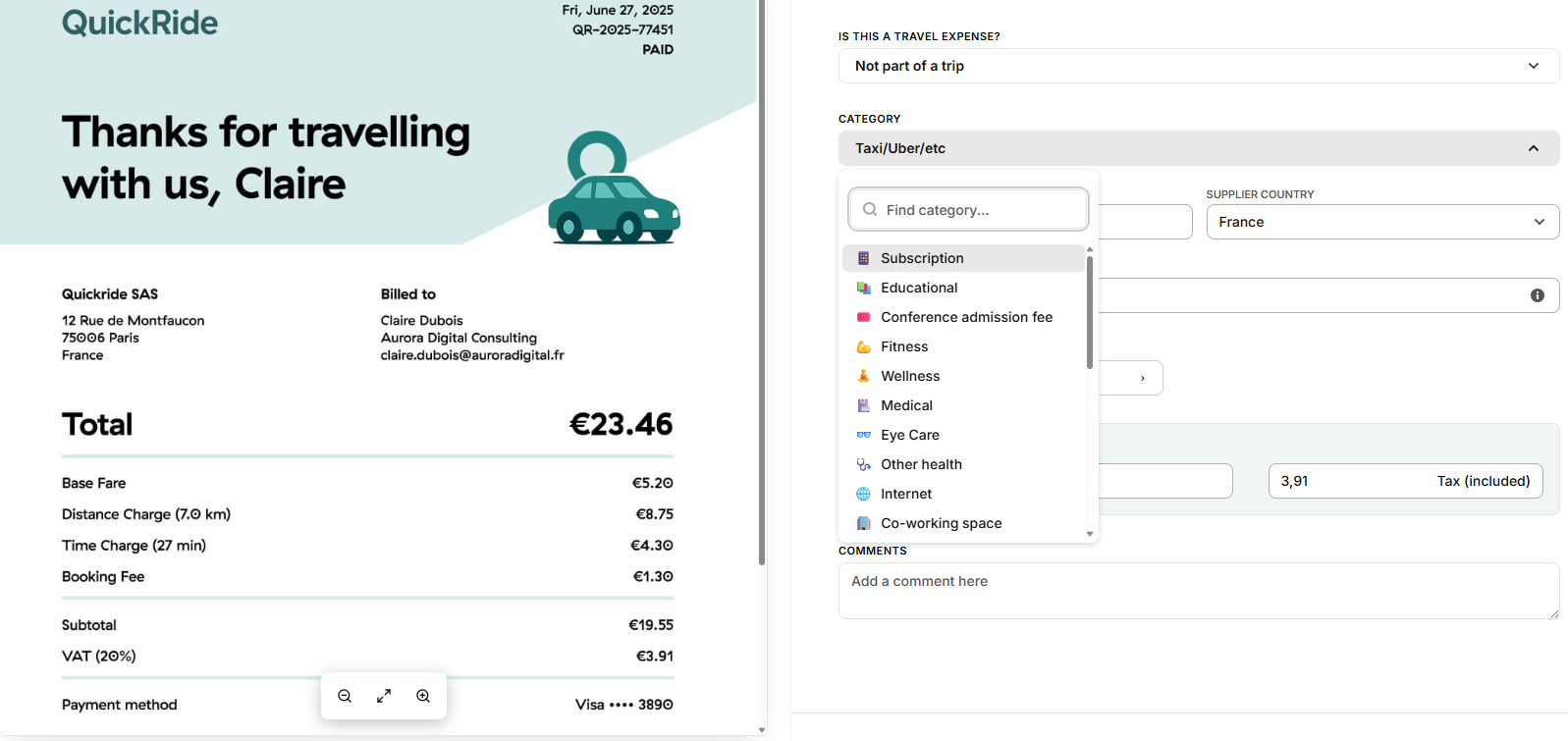
Expense capture is where things get a bit complicated. Expenses aren’t managed directly within Toggle Track; instead, you must connect your account to Toggl Work to access this feature. Once connected, you can either upload a receipt (and an AI agent will scan and input the information) or you can enter the expense details manually.
But the real sticking point is that you cannot link expenses to projects and tasks. They sit completely separately from the rest of your billable data, making it difficult to get a full understanding of true project costs.
Billable rate and costs verdict
My Hours’ billable and expense data sit within the same ecosystem, with all costs linked directly to projects, tasks, and budgets. Because of this, it's easier for you to keep on top of all expenditures without switching between platforms.
Toggl Track’s AI receipt reader is a nice touch, but maintaining a separation between billable and expense-based costs is a real letdown. For agencies, this can pose a problem when managing expenditure.
3. Data Organization and Completeness
My Hours
Whether you need to capture more data or organize it more effectively, My Hours has two ways to do it.
First, you can create unlimited custom tags and apply them to both time and expense entries. These can be used for virtually any reason, such as distinguishing between CapEx and OpEx or defining allowable and unallowable costs.
The second option is to create custom fields. You can pick from text, numerical, or dropdown fields, making them flexible for different purposes. Up to three custom fields can be added to clients, projects, tasks, users, and time/expense entries. These are great for capturing data like cost center codes or expense data, such as mileage.
Toggl Track
Toggl Track supports custom tags for time entries, allowing teams to organize and filter tracked time in much the same way as My Hours. However, these tags cannot be applied to expense entries in Toggl Work.
It’s also not possible to create any custom data fields on entities, so you’re pretty limited in the amount of customized data you can apply.
Data organization verdict
My Hours offers a lot more flexibility with wider customization abilities. This allows you to create datasets that align with your agency's needs, without relying on other tools.
It’s good that Toggl includes custom tags, but it would be useful to have a bit more range. However, with over 100 native integrations, Toggl may be expecting you to rely on third-party integrations to fill in the data gaps.
4. Project Setup
My Hours
Using a simple clients > projects > tasks hierarchy, My Hours makes it easy to organize deliverables and keep all data in the right place.
Each client functions as its own separate workspace, within client spaces, where you can create unlimited projects and tasks. For every client, you can also input crucial info, such as contact details and tax numbers.
At the project level, the overview screen lets you add custom IDs and descriptions, configure billing and budgeting options, and assign users. From there, you can create the relevant tasks for each project.
Tasks support comprehensive data, too, including custom IDs and descriptions, helping users understand each deliverable. For larger projects, tasks can be organized into color-coded task lists, keeping everything tidy and easy to find.

Toggl Track
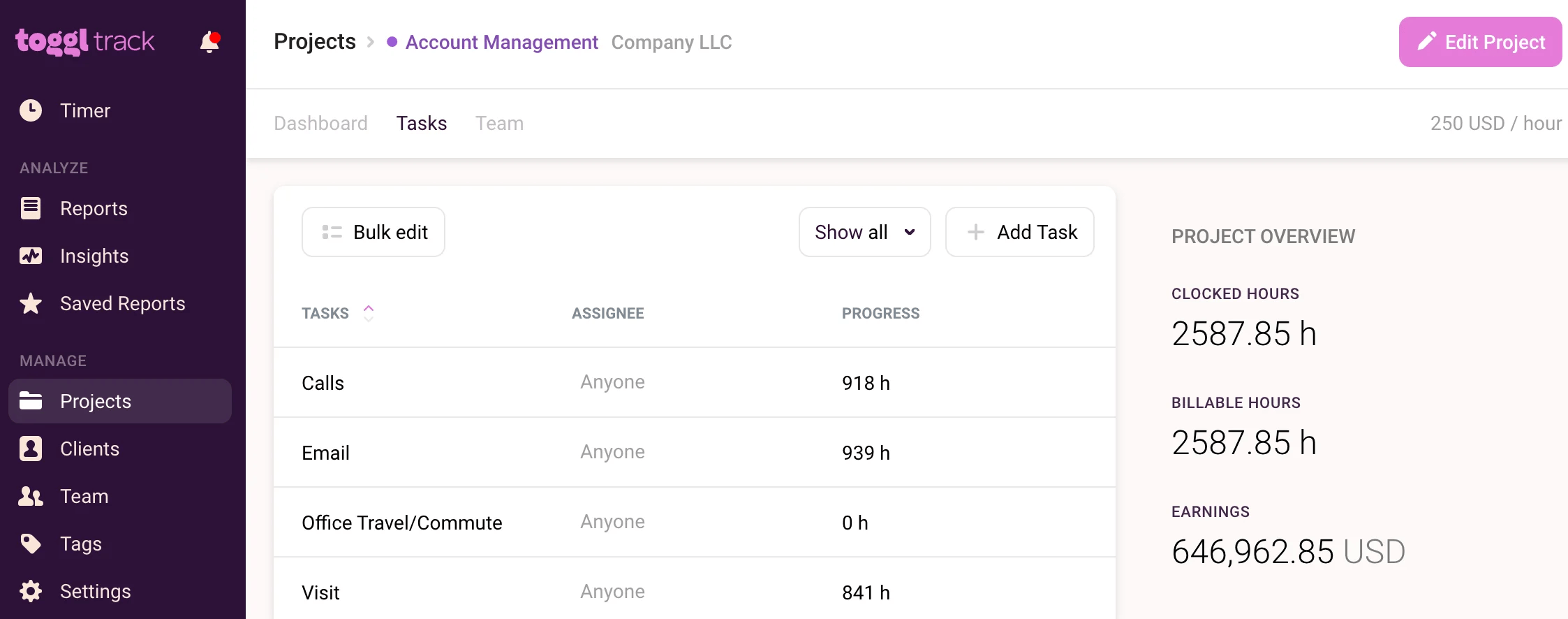
Like My Hours, Toggl Track also follows a client > project > task hierarchy, but the overall setup is more simplistic in comparison.
For example, client records are limited to a name only, with no option to store additional details. Similarly, projects and tasks don’t support descriptions or ID numbers, which restricts how much info can be captured.
This can pose a problem for larger agencies that have high volumes of deliverables or similar-sounding tasks, because there’s no way to add extra information that would be useful for the user.
Toggl Track keeps tasks flat under a project, no grouping layer, though you can tag time entries. To organize tasks into segments or lists, you'd need Toggl Plan, a separate product with its own subscription. My Hours groups tasks into task lists with templates, built into the same tool you already use for time and billing.
Project setup verdict
Toggl Track works if you are a small agency with easily identifiable projects and tasks. If, however, you deal with more complex setups or detailed projects, My Hours offers a better solution for growing agencies to keep everything organized and easily identifiable.
5. Project Billing
My Hours
Depending on your client contracts, you can set up billing structures in My Hours to match.
You can pick from several options:
- User billable rate: Takes the hourly billable rate of each user assigned to a project.
- Task-based rate: Applies a single hourly rate per task, no matter who is working on it.
- Project-based rate: A single hourly fee across the whole project, regardless of users or tasks.
- Flat fee: A single, fixed fee for the whole project, regardless of time tracked.
- Not billable: No billable rates are applied, but labor rates are still tracked. Useful for internal projects that are not invoiced.
Whichever billing type you pick, it will apply across the entire project.
Toggl Track
Toggl offers the same billing options as My Hours, but they work a little differently.
Rather than applying the same billing type across the entire project, you have hierarchies where one rate will supersede another.
For example, if you set a project-based rate, you can also set a new rate for a specific task. The task rate will then override the project rate for that task only. This gives you more control over rates, but it’s easy to get confused or apply the wrong rate. Still, it’s useful for agencies with complex project billing needs.
Project billing verdict
My Hours has simpler and more user-friendly billable rates. However, it’s still possible to apply detailed billing by using the task-based rates.
Toggl gives you more granularity, but it might be overkill for some, especially for simple billing requirements.
6. Analysis and Profitability Tracking
My Hours
Reporting is key for agencies to keep clients updated and stakeholders satisfied. Therefore, My Hours has made it as easy as possible to create custom reports in a few clicks.
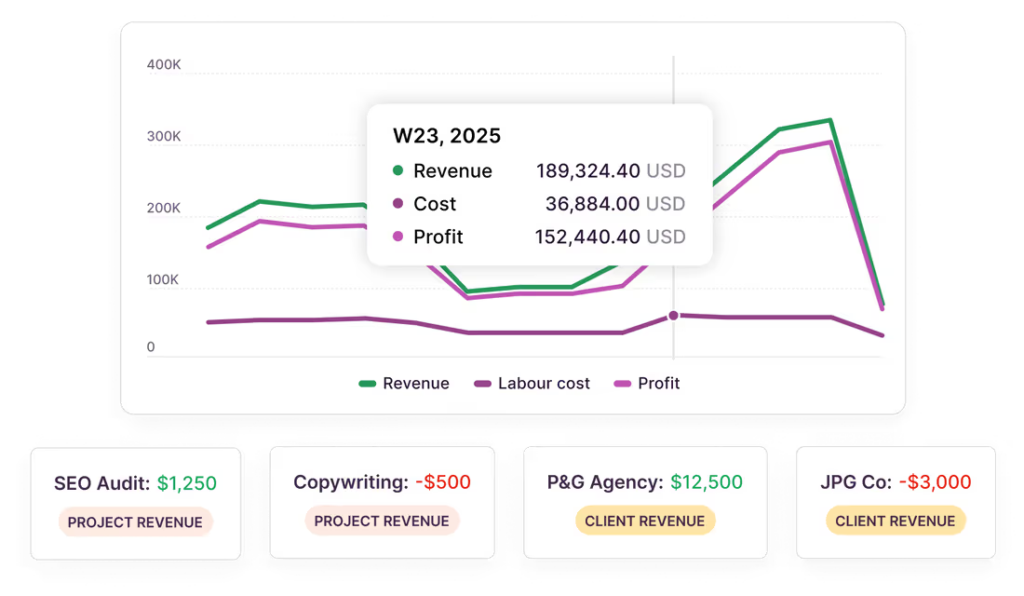
Reporting options include the Dashboard report, which provides a visual overview of profitability and other metrics, complete with graphs.
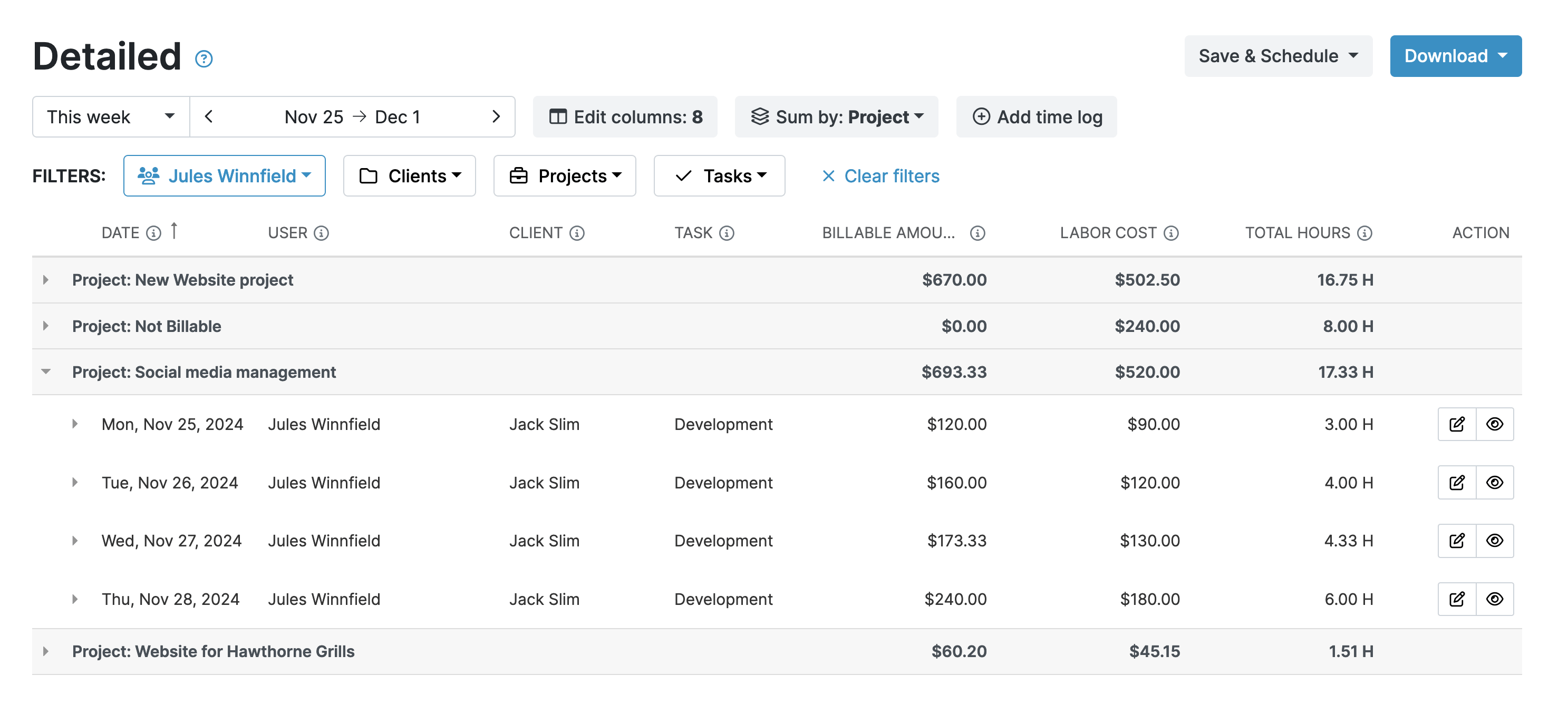
The Detailed report is for when you want to dig into granular data. Choose from an extensive selection of filters and data columns to retrieve the precise information you need. Save your report settings as templates to generate future reports in a single click.
There’s also a handy scheduling tool where My Hours generates a report and then automatically emails it to recipients. Reports can also be downloaded in PDF or XLS format.
For at-a-glance profitability, the trends and forecast tool on each project dashboard is really convenient. It shows you whether you’re on the right track with your spending or need to scale back.
Toggl Track
Toggl’s reporting feature is also extensive and easy to use. As well as summaries and detailed views, there are also specific reports for workloads and profitability.
The profitability report is very useful, since it shows you exactly what your top and bottom earners are. However, bear in mind that if you are subscribed to a plan that doesn’t include labor rates, the reporting data will be limited.
The detailed report works similarly to My Hours, yet, in comparison, you have fewer options for filters and data columns to choose from.
When it comes to sending reports, you can generate a shareable link or download them in PDF, CSV, and XLS format.
Analysis and profitability verdict
Overall, Toggl’s overview screens are more readable than My Hours. They’re laid out well, and the specific profitability report is very beneficial.
However, when it comes to deep data, My Hours delivers. It offers greater granularity than Toggl Track, making it a better choice for analysis.
7. Client Invoicing
My Hours
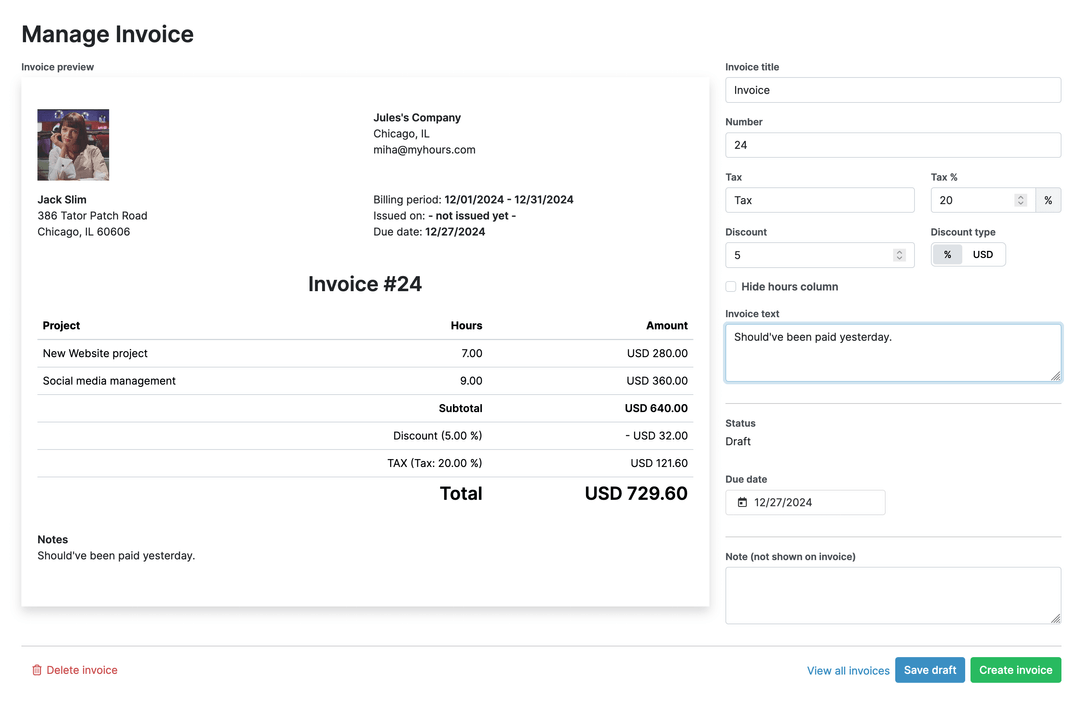
For each client, all billable time and expense data can be quickly pulled onto an invoice and sent for payment.
You configure the invoice page, add in any tax and discount details, and pick the date range. Invoices are emailed directly to clients from within the My Hours platform.
Unfortunately, there are no recurring invoicing capabilities, so it’s a largely manual process. However, it’s simple and ideal for smaller agencies with a handful of clients.
Alternatively, if you need better invoicing, you can integrate with QuickBooks or Xero and send the data over.
Toggl Track
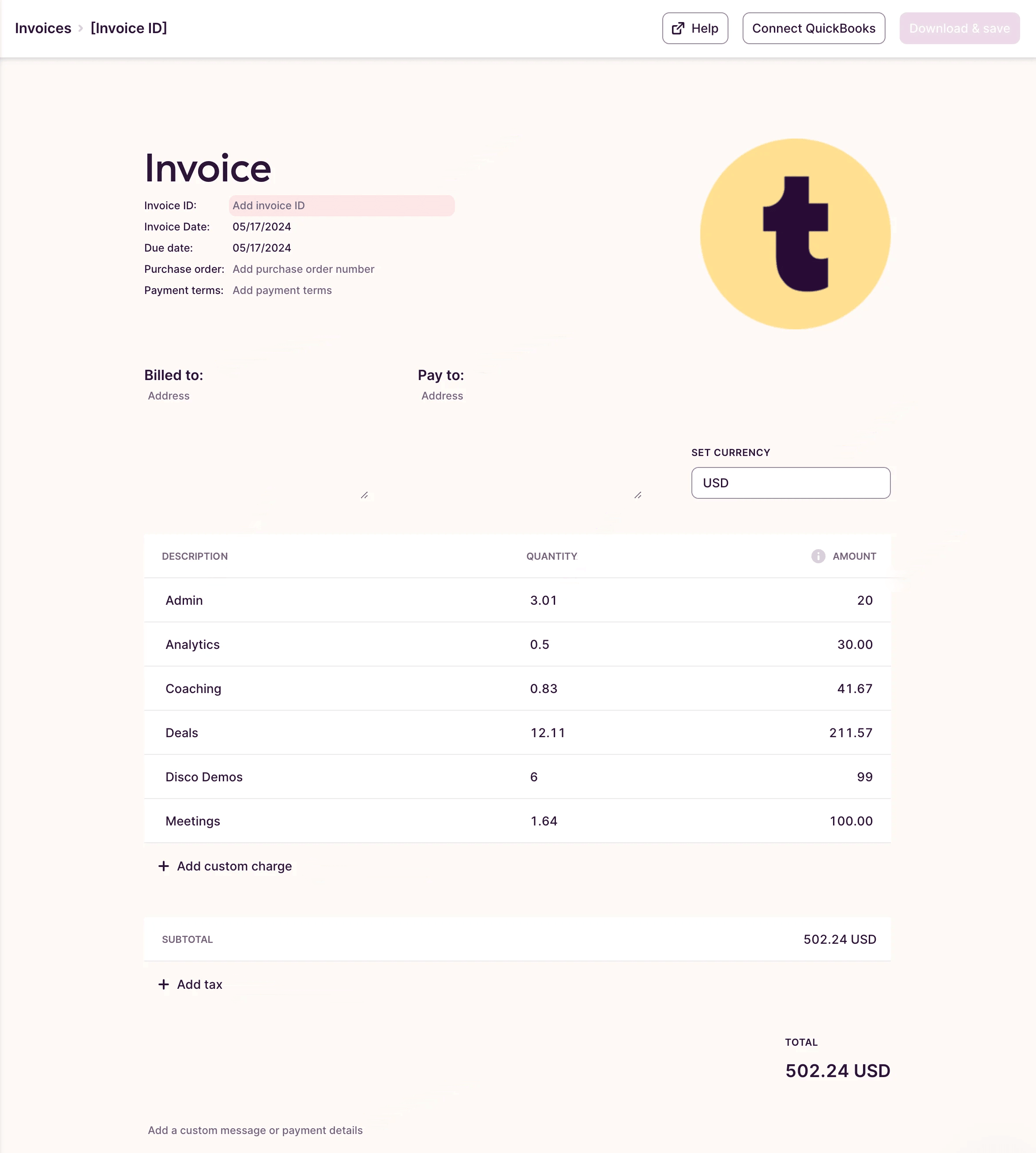
Toggl’s invoicing feature sits within the reporting tool. To send an invoice, you must first generate a report with the right data, as there’s no specific “invoice” report available. This setup can be a bit confusing, particularly for teams expecting a more streamlined invoicing workflow.
In Toggl Work, the invoicing options are better with a proper template. But remember, you can only pull expense data, not the billable time data, which limits its usefulness.
If Toggl combined these two platforms, the tool would become a lot more powerful. That said, Toggl integrates with multiple accounting platforms, so it’s likely that it supports a connection with your preferred financial software.
Client invoicing verdict
Both Toggl and My Hours support simple invoicing, but neither platform’s tools are particularly powerful.
However, My Hours takes the edge because it can pull billable and expense data in one system, saving you from having to generate two separate invoices.
My Hours vs. Toggl Track: Pricing Comparison
Quick overview
Note: Both platforms offer customized enterprise pricing.
My Hours
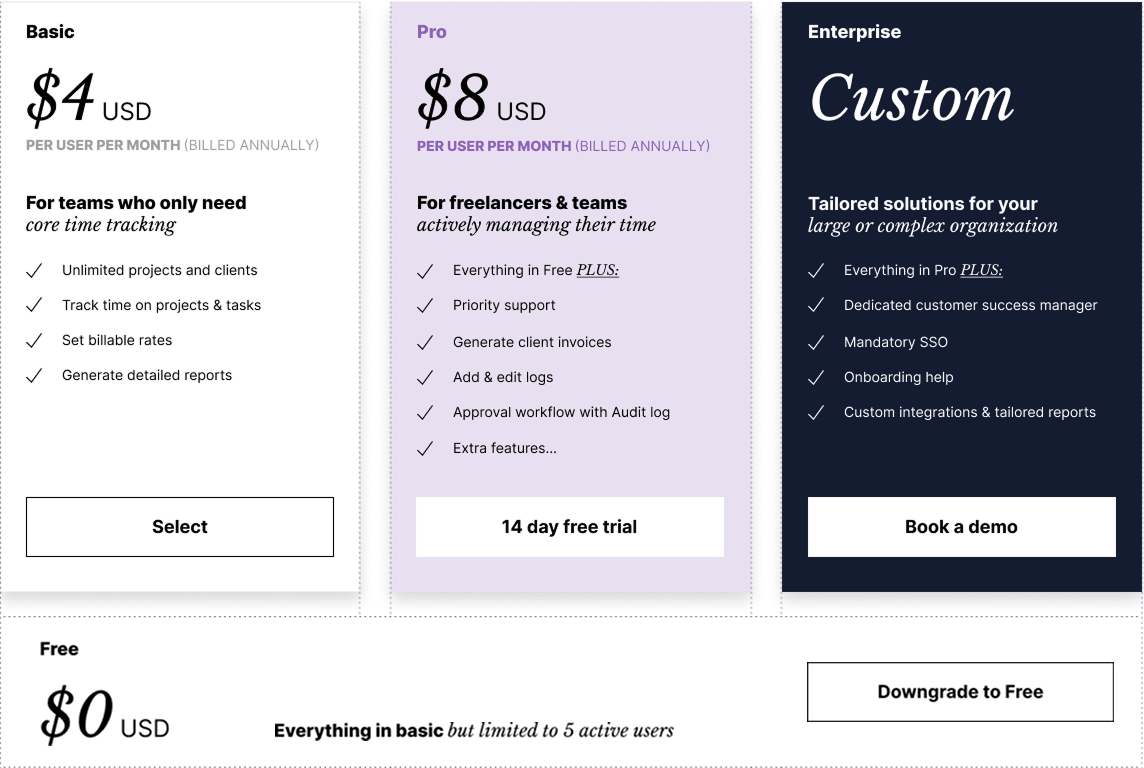
Both platforms offer a free plan, two paid plans, and enterprise pricing.
My Hours is more affordable, especially considering the features you get. For growing agencies, this makes it a better value proposition.
Toggl Track
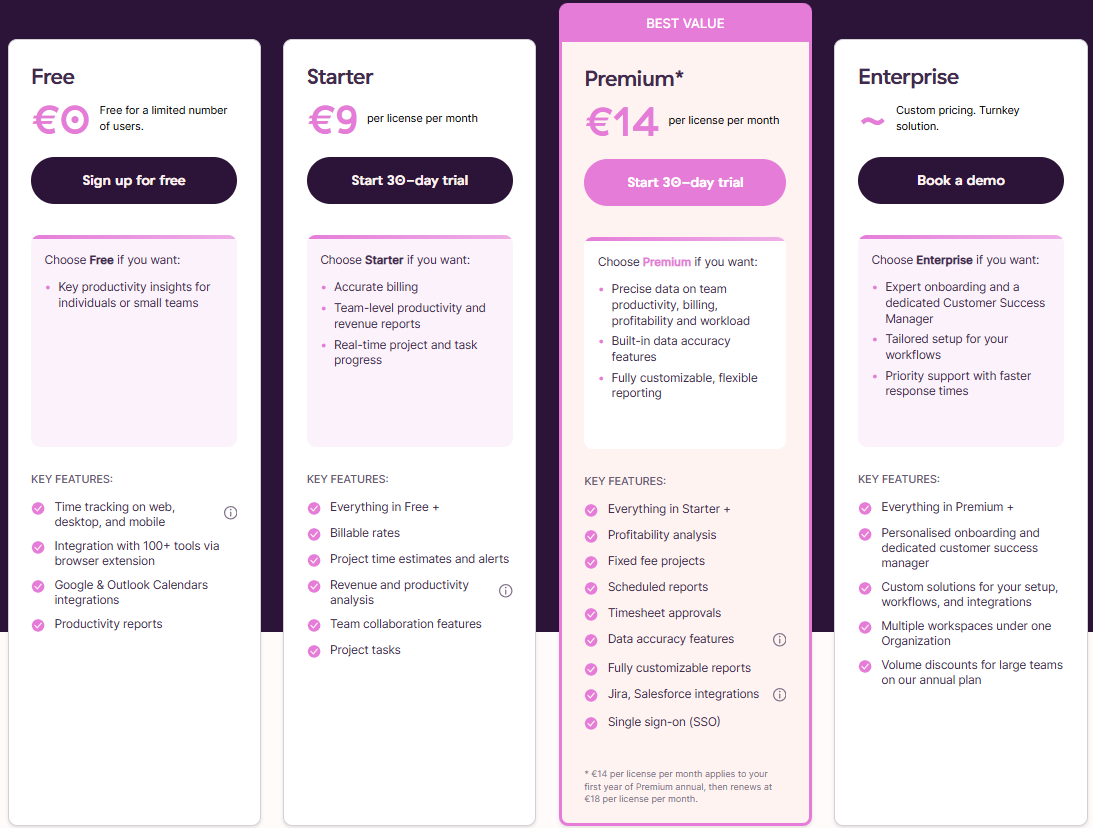
But what you'll quickly notice is that Toggl is double the price of My Hours.
This would be fine if you were getting a richer feature set for the price. However, as this comparison has shown, many of Toggl's tools are either less powerful or not available.
The thing is, if you pay for a platform, then you want to ensure you're getting value for money, and in this case, Toggl Track doesn't deliver.
Pros and Cons of Each Tool
My Hours
Pros
 Strong budget tracking tools
- Expenses, time, and invoicing in one system
- Multiple project billing methods
- Labor rate tracking on all plans
- Flexible project setup with custom fields, IDs, and task organization
- Detailed, granular reporting and forecasting tools
- Powerful approval workflows
- Affordable pricing for growing agencies
Cons
 No recurring invoicing
- Profitability reporting takes more setup than Toggl
- Few native integrations
Toggl Track
Pros
- Strong profitability reporting and visual dashboards
- Flexible rate hierarchy supports complex project billing
- AI-powered expense receipt scanning
- Supports 100+ native integrations
- Good choice for simple agency workflows
Cons
- Expense tracking sits on a separate system
- No true monetary budget tracking
- Lacks customization options for detailed data capture
- Labor rates tracking requires higher-tier plans
- Expensive compared to My Hours
Bottom Line
Overall, Toggl Track is best suited to smaller agencies that value simplicity above all else. Its clean interface and straightforward workflows make it easy to align time with billing without much setup.
My Hours is a stronger fit for agencies that want built-in scalability. As client work becomes more complex, My Hours provides the structure and flexibility to adapt, without disrupting existing workflows.
Additionally, My Hours is better equipped to help agencies maintain firm control over expenditure. When all financials sit within the same ecosystem, you can make informed decisions to maintain healthy margins as operations scale.

Waste no more time,
jump right in!

All rights reserved.