
Time Tracking for PR AGENCIES
Track every hour of PR work and bill clients accurately, whether on retainer or by project
 Track time across every client, campaign, and task
- Set budgets for retainers and campaigns, with alerts before hours run out
- Apply billing rates by team member, service, or project
- Show clients where their budget went, then invoice from the same records

Trusted by more than 100.000 businesses worldwide


Time tracking for PR agencies

PR work rarely sticks to the plan, and the hours spent outside it are the easiest to lose.
A single day at a PR agency can include drafting a press release, pitching reporters, preparing a spokesperson for an interview, and handling an urgent client request. Some of that work is planned. A lot of it isn't.
When unplanned work isn't logged against the right client, it eats into retainer and project budgets without anyone noticing. Often, the agency only finds out once the margin is already gone.
My Hours gives PR agencies a clear record of time across every client and campaign, so they bill each type of work at the right rate and catch budget overruns before they become problems.
Organize Every Client and Campaign in One Place
PR agencies manage dozens of clients, campaigns, and retainers at the same time. Every hour logged needs to be tied to the right client and project, so the team can see where time is going and bill each account accurately.

Group related work into task lists, such as media relations, content, or events, and break each list into specific tasks like pitching, press release drafting, or interview coordination.
Use tags and custom fields to label work by service line, media type, or any other category your agency reports on.

"I love the ease of use of the software, and how you can customize each task, client, and project to meet my individual business needs."

Track Time Across Every Type of PR Work
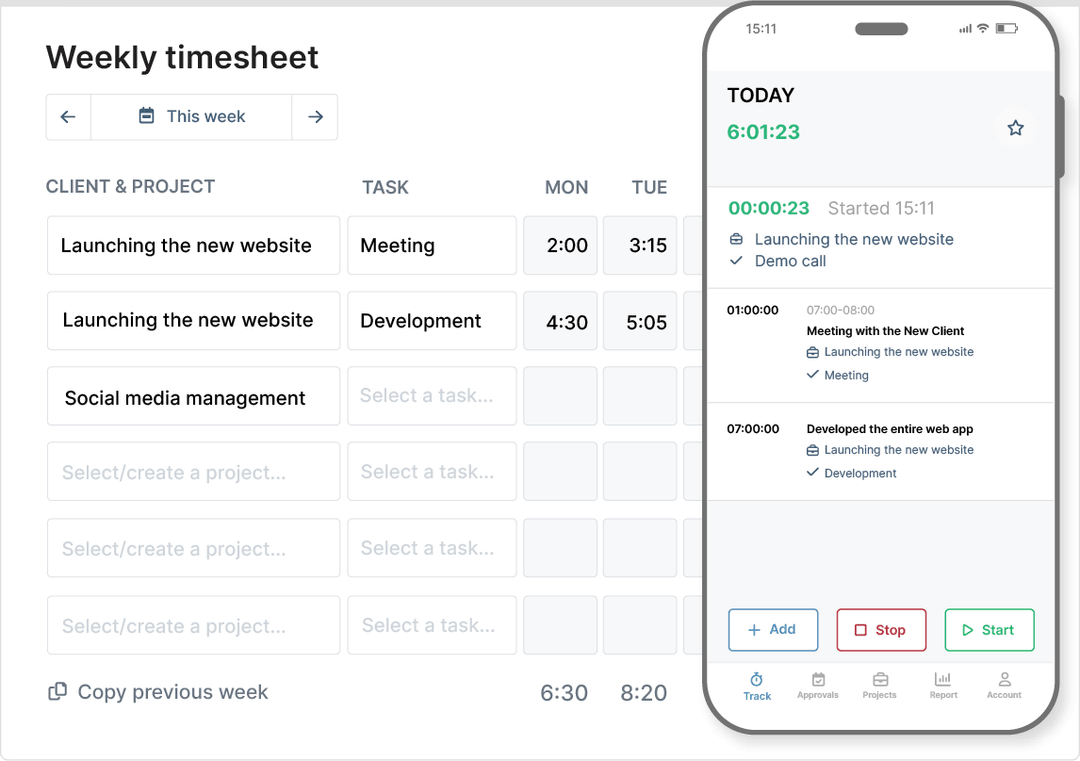
PR work ranges from multi-day projects to quick tasks. All of it counts toward a client's budget, but shorter tasks are the easiest to forget.
My Hours gives your team several ways to log time, whatever the task and wherever the work happens.
See How Much Time Goes Into Pitching New Business
Pitches and proposals take hours, even when there's no client to bill. Tracking that time shows how much of your team's capacity goes into winning new clients.
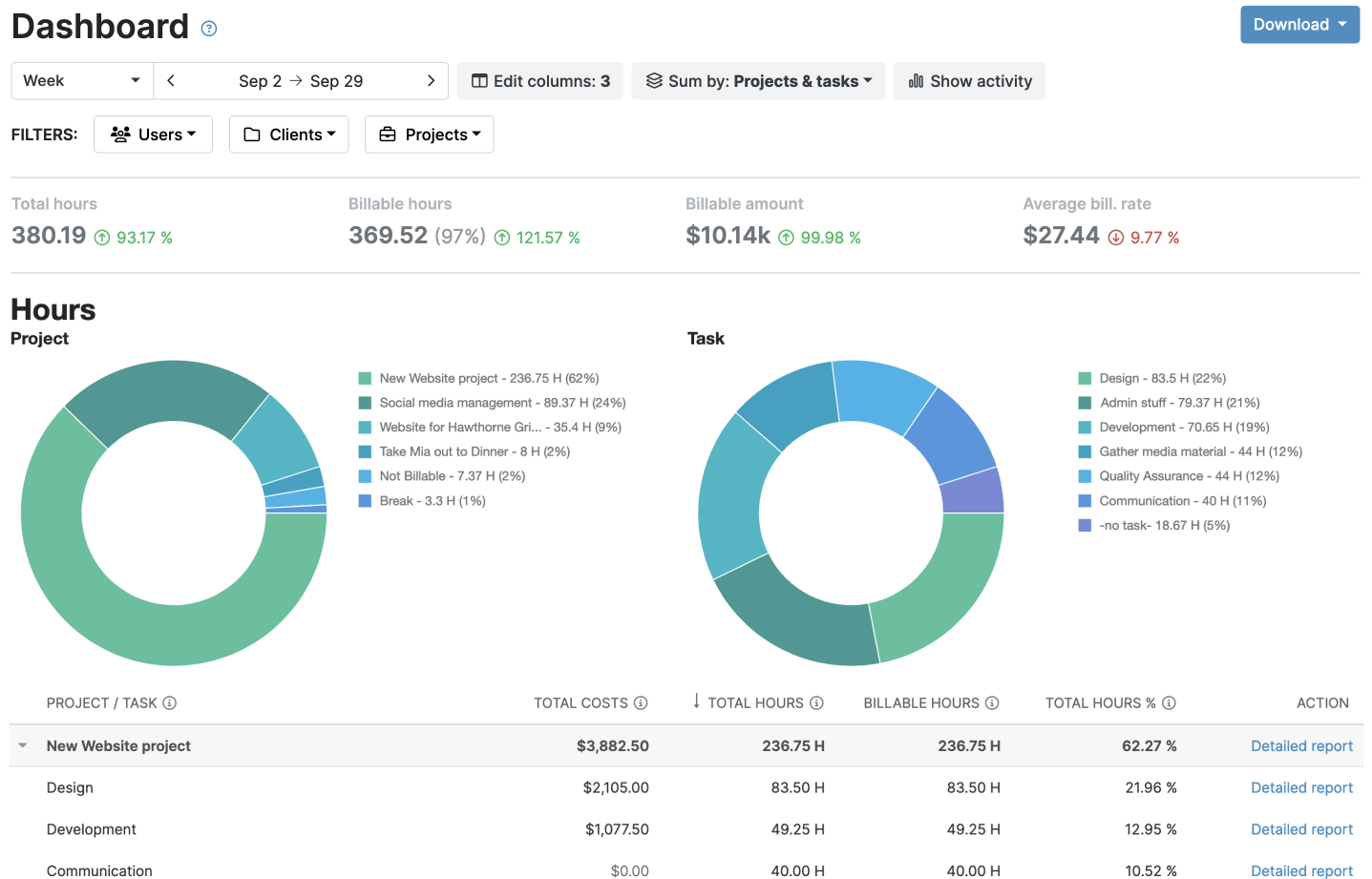
See how many hours each pitch takes, whether you won the account or not.
Check the Dashboard to see when pitching starts taking time away from existing clients.
"We capture more time and more easily. It is so easy to start a time log that we are capturing every action down to tasks requiring only several minutes. This gives us a more accurate accounting of our time – time we could not capture before."
Keep Retainers Within Their Agreed Hours
Retainer work can expand gradually as new requests are added to the work already in progress. Without a clear view of hours used, you can miss how close a project is to its budget until you’re operating at a loss.
My Hours makes project budget tracking part of the daily workflow, so overruns show up while the work is still in progress.
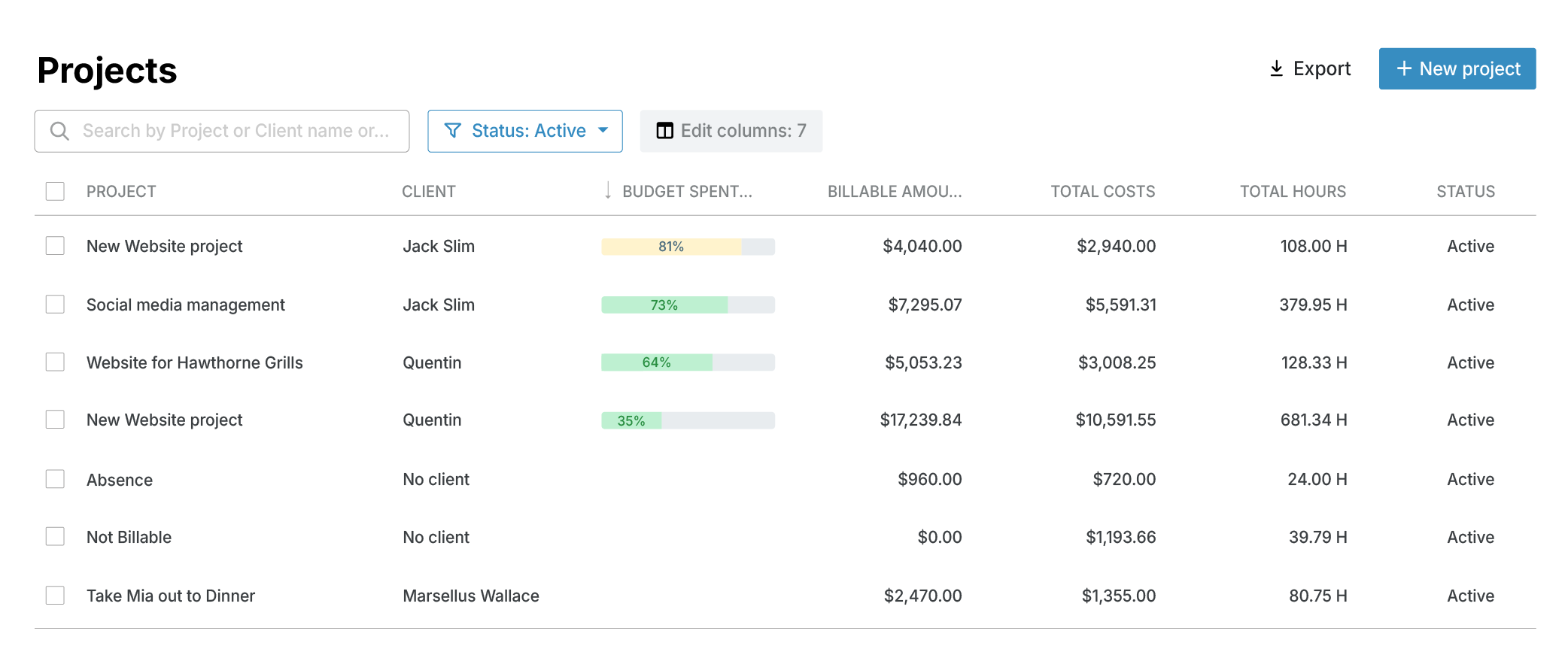
A budget bar shows usage at any point in the month, and alerts notify managers at set thresholds.
Log out-of-scope requests to a separate task or tag, so the extra hours are on record when it's time to discuss a scope change with the client.
Apply the Right Billing Rate to Different PR Services
Strategy, media relations, account management, and other PR services often have different billing rates, and the right rate can also depend on who does the work.
Each project in My Hours can use the billing method that matches the client agreement.
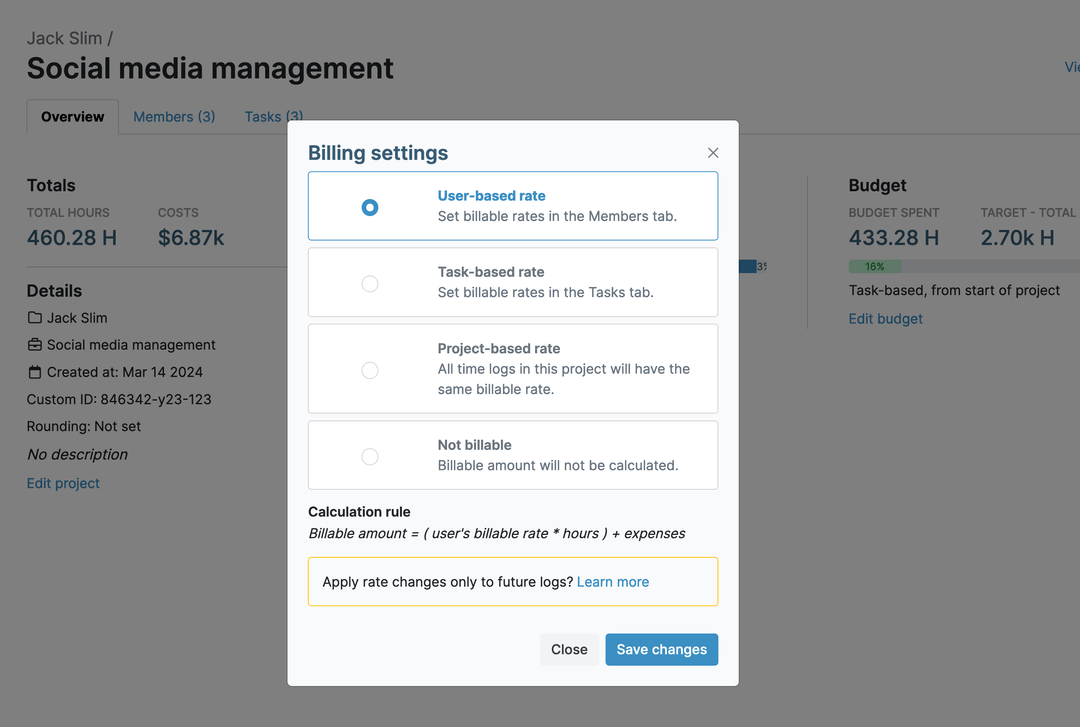
Task/project-based rates: Set different rates for specific services or apply one rate to all hours logged on a project.
Non-billable hours: Mark projects or individual time logs as non-billable when they shouldn't be charged to the client.
Balance Workloads Across Client Accounts
When an account runs over, the extra hours usually land on the same few people. Tracking time per team member shows who is stretched and who has time to spare.

Track PR Expenses Alongside Time
PR work comes with client-related expenses, such as newswire distribution, printing, event costs, and travel. My Hours keeps expense tracking in the same place as client hours, so each cost stays tied to the work it relates to.
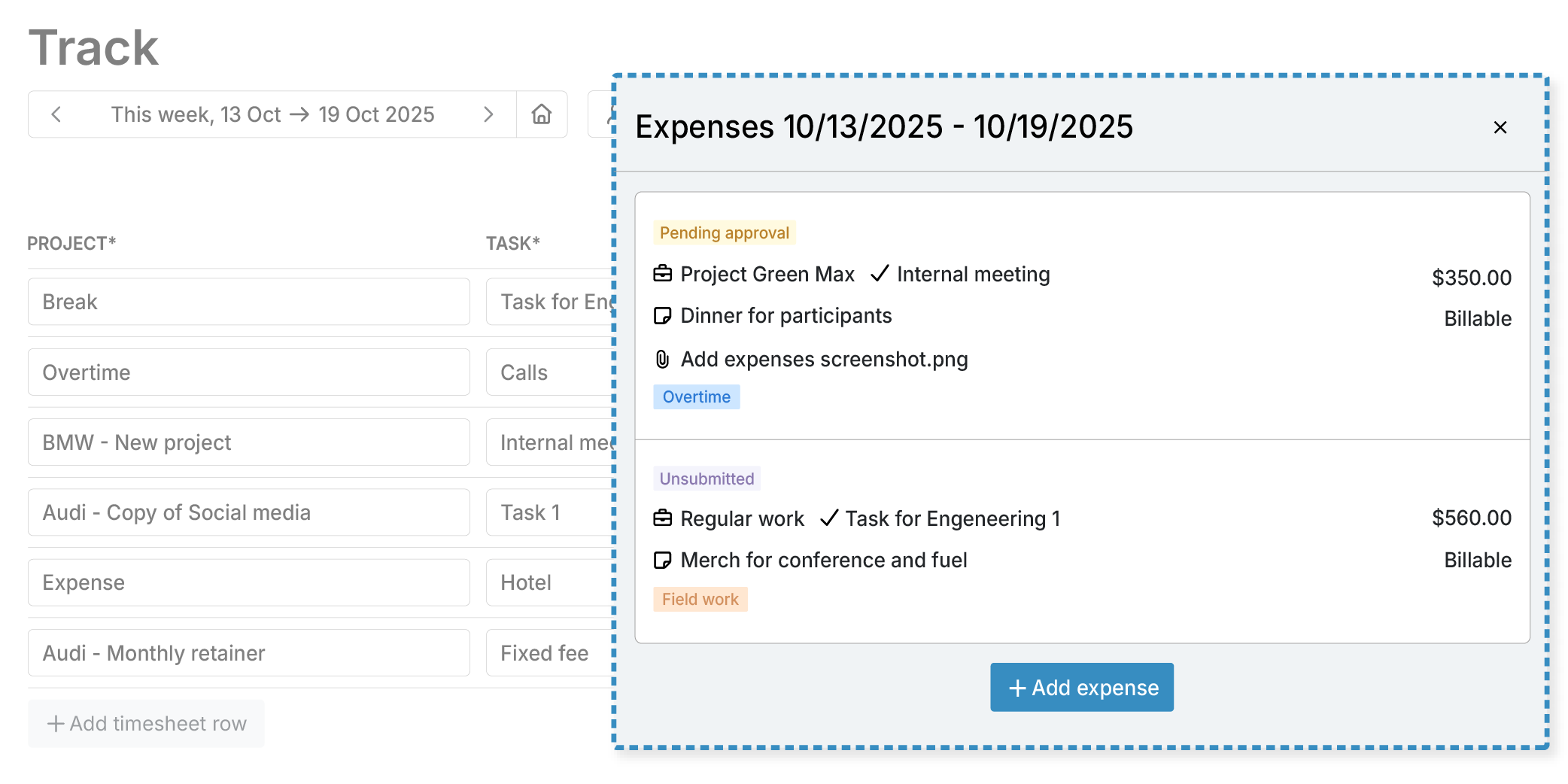
Attach receipts to expenses for documentation.
See Which Retainers Are Profitable
A retainer or campaign can stay within its agreed hours and still lose money, especially when senior staff handles most of the work. Comparing what a client pays with what the work costs shows which accounts are earning and which need repricing.

Approve Time Before Billing Clients
Accurate invoices start with accurate time records. A review step before billing gives managers the chance to catch incorrect entries or missing details. My Hours timesheet approvals let you:
.png)
Review submitted time and expenses as they come in.
Lock approved time logs (from normal editing) so they cannot be changed after approval to keep approved and billed records consistent.
Send Invoices From Logged Time
There's no need to copy billable hours and expenses into a separate invoicing tool. My Hours creates invoices from the same records your team uses to track client work.
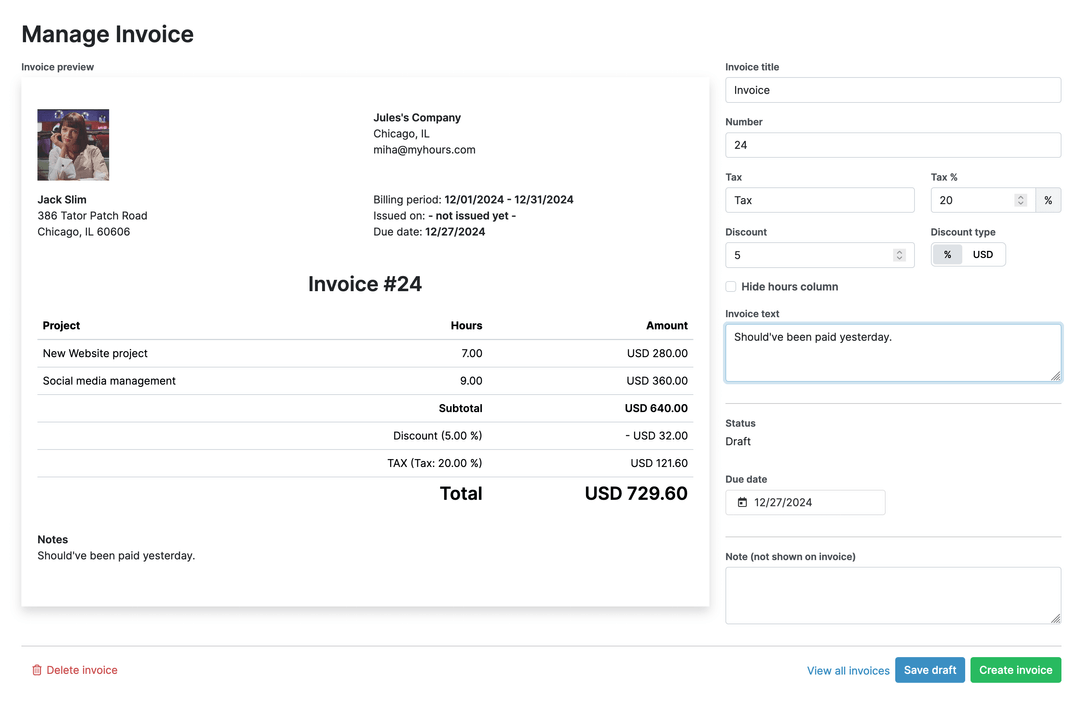
Give Clients Clear Reports on Finished Work
Clients want to see how their budget is being used, especially when a retainer covers different types of PR work. My Hours’ reports show the completed work and hours logged for each client, along with a clear view of your team's working hours.
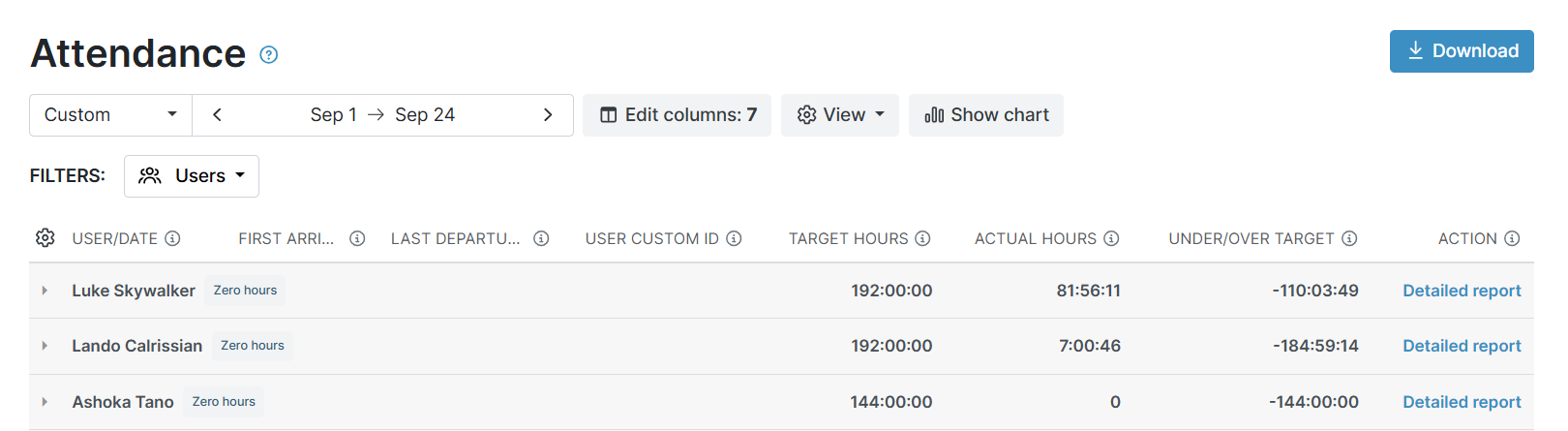
Detailed report: Individual time entries, descriptions, and attachments with advanced filters. Export options: PDF, XLS, email.
Attendance report: Daily hours, arrival/departure times, and overtime per team member. Export options: XLS.
"I just pull down my timesheets at the end of the month, and I have all the details I need. The reporting tools are great too, for getting insights into how you use your time."
Protect Confidential Client Information
PR agencies regularly handle non-public information, including product launches, financial announcements, embargoed news, and crisis communications. My Hours helps protect this information through controlled access and secure data handling.
Encrypted data: Data is encrypted in transit using TLS 1.3.
Role-based access: Regular users can only track time on assigned projects and cannot view other members' time data or billable rates. Manager and administrator access depends on their permissions.
Single sign-on (SSO): Microsoft Entra ID integration lets agencies manage user access centrally.
Regulatory compliance: My Hours complies with GDPR and CCPA, with data backed up several times an hour.
Try My Hours For Free
My Hours has helped businesses track time since 2002 and is trusted by more than 100,000 businesses worldwide. PR agencies get one place to track client hours, manage retainer budgets, and invoice accurately, with 24/7 live support whenever the team needs help.
Teams of up to 5 users can use My Hours for free, and larger agencies can try the paid plans with a 14-day free trial. No credit card is needed.
"I love this product and have been using MyHours for years. I have a number of clients, and My Hours helps me manage all the projects and tasks that I do for them in a simple way."
Your data stays protected and compliant at every step.




Frequently Asked Questions
My Hours time tracking features

Timer or weekly timesheet
Track time with our seamless timer or enter your time through our keyboard-friendly timesheet. Add a description and custom inputs.

Set billable rates and budgets
Automate calculation of billable amounts by setting precise hourly rates by project, task or team member. Add a project budget to monitor its progress.

Analyze logged hours & expenses
With the Dashboard you’ll get a bird’s-eye view of billable vs non billable hours, earned income by project, under- or over-utilized employees and more.

Generate custom reports
Detailed reports are completely customizable and display as much information as needed. Print to PDF, export to XLS or send schedule it via email.

Manage tasks
Add and assign tasks with an estimated budget. Create templates when identical tasks appear across projects.

Submit and approve timesheets
Supervisors get email whenever timesheets are submitted. Each timesheet can be approved or rejected with an email message.

Set flexible roles
Invite your team to track time on their projects without seeing each other’s hours and rates. Designate managers to oversee their team and manage their work.

Prevent inconsistent reporting
Lock team’s time logs to prevent editing or adding new logs in a selected period. Download the audit log report to keep your books in order.

Streamline invoicing
Create numbered invoices straight from hours logged. Integrations with the most popular invoicing apps are available to all customers.

Integrate with other tools
Connect My Hours data with other tools or vice versa through Zapier connectors. Alternatively, use our API to develop your own integration.

Access from anywhere
My Hours is a cloud-based app with nothing to install. View and manage your hours from any web browser or install our native mobile apps.

Secure infrastructure
My Hours is hosted in Microsofts Azure cloud and we are proud of 99.95% uptime. We perform regular security checks to keep your data in safe hands.
Highest praise from our customers


Waste no more time,
jump right in!

All rights reserved.