

Understanding these different approaches reveals that accountability can often be achieved without employee surveillance. In many cases, trust-based time tracking can deliver the visibility organizations need while giving employees a bit more freedom in how they work.
What is a Surveillance-Based Time Tracker?
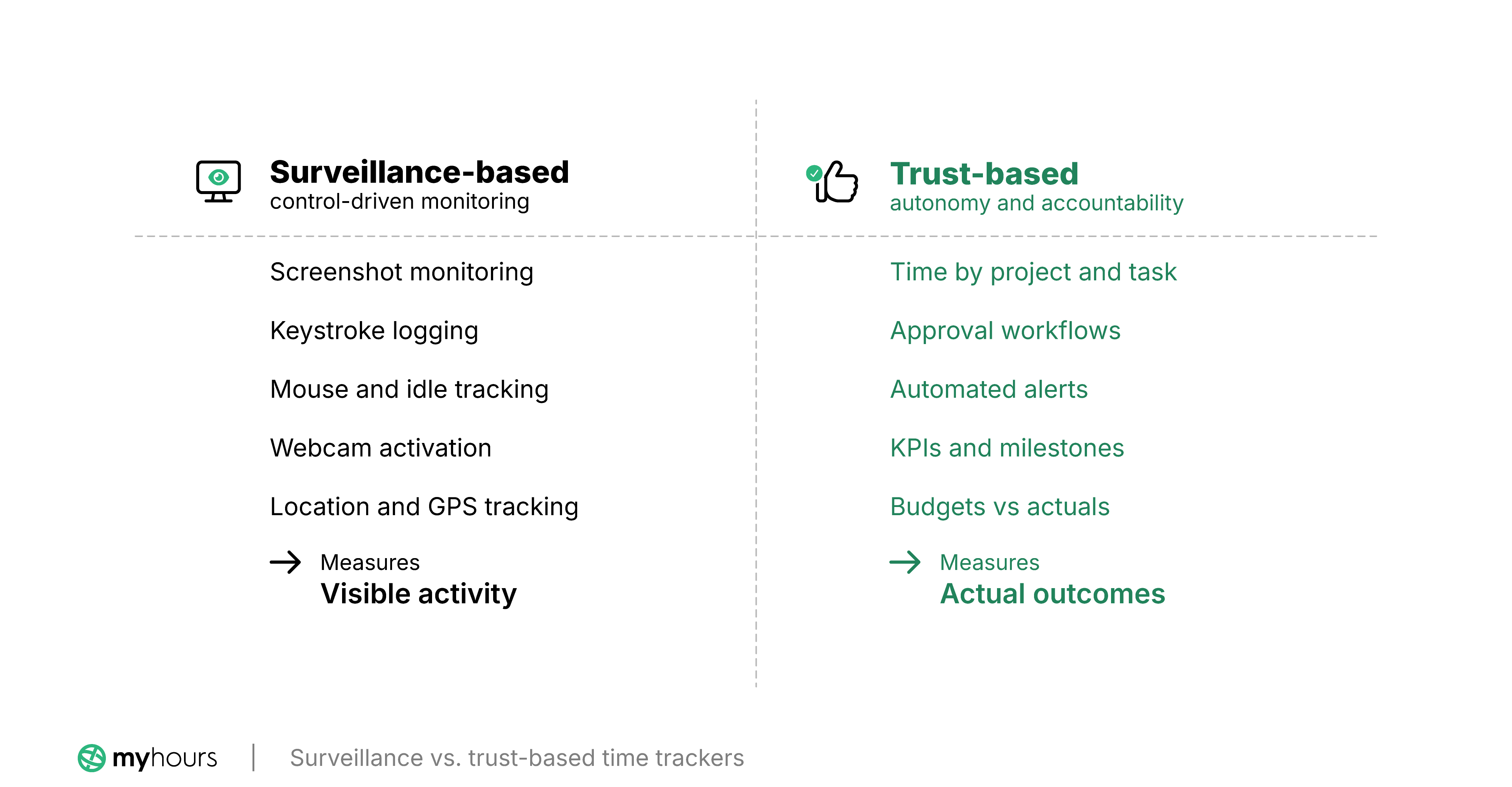
Surveillance-based time trackers are equipped with additional monitoring tools that run in the background of a person’s workstation. As workers track their time, these tools also log and track certain activities, the results of which are fed back to management for analysis.
Typical surveillance tools include:
- Screenshot monitoring: The software takes a screenshot of each worker’s screen at random or set intervals (every 5 mins, 10 mins, etc.).
- Website/app monitoring: Creates a detailed log of which sites or apps were visited and for how long.
- Idle time detection: Records the amount of time when no keyboard or mouse activity was detected.
- Keystroke logging: Logs keyboard usage.
- Mouse movement tracking: Detects when and how the mouse is moving.
- Location tracking: Uses GPS tracking or geofencing to monitor a worker’s whereabouts.
- Webcam activation: Activates a workstation’s webcam to record or capture images of the worker.
Some surveillance time trackers, though, only have basic surveillance tools, such as idle-time detection and screenshot monitoring. Others incorporate a wider range, including more intrusive options, such as keystroke logging and mouse movement tracking.
In most cases, the surveillance data is viewable via dashboards or can be compiled into reports.
What is a Trust-Based Time Tracker?
A trust-based time tracker has no surveillance features on its platform. Instead, oversight is maintained by viewing the time data and the activities each time log is attributed to.
For example, an employee might record time against specific projects and tasks. Managers can then review how long work took and compare it against budgets, estimates, and other data.
Many trust-based platforms often include additional non-intrusive controls, such as approval workflows (where a manager or supervisor approves each timesheet) and automated alerts to remind workers to complete their timesheets.
These controls aim to ensure that time data is reliable while respecting employee privacy.
The Argument for Surveillance-Based Time Trackers
An organization might choose to implement surveillance-based time tracking for several reasons.
It can be used as a deterrent against time theft and fraud, particularly among organizations that have dealt with buddy punching or inflated timesheets. In these cases, surveillance acts as a way to verify that the hours employees report match the time they actually worked.
The increase in remote working has also led more organizations to use employee surveillance to measure productivity from afar. With more and more teams working from home or on hybrid schedules, managers can use the data to confirm that employees were actively working during the hours they recorded.
Security and risk management are another argument for surveillance. In heavily regulated industries, employee monitoring can help detect policy violations and prevent data breaches.
Other reasons include identifying productivity issues, insights into where performance management support is needed, and smarter ways to manage workload and capacity planning.
The Reality of Using Surveillance and Monitoring
While the reasons for using surveillance and monitoring may be valid, the reality can look very different.
Surveillance predominantly measures visible activity rather than work quality, creativity, or business value and outcomes, making it an incomplete indicator of productivity.
Take a graphic designer, for example. They may spend a few hours searching online for inspiration, which eventually leads to a unique branding design.
The surveillance tools track this behavior, but not the outcome. On the surface, it looks like the individual is simply surfing the web when, in reality, it’s contributing to the creative process and the resulting output.
What’s more, surveillance can also lead to counterproductive behaviors among staff. When workers feel like they’re constantly being watched or micromanaged, they may focus more on looking busy than actually doing anything productive.
And there are other psychological dangers, too.
A 2021 review published by the European Commission’s Joint Research Centre analysed 398 academic articles on the subject of excessive monitoring. The resulting Electronic Monitoring and Surveillance in the Workplace report found that it’s linked to:
- Increased resistance (or counterproductive behaviors)
- Decreased job satisfaction and commitment
- Increased stress
- Increased turnover
In another study, Private Eyes, They See Your Every Move: Workplace Surveillance and Worker Well-Being, the findings also revealed that perceived surveillance resulted in higher psychological stress, reduced autonomy, and privacy violations.
Speaking of privacy violations, certain surveillance tactics, like screenshot monitoring, capture an enormous amount of data, some of which is private information.
In April 2025, a huge privacy breach was uncovered by Cybernews. WorkComposer, a workplace surveillance app, had accidentally leaked over 21 million screenshots, including images of business documents and login credentials.
Despite all of this evidence, organizations continue to invest in worker surveillance, and more than 74% of US employers use some form of online tool to monitor work activities.
Fortunately, there’s a better way to improve accountability and productivity without the downsides.
How Trust-Based Time Trackers Enhance Productivity
When you implement a trust-based time tracker, you’re building trust and encouraging autonomy. And there are studies to show that this equates to higher job performance.
One meta-analytic test looked at 319 studies encompassing over 151,000 employees. It found that increasing work motivation and reducing mental strain lead to better productivity. Part of this was implementing decision-making autonomy. So, by giving people control over their own time tracking, you provide the autonomy conditions that drive performance.
A neuroscience experiment also supports this: In a controlled lab experiment comparing high vs. low autonomy conditions, it was found that high-autonomy environments produced significantly higher individual and group productivity as well as a better overall mood among the workforce.
Equally important to autonomy is trust. Another meta-analysis across 112 studies and 7,763 teams found that intrateam trust is positively related to team performance.
When time tracking is implemented in a trust-first way, it supports team confidence and, therefore, performance.
When Trust-Based Time Trackers Can Fail
Trust-based time trackers rarely fail outright. Without the right support, though, the results won’t be as good or comprehensive.
Some workers simply do better with guidance or structure as opposed to having full autonomy. And without built-in accountability, staff may have problems organizing their workloads or submitting their timesheets before the deadline.
Just because we’re relying on trust, it doesn’t mean that we can do away with all types of oversight. While surveillance tools might be out of the question, time tracking is still required to maintain compliance and data consistency to achieve business outcomes
What this means is that for trust-based time tracking to work, organizations have to find the right balance between oversight and trust.
7 Ways to Support Trust-Based Time Tracking
So, how exactly can we go about supporting trust-based tracking without encroaching on worker privacy or resorting to surveillance?
We’ve narrowed support down to seven key areas.
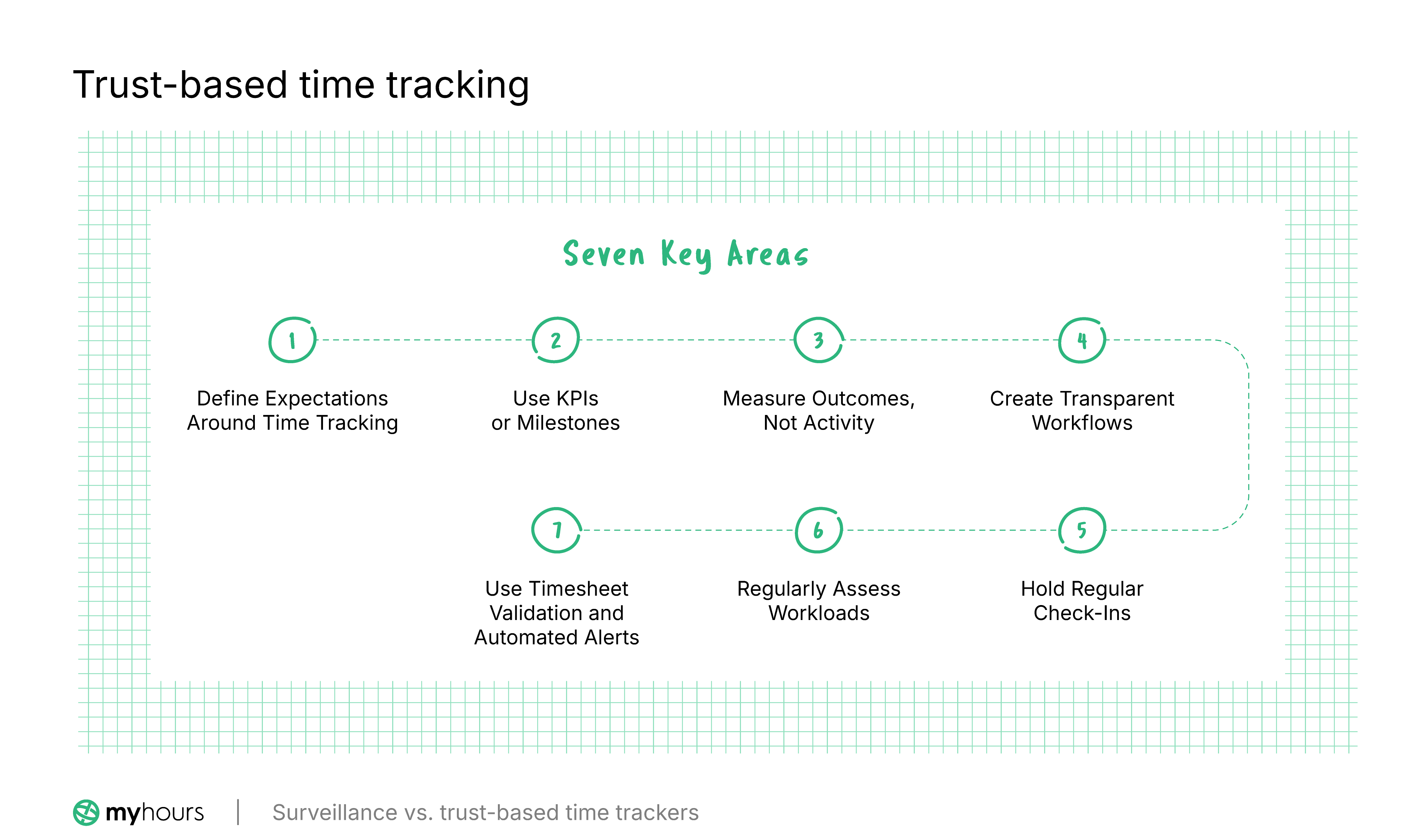
1. Define Expectations Around Time Tracking
First, employees should clearly understand what your expectations are when it comes to time tracking.
This means you have to develop a timekeeping policy that details everything surrounding the process. Workers must understand:
- What constitutes a full working day
- What time should be tracked and how
- How breaks, time off, absence, and overtime are handled
- What level of detail is expected in each time entry
- Deadlines for timesheet submissions
- Escalation processes when the time data is inaccurate, or when timesheets are missing
- Who is responsible for what
Document the policy and keep it accessible so all workers can read it. Provide training on the policy as well as add it to your onboarding process. Review the policy periodically to ensure it aligns with your existing business practices.
2. Use KPIs or Milestones
Key performance indicators (KPIs) and project milestones provide objective ways to assess whether work is on track.
Using time entries, workers can show how they are progressing toward each goal. In turn, managers can easily view if projects are moving as expected or if targets are being met.
Doing this shifts accountability away from employee activity and toward measurable progress, without resorting to invasive monitoring practices.
3. Measure Outcomes, Not Activity
Trust-based tracking recognizes that hours worked do not always reflect the value delivered. For instance, two employees might spend the same amount of time on a task, yet only one may produce meaningful results.
Instead of evaluating productivity based on how active or busy a worker appears to be, use metrics that are aligned with business outcomes and each worker’s KPIs.
Examples of metrics might include completed projects, quality standards, profit margins, or billable work delivered.
4. Create Transparent Workflows
Transparency doesn’t necessarily translate to surveillance. In this case, we’re talking about maintaining visibility over workflows so it’s clear who is responsible for what.
Ultimately, this upholds accountability while allowing managers to monitor progress. It also becomes easier to spot where delays or bottlenecks occur or if team members are overloaded.
This transparency can be achieved by using shared project boards or collaboration platforms. Most time tracking apps also support project/task hierarchies, allowing you to assign deliverables to specific users.
5. Hold Regular Check-Ins
Regular one-to-one or team meetings provide opportunities to discuss work progress and adjust priorities before small issues escalate.
Additionally, face-to-face communication allows workers to explain challenges properly and discuss the type of support they might need.
Plus, managers can gain valuable context that activity reports alone would never provide. Why? Because check-ins focus on solving problems instead of simply observing them.
6. Regularly Assess Workloads
Trust-based time-tracking depends on setting realistic expectations.
Look for patterns and trends within timesheet data. If you notice that employees are consistently working overtime or that tasks are exceeding their deadlines, the issue may quite well be workload planning rather than individual performance.
Additionally, look at how work is spread across a team. You may notice that certain employees are carrying a disproportionate share of the load.
It can also help greatly to review the time data from similar past projects. Doing so aids workload planning for upcoming projects because you can see the amount of resources you are likely to need as well as what a realistic deadline might look like.
7. Use Timesheet Validation and Automated Alerts
Timesheet approval workflows are a solid way of maintaining oversight on time data without sacrificing trust.
Many reputable time trackers have this feature on their platforms, and they are easy to set up and use.
Essentially, managers are alerted when a user has submitted a timesheet. They then review it for accuracy before approving or rejecting it. Rejected timesheets go back to the user for correction before being resubmitted.
All validations, corrections, and adjustments are recorded and timestamped in case you need them for audit purposes.
Additional controls, like automated alerts that prompt users to complete their timesheets or to keep their hours within a certain limit, are also very useful.
They help maintain reliable records without relying on surveillance.
Trust-Based Time Tracking for Different Team Types
Service-Based Teams
Teams that invoice clients, such as lawyers, agencies, and consultants, have to track every billable second correctly. Most clients also require detailed reporting, and other expenses may need to be included on the invoice.
The problem is that client-facing roles often come with a lot of distractions, making it difficult to accurately track time, especially when it’s billable. This can lead to inaccurate invoicing and client disputes.
Allowing teams to block off time for non-billable and billable work is one solution. This, coupled with real-time tracking, makes it easier and more convenient to track accurately.
Some time trackers also record online activity, not for the purpose of surveillance, but to transform it into time entries. For example, the time spent on an app would transform into a time entry, while time spent on a website would transform into another.
Time trackers with built-in reporting are also necessary. These enable you to set up customized reports, which can then be sent to clients in a couple of clicks.
Desk-Based Remote Teams
The key challenge for remote teams is the physical separation between the office and the worker. As such, managerial oversight is limited, and it’s harder to assess the workload of each individual.
To solve the problem, place a strong emphasis on communication. Use video calls for regular check-ins and be very clear on your expectations. Additionally, encourage workers to be transparent about their workload and how they feel they are coping with it.
Use team timesheets to help with task delegation and resource planning, and be mindful that teams working across time zones will require deadlines that accommodate differing working hours.
Choose a time tracker that offers multiple ways to track time, such as a mobile app and desktop extensions. This way, each worker can choose the method that fits their work setup.
Field-Based Teams
Teams that work offsite face the same challenges as desk-based remote teams. When managerial oversight is limited, it can be difficult to keep track of a worker’s whereabouts.
Most time trackers come with a mobile app, which enables tracking from anywhere. This is a good solution for field teams that don’t work in regular locations, like travelling salesmen.
For fixed-site locations, geofencing is an option. Rather than recording every single move like GPS tracking would, it creates a virtual boundary around a location. As someone moves through the boundary, it can trigger a clock-in or a clock-out.
Shared team calendars provide transparency, so team members know where each other are likely to be during the workday.
Project-Based Teams
Project teams often work across multiple projects with shifting priorities. Progress is measured by completed deliverables and milestones rather than the number of hours spent at a desk.
Time tracking should, therefore, focus on recording time against project tasks or phases, giving managers greater visibility over progress.
Task tracking is particularly valuable because it enables managers to compare estimated vs. actual hours. Over time, the data can be used to improve project planning, including resource and workload allocation.
Choose a time tracker that offers budgets and accurate project cost tracking, and one that integrates with project management software to synchronize issues and tickets. This feeds into a transparent workflow where everyone is accountable for their deliverables.
Creative Teams
Creatives rarely work in a linear or predictable fashion. A lot of time is spent researching, experimenting, brainstorming, and revising ideas.
For these teams, surveillance provides virtually zero indication of productivity and can actively discourage creative thinking.
Instead, evaluate progress against clear deliverables, goals, or milestones. Encourage team members to record time against creative tasks so managers can better understand how long different types of work take.
The best time trackers for creatives are simple and unobtrusive. Features like real-time tracking and mobile or browser-based tracking make it simple to record time accurately without disrupting the creative process.
6 Surveillance-Free Time Tracking Tools
Fortunately, there are many trust-based time trackers on the market. After analyzing the features and stance on worker privacy, here are the best options according to team type.
Surveillance Time Trackers: Pitfalls to Avoid
Many time trackers feature lightweight or optional surveillance features. For example, Clockify offers optional screenshot monitoring (on Pro and Enterprise paid plans), and Jibble has a productivity tracker as well as screenshots through its desktop app.
Because you can switch off the surveillance, it seems reasonable to go for one of these platforms with the idea that you’ll never use the monitoring tools. However, the temptation is always there “just to see.”
In doing so, you’re exposing yourself to a level of risk, so we advise that you proceed with caution.
Beyond eroding employee trust and morale, here are some of the pitfalls that come with choosing a surveillance-based time tracker:
- Surveillance creep: Starting with limited monitoring can gradually escalate into increasingly intrusive oversight as new features are enabled over time, creating a workplace culture of constant surveillance.
- Privacy law violations: In jurisdictions subject to privacy laws (GDPR, CCPA, etc.), switching on the monitoring tools without informing workers or having a justifiable reason can lead to fines or class actions.
- Distorted metrics: Once your workers are aware you are measuring activity, they start gaming the system (using mouse jigglers, etc) or prioritize busywork over productivity.
- Wage and hour risks: Employee monitoring largely relies on computer activity. If it only captures this time, compensable work, like reading documents, taking calls, etc., can be missed, or it may create an overtime liability.
- Weak vendor security: The platform you rely on to collect surveillance data may not be secure and can expose your organization to compliance gaps and cyber breaches.
When Limited Surveillance is Justified
While trust-based time tracking is suitable for the vast majority of organizations, there are circumstances where limited employee monitoring may be appropriate.
In these cases, the objective is not to measure productivity, but to meet legal and contractual obligations.
One example is insider threat mitigation, particularly in high-risk industries or those that are responsible for highly sensitive data. In this case, cybersecurity agencies such as CISA recommend user activity monitoring as one component of a broader insider risk management program.
Yet, these agencies also recognize the need to balance asset protection with privacy expectations.
Another legitimate case is targeted investigations. If there is credible evidence of fraud, intellectual property theft, or serious policy violations, employers may implement temporary monitoring as part of a formal investigation.
The key distinction is purpose. Monitoring should only be in place to support a genuine business need, not act as a substitute for effective management or become the primary way to measure productivity.
Even where monitoring is appropriate, it should remain transparent and limited to what is necessary to achieve a legitimate objective.
Final Thoughts
For most teams, surveillance is not the answer. Start with clear expectations, track time against real work, and use approval workflows or alerts where you need oversight.
If you want a time tracker with no monitoring built in, the table above is a good starting point.


