

What Is Flat Fee Billing?
Flat fee billing is when you charge a client an agreed price for a defined piece of work, no matter how many hours it takes. People also call it a fixed fee or a flat rate.
It usually comes in two forms. One-off project fee, such as the charge for building a website, and the recurring monthly flat fee, where the client pays the same amount every month for some repeat work, e.g., monthly bookkeeping or managing a set number of social media posts.
How Does Flat Fee Billing Work?
Every flat fee starts with the scope. Before you quote a price, you and the client agree on the deliverables.
For example, say an accounting firm quotes $2,500 to prepare a small business’s year-end financial statements and business tax return, including one review meeting.
Here’s how that project would typically play out:
- Agree on the scope: The firm and client sign off on what’s included. In this case, that’s the year-end statements, one tax return, and one review meeting.
- Set the payment schedule: It's common to do a 50/50 split. You get the first half upfront and the rest on delivery. You can also split payments across milestones, such as 30% to start, 40% at draft review, and 30% at filing.
- Deliver the work: The client pays $2,500 whether the work takes 15 hours or 30.
- Price any changes separately: If the client asks the firm to clean up six months of messy bookkeeping first, that’s outside the original scope. That request will have its own price, agreed before the extra work starts.
Recurring flat fees follow the same logic, just on a monthly cycle. A bookkeeper might charge $500 a month to reconcile accounts and prepare monthly reports for a small business. The invoice stays the same each month, as long as the work stays within that agreed list.
Pros and Cons of Flat Fee Billing
Benefits
- Clients know the price upfront, making your quote easier to approve, especially for clients working to a set budget.
- You keep the time you save. If you finish in 40 hours instead of 60, you’re still paid the full fee.
- Invoices are simpler. You don’t have to attach any timesheets, and there are no line items for the client to question.
- Recurring flat fees give you predictable income, and if you’re on a retainer, the same amount comes in each month.
Disadvantages
- If the work takes more hours than you estimated, the client still pays the same, so every extra hour cuts into your profit.
- Scope creep is harder to spot. Small requests, like “Can you tweak this one thing?”, add up quickly, and clients don’t always see them as extra work.
- Quoting takes more work upfront because you need to scope the project, agree on what’s included, and put it in writing before you can name a price; none of that time is paid.
- One big number invites negotiation, and some clients will push back on the total or try to reduce your fees before signing.
What Is Hourly Billing?
Hourly billing is when the client pays an agreed rate for each hour you work on their project. The more time the work takes, the higher the invoice.
It's a common choice for open-ended work, where nobody can say upfront how long the job will take. It's also widely used in some industries, including legal services.
How Does Hourly Billing Work?
With hourly billing, you don’t need to pin down every deliverable before you start. What matters is the rate and an accurate record of your time.
For example, say a consultant charges $120 an hour for advisory work.
Here’s how a typical month would look:
- Agree on the rate: The consultant and client confirm the $120 hourly rate, plus how often invoices go out (weekly or monthly, for instance).
- Track the time: Hours are logged against the client and the task they were spent on.
- Invoice on schedule: At the end of the month, the consultant has logged 18.5 hours, totaling a $2,220 invoice. Time entries are usually listed so the client can see what they’re paying for.
- Set estimates or caps: Many clients ask for an estimate before work starts. Some go further and agree to a not-to-exceed limit, so the bill can’t go past a set amount without their approval.
You can use time tracking apps such as My Hours to handle the time tracking and invoicing side of things, from logging hours against each client and task to turning them into an invoice at the end of the month.
Pros and Cons of Hourly Billing
Benefits
- You’re paid for every hour you work, so a project that takes longer than expected doesn’t cost you money.
- Scope changes are easier to handle, since extra requests simply add more billable time.
- You can start work without a detailed scope, which suits projects where the requirements are still taking shape.
- Clients see exactly what they’re paying for, line by line.
Disadvantages
- Your income stops growing once your calendar fills because there are only so many billable hours in a week.
- You earn less as you get faster. If experience or better tools cut a 10-hour task down to six, your invoice shrinks with it.
- Clients may hesitate when they can’t predict the final cost, and some may question individual time entries.
- Your income depends on accurate time tracking. If someone forgets to log work, those hours never make it onto the invoice.
Flat Fee vs. Hourly Billing: Key Differences
The main difference between flat fee and hourly billing is who pays for extra hours. With hourly billing, the client does. With a flat fee, you do.
The table below shows how the two billing models measure up:
Which Billing Model Earns More?
Neither model earns more by default. A flat fee earns more when the work takes fewer hours than you priced for. Hourly billing earns more when the work takes longer than planned, as you bill for every extra hour.
So the answer depends on how long your projects take compared with your estimates.
To find out which model earns more on your own projects, you need to compare them on the same terms. Hourly billing already gives you a rate per hour. A flat fee doesn’t, so the first step is to turn it into one.
Turn Your Flat Fee Into an Effective Hourly Rate
Even if you charge a flat fee, you can still calculate what you earned per hour. That number is your effective hourly rate, and the formula is simple:
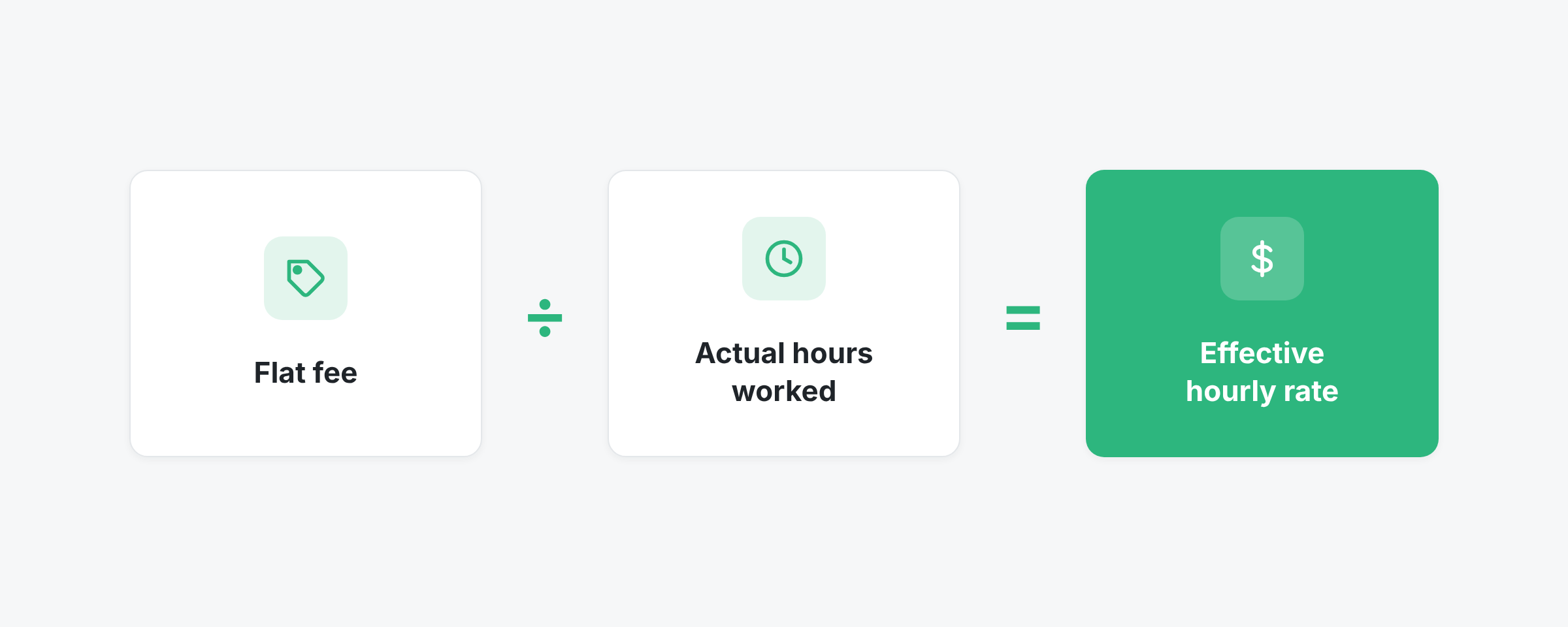
Count every hour spent on the project, not just the hours spent on the deliverable itself. Client calls, revisions, and project admin all belong in the total.
Using the same accounting firm example from above, say it charges a flat fee of $2,500 for a client’s year-end accounts and tax return, and its usual hourly rate is $125. If the work takes 15 hours, the firm earns about $167 per hour. That’s more than it would have been if billed hourly, so the flat fee earned more.
If the work drags on to 30 hours, the effective rate drops to about $83 an hour. In that case, billing hourly would have paid more.
If the firm usually charges $125 an hour, the flat fee earns more when the project takes fewer than 20 hours.
That 20-hour mark is the project's break-even point. It's the number of hours at which the flat fee pays the same as hourly billing.
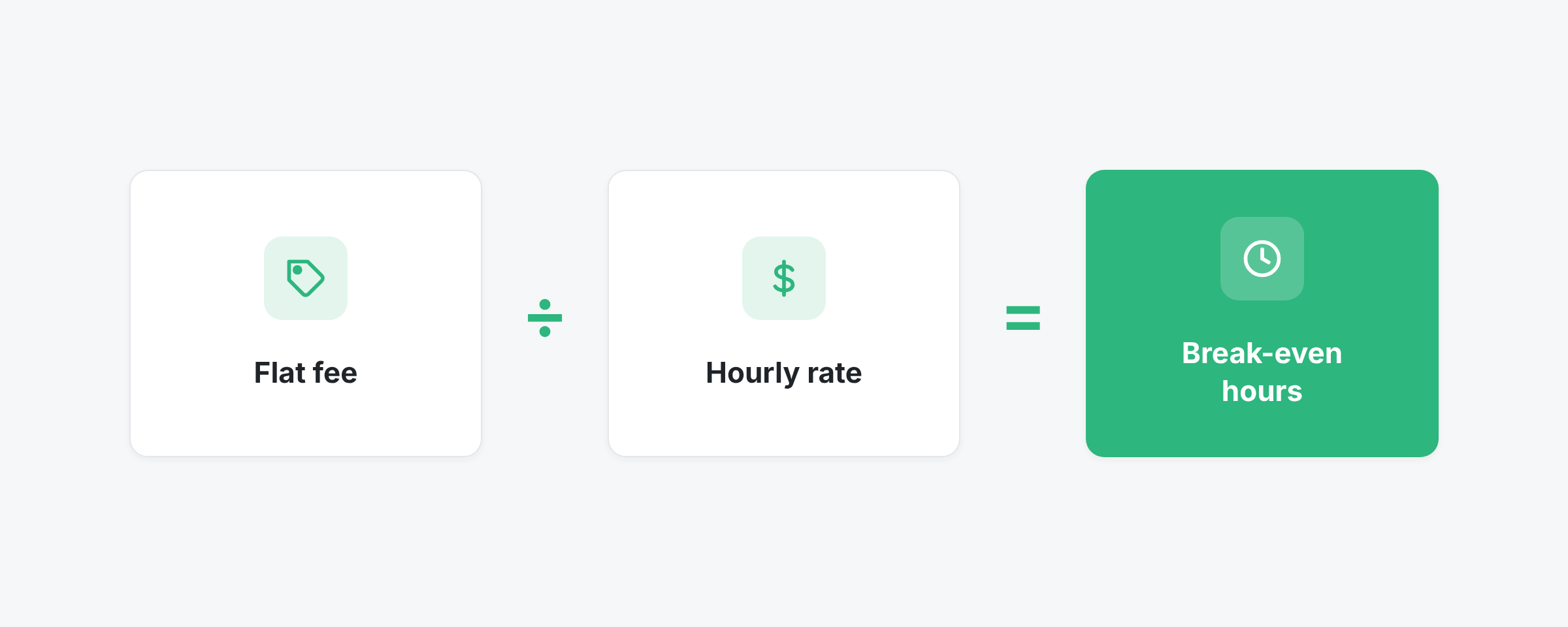
In this example: $2,500 ÷ $125 = 20 hours
If the firm finishes in 20 hours, both models bring in $2,500. Finish sooner, and the flat fee earns more per hour. Take longer, and hourly billing would have brought in more, assuming the client pays for all the hours worked.
Tip: Compare your break-even point with your estimated project hours before sending a quote. If you expect the work to take longer than the break-even point, your flat fee may be too low.
Flat Fee vs. Hourly Billing: A Worked Example
The accounting firm from our earlier example charges $2,500. Its usual hourly rate is $125, so the flat fee equals 20 hours of work.
The firm's actual profit depends on how long the project takes and what it costs to complete. Say the team’s labor costs the firm $35 per hour.
The table shows how much gross profit the firm makes under each billing model at different project durations:
If the firm finishes in 15 hours, its labor costs come to $525. With the flat fee, it keeps $1,975 of the $2,500. Billing hourly, it would have invoiced just $1,875 and kept $1,350. That’s $625 more in its pocket with the flat fee model.
At 20 hours, both models bring in $2,500, labor costs $700, and the firm keeps $1,800 either way, the break-even point.
At 30 hours, things flip. The flat fee is still $2,500, but labor has climbed to $1,050, so the firm keeps $1,450. Billing hourly, it would have invoiced $3,750 and kept $2,700. That’s $1,250 less than hourly billing would have earned.
Time is clearly the deciding factor. Finish in under 20 hours, and the flat fee leaves you with more. Go past 20, and hourly billing pays better, as long as the client pays for every hour you log.
Flat Fee vs. Hourly Billing: When Should You Use Each Billing Model?
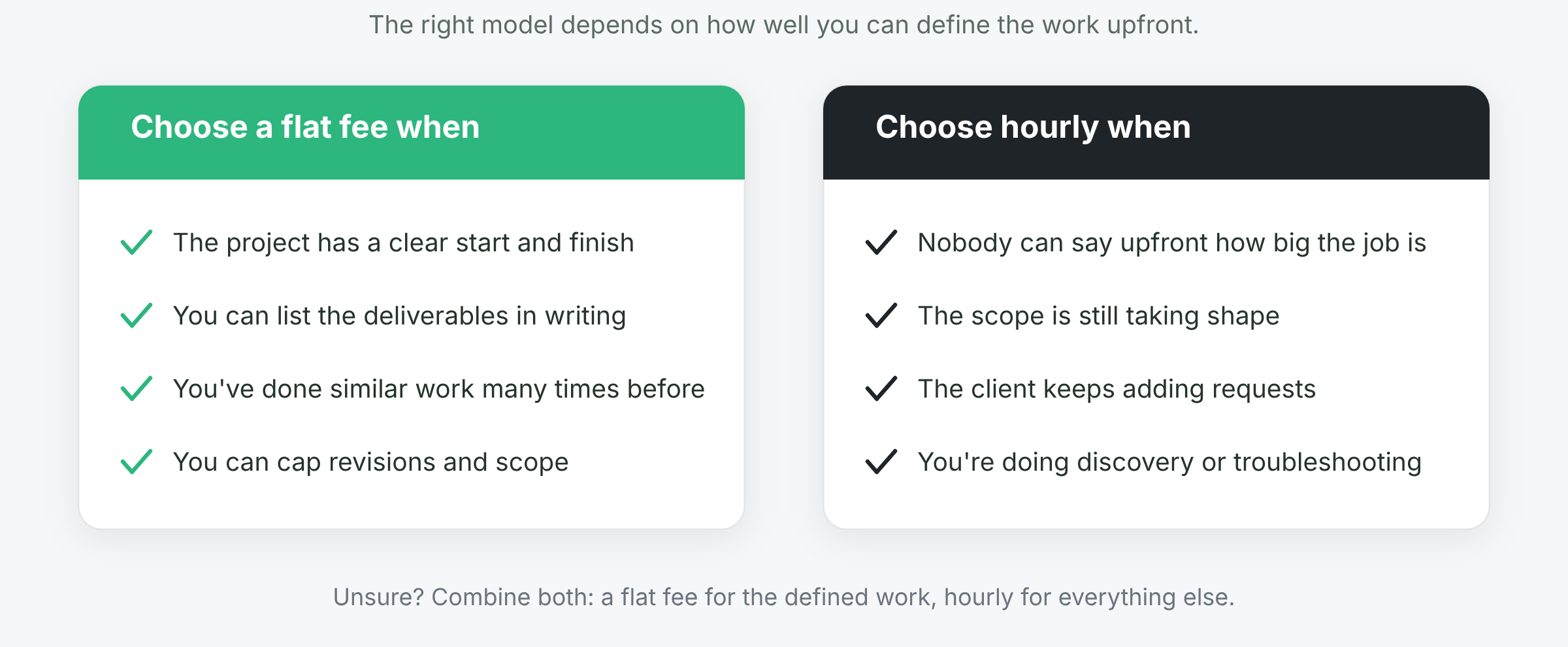
When a Flat Fee Makes More Sense
Flat fees work best for projects with a clear start and finish, and deliverables you can list in writing. They're also a good fit for work you've done many times before, because you already know roughly how long it takes.
Here are some typical examples:
- A five-page website with an agreed number of revision rounds.
- A logo design package.
- A set number of blog posts or social media graphics each month.
- Recurring services such as monthly bookkeeping or payroll processing, where the tasks stay the same month to month.
- A clearly defined software feature, built to an agreed spec.
Tracked your time on similar projects in the past? Even better. That data tells you what a fair fee looks like and reduces the guesswork.
When Hourly Billing Makes More Sense
Hourly billing is the safer choice when nobody can say upfront how much work the job involves. It's also a good fit when the client is likely to keep adding requests as the project goes on.
Typical examples include:
- Troubleshooting a technical problem, where you don't know the cause yet.
- Research, testing, or discovery work.
- Open-ended advisory or consulting work.
- Ongoing support, where requests vary from week to week.
Tip: Unclear scope doesn't have to rule out a flat fee for good. Many agencies bill the early discovery work separately (either hourly or as a small fixed fee), then quote a flat fee for the main project once they know exactly what it involves.
Checklist: Should You Bill Flat Fee or Hourly?
Still not sure which model fits your next project? Run through these questions before you send the quote:
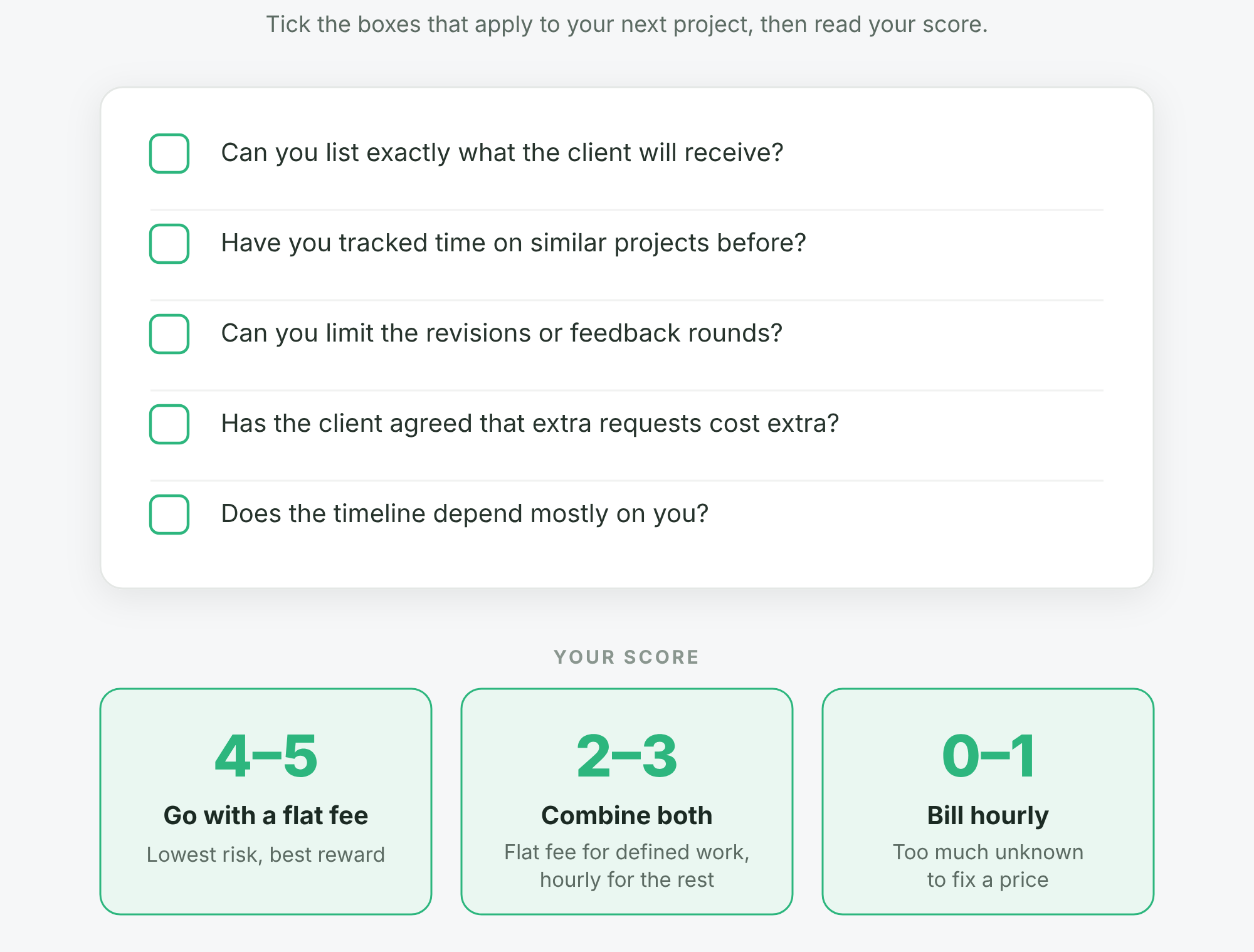
If you ticked four or five boxes, a flat fee is likely the safest bet. Two or three? Consider combining both models, with a flat fee for the defined work and hourly billing for everything else. One or none? You're better off billing hourly.
How to Earn More With Either Billing Model
Each billing model loses money in its own way. With a flat fee, it's the hours that go over scope. With hourly billing, it's the untracked time that never makes it onto an invoice.
With a Flat Fee
Most flat fee profitability issues start at the quote. If your price only covers the hours you hope the work will take, any surprise affects your profit.
That's why it pays to build a buffer into your price. Estimate the hours from similar past projects, multiply by your hourly rate, then add 10-20% on top.
Also, always put the scope in writing. List the deliverables, the number of revision rounds, and anything the fee doesn't cover. Anything not written down could lead to assumptions and disputes later on.
Then, keep an eye on your daily working hours as the project progresses. Don't wait until delivery to find out the project went over. If hours are climbing faster than expected, check whether the extra work is within scope or not.
Once the project wraps up, compare your actual hours with the estimate. If the same tasks keep exceeding your projected hours, adjust your next quote.
With Hourly Billing
Log your time as you work, not when you remember to. This helps cut down unlogged hours so nothing slips through the cracks and less billable time goes missing.
How you describe that time matters, too. "Worked on a project" invites questions. "Revised homepage copy based on client feedback" doesn't. Clear entries make it easier for clients to approve invoices.
Then there's your rate. As you get faster, the same work brings in less money. Reviewing your rate at least once a year (and raising it as your skills grow) helps keep your income in line with what your time is worth.
Give clients some certainty. An estimate or a not-to-exceed cap gives them a rough sense of what they'll pay, while you still bill for the hours you put in. That alone can cut down on pushback.
Can You Combine Flat Fee and Hourly Billing?
Yes. Many businesses use both billing models, either on different projects or within the same client account. This hybrid billing lets you use a flat fee where the work is predictable and hourly billing where it isn’t.
Here are the most common ways to combine the two:
- Flat fee plus hourly: The core project gets a flat fee, and anything outside the agreed scope is billed by the hour. A website build might cost $6,000, with extra features charged at $100 an hour once the client approves them.
- Hourly with a cap: You bill for actual hours, but the total can’t go past an agreed limit. The client gets a ceiling on cost, and you still get paid for the time you put in up to that point.
- Recurring flat fee plus hourly extras: The client pays the same amount each month for a set list of services, and you bill one-off requests hourly. A bookkeeper might charge a monthly fee for reconciliations and reports, then bill hourly for a tax planning session.
You can also split billing by project. One client might have a flat-fee project for a brand refresh and a separate hourly arrangement for ongoing support.
Whichever setup you choose, agree on it before the work starts. The client should know exactly which work falls under the flat fee and which gets billed by the hour.
Tip: A capped hourly arrangement only protects you if the cap is realistic. Set it too low, and you’re back to absorbing extra hours, the same problem a flat fee has.
Bill Flat Fee and Hourly Projects With My Hours
Whichever billing model you use, the money is made or lost in the hours behind it. My Hours gives you visibility into those hours, so you always know which projects are paying off and which ones aren't.
Flexible Billing for Every Project
You’re not restricted to one billing model. For hourly work, you can bill by:
- User-based rate: Each person bills at their own default rate, with custom rates for specific projects.
- Task-based rate: Different tasks carry different rates, so strategy work can bill higher than production.
- Project-based rate: Every hour on the project bills at the same rate, no matter who logs it.
For flat fee work, you just add the agreed fee to the project, log at least one time entry, and invoice it when it’s due. The same fee can be invoiced again once new time is logged on the project, so monthly flat fee clients are just as easy to handle as one-off projects.
A Clear View of What Your Flat Fee Is Really Worth
When you bill a flat fee, it’s easy to lose track of how much time the work actually took, and whether the price you charged was fair to you.
My Hours keeps that visible. Every hour your team logs on a flat-fee project is still valued at your normal rates, and while that amount never appears on the invoice, you can compare it with the fee you charged at any point.
Say you charged a client $2,500, and your team’s logged hours add up to $3,750 at your usual rates. That’s $1,250 the project would have earned by the hour, and a clear sign to raise your price next time.
Add your team’s labor rates, and you can compare internal costs vs. fixed fee revenue, as well as profitability. On our Pro plan, the project overview shows each project's all-time balance and margin, including flat fee projects.
Early Warnings Before Overruns Eat Your Margin
Budgets in My Hours help you spot flat fee projects that are at risk of going over budget while there’s still time to do something about it.
Set a budget in total hours, billable amount, or costs (tracked time at labor rates, plus expenses) for the whole project or task by task.
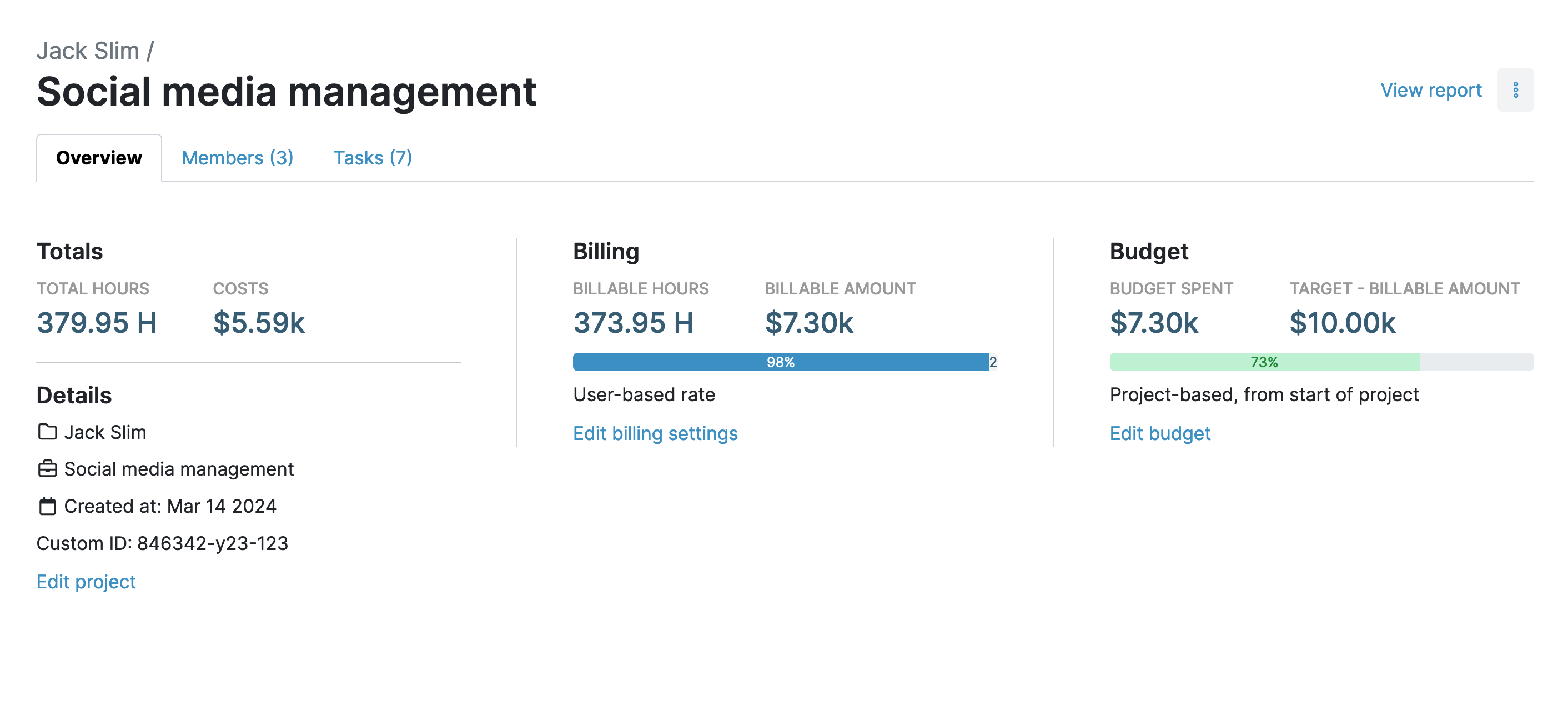
As your team logs time, a progress bar shows how much of the budget is remaining, and each time log shows the share of the budget it used. You can also get an email alert when spending hits specific thresholds, such as at 50% or 80%.
That alert won't stop anyone from logging time. But it allows you to check whether the extra work is in scope and to raise a change request before your profit margins disappear.
Working on a monthly flat fee or retainer? Set the budget to reset at the start of each month.
Every Billable Hour Accounted For
On hourly projects, the biggest leak is time that never gets recorded.
My Hours makes it easy to track time on the go, with a running timer or a weekly timesheet on the web, mobile, and desktop apps.
My Hours can email anyone who logged zero hours the day before, and mobile reminders nudge your team if they haven't started tracking by the start of their workday (or left a timer running at the end of it).
Rate Changes That Don't Rewrite Your History
As you get faster, you'll want to raise or change your billing rates. My Hours lets you decide where a new rate applies: to new logs only, to new and existing logs, or to logs from a certain date onward.
Whichever option you choose, locked, approved, and invoiced logs never change, and invoices you've already sent stay exactly as they were.
Better Data for Your Next Quote
Every project you track becomes evidence for the next one.
The Dashboard report shows time, costs, and budgets at a glance, by client, project, or task. The Detailed report goes all the way down to individual time logs, and you can save its settings as a template to run again in one click. Both download as PDF or XLS.
Over time, you'll see which kinds of projects make money as flat fees and which are safer to bill by the hour.
To see how it all works together, sign up for a 14-day free trial of My Hours.
Final Thoughts on Flat Fee vs. Hourly Billing
Neither billing model is the better choice for every project. Flat fees reward you for working efficiently on work you know well, while hourly billing protects you when the scope is still taking shape. Plenty of businesses use both, depending on the client and the work.


