
Feature Comparison Matrix: 10 Popular Time Trackers
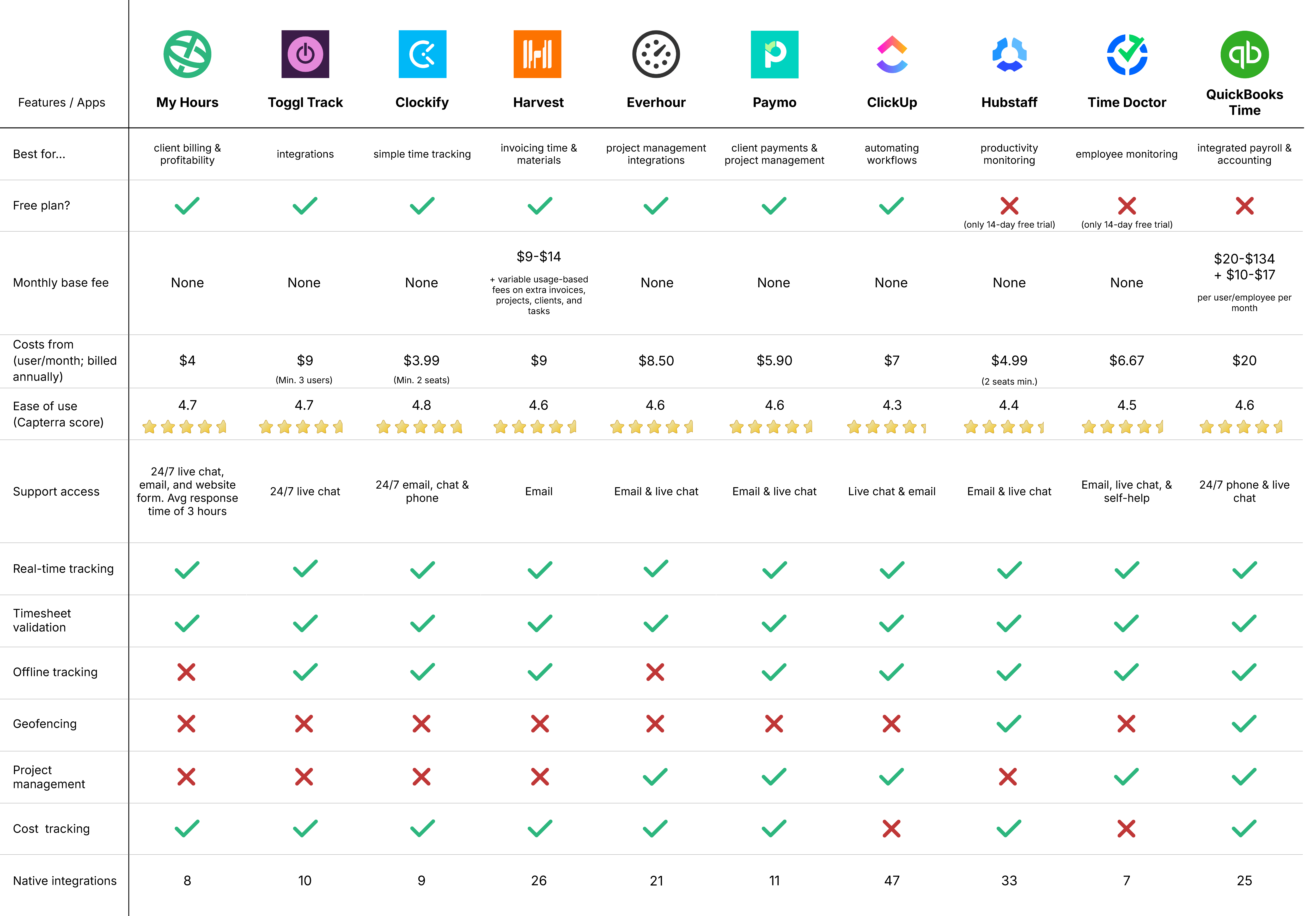
Here are our top recommendations for time tracking apps, tested and reviewed by our team with over a decade of experience in time-tracking software.
By Tjaša Fatur
Best for...







Content overview

- 1. My Hours: Best for client billing and profitability
- 2. Toggl Track: Best for native and external integrations
- 3. Clockify: Best for simple time tracking
- 4. Harvest: Best for invoicing time and materials
- 5. Everhour: Best for project management integrations
- 6. Paymo: Best for client payments and project management
- 7. ClickUp: Best for automating workflows
- 8. Hubstaff: Best for productivity monitoring
- 9. Time Doctor: Best for employee monitoring
- 10. QuickBooks Time: Best for integrated payroll and accounting
Top 10 Time Tracking Apps


1. My Hours: Best for client billing and profitability
Price:
- Free (5 users)
- $5 - $9/per user (paid monthly)
- $4 - $8/per user, per month (paid annually)
- Enterprise pricing available
Available on: Desktop, web, browser extension, iOS & Android
 Flexible billing by user, project, or task, with full rate history
- Budget alerts that warn before a project goes over, not after
- Fully featured mobile app for tracking online
 No Gantt charts, Kanban boards, or GPS tracking

My Hours is built for teams that want a variety of billing options. The platform lets you charge clients an hourly rate set per user, per project, or per task. You can also apply a fixed fee to the whole project instead.
It doesn't try to be a project management tool. Instead, it focuses on turning tracked time into accurate invoices and clear cost data.
Anyone on the team can log an expense with a photo of the receipt straight from the mobile app. For supporting information, users can even add a description or a relevant tag.
Budgets update in real time as hours are logged, and a manager is warned before a project runs over, not after the invoice is sent.
Once a timesheet is approved, it locks against further edits by the person who submitted it, which keeps old invoices matching old reports even if a billing rate changes later.
You can view reports in three formats: a timesheet report exportable in XLS as well as a visual dashboard and a detailed view with over 35 data columns, both exportable in raw XLS, formatted XLS, and PDF.
My Hours also connects to 1000+ tools, including Jira, QuickBooks, and Zapier, so tracked time and cost data sync with whatever the team already uses.
There's no screenshot capture or activity monitoring built in, and there never has been (or ever will). My Hours tracks hours and cost data, not what someone did at their desk.
For agencies, consultants, and small teams that need accurate billing and cost data more than task boards, My Hours keeps the whole workflow in a unified system.
"Response time of MyHours is amazing. You click, it starts. Some other software is simply too slow to process information or start tasks, and I'm always wondering if the task timer has started or not."
Nadege B., Freelance, Executive Office

"There is only one feature missing from the software that I have determined after using it for almost a year. When a report is pulled up, I would like to be able to click on a certain day on the graph. Right now, the bar graphs are not hyperlinked to the actual working hours."
Stephanie L. W., Project Manager, E-Learning


2. Toggl Track: Best for native and external integrations
Price:
- Free (5 users)
- $12 - $20/per user (paid monthly)
- $9 - $18 per user, per month (paid annually). Enterprise starts at $14 for year one, then renews at $18
- Enterprise pricing available
Available on: Desktop, web, browser extension, iOS & Android
- 10 native integrations and browser extension compatible with 130+ platforms
- Minimal interface with a short learning curve
- Idle time detection and offline tracking
- Basic invoicing, with no native accounting software sync
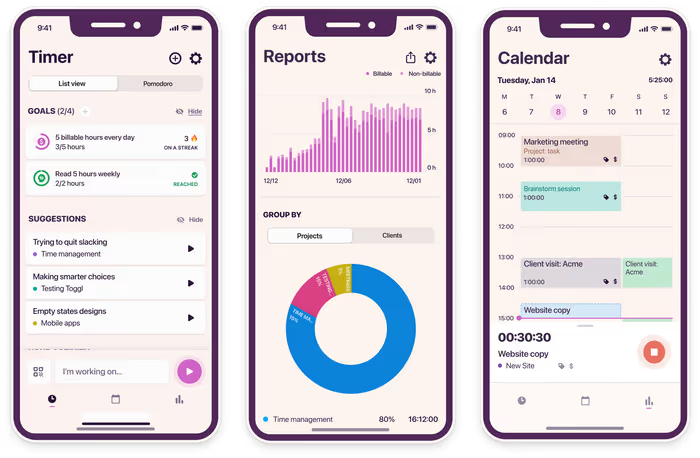
Toggl Track built its reputation on how little friction it takes to start tracking. One click starts the timer, and the interface stays out of the way after that.
There’s also basic invoicing. The platform turns your tracked hours into a PDF or invoice, or you can send that data straight to QuickBooks. The billable amount only calculates automatically once you're on a paid plan.
The platform is known for having over 100 integrations, but only 10 of those are native. The vast majority are browser extensions.
You grant one permission, and it embeds a Toggl Track timer directly into whatever platform you're working from, whether that's Trello, Asana, or GitHub, rather than syncing data between the two systems.
Toggl Track alerts you when a project is nearing its estimate, but that budget tracking is only available on the Premium plan. The platform also doesn't have any expense tracking capability.
Note: Toggl Track is one of the different products under the Toggl company. There’s also Toggl Work, a free, lightweight expense management solution, and Toggl 2.0, a separate planning and capacity-forecasting tool.
Toggl 2.0 costs between $9 and $14 per user per month, billed annually.
“One of the standout features of Toggl Track is its simplicity and ease of use. The intuitive interface allows you to start tracking time with just a few clicks, which is perfect for both individuals and teams. I also appreciated the detailed reporting tools, which provide valuable insights into how time is being spent across different projects."
Jessica G., Consultante en optimisation d'affaires, Consumer Services
“Users must remember to start and stop timers, which can lead to inaccuracies if forgotten. Some competitors provide automatic tracking to address this issue.”
Jessica G., Consultante en optimisation d'affaires, Consumer Services

3. Clockify: Best for simple time tracking
Price:
- Free (5 users)
- $4.99 - $15.99/per user (paid monthly)
- $3.99 - $12.99 per user, per month (paid annually)
Available on: Desktop, web, browser extension, iOS & Android
- Clock-in kiosk with PIN, QR code, or photo verification
- Covers budgeting, scheduling, attendance, and payroll in one platform
- Email support responds in under an hour on average
- No Kanban boards or task dependencies
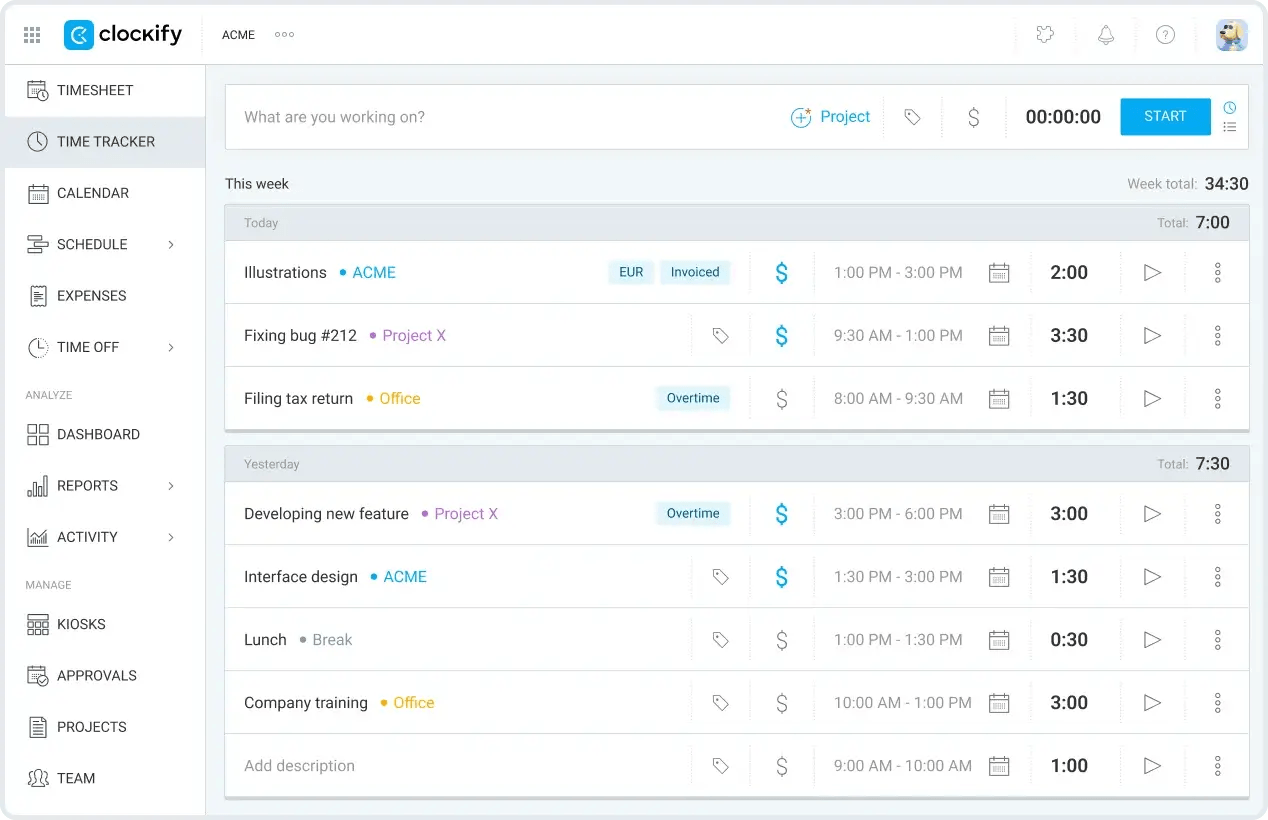
One of Clockify’s core functions is helping teams track time consistently, and it does a great job at that.
The platform gives you a one-click timer, a weekly timesheet grid, a clock-in kiosk for shared devices, and an auto-tracker that logs how long you spend on apps and websites, so whichever way someone prefers to log hours, there's a version built for it.
The auto-tracker’s activity data remains private until you choose to turn it into a time entry, so nothing gets shared without your say-so.
Clockify goes beyond time tracking and is also useful for budgeting, resource scheduling, attendance, and payroll. It provides built-in capabilities for all of these use cases, meaning you don’t need an integration or an external platform. However, you’d have to subscribe to the Pro plan to access the budgeting and scheduling features.
Where Clockify comes up short is project management and planning. It doesn't have any features for task dependencies, and there’s no Kanban-style board for keeping your work organized.
"Clockify is super easy to set up. I needed to provide detailed project time tracking for a client. I did a little research and found Clockify. Within 30 minutes, I had my account set up and my client projects configured. I was able to quickly and easily generate timesheets for the client."
Eric T., Managing Member, Information Technology and Services
"I really would have liked to be able to integrate the Clockify time tracking with something like Wave: Small Business Software for invoicing. That would have simplified my invoicing process and allowed for better tracking."
Eric T., Managing Member, Information Technology and Services

4. Harvest: Best for invoicing time and materials
Price: Bespoke pricing
- Free (1 user, 2 projects)
- $11 - $17.50/per user (paid monthly)
- $9 - $14/per user, per month (paid annually)
- Additional usage-based charges for invoices, clients, and tasks
- Enterprise pricing available
Available on: Desktop, web, browser extension, iOS & Android
- Stripe and PayPal payments built into invoices
- Native retainer billing with live balance tracking
- Team capacity reporting alongside cost data
- No full project planning tools
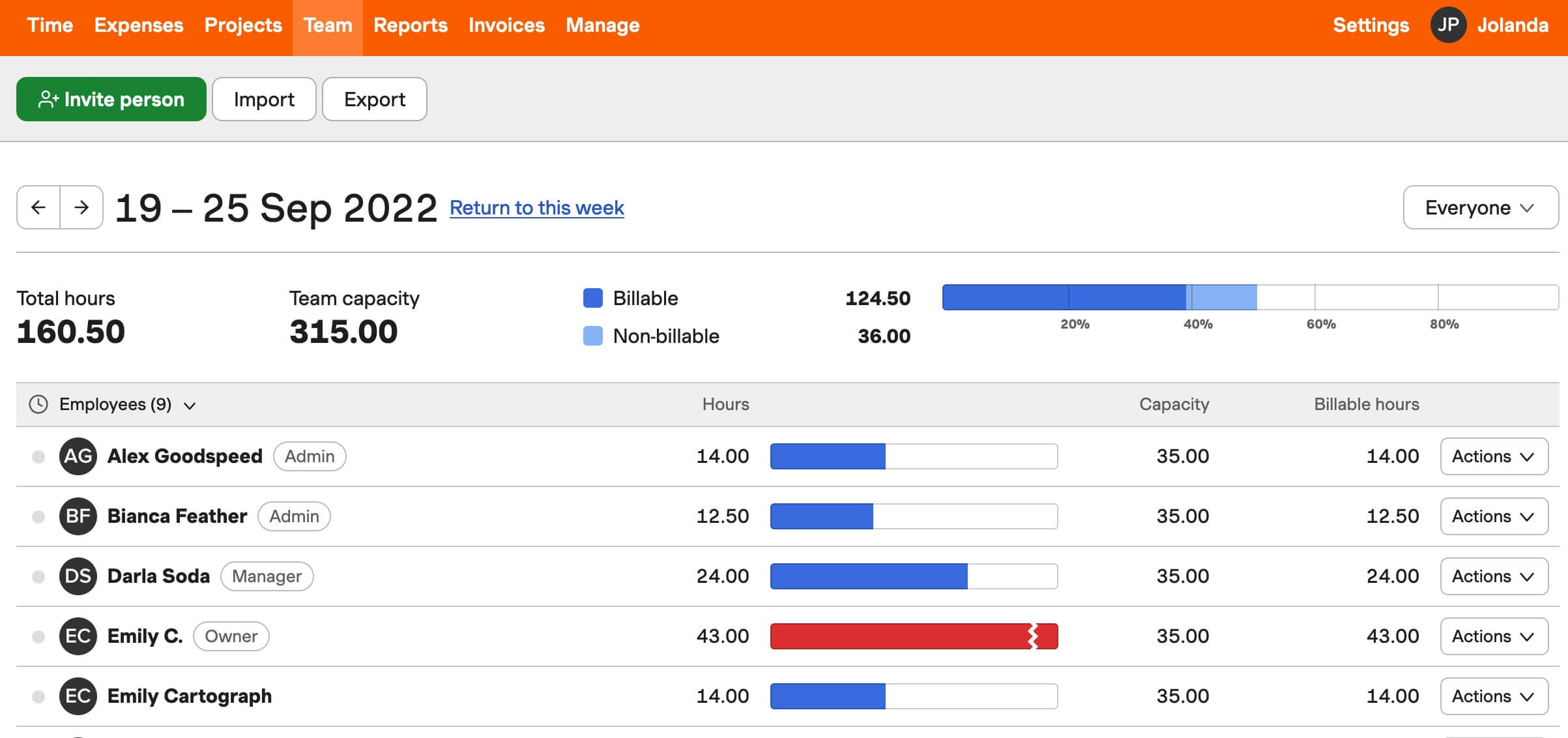
Harvest is built around one job: turning your tracked hours into a paid invoice as fast as possible. Clients can pay directly from the invoice through Stripe or PayPal.
Billing rates adapt to how you actually work. Set them by person, project, or task type, and Harvest applies the right one automatically as time gets logged.
Budgets update in real time, too, and you get alerts once spending crosses a set threshold. This is available at every plan level, including the free plan.
Harvest also handles retainer work. Set the number of hours a client's paid for upfront, or a project estimate, and Harvest updates in real time as your team logs time against it, so you always know how much is left.
A quick heads-up before you commit: Harvest's pricing model changed after Bending Spoons acquired the company in 2025. It's moved from a flat per-seat fee to a base subscription plus usage-based charges as you add clients, projects, and invoices, so the number on the pricing page isn't always the number on the bill.
Another downside is the lack of project management capabilities. You should be good as long as its built-in capabilities are all you need.
"The time tracking interface is clean and intuitive. Logging hours against specific clients and projects is straightforward, and converting tracked time into an invoice is seamless. The Stripe integration setup was also simple and quick."
Deniz M., Fractional CFO, Financial Services
"Harvest silently deducts an $80 application fee from invoice payments on free trial accounts - on top of Stripe's standard processing fees. On my first $2,000 invoice, I received only $1,861.70 with zero prior warning. There is no disclosure during onboarding, no warning when setting up Stripe, and nothing shown before the client pays."
Deniz M., Fractional CFO, Financial Services

5. Everhour: Best for project management integrations
Price:
- Free (5 users)
- $10/per user (paid monthly)
- $8.50/per user, per month (paid annually)
- Enterprise pricing available
Available on: Desktop (macOS only), web, browser extension, iOS & Android
- Embedded timers inside Asana, Jira, ClickUp, and Linear
- Auto-stops running timers once a budget is hit
- Built-in PTO tracking with automatic balance updates
- No GPS or geofencing
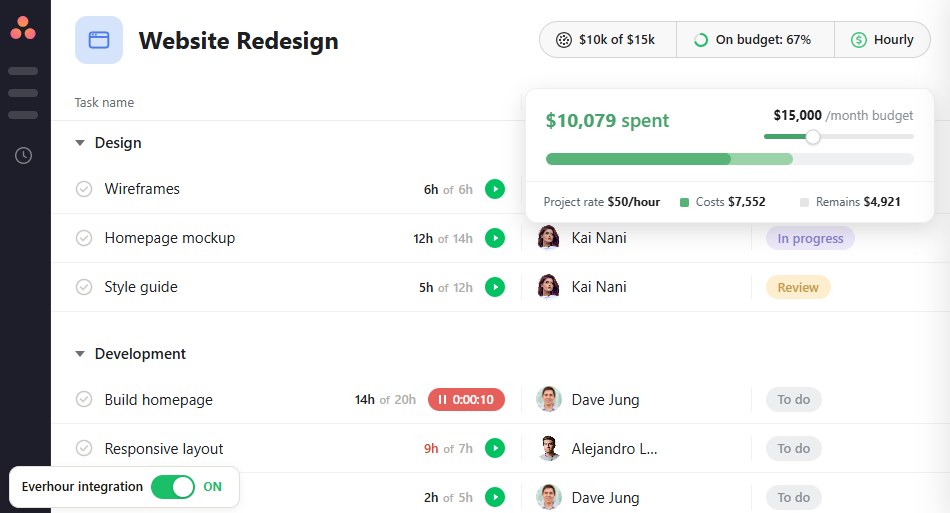
Everhour tracks time, budgets, and expenses on its own, with projects, tasks, and reporting built in. You can also connect it to tools like Asana, Jira, ClickUp, or Linear, and once you do, a timer sits directly inside those tasks so you don't have to switch between apps to log time.
Change a task name in Asana or Jira, and Everhour's own reports update automatically to match.
You can set a budget in hours or dollars, get alerts at 75%, 90%, or a custom threshold, and even auto-stop every running timer the moment a budget's exceeded, to avoid overbilling.
Timesheets also go through a full approval flow. Once you approve one, it's locked. You can restrict changes to specific dates or entire archived projects.
We love that beyond time and money management, Everhour helps you handle team capacity and time off. You can see who's overbooked before assigning new work, and PTO balances update as employees take time off, eliminating manual calculations.
"Integrates seamlessly with Asana. Creates absolute transparency on where staff are spending their time. Very useful tool as a leader of our organization. I really appreciate the daily, weekly, and monthly reports automatically sent to me."
Kaden H., Operations Leader, Accounting
"I wish I could see time by custom fields in my reports. We have client groups with tasks spread across several projects. It would be a game changer for us to be able to compile the time reports by the custom field we use to group them in Asana."
Kaden H., Operations Leader, Accounting

6. Paymo: Best for client payments and project management
Price:
- Free for 1 user
- $9.90 - $23.90/per user (paid monthly). Additionally, a reduced rate is provided for the first three months
- $5.90 - $16.90/per user, per month (paid annually)
- Enterprise pricing available
Available on: Desktop, web, iOS & Android
- Gantt charts, Kanban boards, and task dependencies included
- File proofing with markup tools and version history
- Platform in 22 languages, invoices in 15, and support for 85+ currencies
- Built-in payments limited to US customers
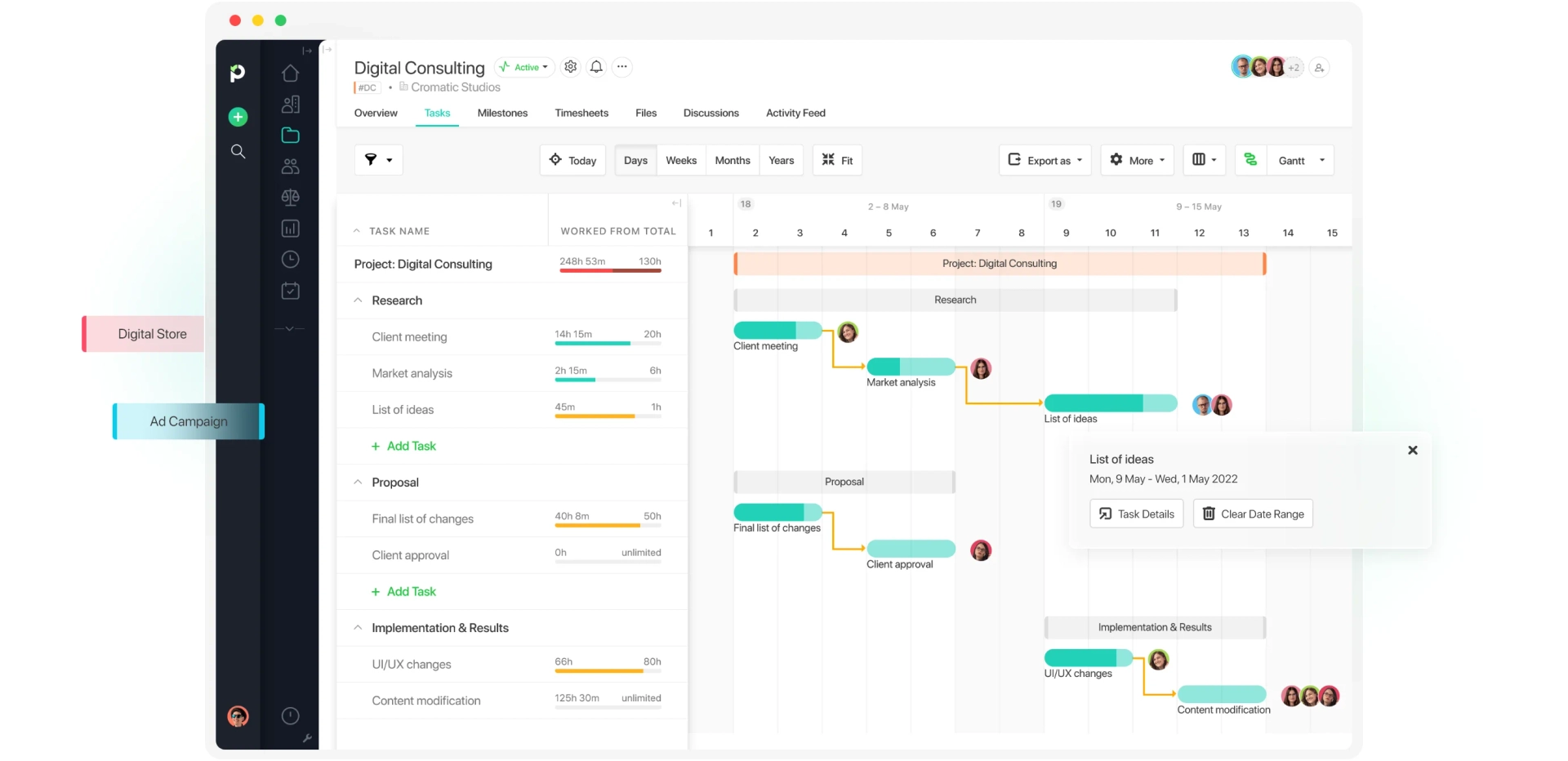
Paymo covers the basics you'd expect from any time tracker, but also adds a lightweight project management layer.
You get Gantt charts that show task dependencies and let you spot delays before they become a problem, as well as Kanban boards for organizing work visually.
Billing is built in too, and its invoicing system allows clients to pay through gateways like Stripe, PayPal, or Authorize.net. The platform also supports recurring invoices, but it’s restricted to paid subscription tiers.
One great thing about Paymo is its file management system. You can upload JPEGs, PNGs, and similar file types, collaborate with teammates on designs, gather feedback, plus keep a version history.
There are two major drawbacks with Paymo: the free plan only comes with one user, and PM Payments, its built-in online payment feature, is only available to US customers.
"Paymo excels as a comprehensive project management and time tracking tool, especially for freelancers and agencies handling multiple clients and projects. The user-friendly interface makes it easy to navigate through the app and learn how to use it in minutes. The best feature is the ability to granularly keep track of the profitability of a project at the task level."
Andrea F., Founder, Architecture & Planning
"The mobile app, while functional, feels slightly less polished compared to the desktop version, and certain features, like time tracking, can be a bit cumbersome to use on smaller screens. The lack of a subtask feature is a big issue for managing complex projects."
Andrea F., Founder, Architecture & Planning

7. ClickUp: Best for automating workflows
Price:
- Free (unlimited users)
- $10 - $19/per user (paid monthly)
- $7 - $12/per user, per month (paid annually)
- Enterprise pricing available
Available on: Desktop, web, browser extension, iOS & Android
- Time entries sync in from other tracking platforms in case you're already logging hours elsewhere
- Billable time marking with rollup totals, so you can see exactly where hours went
- 47 native integrations plus 900+ more built by other platforms due to ClickUp's popularity
- Overwhelming to learn and use because of the multitude of features it has
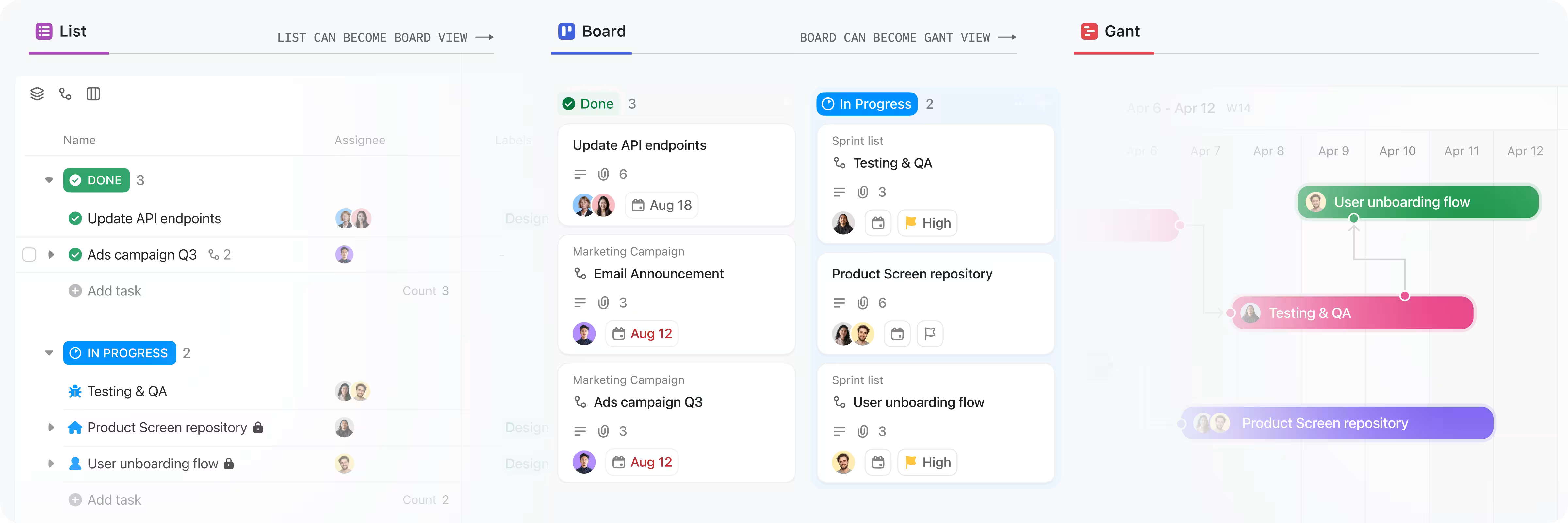
From AI agents that build reports and automate workflows to automations that trigger status changes and assignments, ClickUp is a great tool for businesses, especially large enterprises that are tired of juggling several apps.
One unique thing is Brain, ClickUp's built-in AI that can summarize time entries and answer questions about where your team's hours went.
The software is a great choice if you need robust project management capabilities alongside time tracking because you get 15+ ways to view your work, including List, Board, Calendar, and Gantt.
One downside is that there’s no dedicated budget or expense module. Time only gets marked as billable or non-billable, and for anything else, you’ll need a separate tool or a manual workaround using custom fields.
Also, ClickUp does a lot, which makes it overkill and hard to learn if all you need is basic time tracking.
You'd expect a platform that’s loaded with so many features to be costly, but even though it's feature-packed, it starts at $7 per user per month (paid annually), which is generous pricing for what you get.
"What I like most about ClickUp is how much it helps centralize our work in one place. We use it to manage projects, assign tasks, track deadlines, and collaborate across different teams, which has significantly improved visibility and organization. The platform is highly customizable, allowing us to adapt workflows to our specific processes without feeling restricted."
Andrea L., Office Manager, Translation and Localization
"While ClickUp is extremely powerful, the sheer number of features can make it feel overwhelming at first. There is a learning curve before teams can take full advantage of the platform, especially when configuring custom workflows and automations."
Andrea L., Office Manager, Translation and Localization

8. Hubstaff: Best for productivity monitoring
Price:
- No free plan, 14-day free trial
- $7 - $12/per user (paid monthly)
- $4.99 - $10/per user, per month (paid annually)
- $25/per user per month for Enterprise (only available annually)
Available on: Web, desktop, browser extension, iOS & Android
- Geofenced job sites automatically start and stop the timer as someone arrives or leaves
- Activity levels tracked from keyboard and mouse input, with optional screenshots you can blur or turn off per person
- Payments through PayPal, Wise, Deel, and Payoneer
- Costly add-on features can drive up costs
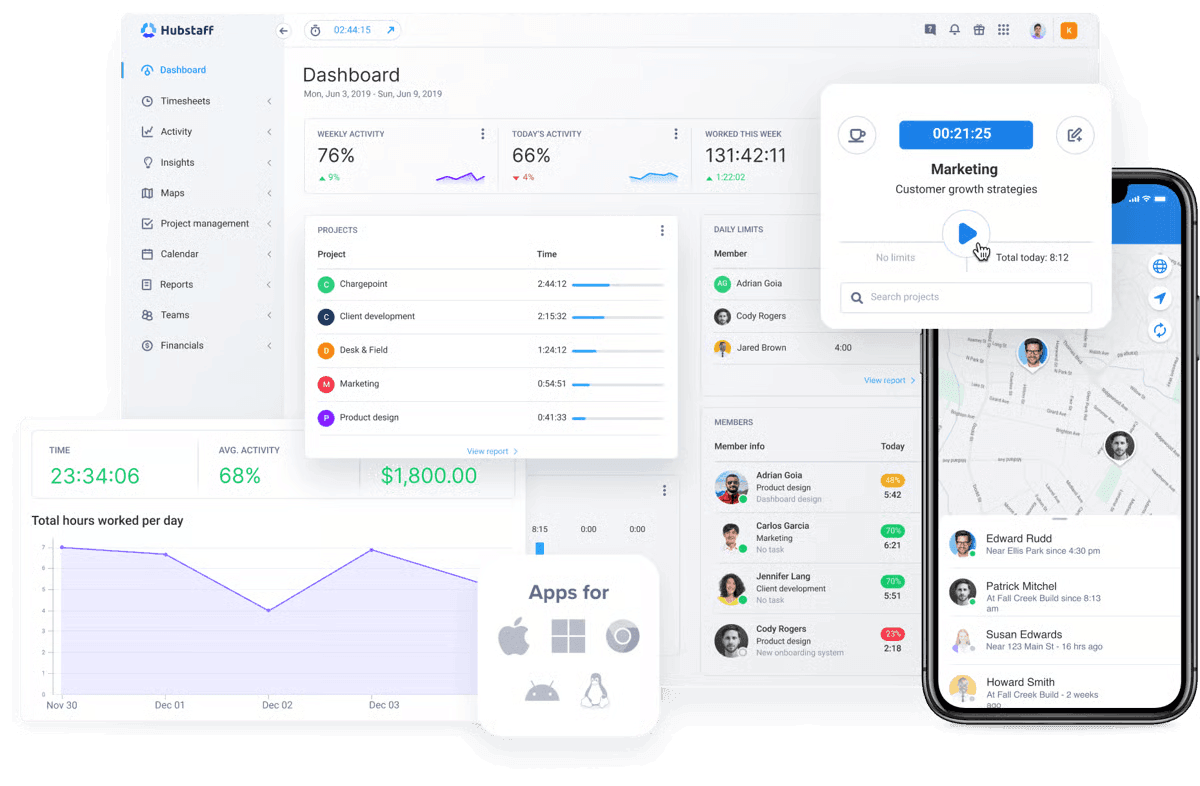
Hubstaff is a great tool to use if you're managing a team that works remotely, in the field, or across a mix of both.
It lets you monitor your team by tracking keyboard and mouse input, app and website usage, and optional screenshots, all through the desktop app installed on each person's computer.
You can create geofenced job sites for field teams. Their timers will start the moment they arrive and stop the moment they leave, eliminating missed clock-ins.
Once a timesheet's approved, you can make payments directly from Hubstaff, through PayPal, Wise, Deel, or Payoneer; no separate payroll tool needed.
Hubstaff can also break down productivity by location, comparing average hours, idle time, and start-and-stop patterns between your remote and in-office team members. If you're running a hybrid setup, this shows you how working environments affect productivity.
"It is easy to use and helps track time accurately. It helps to evaluate team productivity. Reports are useful and work well for remote teams."
Osama A., Full Stack Developer, Government Administration
"Sometimes the app feels a bit slow, and the user interface can be more user-friendly. Few features take time to understand, and pricing can feel high for small teams."
Osama A., Full Stack Developer, Government Administration

9. Time Doctor: Best for employee monitoring
Price:
- No free plan, 14-day trial
- $8 - $20/per user, per month (paid monthly)
- $6.67 - $16.70/per user/month (paid annually)
- Enterprise pricing available
Available on: Desktop, web, browser extension, iOS & Android
- Optional screen video recording
- Unusual Activity Report flags irregular time data automatically
- Payroll-ready reports reduce manual entry errors
- Heavy monitoring focus won't fit every workplace
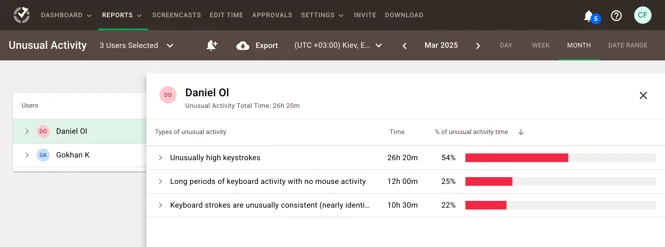
Time Doctor is a solid pick if you need airtight, audit-ready proof of where hours went.
Beyond keyboard and mouse input, app and website usage, and optional screenshots, Time Doctor takes employee monitoring further with video recording.
An interesting feature is its Unusual Activity Report, which automatically flags irregularities in time data, like a suspiciously long entry or a gap that doesn't match the rest of someone's day, so you're not manually combing through timesheets looking for something off.
Unlike other time trackers with monitoring capabilities, Time Doctor doesn’t provide location tracking. There’s no GPS or geofencing, so it's built for desk-based monitoring rather than field crews.
"The agent is lightweight on system resources. The web dashboard is reasonably organized and finding a specific user's data is straightforward."
David P., Independent Consultant, Management Consulting
"I was charged for the Executive Dashboard feature, but the product itself blocks access until you reach 20 active users. There is no warning during purchase and no clear indication that this is a tier-based feature. I paid for something I literally cannot use."
David P., Independent Consultant, Management Consulting
10. QuickBooks Time: Best for integrated payroll and accounting
Price:
- No free plan, free trial available
- Two separate pricing tracks, both billed monthly only, no annual plan
- Track time only: $20 - $40/month base fee + $10 - $12 per user per month
- Track time + run payroll: $88 - $134/month base fee + $13 - $17 per user per month
- The base fee on every plan includes 1 admin, and new customers get 90% off the base fee for the first 3 months
Available on: Desktop, iOS & Android
- Syncs directly with QuickBooks Online for payroll and accounting
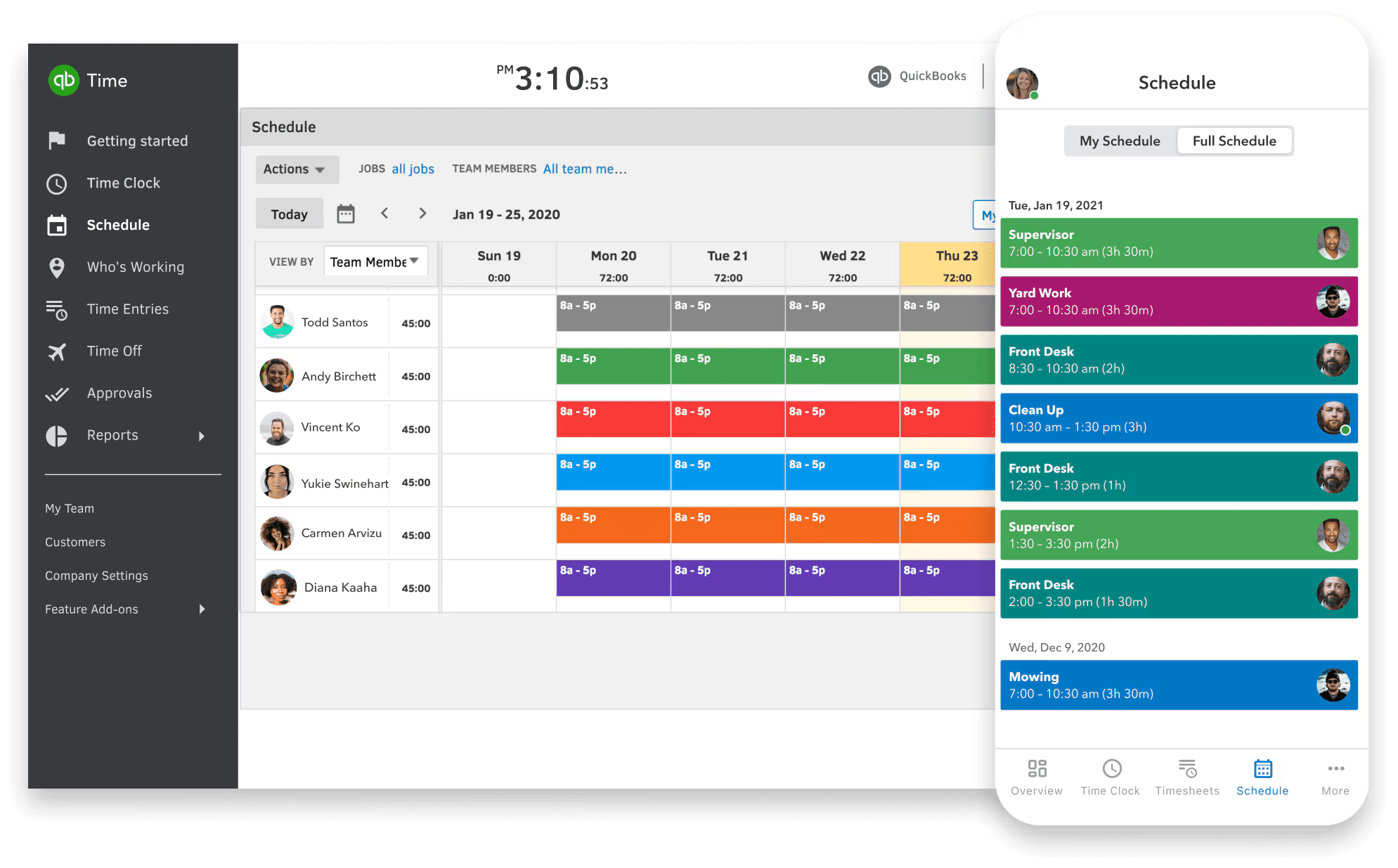
- Drag-and-drop scheduling with automatic change alerts
- Overtime alerts and stored records for audits
- No native expense tracking (must use QuickBooks Online)
QuickBooks Time is the perfect fit for businesses already running their finances through QuickBooks Online.
Once connected, your team’s hours flow straight into payroll and job costing without re-entering anything. That’s a great reason to pick this over a standalone tracker.
GPS tracking keeps you informed of where your team is working. When someone clocks in, the app logs their location and updates it throughout the day, so you can see who's closest to the next job site and adjust schedules on the spot.
Set up a geofence, and your team gets reminded to clock in or out every time they enter or leave a job site.
Scheduling is built in, too. You can drag and drop jobs from previous schedules, repeat last week's schedule with a tap, and your team gets an automatic alert whenever anything changes.
One limitation is that expense tracking isn't part of QuickBooks Time itself. That’s only available in QuickBooks Online, so you’ll need a wider subscription to get it.
"QuickBooks Time's intuitive interface and automated time tracking make it a pretty solid choice for our team. We've seen a significant reduction in manual errors and improved employee accountability."
Maisie T., Project Manager, Shipbuilding
"While we love the app, the customer support can be a bit slow to respond to our queries. Took a bit to figure out the reporting features, but once we did, it worked well enough."
Maisie T., Project Manager, Shipbuilding
How to Choose the Best Time Tracking Software
One of the most important things to evaluate when looking for a time tracking platform is the feature set.
In particular, you need to check the following:
- Can a new user understand it without extensive training?
- Is entering time fast enough that people will actually do it consistently, or are too many steps involved?
- Is the platform a good fit for how your team already works (by client, by task, by project) or will it create more admin work?
- What’s their support system like, both business hours and in a different time zone?
- Is support only available via email, or can their customer care contact them via live chat or phone?
- Can you import existing time logs, projects, and clients, etc, or does switching mean starting from zero?
- Can data be exported if you ever decide to leave? If yes, in what format will the data be exported?
- Does the platform have relevant certifications, like SOC 2, ISO, or GDPR, if that matters for your industry or clients?
- What’s the vendor’s track record on uptime and outages?
- Does the platform offer integrations with core systems, like accounting, payroll, or project management?
- Will this still work if your team size doubles or more, or is it built for exactly the size you are today?
- Has the vendor made major changes to pricing or free plans recently that suggest instability?
How We Chose the Best Apps for 2026
There are hundreds of time tracking apps on the market, but they aren't all suitable for client billing, project profitability, team accountability, or monitoring.
To find the best of the best, we:
- Consulted verified reviews on sites like Capterra and G2, analyzing the feedback of businesses and users who’ve tried these platforms to see which apps came recommended and were genuinely helpful.
- Drew on our 20+ years of experience running a time tracking platform to know which features truly matter for a team's day-to-day, and which ones just look good on a features page.
- Put every recommended app through its paces, checking whether the features held up in practice and how responsive customer support truly was.
Disclaimer: Yes, we included My Hours on the list.
Why did we do that?
Because we firmly believe My Hours is a genuinely strong fit for teams that need accurate billing, budget tracking, and profitability data. It won't suit every team, especially those needing GPS tracking or field-crew monitoring, but for client billing and project profitability, it holds its own.

Waste no more time,
jump right in!

All rights reserved.
Product
Resources
Use Cases
Integrations
Looking for employee attendance and absence tracking? Visit All Hours.
